


Deezerオフライン:Deezerの音楽を制限なくオフラインで聴く方法
多くの音楽愛好家は、モバイルデータやインターネット接続を使用せずに音楽を聴くために、Deezerのオフラインモードを利用しています。旅行中、通勤中、帯域幅を節約しているときなど、 Deezer オフライン 再生機能は、このプラットフォームの最も便利な機能の一つです。しかし、多くのユーザーはすぐに、Deezerの標準ダウンロードには制限があることに気づきます。このガイドでは、Deezerのオフラインモードの仕組み、その制限事項、そしてDeezerの音楽を永久にオフラインで保存する方法について説明します。
コンテンツガイド パート1:Deezer Musicのオフラインモードとは?パート2:Deezer Musicのオフラインモードの使い方パート3:Deezerの音楽を永久にオフラインで保存する最良の方法パート4。よくある質問パート5:結論
パート1:Deezer Musicのオフラインモードとは?
Deezerのオフラインモードでは プレミアムサーマルバッグ 加入者は、楽曲、アルバム、プレイリストをダウンロードして、インターネット接続なしで聴くことができます。オフラインモードを使用すれば、Wi-Fiがなくても音楽を聴くことができます。
しかし、多くのユーザーはDeezerのオフライン機能が実際にどのように動作するのかを誤解しています。Deezerのダウンロードは従来の MP3 ファイルはデバイスに永続的に保存されません。代わりに、暗号化された状態でDeezerアカウントに紐付けられます。
パート2:Deezer Musicのオフラインモードの使い方
Deezerのオフラインモードを使うのは比較的簡単です。
モバイルで
- Deezerアプリを開く
- Deezerプレミアムアカウントにログインしてください
- プレイリストまたはアルバムを選択してください
- ダウンロードボタンをタップします
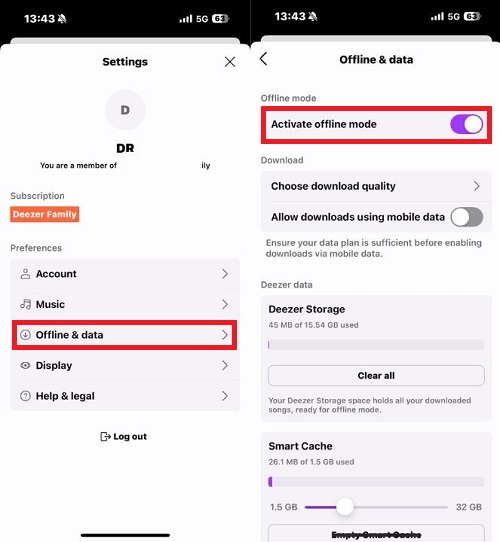
- 設定でオフラインモードを有効にする
ダウンロード後は、インターネット接続がなくても音楽を聴くことができます。
パート3:Deezerの音楽を永久にオフラインで保存する最良の方法
Deezerのオフライン再生は便利ではあるものの、多くのユーザーを悩ませるいくつかの制限があります。まず、ダウンロードした音楽はDeezerプレミアムアカウントに紐づけられたままです。サブスクリプションの有効期限が切れると、オフライン再生がすぐにできなくなる可能性があります。Deezerのオフラインモードのもう一つの大きな制限は、ダウンロードした曲が通常の方法では保存されないことです。 MP3 ファイル。ユーザーはDeezer以外でダウンロードしたファイルを自由に利用することはできません。
より柔軟性を求めるユーザー向けに、次のようなツールがあります。 DumpMedia ディーズプラス Deezerの標準的なオフライン制限に対する代替アプローチを提供します。Deezerの暗号化されたダウンロードに完全に依存するのではなく、 DumpMedia DeezPlusを使用すると、Deezerの音楽を一般的なオーディオ形式に変換して、オフラインで永続的に再生できます。
🏆なぜ使うのか DumpMedia ディーズプラス
- Deezerを変換して MP3WAV、FLAC、AAC
- Deezerウェブプレーヤーとの連携
- DeezerのDRM保護を解除します*
- オリジナルの音質を維持
- プレイリストとアルバムを一括ダウンロードする
- 高速変換速度
- 楽曲のメタデータとID3タグを保持する
- あらゆるデバイスでオフライン再生に対応
これにより、従来のDeezerオフライン再生と比較して、ユーザーはより多くの制御が可能になります。
Deezer Musicをダウンロードして、オフラインで永久再生しよう
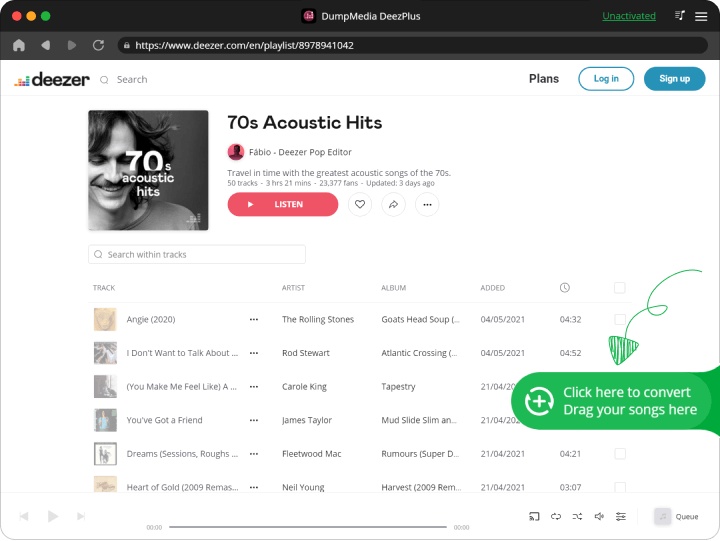
ステップ 1: ダウンロードしてインストール DumpMedia Mac/PC で DeezPlus を起動します。 DumpMedia Deezer Converterを起動すると、インターフェースが表示されます。Deezerアカウントを使用してログインしてください。
ステップ 2: 変換したいプレイリスト、アルバム、または特定の曲を探してください。画面右側の「+」アイコンに曲をドラッグすることもできます。または、プレイリスト/アルバム全体を開き、「変換に追加」アイコンをクリックして、リスト全体をコンバーターに読み込むこともできます。
ステップ 3: 選択 MP3 (最も互換性が高い)。また、ビットレートやサンプリングレートを変更することもできます。
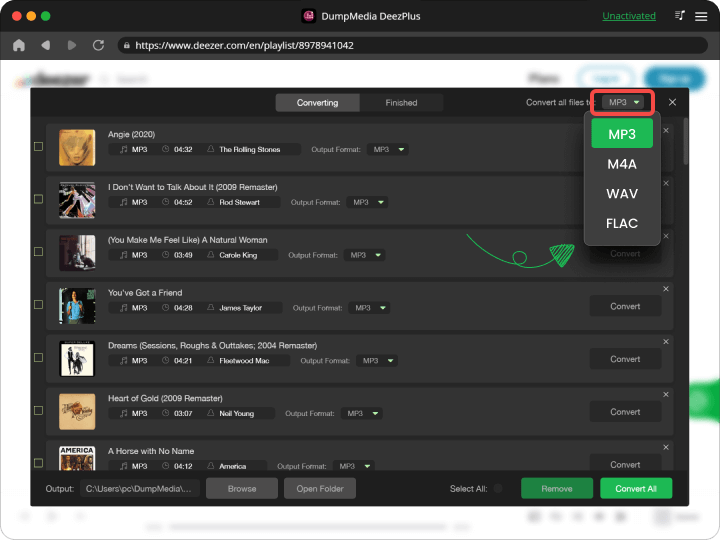
ステップ 4: 設定が完了したら、ユーザーは「変換」アイコンをクリックして変換処理を開始できます。 DumpMedia Deezerの曲を MP3 その超高速性により、数秒以内に。

パート4。よくある質問
Deezerはオフラインでもインターネット接続なしで使えますか?
はい、ただしダウンロードした音楽はアカウント認証と購読状況によって利用状況が異なります。
Deezerの曲を永久に保存できますか?
Deezerの標準オフラインダウンロードは一時的なものです。変換されたローカルファイルは、より永続的なアクセスを提供します。
Deezerでダウンロードしたデータが消えてしまったのはなぜですか?
これは通常、サブスクリプションの有効期限が切れたか、アプリがオンライン認証を必要としたために発生します。
Deezerは無料ユーザーでもオフラインで利用できますか?
いいえ。オフラインモードは通常、Deezer Premium加入者のみ利用可能です。
Deezerの音楽を変換できますか? MP3?
はい。 DumpMedia DeezPlusは、Deezerの音楽を一般的なオーディオ形式に変換できます。
パート5:結論
Deezerのオフラインモードは一時的なオフライン再生には便利ですが、サブスクリプション、デバイスの互換性、ファイルアクセスに関するいくつかの制限があります。より永続的なオフライン再生の柔軟性を求めるユーザー向けには、 DumpMedia DeezPlusは、Deezerの音楽を、複数のデバイスで保存および再生できるアクセスしやすいオーディオ形式に変換する実用的なソリューションを提供します。
*DumpMedia このツールは、Deezerの楽曲を復号化してDRMフリーのファイルとしてダウンロードすることで、あらゆるデバイスでライブラリのクリーンで制限のないコピーを入手できるようにします。ただし、ローカルオーディオファイルのDRM解除機能は含まれていません。

30% オフ >>>