


Rimozione del DRM da iTunes Movies Free: cosa funziona ancora nel 2026
Apple utilizza la protezione DRM sui film di iTunes per controllare l'autorizzazione alla riproduzione e l'accesso ai diritti d'autore. Per questo motivo, i file video M4V protetti spesso presentano restrizioni di riproduzione, limitazioni dei dispositivi e problemi di visualizzazione offline. In questa guida, spiegheremo la situazione attuale per la rimozione gratuita del DRM dai film di iTunes, perché la maggior parte degli strumenti gratuiti per la rimozione del DRM non funziona più in modo affidabile e come gli utenti Apple gestiscono oggi i contenuti multimediali protetti da DRM.
Indice dei contenuti Parte 1. Cos'è il DRM per i film di iTunes? Parte 2. È ancora possibile rimuovere il DRM dai film di iTunes? Parte 3. È ancora possibile rimuovere il DRM da Apple Music? Parte 4. Una soluzione migliore per la riproduzione offline di Apple Music Parte 5. Domande frequenti Parte 6. Riepilogo
Parte 1. Cos'è il DRM per i film di iTunes?
Per capire come rimuovere il DRM dai film di iTunes gratuitamente, è importante prima comprendere come funziona il DRM di Apple.
Come il DRM di Apple protegge i film di iTunes
Apple applica la tecnologia DRM a molti acquisti e noleggi di film su iTunes. Questo sistema di protezione aiuta Apple a:
- Impedire la condivisione non autorizzata
- Gestisci le autorizzazioni di riproduzione
- Limita i dispositivi non supportati
- Proteggere i contenuti protetti da copyright
Che cosa sono i file M4V protetti?
Molti film di iTunes sono archiviati come file M4V protetti. A differenza dei video MP4 standard, i file M4V protetti possono essere riprodotti solo tramite piattaforme Apple autorizzate.
Perché il DRM limita la riproduzione
La protezione DRM spesso limita:
- Trasferimenti di file
- Riproduzione offline
- Compatibilità del dispositivo
- Accesso permanente
- supporto per lettori di terze parti
Ecco perché molti utenti iniziano a cercare metodi per rimuovere gratuitamente il DRM dai film di iTunes.
Parte 2. È ancora possibile rimuovere il DRM dai film di iTunes?
Molti utenti si chiedono se la rimozione gratuita del DRM dai film di iTunes funzioni ancora. Anni fa, diversi strumenti gratuiti per la rimozione del DRM affermavano di sbloccare i file video protetti di iTunes. Alcuni di questi strumenti tentavano di convertire i file M4V. Oggi, molte soluzioni gratuite per la rimozione del DRM non funzionano più in modo affidabile. Apple aggiorna regolarmente i suoi sistemi DRM, rendendo obsoleti o incompatibili gli strumenti più vecchi.
Parte 3. È ancora possibile rimuovere il DRM da Apple Music?
Sì, è assolutamente possibile, ma la definizione tecnica di "come" si fa è cambiata. La vera rimozione del DRM, ovvero prendere un file crittografato scaricato direttamente dall'app di streaming (.m4p) e rimuovere il livello di crittografia FairPlay senza modificare il file, è praticamente impossibile al giorno d'oggi. I moderni sistemi operativi desktop e le versioni aggiornate di iTunes/Apple Music hanno bloccato rigorosamente questi meccanismi di decrittazione.
Invece, quando si parla di rimuovere il DRM da Apple Music, in realtà ci si riferisce al download di copie prive di DRM o alla registrazione dello streaming tramite software specializzato.
Parte 4. Una soluzione migliore per la riproduzione offline di Apple Music
Per gli utenti che desiderano un ascolto musicale offline più flessibile, DumpMedia Apple Music Converter fornisce una soluzione pratica. A differenza degli strumenti di rimozione DRM dei film, questo software è progettato specificamente per la gestione audio di Apple Music e la riproduzione offline. Questo convertitore professionale aiuta gli utenti converti Apple Music in MP3 e salvarli per una riproduzione offline stabile senza dover dipendere completamente dall'app Apple Music.
Download gratuito Download gratuito
Perché usare DumpMedia Convertitore di musica Apple?
- 🎶Scarica Apple Music per MP3, WAV, FLAC e AAC
- 🎶Mantieni la qualità audio originale
- 🎶Scarica in blocco playlist e album
- 🎶Velocità di conversione elevata
- 🎶Mantieni i metadati del brano e i tag ID3
- 🎶Supporta la riproduzione offline su qualsiasi dispositivo
Per gli utenti frustrati dalle restrizioni dello streaming, la riproduzione locale della musica offre spesso un'esperienza molto più comoda. Anche se l'app Apple Music non funziona sul tuo dispositivo, puoi riprodurre Apple Music offline su un altro lettore musicale immediatamente.
Scarica i brani di Apple Music per la riproduzione offline
Passo 1: Scarica e installa DumpMedia Installa Apple Music Converter sul tuo Mac/PC. Avvialo e visualizzerai l'interfaccia. Accedi utilizzando il tuo account Apple Music.
Download gratuito Download gratuito
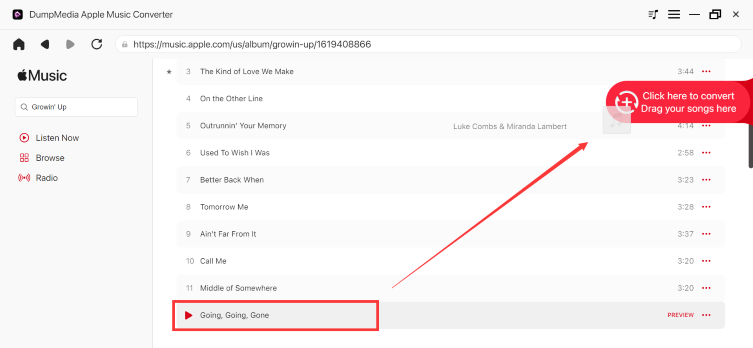
Passaggio 2. Trova la playlist, l'album o il brano specifico che desideri convertire. Puoi trascinare un singolo brano sull'icona "+" sul lato destro dello schermo. In alternativa, apri un'intera playlist/album e fai clic sull'icona "Aggiungi alla conversione" per caricare l'intero elenco nel convertitore.
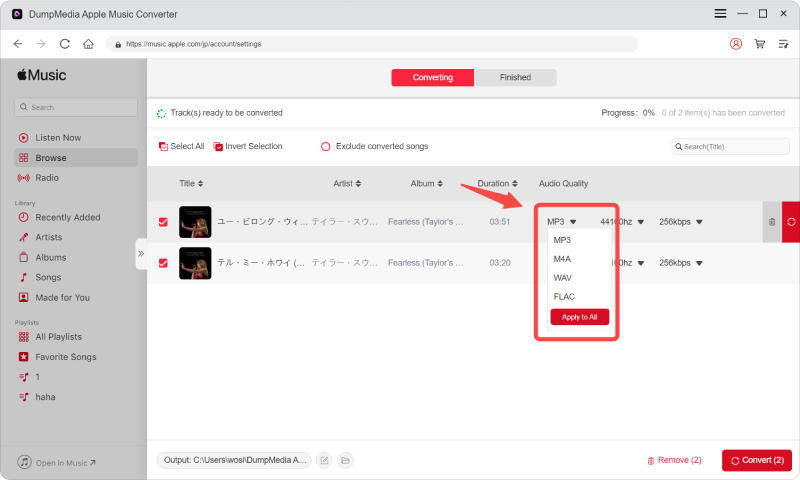
Passo 3: Seleziona MP3 (massima compatibilità). È inoltre possibile modificare il bitrate o la frequenza di campionamento. Per un equilibrio ottimale, si consiglia di scegliere 320 kbps.
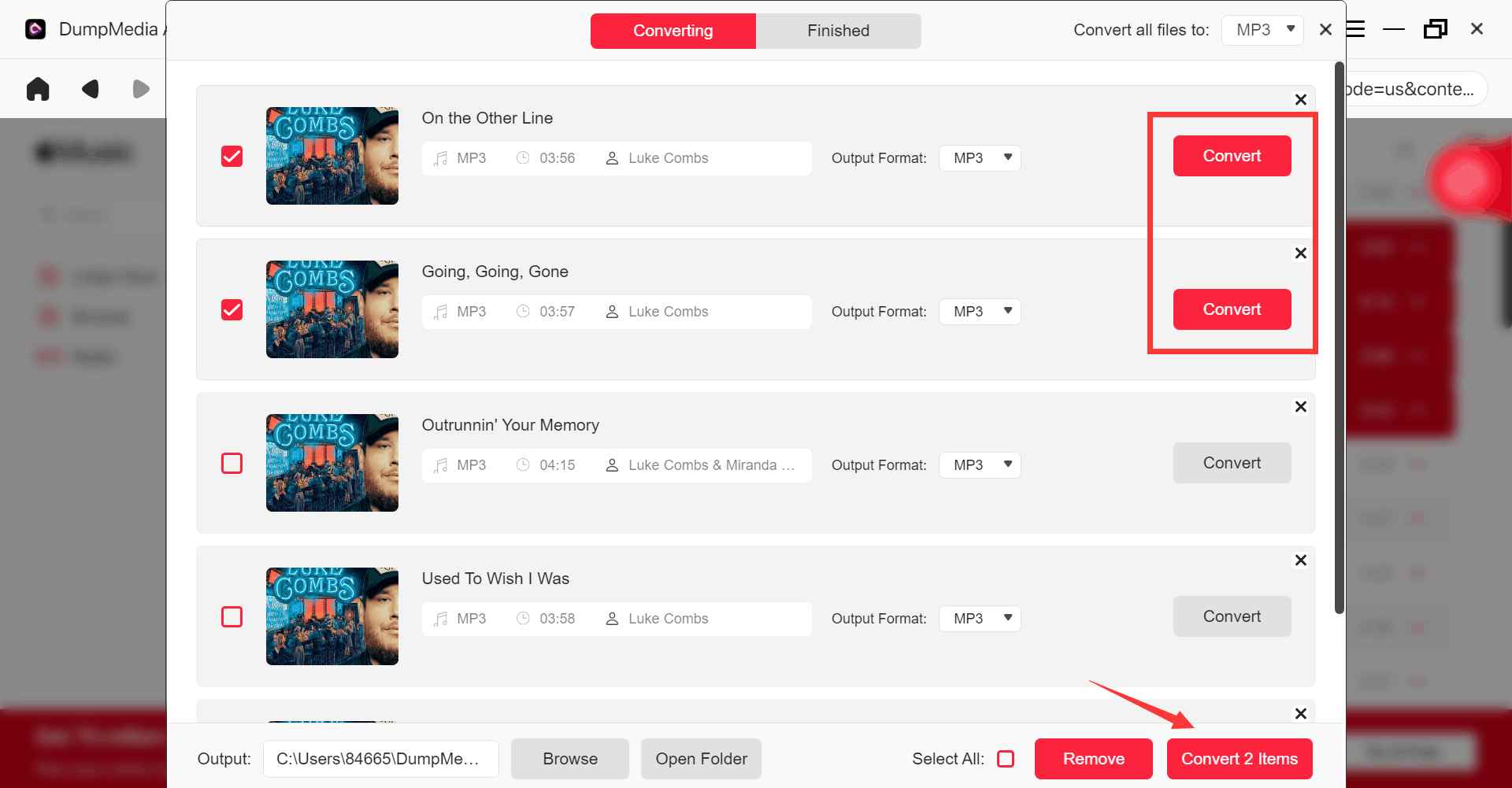
Passo 4: Una volta completate le impostazioni, gli utenti possono procedere con la conversione facendo clic sull'icona "Converti". Quindi DumpMedia convertirà i brani di Apple Music in MP3 in pochi secondi grazie alla sua velocità superveloce.
Parte 5. Domande frequenti
È possibile rimuovere gratuitamente la protezione DRM dai film di iTunes?
Alcuni vecchi strumenti tentavano di rimuovere il DRM dai film di iTunes, ma molte soluzioni gratuite non funzionano più in modo affidabile a causa degli aggiornamenti del DRM di Apple.
Perché gli strumenti gratuiti per la rimozione del DRM smettono di funzionare?
Apple aggiorna frequentemente i suoi sistemi DRM, rendendo incompatibili gli strumenti più vecchi.
Che cosa sono i file M4V protetti?
I file M4V protetti sono file video di iTunes protetti da DRM con restrizioni di riproduzione.
Anche Apple Music utilizza il DRM?
Sì. Anche i brani di Apple Music potrebbero includere limitazioni di riproduzione legate al DRM.
Posso ascoltare Apple Music offline senza restrizioni?
Molti utenti usano DumpMedia Apple Music Converter per una riproduzione offline più flessibile.
Parte 6. Sommario
Molti utenti che cercano di rimuovere gratuitamente il DRM dai film di iTunes, in realtà, cercano di risolvere problemi di riproduzione, di visualizzazione offline e di compatibilità con i dispositivi causati dai contenuti protetti da DRM. Sebbene le soluzioni gratuite per la rimozione del DRM dai film di iTunes siano diventate sempre meno affidabili, le restrizioni DRM dell'ecosistema Apple continuano a influenzare molte forme di contenuti digitali ancora oggi.
Per gli utenti che preferiscono l'ascolto offline di Apple Music e la riproduzione locale flessibile, DumpMedia Apple Music Converter offre una soluzione pratica per scaricare musica in formati audio standard e riprodurla offline su più dispositivi.
Download gratuito Download gratuito
*DumpMedia Questo strumento funziona decrittografando e scaricando i brani di Apple Music in file privi di DRM, consentendo di ottenere una copia pulita e senza restrizioni della propria libreria per qualsiasi dispositivo. La sua funzionalità non include la rimozione del DRM dai file audio locali.