


Comment extraire un CD de livre audio MP3 (Méthodes gratuites et meilleure alternative)
Extraire un CD de livre audio MP3 C'est toujours possible, mais ce n'est plus la méthode la plus pratique pour écouter des livres audio. De nombreux utilisateurs se retrouvent aujourd'hui confrontés à la gestion de plusieurs disques, de métadonnées manquantes et de matériel obsolète pour convertir leurs collections de livres audio. Ce guide vous apprendra comment extraire le contenu d'un CD audio sur un autre support. MP3 Nous vous guiderons pas à pas, en abordant également les problèmes courants que vous pourriez rencontrer. Plus important encore, nous vous présenterons une alternative moderne et performante qui vous permettra de profiter des livres audio sans avoir besoin de CD.
Guide des matières Partie 1. Peut-on extraire le contenu d'un CD de livre audio pour MP3?Partie 2. Extraire un CD de livre audio MP3 Utilisation d'iTunes/Apple MusicPartie 3. Extraire un CD de livre audio MP3 L'utilisation de WinLecteur multimédia DowsPartie 4. Problèmes courants lors de l'extraction de CD de livres audioPartie 5. Comment télécharger des livres audio Audible MP3 (Meilleure solution)Partie 6. Conclusion
Partie 1. Peut-on extraire le contenu d'un CD de livre audio pour MP3?
Oui, vous pouvez toujours extraire le contenu d'un CD de livre audio. MP3 Vous pouvez numériser les fichiers à l'aide d'un logiciel multimédia standard. Toutefois, vous aurez besoin d'un ordinateur équipé d'un lecteur CD/DVD, d'un logiciel d'extraction de CD et de suffisamment de temps pour traiter plusieurs disques.
Bien que le processus lui-même n'ait pas beaucoup changé, la technologie qui l'entoure est devenue obsolète. De nombreux ordinateurs portables modernes ne sont plus équipés de lecteurs de disque, ce qui rend les flux de travail basés sur les CD moins pratiques qu'auparavant.
Partie 2. Extraire un CD de livre audio MP3 Utilisation d'iTunes/Apple Music
Comment extraire le contenu d'un CD de livre audio MP3Voici les meilleures façons de procéder sur WinDows et Mac.
Étape 1 : Ouvrez iTunesMusique > Réglages (ou Préférences) > Général > Réglages d'importation. Définissez l'option Importer en utilisant MP3 Encodeur. Cochez la case : « Utiliser la correction d’erreurs lors de la lecture des CD audio » (utile pour les CD de bibliothèque rayés).
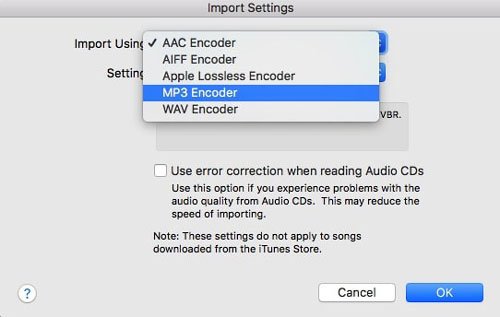
Étape 2 : Insérez le CD. Lorsque la liste des pistes apparaît, sélectionnez toutes les pistes (Ctrl+A ou Cmd+A).
Étape 3 : Cliquez sur Options (trois points) ou sur l'icône d'engrenage et sélectionnez Joindre les pistes du CD.
Étape 4 : Cliquez sur Importer le CD. Répétez l'opération pour chaque disque. Le logiciel convertira chaque piste en MP3 le format.
Extraire un CD de livre audio MP3 Utiliser iTunes est simple, mais pour les livres audio en particulier, il faut faire attention à l'organisation des chapitres et à la concaténation des fichiers afin de ne pas se retrouver avec 100 petits fichiers pour un seul livre.
Partie 3. Extraire un CD de livre audio MP3 L'utilisation de WinLecteur multimédia Dows
Si vous êtes sur WinDows 10 ou 11, vous pouvez utiliser le Windows Media Player Legacy pour extraire un CD de livre audio vers MP3.
Étape 1 : Ouvrez WinWindows Media Player. Accédez aux paramètres d'extraction > Format et sélectionnez MP3.
Étape 2 : Allez dans les paramètres Rip > Qualité audio et choisissez 192 Kbps.
Étape 3 : Insérez votre CD et cliquez sur Extraire le CD.
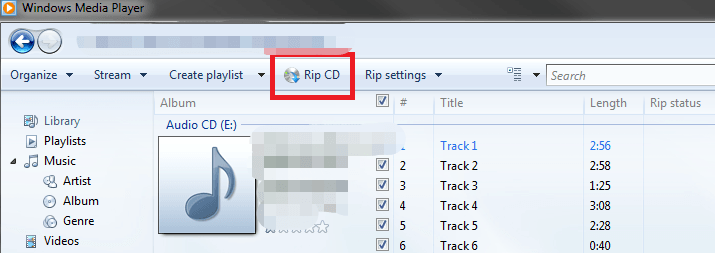
Il s'agit de l'une des méthodes gratuites les plus simples qui soient. Cependant, WinDows Media Player ne possède pas de fonction « Fusionner les pistes », vous obtiendrez donc plusieurs fichiers par CD. La gestion des fichiers doit être manuelle.
Partie 4. Problèmes courants lors de l'extraction de CD de livres audio
Bien que la numérisation de CD soit une méthode fiable pour numériser sa bibliothèque, le processus présente souvent plusieurs obstacles frustrants :
- Investissement en temps important : les livres audio s’étendent souvent sur 10 disques ou plus, transformant une tâche simple en une corvée lente et répétitive.
- Sortie fragmentée : de nombreux outils d’extraction exportent chaque piste comme un fichier séparé, ce qui vous laisse avec des centaines de petits clips au lieu d’un livre audio continu.
- Lacunes dans les métadonnées : les bases de données automatisées ne parviennent souvent pas à reconnaître les livres audio anciens ou de niche, ce qui vous oblige à saisir manuellement les titres, les auteurs et les marqueurs de chapitres.
- Pénurie de matériel : La plupart des ordinateurs portables et de bureau modernes ne comportent plus de lecteur optique interne, ce qui nécessite le coût supplémentaire et l'encombrement d'un lecteur CD externe.
Partie 5. Comment télécharger des livres audio Audible MP3 (Meilleure solution)
En raison des limitations de lecture, de nombreux utilisateurs délaissent les CD au profit des plateformes de livres audio numériques. Ces derniers offrent un accès immédiat (pas de disque physique) et une compatibilité avec de nombreux appareils. Cependant, un problème subsiste : la plupart des plateformes (comme Audible) utilisent la protection DRM, ce qui limite les possibilités d’écoute.
Si vous souhaitez la flexibilité de MP3 sans avoir recours aux CD, l'approche la plus efficace consiste à convertir les livres audio numériques en MP3 le format. C'est ici que DumpMedia Convertisseur audible devient utile.
Téléchargement gratuit Téléchargement gratuit
Pourquoi choisir DumpMedia Convertisseur sonore ?
- ✅ Supprimer la protection DRM* Cet outil supprime les DRM, vous permettant ainsi de contrôler pleinement vos fichiers.
- ✅ Convertir Audible en MP3 Facilement: Vous pouvez télécharger rapidement des livres Audible sur MP3 et d'autres formats comme M4A ou FLAC.
- ✅ Conversion à grande vitesse : Convertissez des livres audio entiers en quelques minutes.
- ✅ Qualité sans perte : Aucune perte de qualité lors de la conversion.
- ✅ Fonctionne sur plusieurs appareils : Écoutez vos livres audio hors ligne n'importe où après la conversion.
Au lieu de ripper des CD, vous pouvez constituer une bibliothèque de livres audio entièrement numérique, compatible avec tous les appareils.
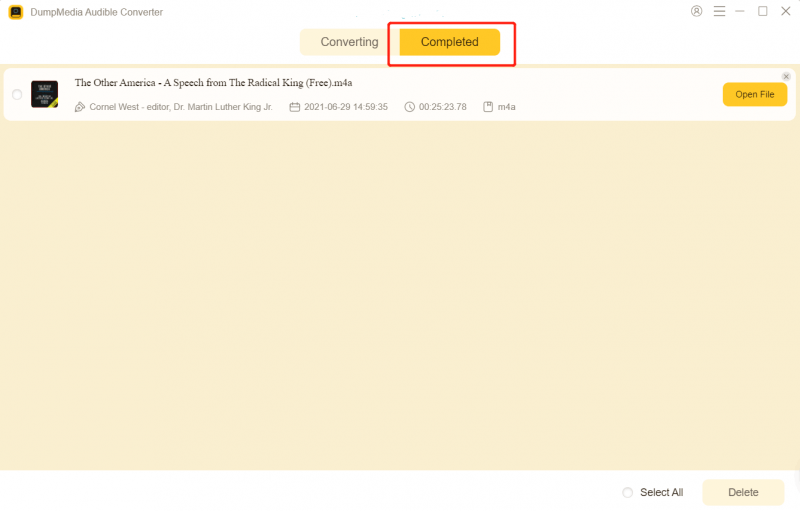
Comment utiliser DumpMedia Audible Converter (Guide complet) >>>
Partie 6. Conclusion
Extraire des CD de livres audio vers MP3 C’est encore possible en 2026, mais c’est de plus en plus obsolète et inefficace. Tandis que des outils comme iTunes et WinDows Media Player peut faire le travail, mais cela nécessite du temps, des efforts et du matériel que beaucoup d'utilisateurs ne possèdent plus.
Si vous recherchez une solution plus rapide et plus flexible, passez aux livres audio numériques et utilisez-les. DumpMedia Audible Converter est le choix le plus judicieux. Plus besoin de lecteur CD, traitement plus rapide (pas de changement de disque) et véritable écoute hors ligne. DumpMedia une alternative moderne aux flux de travail traditionnels de production de CD.
Téléchargement gratuit Téléchargement gratuit
*DumpMedia Il fonctionne en décryptant et en téléchargeant vos livres audio dans des fichiers sans DRM, vous permettant ainsi d'obtenir une copie propre et sans restriction de votre bibliothèque pour n'importe quel appareil.

30% de réduction >>>