


Application Audible pour PC : Comment télécharger Audible sur Winles sourds
Vous cherchez une application Audible pour PC afin d'écouter vos livres audio sur un ordinateur ? WinVous utilisez un ordinateur ? Vous n'êtes pas seul. De nombreux utilisateurs préfèrent un PC pour des sessions d'écoute plus longues, un meilleur contrôle audio et le multitâche. La bonne nouvelle, c'est qu'Audible est compatible avec la lecture sur PC, mais pas comme vous l'imaginez. Bien qu'il soit possible d'utiliser Audible sur ordinateur, certaines limitations affectent la flexibilité, l'accès aux fichiers et l'écoute hors ligne. Ce guide vous apprendra à télécharger et à utiliser l'application Audible sur PC, ainsi qu'une façon plus astucieuse de profiter de vos livres audio sans restrictions.
Sommaire Partie 1. Existe-t-il une application Audible pour PC ? Partie 2. Comment utiliser Audible sur PC ? Partie 3. Limitations de l’application Audible sur PC Partie 4. Meilleure façon d’écouter Audible sur PC sans limites Partie 5. FAQ Partie 6. Résumé
Partie 1. Existe-t-il une application Audible pour PC ?
Oui, mais avec quelques détails importants. Contrairement aux appareils mobiles, il n'existe pas d'appareil autonome complet. Audible application pour tous WinUtilisateurs de Dows. Vous avez donc deux options principales :
1. Lecteur Web Audible
- Accessible via votre navigateur
- Aucune installation requise
- Fonctionne sur n'importe quel PC
2. Application Audible (Limitée) WinSupport Dows)
- Disponible uniquement dans certains environnements (par exemple, Win(Versions du magasin Dows)
- Moins couramment utilisé aujourd'hui
Pour la plupart des utilisateurs, le lecteur web est le principal moyen d'utiliser Audible sur PC.
Partie 2. Comment utiliser Audible sur PC ?
À l'heure actuelle, l'application Audible dédiée pour WinLe service Dows n'est plus disponible. Cependant, utiliser Audible sur votre PC reste très simple : il vous suffit d'utiliser votre navigateur ou un petit logiciel de synchronisation. Voici un guide étape par étape pour écouter des livres audio sur votre ordinateur.
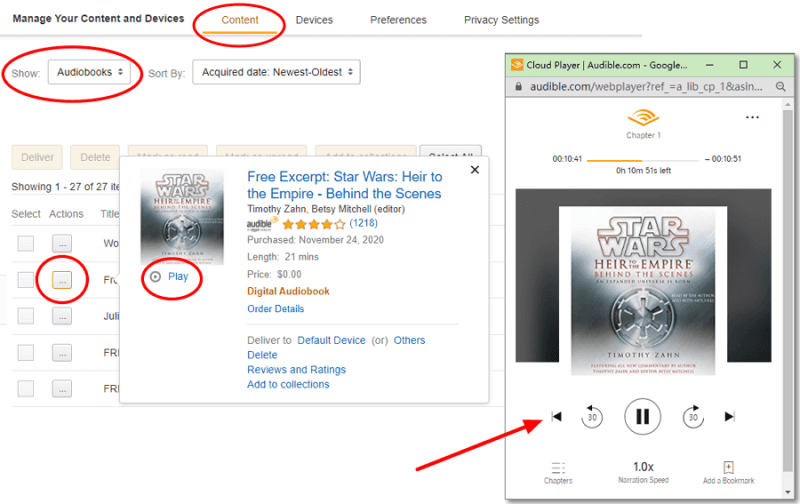
Étape 1. Ouvrez Audible.com (ou votre site régional comme .ca ou .co.uk) et connectez-vous.
Étape 2. Cliquez sur Bibliothèque dans la barre de navigation supérieure.
Étape 3. Trouvez le livre que vous souhaitez écouter et cliquez sur le bouton Écouter maintenant.
Étape 4. Une fenêtre distincte « Cloud Player » s’ouvrira. Vous pourrez alors régler la vitesse de narration, passer des chapitres et ajouter des signets.
Conseils de dépannage rapide
- Bloqueur de pop-ups : si le lecteur cloud ne s’ouvre pas lorsque vous cliquez sur « Écouter maintenant », vérifiez la barre d’adresse de votre navigateur pour trouver une icône « Pop-ups bloqués » et sélectionnez « Toujours autoriser ».
- Qualité audio : Dans les paramètres du lecteur cloud (icône d’engrenage), vous pouvez basculer entre la qualité « Standard » et la qualité « Élevée » si votre connexion Internet est stable.
Partie 3. Limitations de l'application Audible sur PC
Bien que l'application Audible pour PC (ou le lecteur web) fonctionne, elle présente plusieurs restrictions :
1. Aucun véritable accès aux fichiers : vous ne possédez pas réellement les fichiers du livre audio, vous les écoutez en streaming ou y accédez via le système d'Audible.
2. Protection DRM : les fichiers Audible sont verrouillés au format AAX, ce qui signifie :
- Ne peut pas être lu sur la plupart des lecteurs multimédias
- Ne peut être transféré librement
- Réservé aux applications autorisées
3. Flexibilité hors ligne limitée : la lecture hors ligne n’est pas toujours aussi simple sur PC que sur appareils mobiles.
4. Restrictions relatives à l'appareil : Il n'est pas facile de transférer des livres audio vers MP3 lecteurs, montres connectées ou systèmes embarqués dans les voitures.
Partie 4. Meilleure façon d'écouter Audible sur PC sans limites
Si vous souhaitez un contrôle total sur vos livres audio, comme les écouter sur n'importe quel appareil, les conserver définitivement ou les utiliser avec votre lecteur multimédia préféré, une autre approche s'impose. Au lieu de se fier uniquement à l'application Audible, de nombreux utilisateurs choisissent de convertir les livres Audible en formats standards tels que… MP3Cela supprime les restrictions et vous offre une flexibilité totale. Pour ce faire efficacement, vous pouvez utiliser DumpMedia Convertisseur audible.
Téléchargement gratuit Téléchargement gratuit
Pourquoi choisir DumpMedia Convertisseur sonore ?
- ✅ Supprimer la protection DRM* Cet outil supprime les DRM, vous permettant ainsi de contrôler pleinement vos fichiers.
- ✅ Convertir Audible en MP3 Facilement: Vous pouvez rapidement télécharger des livres Audible sur MP3 et d'autres formats comme M4A ou FLAC.
- ✅ Conversion à grande vitesse : Convertissez des livres audio entiers en quelques minutes.
- ✅ Qualité sans perte : Aucune perte de qualité lors de la conversion.
- ✅ Fonctionne sur plusieurs appareils : Écoutez vos livres audio hors ligne n'importe où après la conversion.
Comment utiliser DumpMedia Convertisseur audible
Étape 1 : Ouvrez le logiciel sur votre ordinateur. Il fonctionne avec les deux WinCompatible avec Windows et Mac. Son interface intuitive facilite la prise en main, même pour les débutants.
Téléchargement gratuit Téléchargement gratuit
Étape 2 : Ouvrez le lecteur web Audible intégré à l'intérieur DumpMedia Connectez-vous avec votre compte Audible. Parcourez le catalogue Audible et glissez-déposez le livre que vous souhaitez télécharger dans le convertisseur.
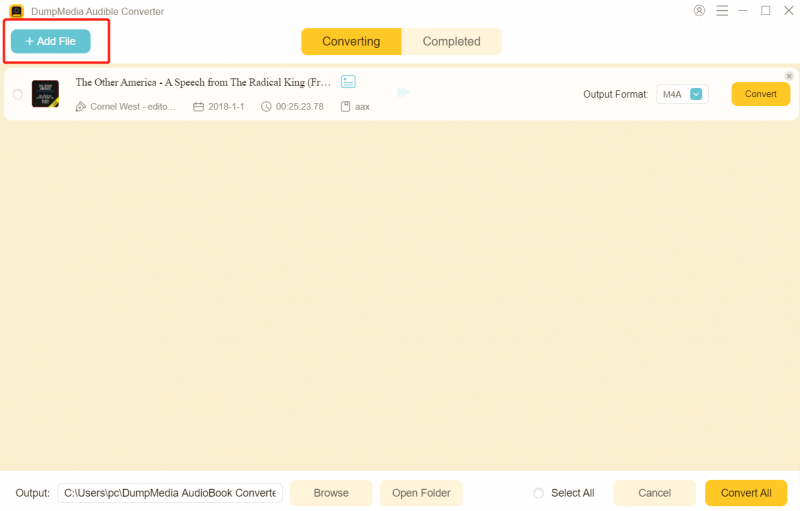
Étape 3. Dans le panneau des paramètres, sélectionnez le format que vous souhaitez télécharger.

Étape 4. La dernière étape consiste à cliquer sur le bouton « Convertir » pour lancer le processus de conversion.

Partie 5. FAQ
1. Puis-je télécharger l'application Audible sur PC ?
Oui, mais pas de la même manière que sur les appareils mobiles. La plupart des utilisateurs accèdent à Audible sur PC via le lecteur web plutôt que via une application dédiée. WinLes versions Dows peuvent prendre en charge une application, mais la disponibilité et les fonctionnalités sont limitées.
2. Pourquoi ne puis-je pas lire les fichiers Audible sur d'autres lecteurs multimédias ?
Les fichiers Audible sont au format AAX et protégés par DRM. Ils ne peuvent donc être lus que sur des plateformes autorisées, comme l'application ou le lecteur web Audible. Les lecteurs multimédias classiques ne prennent pas en charge ce format.
3. Puis-je écouter Audible hors ligne sur PC ?
L'écoute hors ligne sur PC est plus limitée que sur appareils mobiles. Dans la plupart des cas, vous devez rester sur la plateforme Audible, et l'accès hors ligne peut ne pas être disponible selon votre configuration.
4. Comment transférer des livres Audible sur d'autres appareils ?
Par défaut, vous ne pouvez pas transférer librement les livres audio Audible en raison des restrictions DRM. Ils sont liés à votre compte et uniquement aux applications compatibles. Si vous souhaitez transférer des livres audio sur des appareils comme… MP3 Pour les lecteurs, les montres connectées ou les systèmes audio de voiture, vous devez les convertir dans un format compatible tel que : MP3.
5. Est-il légal de convertir des livres Audible en MP3?
Cela dépend de la législation en vigueur dans votre pays concernant le droit d'auteur. Dans de nombreuses régions, la conversion de contenu pour un usage personnel est autorisée, mais le partage ou la distribution des fichiers convertis est interdit. Consultez toujours la réglementation locale avant de procéder.
6. Ai-je encore besoin de l'application Audible après la conversion des fichiers ?
Non. Une fois vos livres Audible convertis en MP3 ou dans d'autres formats standards, vous pouvez les lire sur n'importe quel lecteur multimédia sans utiliser l'application Audible.
Partie 6. Résumé
L'application Audible pour PC est un moyen pratique d'accéder à vos livres audio, notamment via le lecteur web. Cependant, elle présente des limitations qui restreignent l'utilisation et la gestion de vos fichiers. Si vous recherchez une solution plus flexible, vous permettant d'écouter vos livres Audible partout et à tout moment, sans restrictions, vous pouvez les convertir en MP3 est la meilleure option. Prenez le contrôle total de votre bibliothèque de livres audio avec DumpMedia Audible Converter vous permet de profiter d'une écoute illimitée sur votre PC et bien plus encore.
Téléchargement gratuit Téléchargement gratuit
*DumpMedia Il fonctionne en décryptant et en téléchargeant vos livres audio dans des fichiers sans DRM, vous permettant ainsi d'obtenir une copie propre et sans restriction de votre bibliothèque pour n'importe quel appareil.