


Spotify DJ模式:使用方法(2026完整指南)
如果你最近聽過… Spotify DJ模式,你可能想知道它到底有什麼作用以及如何使用。 Spotify AI DJ模式是其中之一 Spotify它最令人興奮的功能是提供由人工智慧驅動的個人化音樂體驗。但儘管它功能強大,也存在一些許多用戶沒有意識到的限制。在本指南中,您將了解… Spotify AI DJ是什麼?以及如何啟用AI DJ? Spotify.
內容指南 部分1。 什麼是 Spotify 人工智慧DJ?第 2 部分. 如何啟用 Spotify 人工智慧DJ?第三部分:局限性 Spotify 人工智能DJ第 4 部分。 如何保存 Spotify DJ音樂適合離線使用嗎?第 5 部分。 常見問題解答部分6。 結論
部分1。 什麼是 Spotify 人工智慧DJ?
Spotify DJ模式是一個個人化的音樂指南,它就像一個虛擬電台主持人,融合了先進的機器學習技術和極其逼真的AI語音。這項功能僅限高級會員使用,它不僅能隨機播放歌曲,還能根據你的收聽歷史、當前流行趨勢,甚至是你多年未聽的經典老歌,為你精心打造一個持續不斷的音樂流。
主要特點 Spotify 人工智能DJ
- 個性化歌曲推薦
- 無需手動輸入即可連續播放
- 人工智慧生成的語音解說
- 巧妙的情緒和類型轉換
這就是為什麼 Spotify DJ模式越來越受到喜歡輕鬆聆聽的使用者的歡迎。
第 2 部分. 如何啟用 Spotify 人工智慧DJ?
如何訪問 Spotify DJ模式?如果您已訂閱 Spotify 高級, 跟著這些步驟:
第一步:請確保您的應用程式已更新至最新版本。前往「首頁」部分。
第二步:在你的資訊流中找出DJ功能。立即開始收聽。
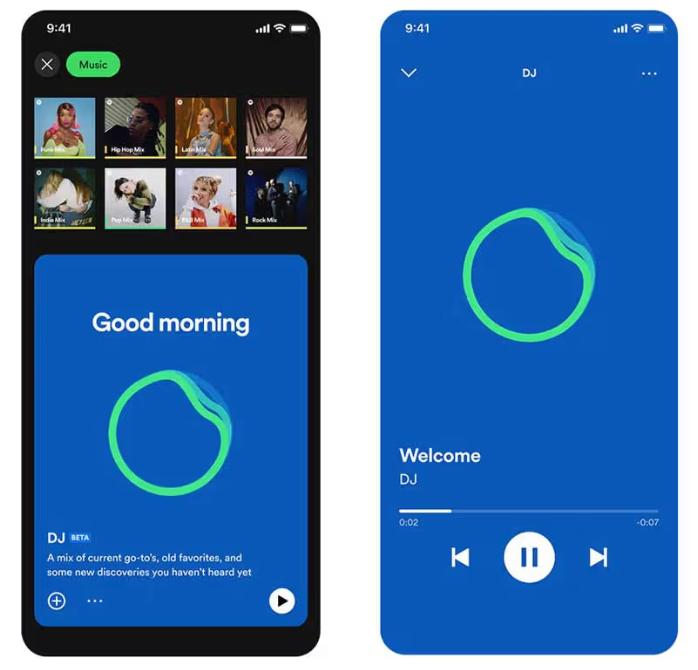
Spotify的AI DJ現在支援「點歌」功能。就像你和真人DJ對話一樣,你可以使用語音命令或文字訊息,例如“切換到更舒緩的音樂類型”或“多播放一些Jay-Z和Justin Bieber的歌曲”,AI會立即調整播放清單。
第三部分:局限性 Spotify 人工智能DJ
Spotify DJ模式的亮點在於它免去了手動搜尋音樂的麻煩。它非常適合後台播放、發現新歌以及營造類似電台的體驗。 Spotify的 AI DJ 功能令人印象深刻,但也存在一些重要的限制。
1. 無永久下載
即使是高級會員,歌曲也無法真正下載。文件被鎖定在應用程式內,無法傳輸。
2. 沒有離線自由
您可以下載音樂以供離線收聽,但存取權限取決於您的訂閱。如果您取消訂閱,音樂將無法下載。
3. 禁止出口或共享
您無法匯出 DJ 播放清單並將混音儲存到外部。
4. 控制有限
Spotify AI 控制歌曲的選擇和順序。你無法完全自訂。
如果你想更掌控自己的音樂,這些限制就變得很重要了。
第 4 部分。 如何保存 Spotify DJ音樂適合離線使用嗎?
如果你喜歡 Spotify 想要DJ模式但又想要更大的彈性,你需要一種永久保存歌曲的方法。而不是依賴… Spotify由於其內建的限制,您可以從 DJ 推薦中選擇歌曲並將其轉換為本機檔案。這讓您可以完全掌控自己的音樂。最可靠的方法是使用專業的工具,例如 DumpMedia Spotify Music Converter.
🏅為什麼選擇 DumpMedia Spotify Music Converter:
- ⭐集成 Spotify 網絡播放器
- ⭐為雙方工作 Spotify 保費和 Spotify 免費用戶
- ⭐提供高達 35 倍速度的批次轉換
- ⭐轉 Spotify 歌曲 MP3、WAV 或 FLAC
- ⭐保留ID3標籤,如藝術家、封面、藝術等。
- ⭐保留原始音質
- ⭐100% 乾淨的。使用無風險
逐步指南:轉換 Spotify DJ音樂
步驟二 下載並安裝軟體到您的電腦。它適用於兩種系統。 Win支援Windows和Mac系統。介面友好,即使是新手也能輕鬆上手。
步驟二 打開內建 Spotify 內建網路播放器 DumpMedia 並使用 Spotify 帳戶。瀏覽 Spotify 然後將要下載的歌曲、專輯或播放清單拖入轉換器中。

步驟二 在設定面板中,選擇 MP3 作為輸出格式以啟用 MP3 下載您選擇的曲目。

步驟二 按下“全部轉換”按鈕,開始轉換。 DumpMedia Spotify Music Converter 支援 35 倍速下載,您只需等待轉換過程完成即可。

第 5 部分。 常見問題解答
1。 什麼是 Spotify DJ模式?
這是一項人工智慧驅動的功能,可以根據你的喜好播放個人化音樂。
2。 是 SpotifyAI DJ是免費的嗎?
不,通常需要高級會員訂閱。
3.可以下載嗎 Spotify DJ歌曲?
僅限應用程式內使用,不能作為本機檔案使用。
4. 我可以建立自己的 DJ 播放清單嗎?
是的,尤其是如果你有本地音樂備份的話。
部分6。 結論
Spotify DJ模式是一項強大的功能,讓音樂發現變得更加輕鬆愉快。然而,它也存在一些限制,例如無法永久下載和離線存取受限。如果您想充分享受DJ模式帶來的好處, Spotify想要擺脫這些限制,使用可靠的工具保存音樂才是最佳方案。這樣你就能保存自己喜歡的曲目,創造專屬歌單,完全掌控你的聆聽體驗。
*DumpMedia 工作原理是透過解密和下載 Spotify 將歌曲轉換為無 DRM 保護的文件,讓您可以在任何裝置上取得乾淨、無限制的音樂庫副本。此功能不包括轉換本地音訊檔案。