


如何記錄 Spotify 至 MP3 在線(簡單方法和最佳替代方案)
如果您正在尋找錄製方法 Spotify 至 MP3 在網路上,你並不孤單。許多用戶都想保存 Spotify 歌曲如 MP3 文件可用於離線收聽、備份或個人使用。但是,嘗試錄製時卻出現問題。 Spotify 歌曲 MP3大多數用戶很快就會意識到,並非所有工具都能提供穩定的結果或高品質的音訊。有些工具失效的原因是… Spotify有些加密方式會降低音質,有些則會顯著降低音質。本指南將向您展示如何錄製音訊。 Spotify 歌曲 MP3 在線比較各種可用方法,並介紹一種更可靠的轉換替代方案。 Spotify 音樂進入 MP3 高效格式化。
內容指南 第 1 部分:如何錄製 Spotify 音樂至 MP3 線上?第二部:錄製安全嗎? Spotify 音樂至 MP3?第 3 部分:轉換的最佳方式 Spotify 至 MP3 (推薦解決方案)第四部分:對比:線上錄音機與 Spotify 下載器/轉檔器第 5 部分:常見問題解答部分6:摘要
第 1 部分:如何錄製 Spotify 音樂至 MP3 線上?
當使用者搜尋如何錄製時 Spotify 音樂 MP3 線上用戶通常希望找到基於瀏覽器的快捷解決方案。以下是兩種常用的線上工具,它們聲稱可以幫助您錄製音訊。 Spotify 至 MP3 線上。
1.Apowersoft線上錄音機
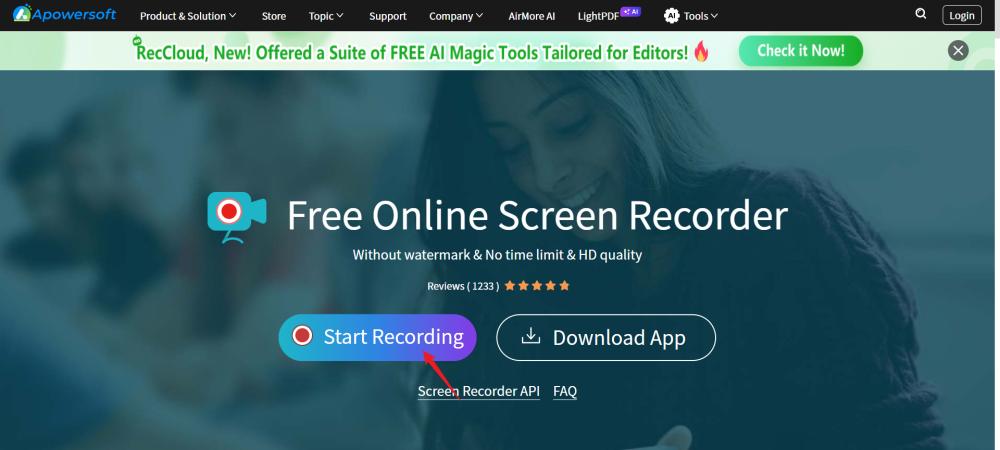
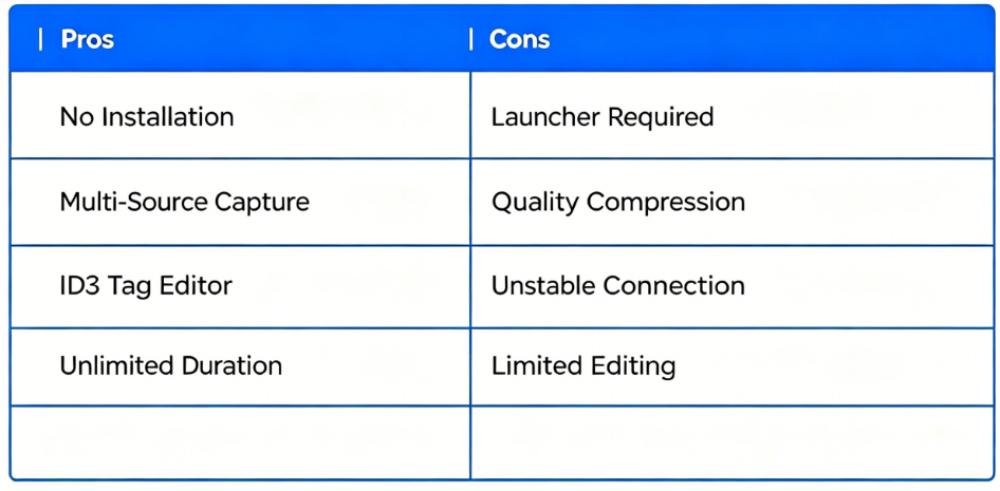
Apowersoft 是最受歡迎的錄音工具之一。 Spotify 至 MP3 線上工具。它使用一個輕量級的「啟動器」來連接瀏覽器和電腦音效卡。它可以同時錄製系統聲音、麥克風輸入或兩者。錄製完成後,音訊可以儲存為多種格式,包括 MP3支援 WAV 和 AAC 格式,使用者可以添加基本的 ID3 標籤來整理文件。
記錄步驟 Spotify 音樂至 MP3 - Apowersoft
- 存取 Apowersoft 線上錄音機
- 選擇“開始錄製”
- 播放 Spotify 在瀏覽器中聽音樂
- 停止錄製和下載 MP3 文件
2. Chrome 音訊擷取擴充程式
另一種記錄方式 Spotify 至 MP3 線上音訊處理軟體會使用 Chrome 擴充功能,例如 Audio Capture。此擴充功能完全在 Chrome 環境下運作。它會捕獲當前活動標籤頁中播放的音頻,並將其編碼成音頻檔案。 MP3 或WAV檔。錄製完成後,它會打開一個新標籤頁,用戶可以在其中將檔案儲存到本地儲存。它尤其因其簡潔易用且無需外部啟動器而備受青睞。
記錄步驟 Spotify 音樂至 MP3 - 音頻捕獲
- 安裝 Chrome 音訊捕獲
- 未結案工單 Spotify 網絡播放器
- 開始錄製擴充
- 匯出文件為 MP3
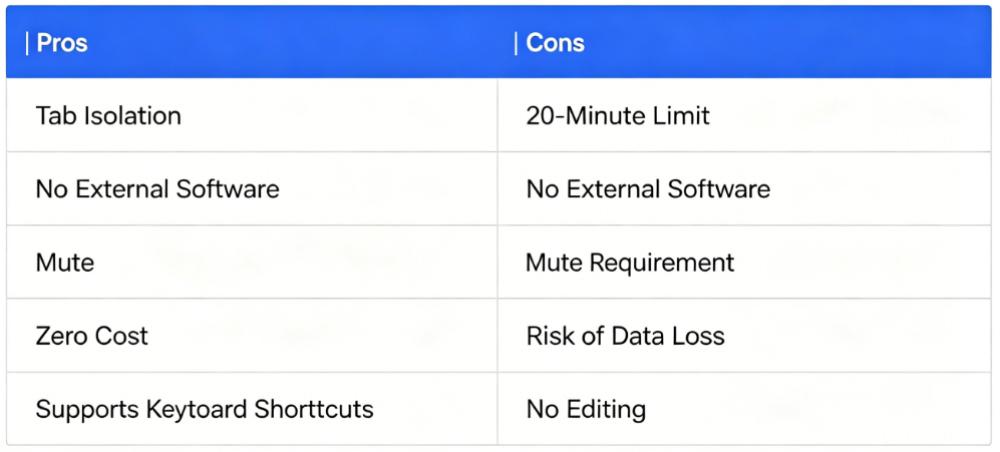
雖然這些工具允許你錄製 Spotify 至 MP3 在線上,它們通常會受到一些限制,這些限制會影響可用性和品質。
第二部:錄製安全嗎? Spotify 音樂至 MP3?
嘗試錄製時 Spotify 歌曲 MP3 在網路世界裡,安全是一個重要的考量。一般來說,線上錄音工具需要音訊權限。此外,一些工具可能會儲存臨時資料。雖然大多數信譽良好的工具都是安全的,但使用者在使用任何錄音方式時仍應保持謹慎。 Spotify 歌曲 MP3 在線,尤其是第三方擴充功能。此外, Spotify 使用 DRM 保護,這可能會導致直接錄製不穩定或不一致。
第 3 部分:轉換的最佳方式 Spotify 至 MP3 (推薦解決方案)
與其依賴不穩定的記錄方式,不如其他方式。 Spotify 至 MP3 在線上,更可靠的解決方案是使用專用轉換器。 DumpMedia Spotify Music Converter 是一款專為轉換的專業工具 Spotify 進入 MP3 品質和穩定性高。
🏅為什麼選擇 DumpMedia Spotify Music Converter:
- ⭐集成 Spotify 網絡播放器
- ⭐為雙方工作 Spotify 保費和 Spotify 免費用戶
- ⭐提供高達 35 倍速度的批次轉換
- ⭐轉 Spotify 歌曲 MP3、WAV 或 FLAC
- ⭐保留ID3標籤,如藝術家、封面、藝術等。
- ⭐保留原始音質
- ⭐100% 乾淨的。使用無風險
為什麼它比嘗試錄製更好 Spotify 至 MP3 在線:
- 沒有瀏覽器限制
- 無音訊損失
- 無記錄不穩定
- 直接與 Spotify 軌道
而不是重複嘗試錄製 Spotify 至 MP3 在線上,該解決方案提供了一種更可靠、可擴展的直接轉換方法。
轉換步驟 Spotify 至 MP3
步驟二 下載並安裝軟體到您的電腦。它適用於兩種系統。 Win支援Windows和Mac系統。介面友好,即使是新手也能輕鬆上手。
步驟二 打開內建 Spotify 內建網路播放器 DumpMedia 並使用 Spotify 帳戶。瀏覽 Spotify 然後將要下載的歌曲、專輯或播放清單拖入轉換器中。
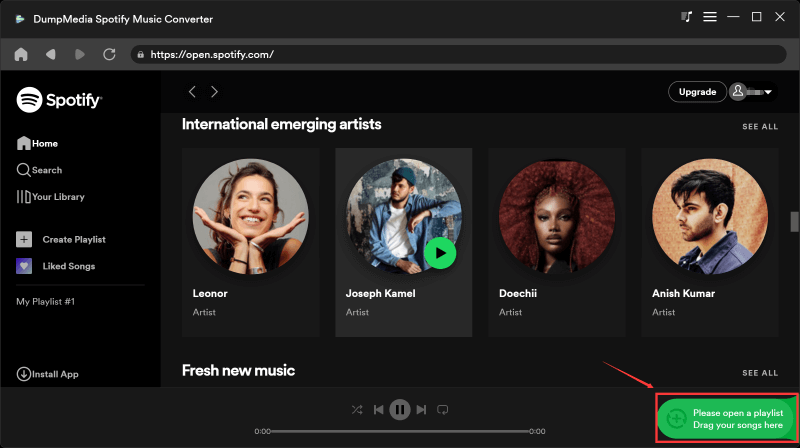
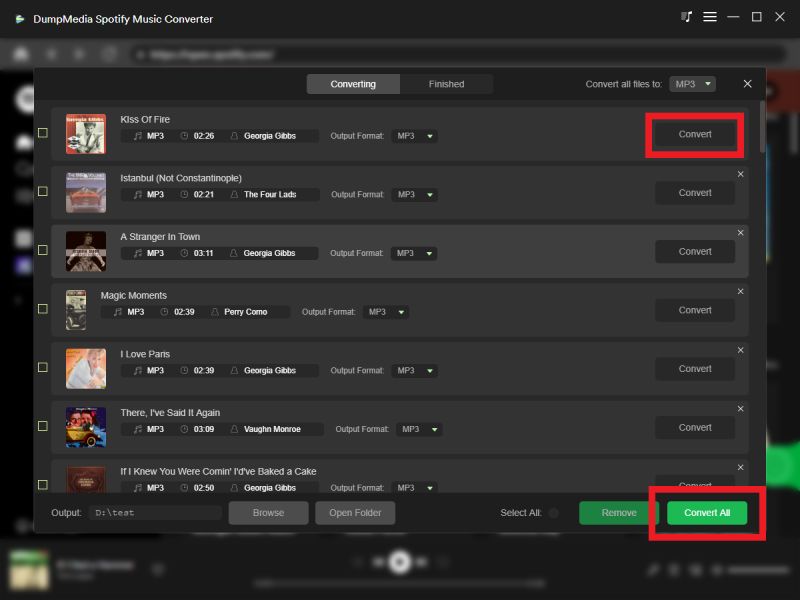
步驟二 在設定面板中,選擇 MP3 作為輸出格式以啟用 MP3 下載您選擇的曲目。
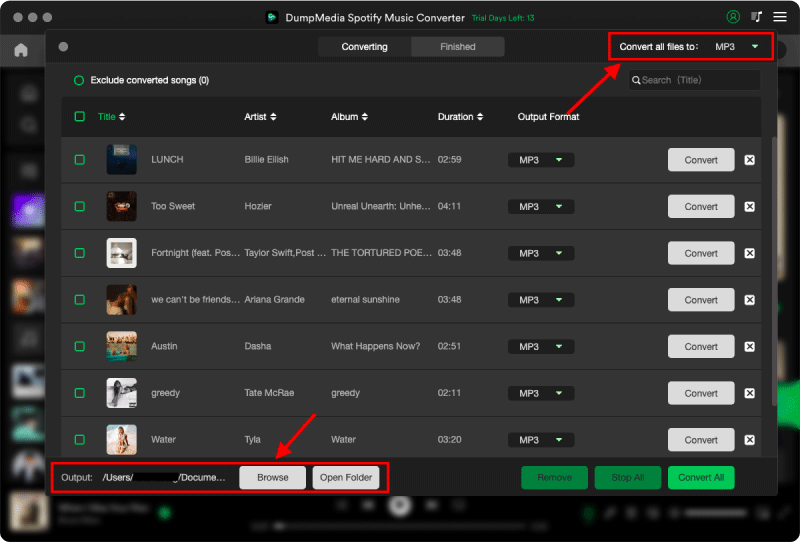
步驟二 按下“全部轉換”按鈕,開始轉換。 DumpMedia Spotify Music Converter 支援 35 倍速下載,您只需等待轉換過程完成即可。
第四部分:對比:線上錄音機與 Spotify 下載器/轉檔器
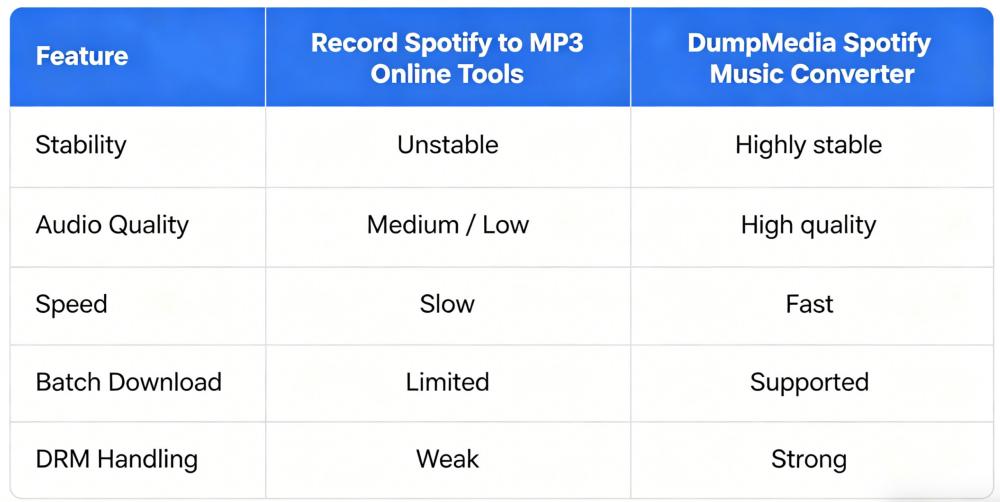
如上所示,雖然您可以嘗試錄製 Spotify 至 MP3 線上轉換器能提供更好的體驗。
第 5 部分:常見問題解答
我真的可以錄音嗎? Spotify 音樂 MP3 免費上網?
是的,你可以嘗試使用一些可以錄製的工具。 Spotify 歌曲 MP3 雖然有線上版本,但大多數版本在品質和穩定性方面都存在局限性。
錄影合法嗎? Spotify 至 MP3 網上?
記錄 Spotify 在某些地區,個人使用音樂是被允許的,但重新分發是被禁止的。
為什麼線上錄製有時會失敗?
Spotify 使用加密串流媒體,這使得錄製更加便捷。 Spotify 至 MP3 網路方法不可靠。
錄製影片的最佳替代方案是什麼? Spotify 音樂 MP3 網上?
專用轉換器,例如 DumpMedia Spotify Music Converter 是最穩定的替代方案。
部分6:摘要
雖然很多用戶都嘗試錄製 Spotify 至 MP3 然而,現實情況是,線上工具往往存在穩定性差、品質低劣和技術限制等問題。如果您需要可靠且高品質的解決方案,不妨考慮使用專業的工具,例如… DumpMedia Spotify Music Converter 這是最佳選擇。與其重複嘗試錄製,不如直接錄製。 Spotify 音樂 MP3 在線上使用專用轉換器可確保更好的效能、更高的音訊品質和更流暢的使用者體驗。

30% 折扣 >>>