


Deezer離線收聽:如何無限制地離線收聽Deezer音樂
許多音樂愛好者依靠 Deezer 的離線模式來收聽歌曲,而無需使用行動數據或網路連線。無論您是在旅行、通勤還是節省流量, Deezer 離線 播放是該平台最實用的功能之一。然而,許多用戶很快就發現,Deezer 的標準下載有許多限制。在本指南中,您將了解 Deezer 離線模式的工作原理、其限制以及如何永久離線保存 Deezer 音樂。
內容指南 第一部分:什麼是 Deezer 音樂離線模式?第二部分:如何使用 Deezer 音樂離線模式?第三部分:永久離線播放 Deezer 音樂的最佳方法第 4 部分。 常見問題解答部分5。 結論
第一部分:什麼是 Deezer 音樂離線模式?
Deezer的離線模式允許 高級 訂閱用戶可以下載歌曲、專輯和播放列表,以便在沒有網路連線的情況下收聽。使用離線模式時,使用者無需 Wi-Fi 即可收聽音樂。
然而,許多用戶誤解了 Deezer 離線播放的實際運作方式。 Deezer 的下載方式並非傳統方式。 MP3 文件不會永久儲存在您的裝置上。相反,它們會保持加密狀態並與您的 Deezer 帳戶綁定。
第二部分:如何使用 Deezer 音樂離線模式?
使用 Deezer 離線模式相對簡單。
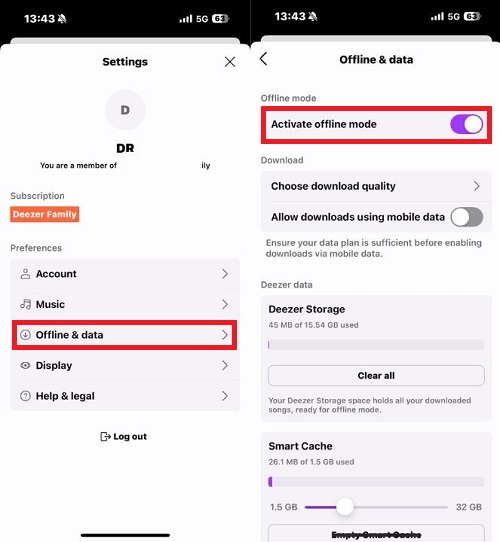
在移動
- 開啟 Deezer 應用程式
- 登入您的 Deezer Premium 帳戶
- 選擇播放清單或專輯
- 點擊下載按鈕
- 在設定中啟用離線模式
下載完成後,無需網路連線即可收聽您的音樂。
第三部分:永久離線播放 Deezer 音樂的最佳方法
儘管 Deezer 的離線播放功能很方便,但它也存在一些令許多用戶感到不滿的限制。首先,下載的音樂仍然與您的 Deezer Premium 帳戶綁定。一旦您的訂閱到期,離線歌曲可能立即無法播放。 Deezer 離線模式的另一個主要限制是,下載的歌曲不會像正常歌曲那樣儲存。 MP3 文件。使用者不能在 Deezer 平台之外自由使用下載的檔案。
對於想要更大靈活性的用戶來說,諸如此類的工具 DumpMedia 迪茲加 提供一種替代 Deezer 標準離線限制的方法。這種方法並非完全依賴 Deezer 的加密下載, DumpMedia DeezPlus 讓用戶將 Deezer 音樂轉換為常見的音訊格式,以便永久離線播放。
🏆為什麼要使用 DumpMedia 迪茲加
- 將 Deezer 轉換為 MP3WAV、FLAC 和 AAC
- 與 Deezer 網路播放器集成
- 移除 Deezer DRM 保護*
- 保持原音質
- 批量下載播放清單和專輯
- 轉換速度快
- 保留歌曲元資料和 ID3 標籤
- 支援在任何裝置上離線播放
與傳統的 Deezer 離線播放相比,這使用戶擁有更大的控制權。
下載 Deezer 音樂,永久離線播放
步驟二 下載並安裝 DumpMedia 在您的 Mac/PC 上啟動 DeezPlus。 DumpMedia 點擊 Deezer Converter,您將看到介面。使用您的 Deezer 帳戶登入。
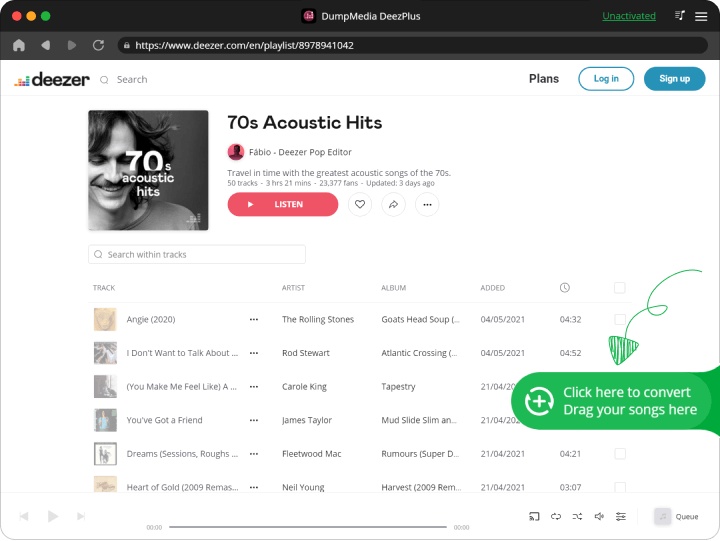
步驟二 找到您想要轉換的播放清單、專輯或特定歌曲。您可以將單首歌曲拖曳到螢幕右側的「+」圖示上。或者,打開整個播放清單/專輯,然後點擊「新增到轉換」圖標,將整個清單載入到轉換器中。
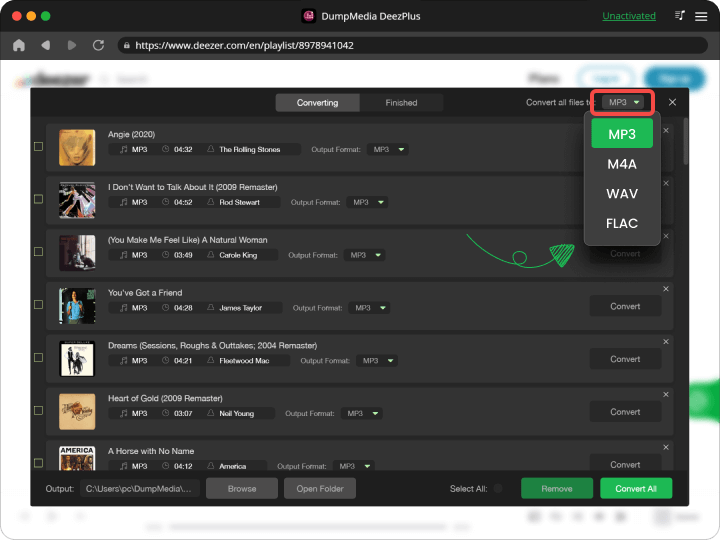
步驟二 選擇 MP3 (相容性最強)。此外,您還可以變更位元率或取樣率。
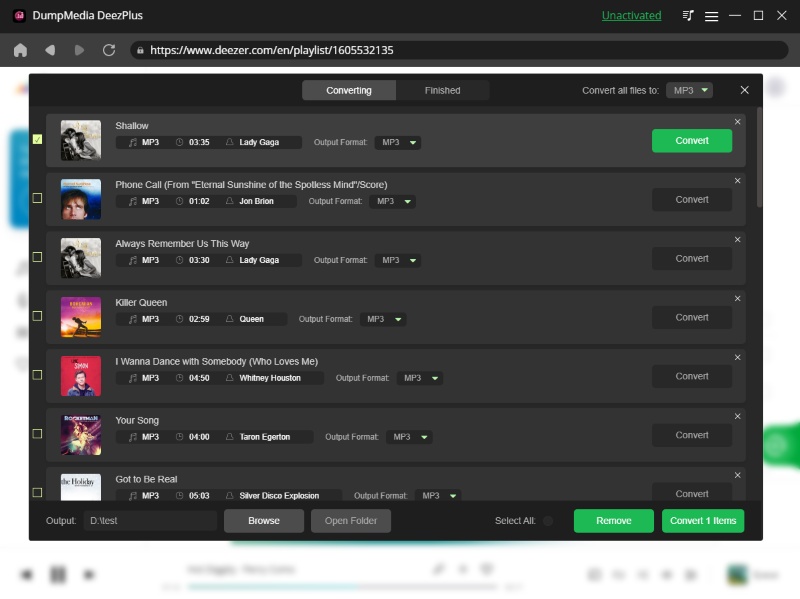
步驟二 設定完成後,使用者即可點選「轉換」圖示轉換。 DumpMedia 將 Deezer 歌曲轉換為 MP3 憑藉其超快的速度,只需幾秒鐘即可完成。
第 4 部分。 常見問題解答
Deezer離線模式下,無需網路連線即可使用嗎?
是的,但下載音樂仍然取決於帳戶驗證和訂閱狀態。
我可以永久保存 Deezer 上的歌曲嗎?
Deezer 的標準離線下載是臨時的。轉換後的本機檔案可提供更永久的存取權限。
我的 Deezer 下載內容為什麼消失了?
這通常是因為訂閱過期或應用程式需要線上驗證。
Deezer 離線功能對免費用戶開放嗎?
不。離線模式通常僅限 Deezer Premium 會員使用。
我可以將 Deezer 音樂轉換為 MP3?
是的。類似的工具 DumpMedia DeezPlus 可以將 Deezer 音樂轉換為常見的音訊格式。
部分5。 結論
Deezer 的離線模式便於臨時離線收聽,但它存在一些與訂閱、裝置相容性和檔案存取相關的限制。對於想要更持久、更靈活的離線播放的用戶來說, DumpMedia DeezPlus 提供了一個實用的解決方案,可以將 Deezer 音樂轉換為易於存取的音訊格式,以便在多個裝置上儲存和播放。
*DumpMedia 其工作原理是解密並下載 Deezer 歌曲到無 DRM 保護的文件,讓您可以在任何裝置上取得乾淨、無限的音樂庫副本。此功能不包括移除本機音訊檔案的 DRM 保護。

30% 折扣 >>>