如何在 Audible 應用程式上下載有聲書?

羅西(Rosie)撰寫

最後更新時間:2026年04月08日

2最小讀取

如果你想知道 如何在有聲應用上下載書籍, you’ve come to the right place. Audible allows you to download purchased audiobooks for offline listening, but there are limitations that most users overlook. In this guide, we’ll show you exactly how to download your audiobooks on Audible and how to ensure permanent access to them, even across devices.

內容指南 Part 1. How to Download Audiobooks from Audible App?Part 2. How to Permanently Keep Audible Books and Listen AnywherePart 3. FAQ About Downloading Audible Books部分4。 概要

Part 1. How to Download Audiobooks from Audible App?

How to download books on Audible app? It is a simple process, though the steps vary slightly depending on whether you are using an iPhone or an Android device. Here is the most direct way to get your audiobooks ready for offline listening.

步驟二 Ensure you are signed into your Amazon/Audible account.

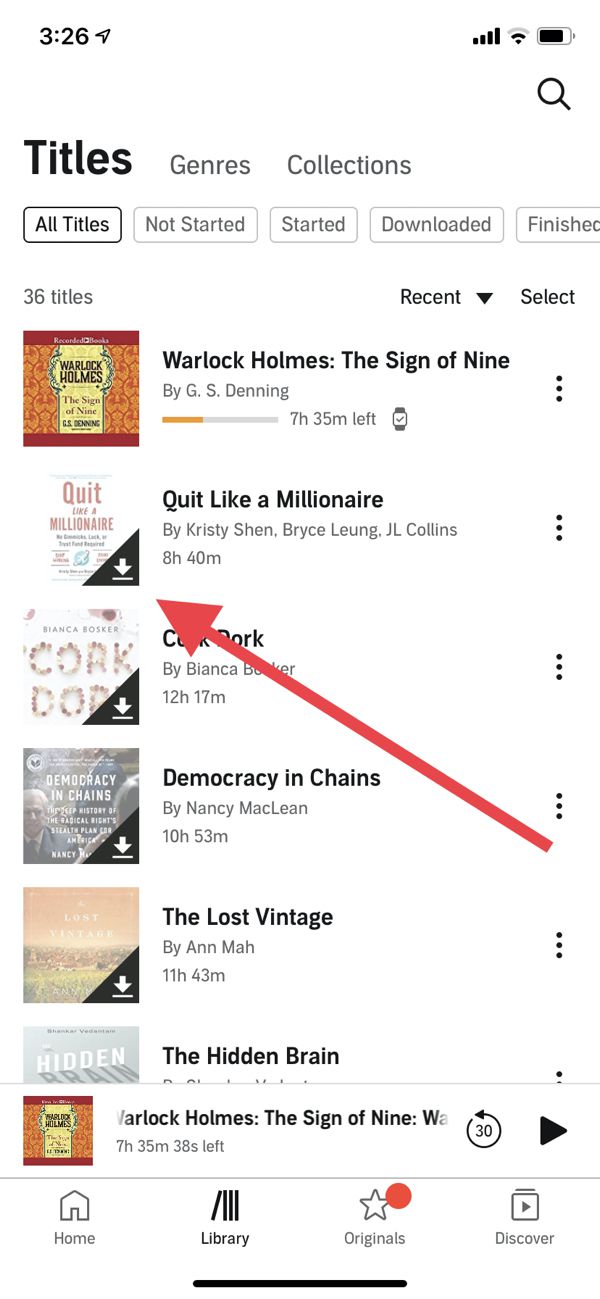
步驟二 Tap the Library icon located at the bottom of the screen. Then find the title you want to download.

步驟二 Tap the downward arrow located on the bottom-right of the book's cover art. Once the progress circle finishes, the downward arrow will disappear, and the book is ready for offline playback.

Download Audiobooks from Audible

While this answers how to download books on Audible app, keep in mind that downloaded files are still DRM-protected. This means you can only listen to them within the Audible app or authorized devices.

Part 2. How to Permanently Keep Audible Books and Listen Anywhere

You might be asking: can I listen to Audible books anywhere? The problem is DRM. Downloading books on the Audible app only allows offline access within the app, it doesn’t let you transfer files freely to MP3 players, car audio systems, or other devices. This is where DumpMedia Audible有聲音轉档器 進來。

為什麼選擇 DumpMedia 音頻轉換器?

  • 移除DRM保護* 該工具可以移除 DRM,讓您完全掌控自己的檔案。
  • 將聲音轉換為 MP3 容易地: 你可以快點 下載有聲書到 MP3 以及其他格式,例如 M4A 或 FLAC。
  • 高速轉換: 幾分鐘內即可轉換整本有聲書。
  • 無損質量: 轉換過程中無質量損失。
  • 可在多種裝置上使用: 轉換完成後,隨時隨地播放您的有聲書。

免費下載 免費下載

Permanently Keep Audible Books

通過使用 DumpMedia, you can fully control your audiobooks and solve the limitations of the Audible app. This is the most reliable solution for anyone who wants to truly own their content. If you’re concerned about losing access after unsubscribing or changing devices, simply downloading books on Audible app isn’t enough. Let's check the guide to download Audible audiobooks with DumpMedia.

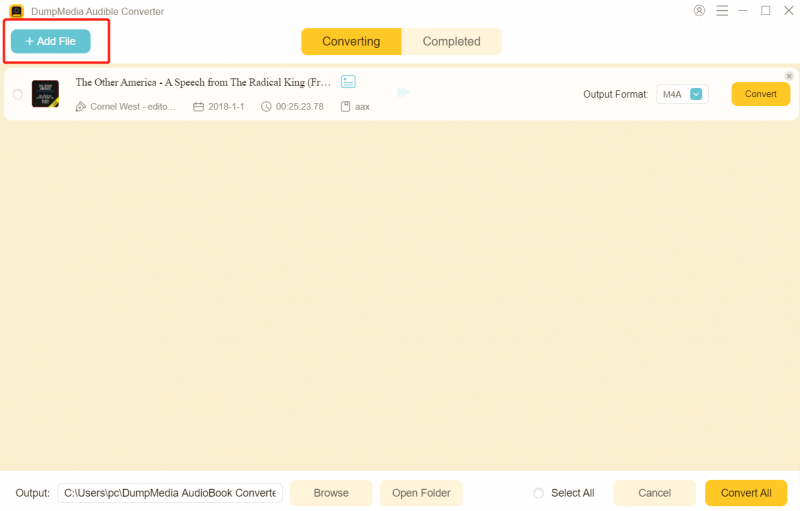
步驟二 下載並安裝 DumpMedia Audible Converter。提供 PC 和 Mac 版本。打開 DumpMedia然後轉到 Audible 選項卡。

免費下載 免費下載

步驟二 從您的 Audible 書庫中選擇要轉換的書籍。

選擇有聲文件

步驟二 選擇輸出設定並開始轉換。

 選擇有聲文件輸出格式

步驟二 轉換完成後,請查看輸出檔。

轉換音頻文件

Once converted, you can play your books anytime, anywhere, with no restrictions. This method is the definitive answer to how to download books on Audible app in a way that guarantees permanent access.

Part 3. FAQ About Downloading Audible Books

我可以下載 Audible 有聲書嗎? MP3?

是的。 使用 DumpMedia Audible Converter, you can convert downloaded Audible books to MP3.

Do I lose quality when converting?

序號 DumpMedia ensures lossless quality during conversion.

Can I play converted files on all devices?

是的。 MP3 files work on phones, tablets, MP3 players, computers, and car systems.

What happens if I cancel my Audible subscription?

Purchased books remain in your library, but without conversion, access is limited to Audible app only. Using DumpMedia ensures you keep books permanently.

部分4。 概要

If your goal is to download books on Audible app and truly own them, simply using the app is not enough. DRM restrictions prevent full control and limit playback to authorized devices. For permanent access, offline listening anywhere, and flexibility, DumpMedia Audible Converter is the best solution. Don’t let DRM limit your audiobooks. Take full control today and ensure you never lose access to your purchased books.

免費下載 免費下載

*DumpMedia 其工作原理是將您的有聲讀物解密並下載為無 DRM 的文件,使您可以在任何裝置上獲得乾淨、不受限制的庫副本。

註冊即可享 30% 折扣 註冊獲取
30% 折扣 >>>