如何從亞馬遜下載音樂 MP3 播放器(快速、無損方法)

羅西(Rosie)撰寫

最後更新時間:2026年04月02日

2最小讀取

如果你想知道 how to download music from Amazon to MP3 播放機, you're not alone. Many users want to enjoy their favorite 亞馬遜音樂 tracks on portable devices, but quickly realize there are limitations due to DRM protection. In this guide, we’ll show you exactly how to download Amazon songs to your MP3 player using the most efficient and reliable method available today.

內容指南 Part 1: Why You Can’t Directly Download Amazon Music to MP3 玩家Part 2: Best Way to Download Music from Amazon to MP3 玩家第 3 部分:常見問題解答部分4:摘要

Part 1: Why You Can’t Directly Download Amazon Music to MP3 玩家

Before learning how to download music from Amazon to MP3 player, it’s important to understand the limitation. Amazon Music tracks (especially from Prime and Unlimited) are protected by DRM (Digital Rights Management). This means:

  • Songs cannot be transferred directly to MP3 球員
  • Files are not in standard MP3 格式
  • Playback is restricted to the Amazon Music app

So if you try to move 下載的歌曲 給你 MP3 player, they simply won’t work. To solve this problem, you need a professional tool that can remove DRM and convert files into MP3 格式。

Part 2: Best Way to Download Music from Amazon to MP3 玩家

The most effective solution for how to download music from Amazon to MP3 player is using DumpMedia 亞馬遜音樂轉換器. This tool is specifically designed to help users convert Amazon Music into MP3 and other common formats, making it easy to transfer and play on any MP3 播放器。

免費下載 免費下載

主要優點:

  • 將亞馬遜音樂轉換為 MP3 容易
  • Remove DRM protection* automatically
  • Preserve original audio quality (up to 320kbps)
  • 批量下載播放清單和專輯
  • 適用於兩者 Win陶氏和麥克

*DumpMedia 其工作原理是將您的有聲讀物解密並下載為無 DRM 的文件,使您可以在任何裝置上獲得乾淨、不受限制的庫副本。

下載亞馬遜音樂 MP3

How to download music from Amazon to MP3 player? Follow these steps to get your Amazon tracks into MP3 第一:

步驟 1 開啟電腦上的軟體。它適用於兩者。 Win支援Windows和Mac系統。介面友好,即使是新手也能輕鬆上手。

免費下載 免費下載

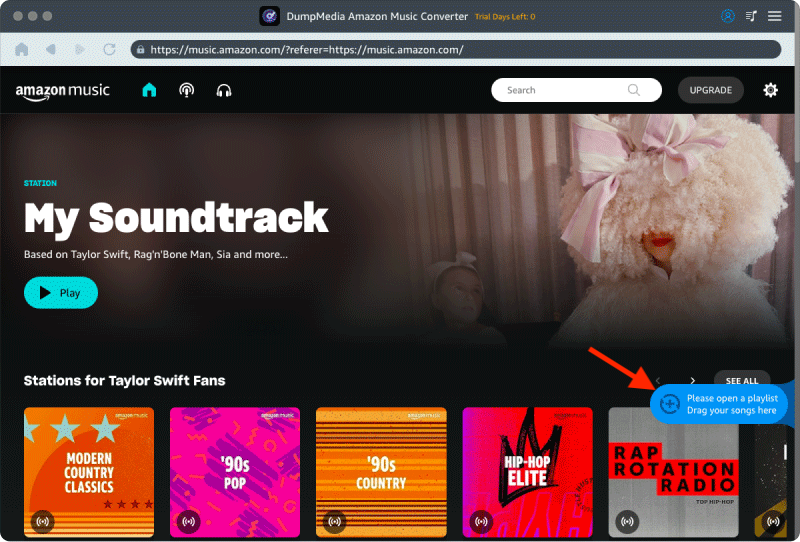
步驟 2 Open the built‑in Amazon Music web player inside DumpMedia and log in with your Amazon Music account. Browse Amazon Music and drag the songs, albums, or playlists you want to download into the converter.

將亞馬遜音樂歌曲加入轉換器

步驟 3 在設定面板中,選擇 MP3 作為輸出格式以啟用 MP3 下載您選擇的曲目。
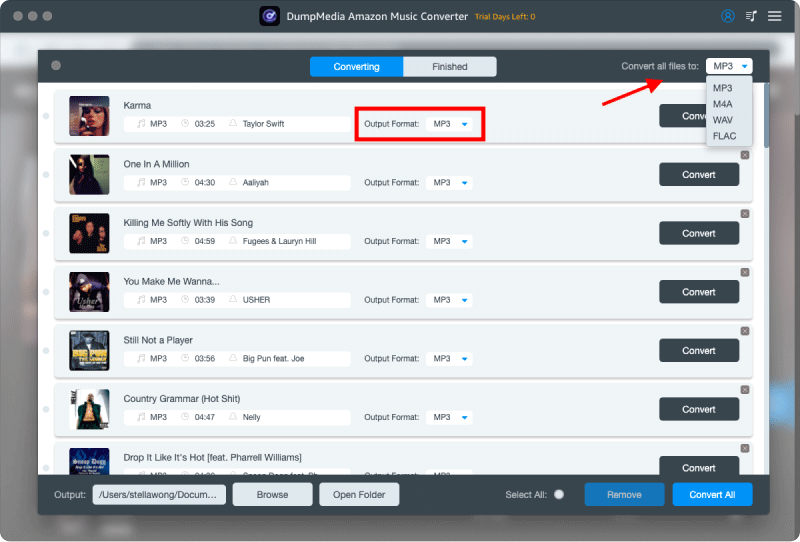
選擇 MP3 輸出格式

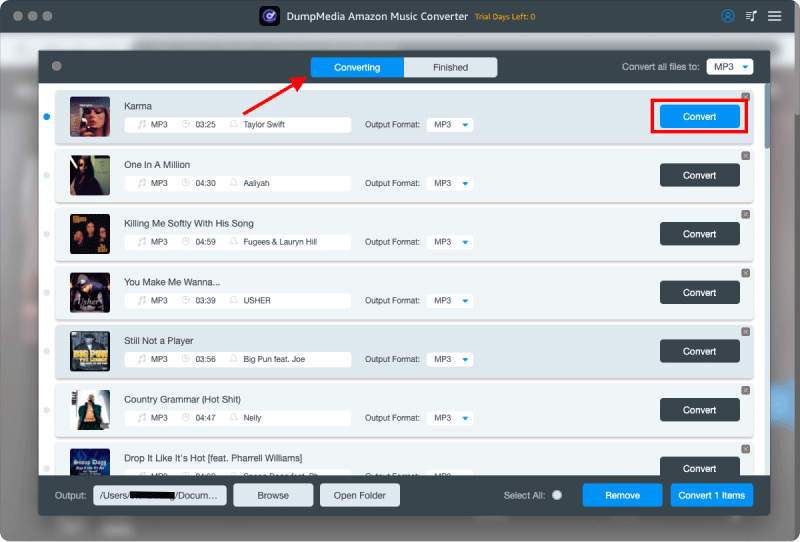
步驟 4 最後一步是點擊「轉換」按鈕開始轉換過程。

從亞馬遜下載音樂

將 Amazon Music 轉移到 MP3 玩家

How to download music from Amazon to MP3 player? Follow these steps:

For most non-Apple devices (such as Sony Walkman, Shanling, FiiO, or standard MP3 players)

  1. 連接你的 MP3 player to your computer using a data cable.
  2. Your computer will recognize it as a "Removable Disk" (visible under "This PC" on Windows or in the Finder sidebar on Mac).
  3. On your computer, open the folder where your downloaded Amazon Music files are stored.
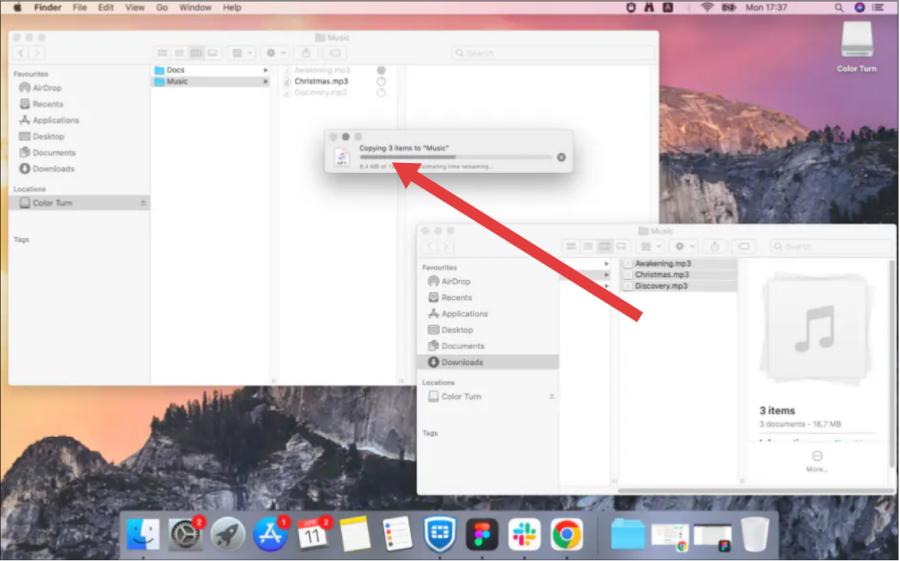
  4. Directly drag the selected music files into the "Music" folder on your MP3 播放器。
  5. Right-click on the drive and select "Eject" before unplugging the data cable to prevent file corruption.

將 Amazon Music 轉移到 MP3 玩家

For Apple Devices (iPod or iOS-compatible player)

  1. 將您的裝置連接到電腦。
  2. Open Apple Music (Mac) or iTunes (Win道氏)。
  3. Import your local Amazon Music MP3 files into your library (File > Import).
  4. Click the device icon, select "Sync Music," and then click "Apply."

第 3 部分:常見問題解答

Can I download Amazon Music directly to an MP3 球員?

No. Due to DRM protection, direct transfer is not supported. You need to convert the files first.

使用安全嗎? DumpMedia 亞馬遜音樂轉換器?

Yes, it is safe and does not affect your Amazon Music account or original files.

轉換後音訊品質會下降嗎?

序號 DumpMedia ensures high-quality output, allowing you to keep the original listening experience.

部分4:摘要

Now you know exactly how to download music from Amazon to MP3 player in the easiest and most effective way. Instead of struggling with DRM restrictions, using DumpMedia Amazon Music Converter allows you to enjoy complete freedom over your music. Download DumpMedia Amazon Music Converter now and start converting your favorite songs to MP3 今天!

免費下載 免費下載

註冊即可享 30% 折扣 註冊獲取
30% 折扣 >>>