如何在任何裝置上離線下載亞馬遜 Prime Music

羅西(Rosie)撰寫

最後更新時間:2026年06月03日

2最小讀取

許多 Amazon Prime subscribers want to download Amazon Prime music offline so they can enjoy their favorite songs without relying on an internet connection. Whether you're traveling, commuting, or simply trying to save mobile data, offline listening can significantly improve your music experience. In this guide, we'll explain how to download Amazon Music songs on different devices, discuss common restrictions, and explore options for managing your offline music library more flexibly.

內容指南 Part 1. Can You Download Amazon Prime Music?Part 2. How to Download Amazon Prime Music on Mobile?Part 3. How to Download Amazon Prime Music on PC?Part 4. Why Are Some Amazon Prime Music Downloads Unavailable?Part 5. How to Keep Amazon Prime Music Offline Permanently?第 6 部分。 常見問題解答部分7。 結論

Part 1. Can You Download Amazon Prime Music?

Yes. Amazon Prime members can download Amazon Prime music offline through the official Amazon Music app. Downloaded songs can be played without an active internet connection, making offline listening convenient for traveling, flights, or areas with poor network coverage.

However, downloaded content remains connected to your Amazon Music account and subscription status.

Part 2. How to Download Amazon Prime Music on Mobile?

The easiest way to download Amazon Prime music offline is through the Amazon Music mobile application.

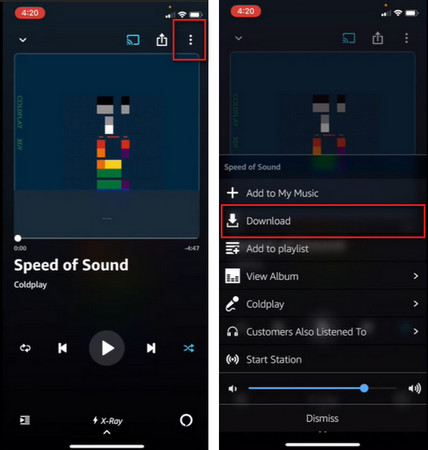
Download Amazon Prime Music on Phone

  1. 打開亞馬遜音樂應用。
  2. 使用您的Amazon帳戶登錄。
  3. Find the playlist, album, or song you want.
  4. Tap the Download button.
  5. 等待下載完成。

Once completed, you can access the music without an internet connection.

Download Amazon Prime Music on iPhone

Part 3. How to Download Amazon Prime Music on PC?

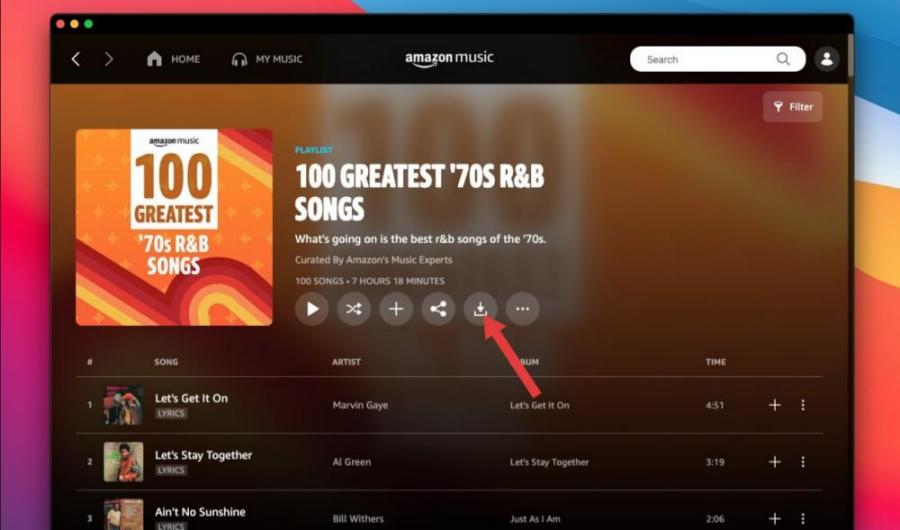
Many users also want to download Amazon Prime music offline on their computers. To do this:

  1. Install the Amazon Music desktop application.
  2. 登錄您的亞馬遜帳戶。
  3. Open your music library.
  4. Select the music you wish to save.
  5. Click the Download option.

Downloaded content can then be accessed through the Amazon Music desktop app.

下載亞馬遜 Prime 音樂

Part 4. Why Are Some Amazon Prime Music Downloads Unavailable?

Sometimes users successfully download Amazon Prime music offline only to discover that certain tracks later become unavailable. This may happen for several reasons.

  • Subscription Verification: Offline downloads often require account verification. If verification fails, downloaded songs may not play.
  • Licensing Changes: Music catalogs frequently change. If Amazon loses licensing rights to specific tracks, those songs may no longer be available.
  • Regional Restrictions: Some songs are restricted based on geographic location. Traveling between countries can occasionally affect availability.
  • App or Syncing Issues: Software bugs and syncing problems can temporarily prevent access to downloaded music.

Part 5. How to Keep Amazon Prime Music Offline Permanently?

Although Amazon allows users to download Amazon Prime music offline, official downloads come with several restrictions. Downloaded songs can typically only be played through the Amazon Music application. Users generally cannot transfer downloaded songs freely between devices. Many users searching for download Amazon Prime music are actually looking for a way to maintain long-term access to their music collections.

For users seeking more flexibility, DumpMedia 亞馬遜音樂轉換器 offers a practical solution for managing Amazon Music content. The software helps users convert Amazon Music songs into commonly supported formats for offline playback. Even if the songs are greyed out on Amazon Music, you can play Amazon Music songs offline on another music player immediately.

免費下載 免費下載

🏆為什麼要使用 DumpMedia 亞馬遜音樂轉換器

  • 下載亞馬遜音樂 MP3WAV、FLAC 和 AAC
  • 與亞馬遜音樂網路播放器集成
  • 保持原音質
  • 批量下載播放清單和專輯
  • 轉換速度快
  • 保留歌曲元資料和 ID3 標籤
  • 支援在任何裝置上離線播放

By converting music into widely supported audio formats, users can enjoy their favorite songs on a broader range of devices.

將亞馬遜音樂轉換為 MP3 步步

步驟二 下載並安裝 DumpMedia 在您的 Mac/PC 上安裝 Amazon Music Converter。啟動它,您將看到介面。使用您的 Amazon Music 帳戶登入。

免費下載 免費下載

步驟二 找到您想要轉換的播放清單、專輯或特定歌曲。您可以將單首歌曲拖曳到螢幕右側的「+」圖示上。或者,打開整個播放清單/專輯,然後點擊「新增到轉換」圖標,將整個清單載入到轉換器中。
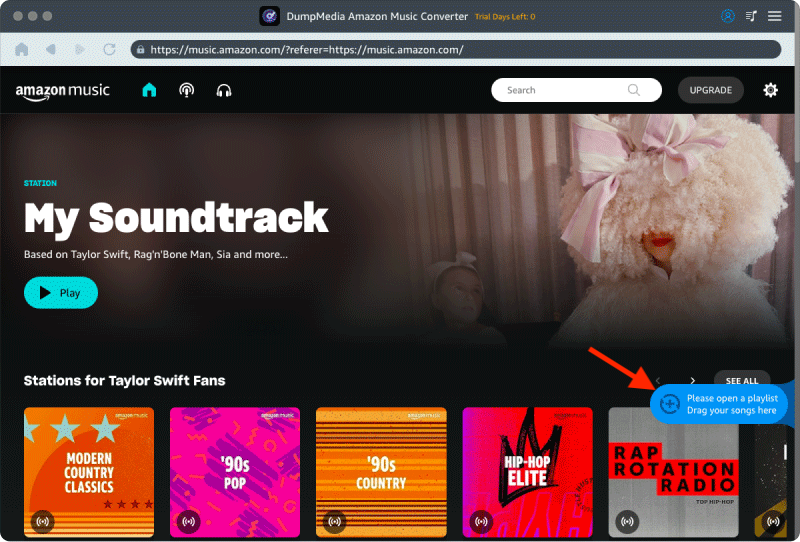
將亞馬遜音樂歌曲/播放列表拖放到程序中

步驟二 選擇 MP3 (相容性最佳)。此外,您還可以變更位元率或取樣率。為了獲得最佳平衡,請選擇 320kbps。
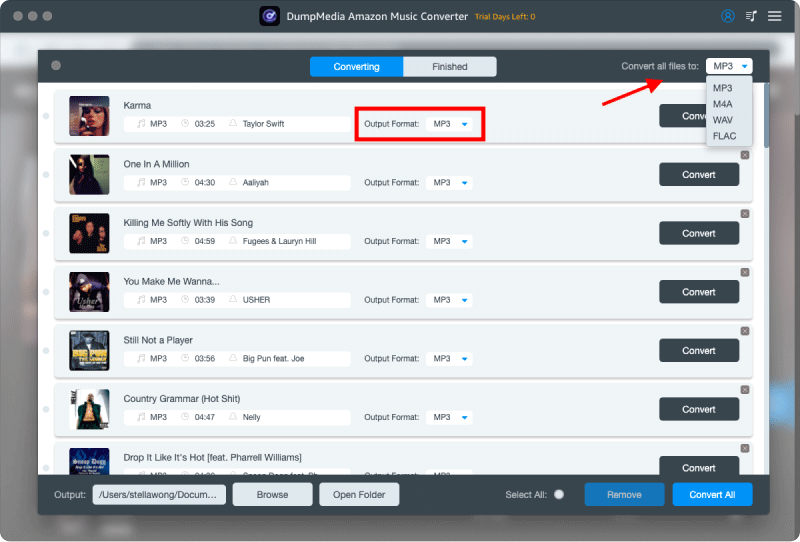
選擇您要下載的不同輸出格式

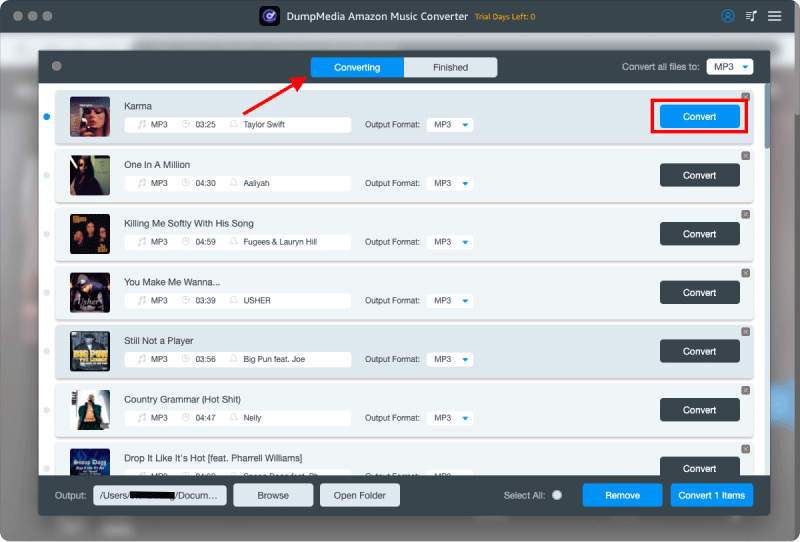
步驟二 設定完成後,使用者即可點選「轉換」圖示轉換。 DumpMedia will download Amazon Music songs to MP3 憑藉其超快的速度,只需幾秒鐘即可完成。

將亞馬遜音樂轉換為 MP3

第 6 部分。 常見問題解答

Can I download Amazon Prime Music offline?

Yes. Eligible songs, albums, and playlists can be downloaded through the Amazon Music app for offline listening.

Where are Amazon Music downloads stored?

Downloads are stored within the Amazon Music application and are generally not available as standard audio files.

Do Amazon Music downloads expire?

Downloaded content may become unavailable if subscriptions lapse or licensing changes occur.

Can I transfer Amazon Music downloads to another device?

Official downloads typically cannot be freely transferred like traditional MP3 文件。

Can I download Amazon Prime Music offline as MP3?

Amazon Music does not normally provide downloaded songs as MP3 files through its official app.

部分7。 結論

Many users want to download Amazon Prime music offline to enjoy uninterrupted listening wherever they go. However, official downloads come with certain limitations, including subscription dependency, playback restrictions, and limited file flexibility. Understanding these restrictions can help you choose the best approach for managing your music collection and enjoying a more convenient offline listening experience.

免費下載 免費下載

註冊即可享 30% 折扣 註冊獲取
30% 折扣 >>>