


Трансфер Spotify Полное руководство по Apple Music (2026)
Многие слушатели, которые изначально использовали Spotify в итоге решают перенести свои музыкальные библиотеки в Apple Music Для лучшей интеграции с устройствами Apple, улучшенного управления библиотекой или по личным предпочтениям. Однако одной из главных проблем при переходе на другую платформу является сохранение тщательно подобранных плейлистов.
К счастью, существует несколько инструментов, которые могут вам помочь. перевод Spotify в Apple Music Быстро и эффективно. В этом руководстве мы расскажем вам о лучших способах перевода. Spotify Мы также рассмотрим альтернативные онлайн-инструменты и практические советы, которые помогут сделать процесс миграции плавным и точным.
Содержание Руководство Часть 1. Почему пользователи хотят перенести данные Spotify Плейлисты в Apple MusicЧасть 2. Лучший способ перевода Spotify Плейлисты в Apple MusicЧасть 3. Альтернативные онлайн-инструменты для перевода Spotify Плейлисты в Apple MusicЧасть 4. Часто задаваемые вопросыЧасть 5. Вывод
Часть 1. Почему пользователи хотят перенести данные Spotify Плейлисты в Apple Music
Прежде чем изучать доступные инструменты, полезно понять, почему многие пользователи решают на перенос данных. Spotify в первую очередь, в Apple Music.
- Переход на другую музыкальную экосистему: для пользователей, которые в значительной степени полагаются на оборудование Apple, Apple Music обеспечивает более удобное прослушивание музыки.
- Сохранение существующих плейлистов: Потеря этих плейлистов при переходе на другую платформу может быть очень неприятной. Именно поэтому инструменты для миграции плейлистов так важны.
- Ручная передача неэффективна: у этого подхода есть несколько проблем, например, поиск каждой песни по отдельности занимает часы; некоторые треки могут быть забыты, порядок в плейлисте может не совпадать с оригиналом и многое другое.
Из-за этих трудностей большинство пользователей полагаются на специализированные инструменты для передачи данных. Spotify автоматически в Apple Music.
Часть 2. Лучший способ перевода Spotify Плейлисты в Apple Music
Среди доступных инструментов, DumpMedia Любой музыкальный конвертер Это одно из самых надежных решений для пользователей, желающих осуществить перевод. Spotify Быстро и точно перенести плейлисты в Apple Music. Специальная функция переноса плейлистов упрощает весь процесс миграции и гарантирует правильное создание плейлистов.
Бесплатная загрузка Бесплатная загрузка
DumpMedia работает на обоих WinПоддержка macOS и Windows делает его доступным для широкого круга пользователей. Функция переноса плейлистов разработана специально для миграции плейлистов между платформами. Вот некоторые из ее наиболее ценных возможностей:
- Пакетная передача плейлистов: вы можете перемещать несколько плейлистов одновременно, вместо того чтобы передавать их по отдельности.
- Функция интеллектуального сопоставления треков: программное обеспечение автоматически определяет соответствующие песни в Apple Music, повышая точность переноса.
- Сохранение метаданных: Важная информация, такая как названия песен, исполнители, альбомы и порядок в плейлистах, может быть сохранена во время миграции.
Пошаговое руководство по переносу Spotify в Apple Music
Выполните следующие простые шаги, чтобы завершить процесс миграции.
Шаг 1. Скачайте и установите DumpMedia Любой музыкальный конвертер на вашем WinДля компьютеров с операционной системой Windows или Mac. После установки запустите программу, чтобы получить доступ к основному интерфейсу.
Бесплатная загрузка Бесплатная загрузка
Шаг 2. Перейдите к функции «Перенос плейлистов» в программе. Выберите Spotify как источник.

Шаг 3. Выберите Apple Music в качестве платформы, куда вы хотите переместить свой плейлист.
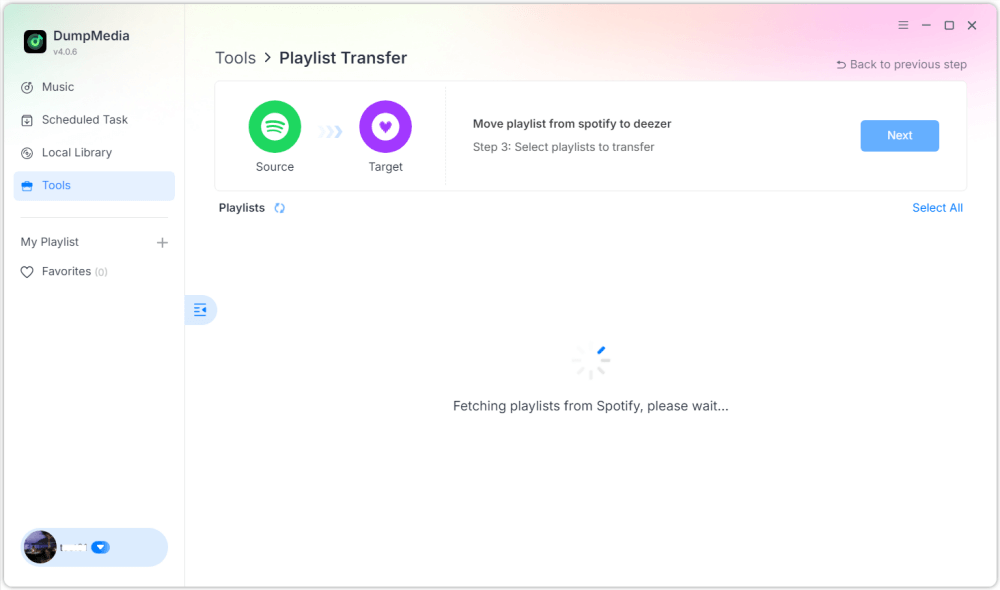
Шаг 4. Найдите плейлисты, из которых хотите перенести данные. Spotify Зайдите в Apple Music и выберите все плейлисты, которые хотите переместить.

Шаг 5. Нажмите «Конвертировать», чтобы начать перевод.
Шаг 6. Перенос завершен. Нажмите «Перейти в Apple Music». Ваши плейлисты перенесены в новый сервис, и вы можете начать пользоваться новым сервисом потоковой передачи музыки.
Для пользователей с большими музыкальными коллекциями это решение предоставляет один из самых простых способов переноса. Spotify Загрузка в Apple Music прошла без ошибок и пропущенных треков.
Часть 3. Альтернативные онлайн-инструменты для перевода Spotify Плейлисты в Apple Music
Хотя настольное программное обеспечение часто является наиболее надежным вариантом, некоторые пользователи предпочитают онлайн-инструменты, поскольку они не требуют установки. Несколько веб-сервисов позволяют осуществлять передачу данных. Spotify Загружайте музыку в Apple Music прямо из браузера. Два популярных варианта — TuneMyMusic и Soundiiz.
Используя TuneMyMusic
TuneMyMusic — это простой онлайн-сервис для переноса плейлистов, поддерживающий множество музыкальных платформ. Он предоставляет удобный интерфейс для пользователей, желающих перемещать плейлисты между сервисами.
Шаг 1. Зайдите на сайт TuneMyMusic и нажмите «Начать».
Шаг 2. Выбрать Spotify Выберите платформу-источник и войдите в свою учетную запись.
Шаг 3. Выберите плейлист, который хотите перенести, или вставьте URL-адрес плейлиста.
Шаг 4. Войдите в свою учетную запись Apple Music, чтобы авторизовать передачу.

Шаг 5. Нажмите «Начать перемещение моей музыки». Сервис сопоставит песни и создаст плейлист в Apple Music.
Используя Soundiiz
Soundiiz — ещё одна мощная онлайн-платформа для управления плейлистами, поддерживающая множество стриминговых сервисов.
Шаг 1. Зарегистрируйтесь или войдите в панель управления Soundiiz.
Шаг 2. санкционировать Spotify Таким образом, Soundiiz сможет получить доступ к вашим плейлистам.
Шаг 3. Добавьте Apple Music в качестве подключенного сервиса.
Шаг 4. Выберите плейлист, который хотите перенести.
Шаг 5. Нажмите «Конвертировать» и выберите Apple Music в качестве места назначения.
После завершения процесса плейлист должен появиться в вашей библиотеке Apple Music.
Ограничения онлайн-инструментов
Хотя онлайн-инструменты удобны, у них может быть ряд недостатков:
- Бесплатные версии часто ограничивают количество загружаемых песен.
- Точность сопоставления может варьироваться.
- Обработка больших плейлистов может занять больше времени.
- Наличие интернет-соединения влияет на производительность.
Часть 4. Часто задаваемые вопросы
Могу ли я перевести Spotify В Apple Music бесплатно?
Некоторые онлайн-инструменты предоставляют бесплатную передачу плейлистов, но могут ограничивать количество песен. Платные инструменты, как правило, предлагают более быструю передачу и дополнительные функции.
Все ли песни будут успешно перенесены?
Большинство песен можно найти на обоих сервисах, но иногда некоторые треки могут быть недоступны из-за различий в лицензировании.
Сколько времени занимает перенос плейлистов?
Необходимое время зависит от размера плейлиста. Перенос небольших плейлистов может занять несколько минут, в то время как для больших библиотек может потребоваться больше времени.
Можно ли перенести несколько плейлистов одновременно?
Да. Некоторые инструменты, в том числе DumpMedia Любой музыкальный конвертер поддерживает пакетную передачу, позволяя перемещать несколько плейлистов одновременно.
Безопасно ли использовать инструменты для переноса плейлистов?
Надежные сервисы используют безопасные методы аутентификации для подключения к вашим стриминговым аккаунтам. Всегда выбирайте проверенные сервисы при переносе данных. Spotify в Apple Music.
Часть 5. Вывод
Перенос плейлистов между стриминговыми сервисами больше не должен быть сложным. С помощью подходящих инструментов вы можете это сделать. Spotify Быстро загружайте музыку в Apple Music, сохраняя при этом целостность вашей музыкальной библиотеки. Благодаря мощной функции переноса плейлистов, DumpMedia позволяет вам передавать Spotify Точно синхронизируйте песни с Apple Music, сохраняйте структуру плейлистов и легко переносите несколько плейлистов одновременно. Выбрав правильный метод, вы сможете наслаждаться любимой музыкой в Apple Music, не теряя плейлисты, которые вы создавали годами.