


Как перенести Spotify Плейлист для Amazon Music?
Сервисы потоковой передачи музыки изменили то, как люди слушают музыку. Однако переход на другую платформу иногда может быть неудобным, особенно если у вас есть тщательно составленные плейлисты, созданные за долгие годы. Многие пользователи, которые раньше полагались на... Spotify может решить попробовать Amazon Музыка за интеграцию с устройствами Amazon, обширную музыкальную библиотеку и совместимость с умными колонками с поддержкой Alexa.
К счастью, сегодня существует множество инструментов, позволяющих автоматически перемещать плейлисты между стриминговыми сервисами. В этом руководстве мы расскажем о наиболее эффективных методах этого. перевод Spotify плейлист для Amazon Music используя онлайн-инструменты, настольные программы и мобильные приложения. Независимо от того, что вы используете WinНезависимо от операционной системы — Windows, Mac, iOS или Android — вы найдете решение, которое поможет вам быстро и точно перенести ваши плейлисты.
Содержание Руководство Часть 1. Трансфер Spotify Плейлисты на Amazon Music OnlineЧасть 2. Трансфер Spotify Плейлисты в Amazon Music Winдоус/макЧасть 3. Трансфер Spotify Плейлисты в Amazon Music на iOSЧасть 4. Трансфер Spotify Плейлисты в Amazon Music на AndroidЧасть 5. Часто задаваемые вопросыЧасть 6. Вывод
Часть 1. Трансфер Spotify Плейлисты на Amazon Music Online
Для пользователей, которым нужен быстрый и простой способ без установки программного обеспечения, удобным вариантом являются онлайн-инструменты для переноса плейлистов. Эти сервисы позволяют подключить ваши стриминговые аккаунты через веб-браузер и автоматически переносить плейлисты между платформами.
Одним из самых популярных онлайн-инструментов для этой цели является TuneMyMusic. TuneMyMusic — это веб-инструмент для переноса плейлистов, поддерживающий множество стриминговых платформ. Он позволяет пользователям переносить Spotify Добавить плейлист в Amazon Music всего за несколько шагов.
Ключевые особенности
- Работает непосредственно в вашем веб-браузере.
- Поддерживает множество потоковых платформ.
- Простой интерфейс с пошаговыми инструкциями.
- Установка программного обеспечения не требуется
Шаги по переводу Spotify Добавьте плейлист в Amazon Music с помощью TuneMyMusic.
Шаг 1. Перейдите на сайт TuneMyMusic и нажмите кнопку «Начать», чтобы начать процесс.
Шаг 2. Выбирайте Spotify Выберите исходную платформу и войдите в свою учетную запись. Инструмент запросит разрешение на доступ к вашим плейлистам.
Шаг 3. После подключения вы можете выбрать конкретный плейлист, который хотите перенести, или вставить ссылку на плейлист. Система загрузит все песни из этого плейлиста.
Шаг 4. Затем выберите Amazon Music в качестве целевого сервиса и войдите в свою учетную запись Amazon, чтобы авторизовать передачу.

Шаг 5. Нажмите «Начать перемещение моей музыки». Инструмент автоматически сопоставит песни из... Spotify с каталогом Amazon Music.
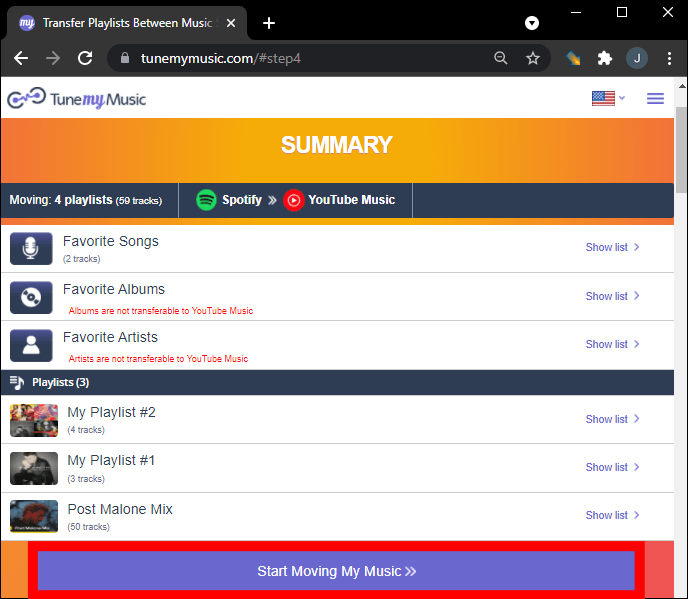
Шаг 6. После завершения процесса откройте свою библиотеку Amazon Music, чтобы убедиться, что плейлист успешно создан.
Использование онлайн-инструмента, такого как TuneMyMusic, — один из самых быстрых способов переноса. Spotify Для небольших и средних плейлистов лучше использовать Amazon Music. Однако для пользователей с большими музыкальными библиотеками или тех, кому нужна большая стабильность, лучше подойдет настольное решение.
Часть 2. Трансфер Spotify Плейлисты в Amazon Music Winдоус/мак
Если вам нужно более надежное и многофункциональное решение, использование настольного программного обеспечения часто является наилучшим вариантом. DumpMedia Любой музыкальный конвертер Это мощная программа, предназначенная для управления и конвертации музыки, а также предлагающая специальную функцию переноса плейлистов. DumpMedia позволяет пользователям передавать Spotify Эффективная интеграция плейлистов в Amazon Music с сохранением информации о плейлистах и метаданных песен.
Бесплатная загрузка Бесплатная загрузка
Ключевые особенности
- Поддержка Windows и macOS
- Специальная функция переноса плейлистов
- Пакетная миграция плейлистов
- Интеллектуальное сопоставление треков
- Поддерживает метаданные, такие как имя исполнителя, название альбома и название трека.
- Стабильная локальная обработка без ограничений браузера.
Эти особенности делают его одним из наиболее эффективных способов перевода. Spotify Добавить плейлист в Amazon Music для пользователей с большими плейлистами.
Пошаговое руководство
Шаг 1. Скачайте и установите DumpMedia Любой музыкальный конвертер на вашем Windows или компьютер Mac. Запустите программу после установки.
Бесплатная загрузка Бесплатная загрузка
Шаг 2. Выберите Инструменты > Перенос плейлиста. Spotify как источник.

Шаг 3. Выберите Amazon Music в качестве места назначения.
Шаг 4. Выберите, что вы хотите перенести. Мы поддерживаем ваши любимые песни, исполнителей, альбомы и ваши собственные плейлисты.

Шаг 5. Нажмите «Конвертировать», чтобы начать перевод.
Шаг 6. Перенос завершен. Нажмите «Перейти в Amazon Music». Ваши плейлисты перенесены в новый сервис, и вы можете начать слушать новые плейлисты в Amazon Music.
По сравнению с онлайн-сервисами, этот метод обеспечивает большую стабильность и точность при переводе средств. Spotify Добавить плейлист в Amazon Music.
Часть 3. Трансфер Spotify Плейлисты в Amazon Music на iOS
Если вы предпочитаете использовать мобильное устройство, вам помогут несколько приложений. Spotify Перенести плейлист в Amazon Music напрямую с вашего iPhone или iPad. Один из самых популярных вариантов — SongShift. SongShift — это известное приложение для переноса плейлистов, разработанное для пользователей iOS. Оно поддерживает множество сервисов потоковой передачи музыки и предлагает интуитивно понятный интерфейс для переноса плейлистов.
Ключевые особенности
- Удобный мобильный интерфейс
- Поддерживает несколько потоковых платформ
- Позволяет осуществлять пакетную передачу плейлистов.
- Создано специально для устройств iOS.
Шаги по переводу Spotify Добавьте плейлист в Amazon Music с помощью SongShift.
Шаг 1. Загрузите SongShift из App Store и откройте приложение. Авторизуйте. Spotify чтобы приложение могло получить доступ к вашим плейлистам.
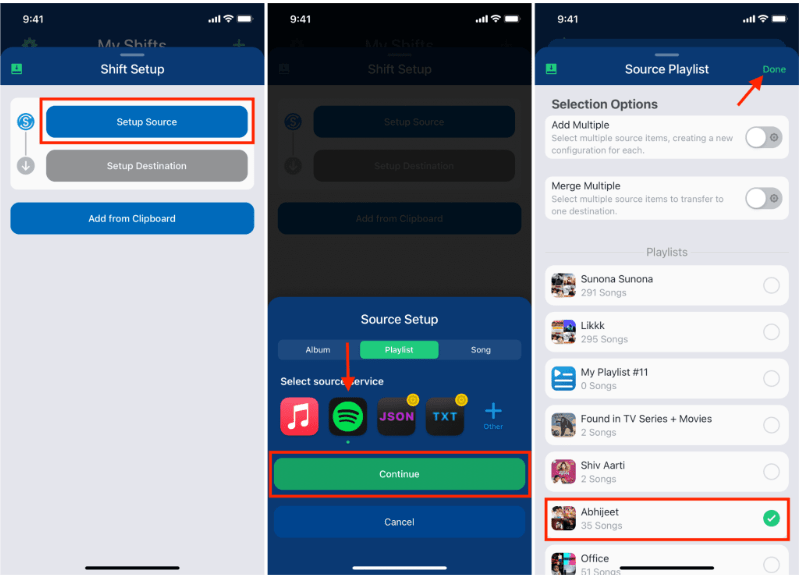
Шаг 2. Добавьте Amazon Music в качестве целевого сервиса, войдя в свою учетную запись Amazon.
Шаг 3. Выберите Spotify Плейлист, который вы хотите перенести.
Шаг 4. Нажмите Start Shift и позвольте приложению синхронизировать песни на разных платформах.
После завершения процесса ваш плейлист должен появиться в Amazon Music. SongShift — удобный вариант для пользователей, желающих перенести свой плейлист. Spotify Добавить плейлист в Amazon Music без использования компьютера.
Часть 4. Трансфер Spotify Плейлисты в Amazon Music на Android
Пользователи Android также могут переносить плейлисты между потоковыми сервисами с помощью специальных приложений. Одним из широко используемых решений является FreeYourMusic. FreeYourMusic — это кроссплатформенный инструмент для переноса музыки, работающий на Android, iOS и других платформах. WinЭто позволяет пользователям перемещать плейлисты между стриминговыми сервисами с минимальными усилиями.
Ключевые особенности
- Поддерживает множество потоковых платформ.
- Простой процесс передачи
- Работает на нескольких устройствах
- Позволяет осуществлять пакетную передачу плейлистов.
Шаги по переводу Spotify Добавьте плейлист в Amazon Music с помощью FreeYourMusic.
Шаг 1. Скачайте FreeYourMusic из Google Play Store и откройте приложение. Выберите Spotify в качестве исходной платформы и войдите в свою учетную запись.
Шаг 2. Выберите Amazon Music и войдите в свою учетную запись.
Шаг 3. Выберите Spotify Плейлист, который вы хотите перенести.
Шаг 4. Нажмите «Перенести», чтобы начать миграцию. Приложение сопоставит песни и создаст новый плейлист в Amazon Music.
Часть 5. Часто задаваемые вопросы
1. Могу ли я перевести Spotify Добавить плейлист в Amazon Music бесплатно?
Некоторые программы предоставляют бесплатную передачу плейлистов с ограничениями, например, с ограничением максимального количества песен за одну передачу. В платных версиях эти ограничения обычно снимаются.
2. Все ли песни будут успешно перенесены?
Большинство песен будут успешно перенесены, но иногда некоторые треки могут быть недоступны на обеих платформах из-за различий в лицензировании.
3. Сколько времени занимает перенос плейлистов?
Время, необходимое для переноса, зависит от размера вашего плейлиста. Перенос небольших плейлистов может занять несколько минут, а больших — больше времени.
4. Безопасно ли использовать инструменты для переноса плейлистов?
Надежные инструменты используют безопасную аутентификацию для доступа к вашим учетным записям. Всегда выбирайте проверенные приложения при переводе средств. Spotify Добавить плейлист в Amazon Music.
Часть 6. Вывод
Независимо от того, предпочитаете ли вы онлайн-сервис, настольную программу или мобильное приложение, существует несколько способов перенести данные. Spotify Быстрая и эффективная загрузка плейлистов в Amazon Music. Для пользователей, которым нужны максимально стабильные и точные результаты, особенно для больших плейлистов. DumpMedia Any Music Converter предлагает одно из лучших решений.