


Как перенести Spotify Музыка на YouTube: полное руководство для всех устройств
Перенос плейлистов между стриминговыми платформами — распространённая необходимость, особенно при смене приложений или объединении музыкальной библиотеки. Если вы хотите это сделать, перевод Spotify музыка на YouTubeХорошая новость в том, что современные инструменты переноса делают этот процесс беспроблемным для веб-версии, настольных компьютеров и мобильных устройств. Это руководство шаг за шагом проведет вас через каждый метод. Поддерживается Spotify Благодаря возможности просмотра YouTube на всех основных устройствах, вы можете без труда перенести свои плейлисты и сохранить доступ к музыке, где бы вы ни слушали.
Содержание Руководство Часть 1. Трансфер Spotify Плейлист на YouTube онлайнЧасть 2. Трансфер Spotify Добавить плейлист на YouTube Winдоус/макЧасть 3. Трансфер Spotify Создание плейлистов для YouTube на iOSЧасть 4. Трансфер Spotify Добавить плейлист на YouTube на AndroidЧасть 5. Часто задаваемые вопросыЧасть 6. Подводя итоги
Часть 1. Трансфер Spotify Плейлист на YouTube онлайн
Если вы хотите самый быстрый способ перевода Spotify Для синхронизации музыки с YouTube без установки программного обеспечения наиболее удобным вариантом является онлайн-инструмент для синхронизации плейлистов. Одним из широко используемых решений является TuneMyMusic, браузерный сервис, поддерживающий прямую миграцию плейлистов между основными стриминговыми платформами.
Как работает онлайн-сервис TuneMyMusic:
- Откройте TuneMyMusic в своем браузере.
- Выбирайте Spotify в качестве исходной платформы и для входа в систему.
- Выберите плейлист, который хотите переместить.
- Выбирайте YouTube как пункт назначения.
- Подтвердите список треков и начните передачу.

Этот метод быстрый, кроссплатформенный и не требует локальной установки. Он идеально подходит для пользователей, которые просто хотят перенести музыку из Spotify на YouTube максимально простым способом.
Часть 2. Трансфер Spotify Добавить плейлист на YouTube Winдоус/мак
Для пользователей настольных компьютеров, которым требуется больший контроль, более высокая стабильность преобразования и автоматическая обработка плейлистов, DumpMedia Любой музыкальный конвертер Предоставляет специальный модуль для переноса плейлистов. Это особенно удобно для пользователей, которые регулярно переносят плейлисты. Spotify Загрузка музыки на YouTube в больших объемах или для тех, кому необходимо предсказуемое и повторяемое составление плейлистов.
Бесплатная загрузка Бесплатная загрузка
Основные преимущества функции переноса плейлистов:
- Поддерживает массовую миграцию плейлистов.
- Обрабатывает метаданные, обложки и порядок треков.
- Обеспечивает надежную логику сопоставления для минимизации несовпадающих дорожек.
- Работает на обоих Windows и macOS
Как это можно использовать:
Шаг 1. Откройте любой музыкальный конвертер. Выберите Инструменты > Перенос плейлистов.
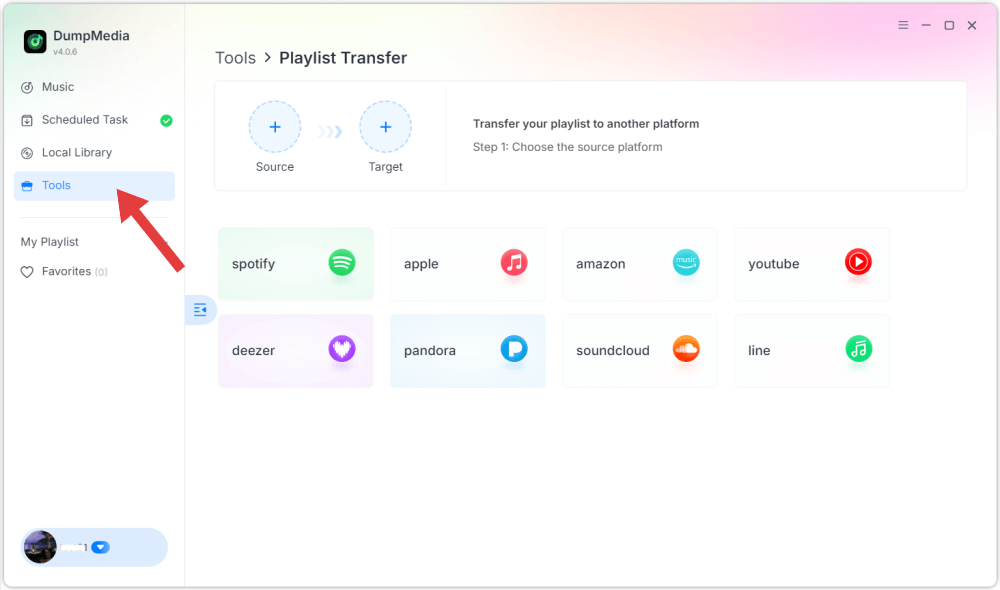
Шаг 2. Выбрать Spotify как источник.

Шаг 3. Выберите YouTube Music в качестве места назначения.
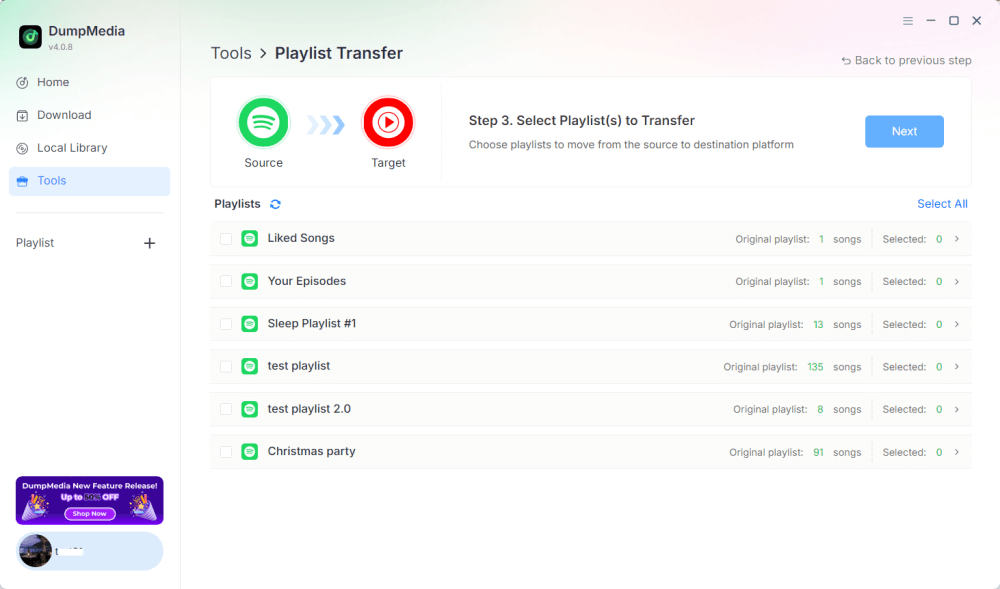
Шаг 4. Выберите, что вы хотите перенести. Мы поддерживаем ваши любимые песни, исполнителей, альбомы и ваши собственные плейлисты.
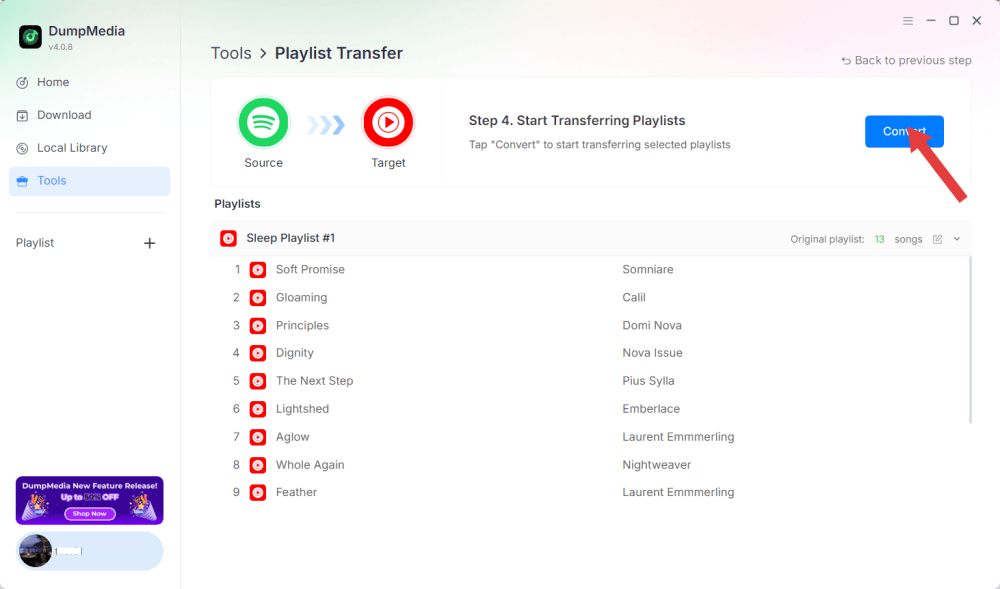
Шаг 5. Нажмите «Конвертировать», чтобы начать перевод.
Шаг 6. Перенос завершен. Нажмите «Перейти в YouTube Music». Ваши плейлисты перенесены в новый сервис, и вы можете начать слушать новый плейлист в YouTube Music.
Поскольку все операции выполняются локально, это решение более стабильно, чем инструменты на основе браузера, и идеально подходит для пользователей, которым часто необходимо переносить музыку Spotify на YouTube для создания нескольких плейлистов или больших библиотек.
Часть 3. Трансфер Spotify Создание плейлистов для YouTube на iOS
Если вы используете iPhone или iPad и хотите перенести музыку из Spotify на YouTube, то оптимизированный для мобильных устройств инструмент миграции, такой как SongShift, — это проверенный вариант. Он разработан специально для экосистемы Apple и предлагает интуитивно понятные рабочие процессы сопоставления плейлистов.
Как работает SongShift:
- Установите SongShift из App Store.
- Подключите ваш Spotify счет.
- Подключите свой аккаунт YouTube.
- Создайте новую задачу Shift и выберите... Spotify Плейлист в качестве источника.
- Укажите YouTube в качестве места назначения и убедитесь, что трек совпадает.
- Выполните перевод.
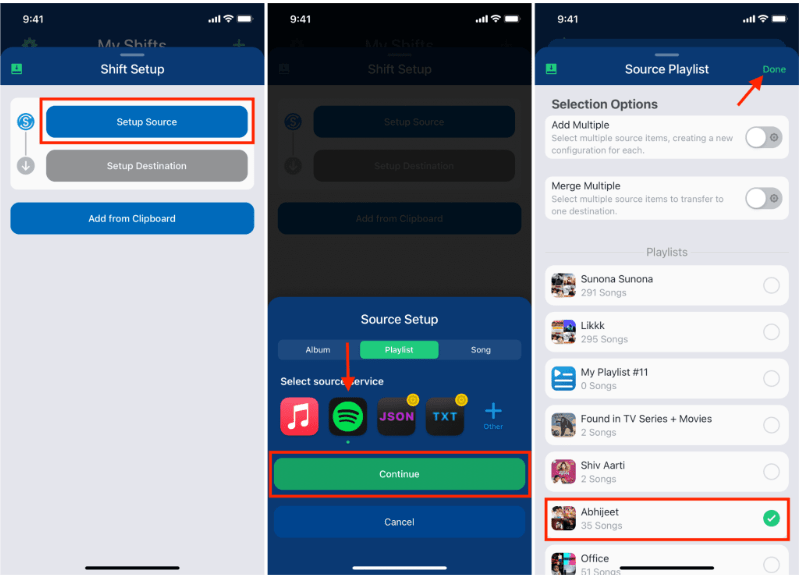
Сильная сторона SongShift заключается в взаимодействии с пользовательским интерфейсом, разработанным специально для iOS, что значительно упрощает задачу переноса. Spotify Плавная загрузка музыки на YouTube для пользователей, которые преимущественно работают на мобильных устройствах.
Часть 4. Трансфер Spotify Добавить плейлист на YouTube на Android
На устройствах Android самый простой способ передачи Spotify Загрузка музыки на YouTube осуществляется с помощью Soundiiz Mobile Web, который хорошо работает в мобильных браузерах и поддерживает интерфейсы, совместимые с Android.
Инструкции по установке мобильной версии веб-версии Soundiiz:
- Откройте веб-сайт Soundiiz в браузере вашего Android-устройства.
- Войдите в свой Spotify счет.
- Выберите плейлист, который хотите переместить.
- Выберите YouTube в качестве целевого сервиса.
- Подтвердите и запустите синхронизацию.
Этот алгоритм удобен для пользователей, которые не хотят устанавливать дополнительные приложения, но при этом нуждаются в простом способе переноса данных. Spotify Слушайте музыку на YouTube в дороге.
Часть 5. Часто задаваемые вопросы
1. Сохранится ли порядок воспроизведения в плейлисте после переноса? Spotify Музыка для YouTube?
Большинство инструментов стремятся поддерживать порядок, но точное сохранение зависит от доступности треков и точности распознавания.
2. Все ли Spotify Треки доступны на YouTube?
Не всегда. Различия в авторских правах, региональные ограничения и недоступность песен могут создавать пробелы.
3. Требуют ли эти инструменты доступа к моим учетным записям?
Да. Им необходимо разрешение, чтобы прочитать ваши данные. Spotify Создавайте плейлисты и добавляйте их в свою библиотеку YouTube. Надежные инструменты используют безопасную аутентификацию OAuth.
4. Сколько времени занимает перевод? Spotify Плейлисты для YouTube?
Это зависит от размера плейлиста: небольшие плейлисты заполняются за считанные секунды, а большие могут занять несколько минут.
Часть 6. Подводя итоги
Поиск наилучшего способа перевода Spotify Перенос музыки на YouTube зависит от вашего рабочего процесса и устройства. С помощью подходящего инструмента вы сможете легко это сделать. Spotify плейлисты для YouTube и поддержание музыкальной целостности на разных платформах.