


Как перенести Amazon Music на Spotify [3 ответов]
Стриминговые платформы предлагают обширные музыкальные библиотеки, но пользователи часто меняют сервисы в поисках лучших функций. Если вы переходите с одного сервиса на другой, Amazon Музыка в SpotifyСамая большая проблема — это перенос ваших тщательно составленных плейлистов без утомительной задачи ручного пересоставления. В этом руководстве сравниваются обе платформы и рассматриваются наиболее эффективные способы, которые могут вам помочь. перенести Amazon Music на Spotify без создания плейлистов с нуля.
Содержание Руководство Часть 1. Обзор: Amazon Music против... SpotifyЧасть 2. Перенос плейлиста Amazon Music на Spotify on Winдоус/макЧасть 3. Перенос плейлиста Amazon Music на Spotify ОнлайнЧасть 4. Перенос плейлиста Amazon Music на Spotify IOS / AndroidЧасть 5. Часто задаваемые вопросыЧасть 6. Вывод
Часть 1. Обзор: Amazon Music против... Spotify
И Amazon Music, и Spotify Они предлагают обширные музыкальные библиотеки и удобные возможности потоковой передачи, но различаются по нескольким важным параметрам, влияющим на предпочтения пользователей.
Цены и планы подписки
Amazon Music предлагает несколько уровней подписки, включая бесплатную версию, Amazon Music Prime для участников Amazon Prime и Amazon Music Unlimited. Spotify Также предлагает как бесплатные, так и платные тарифные планы. SpotifyБесплатный тариф включает рекламу и ограниченные возможности воспроизведения, в то время как Spotify Премиум-подписка обеспечивает прослушивание без рекламы, загрузку для прослушивания в автономном режиме и неограниченное количество пропусков.
- Ознакомьтесь с нашим подробным сравнением, чтобы увидеть разницу между ними. Spotify Бесплатное или Премиум.
Качество звука
Amazon Music известна тем, что предлагает аудиофайлы высокого разрешения в рамках сервиса Amazon Music Unlimited, который включает треки в формате HD и Ultra HD. Spotify Также обеспечивает высококачественную потоковую передачу и широко известна своей стабильной производительностью воспроизведения на разных устройствах. Для многих слушателей обе платформы обеспечивают отличное качество звука, хотя Amazon Music больше ориентируется на варианты аудио высокого разрешения.
Функции и инструменты для поиска музыки
Spotify Amazon Music широко известен своей продвинутой системой рекомендаций и алгоритмическими плейлистами, такими как Discover Weekly и Daily Mix. Эти персонализированные плейлисты помогают пользователям открывать для себя новую музыку на основе их музыкальных предпочтений. Amazon Music предлагает тщательно подобранные плейлисты и интеграцию с голосовым помощником Amazon Alexa, что делает его особенно удобным для умного дома.
Совместимость устройств и интеграция в экосистему
Amazon Music тесно интегрирован с устройствами Amazon, такими как колонки Echo, а также Spotify Amazon Music безупречно работает с широким спектром устройств сторонних производителей, включая смарт-телевизоры, игровые приставки и автомобильные аудиосистемы. Из-за этих различий многие слушатели решают перенести Amazon Music на другие устройства. Spotify чтобы воспользоваться Spotifyфункции обнаружения и более широкая совместимость с устройствами.
Часть 2. Перенос плейлиста Amazon Music на Spotify on Winдоус/мак
Один из самых надежных способов перенести Amazon Music на Spotify Это достигается с помощью настольного программного обеспечения, включающего функции миграции плейлистов. Рекомендуемое решение: DumpMedia Любой музыкальный конвертеркоторый работает на обоих WinЭто программное обеспечение включает функцию переноса плейлистов, разработанную для того, чтобы помочь пользователям быстро и эффективно переносить плейлисты между стриминговыми платформами.
Бесплатная загрузка Бесплатная загрузка
DumpMedia Any Music Converter позволяет пользователям подключать свои музыкальные аккаунты и автоматически создавать плейлисты на целевой платформе. Вместо ручного поиска каждой композиции программа сканирует ваш плейлист, сопоставляет песни между сервисами и заново создает плейлист на целевой платформе. SpotifyТакой подход позволяет значительно сэкономить время, особенно пользователям, которые ведут большие музыкальные библиотеки.
Пошаговое руководство
Шаг 1. Скачайте и установите DumpMedia Любой музыкальный конвертер на вашем Windows или компьютер Mac. Запустите программу после установки.
Бесплатная загрузка Бесплатная загрузка
Шаг 2. После загрузки вашей библиотеки перейдите в раздел «Перенос плейлистов» программы.
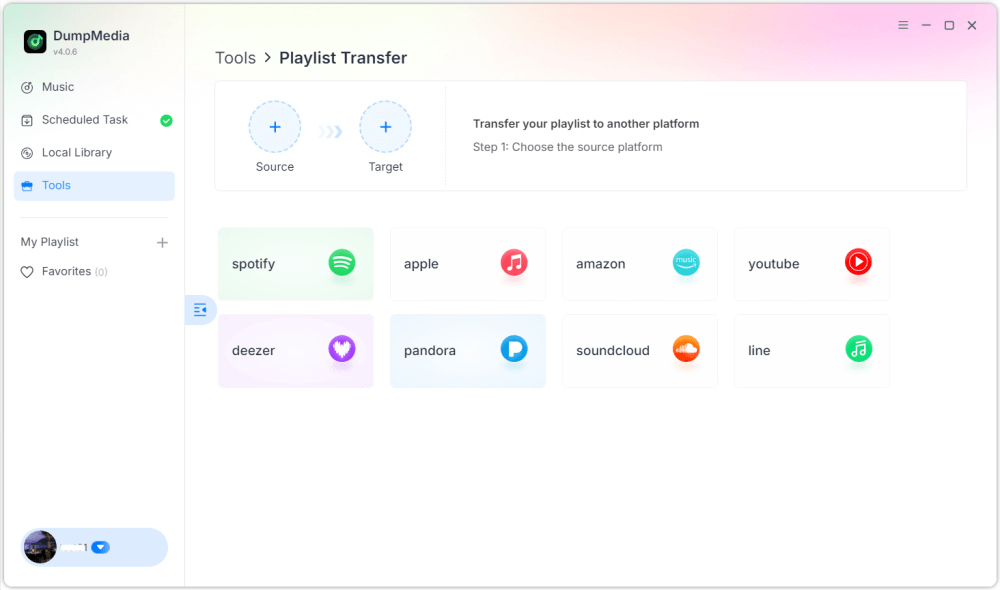
Шаг 3. Выберите Amazon Music в качестве источника.
Шаг 4. Выбрать Spotify как пункт назначения.
Шаг 5. Выберите, что вы хотите перенести. Мы поддерживаем ваши любимые песни, исполнителей, альбомы и ваши собственные плейлисты.
Шаг 6. Нажмите «Конвертировать», чтобы начать перевод.
Шаг 7. Передача завершена. Нажмите «Перейти к». SpotifyТеперь ваш плейлист должен отобразиться с соответствующими песнями.
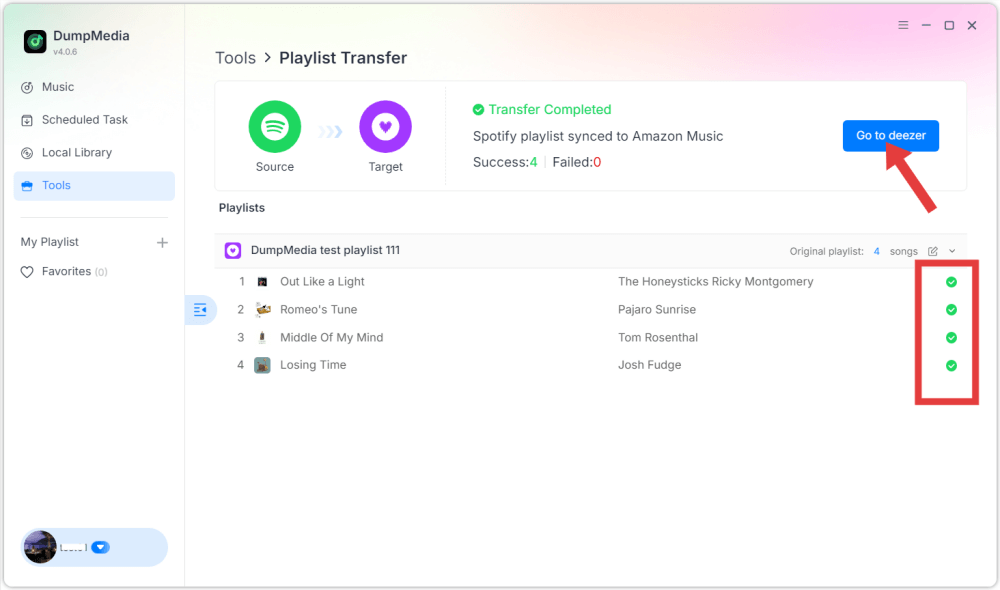
Используя этот метод, пользователи могут эффективно переносить музыку из Amazon Music на другие платформы. Spotify при этом сохраняется порядок воспроизведения и информация о треках.
Часть 3. Перенос плейлиста Amazon Music на Spotify Онлайн
Еще один удобный способ перенести Amazon Music на Spotify Это можно сделать с помощью онлайн-сервиса переноса плейлистов. Одним из широко используемых инструментов является TuneMyMusic, который работает непосредственно в веб-браузере и не требует установки. Онлайн-инструменты особенно полезны для пользователей, которым нужно быстрое решение без установки дополнительного программного обеспечения.
Пошаговое руководство
Шаг 1. Для начала посетите веб-сайт TuneMyMusic и запустите новый процесс переноса. Выберите Amazon Music в качестве исходной платформы и войдите в свою учетную запись, чтобы сервис мог получить доступ к вашим плейлистам.
Шаг 2. После подключения вашей учетной записи платформа отобразит доступные вам плейлисты. Выберите плейлист, который хотите перенести, и перейдите к следующему шагу.
Шаг 3. Затем выберите Spotify в качестве целевой платформы и войдите в систему, чтобы авторизовать подключение. Затем TuneMyMusic проанализирует ваш плейлист и попытается сопоставить каждый трек с Spotifyкаталог.
Шаг 4. После завершения процесса плейлист будет автоматически создан заново в вашем приложении. Spotify Это упрощает перенос Amazon Music в библиотеку. Spotify без необходимости обладать техническими навыками.
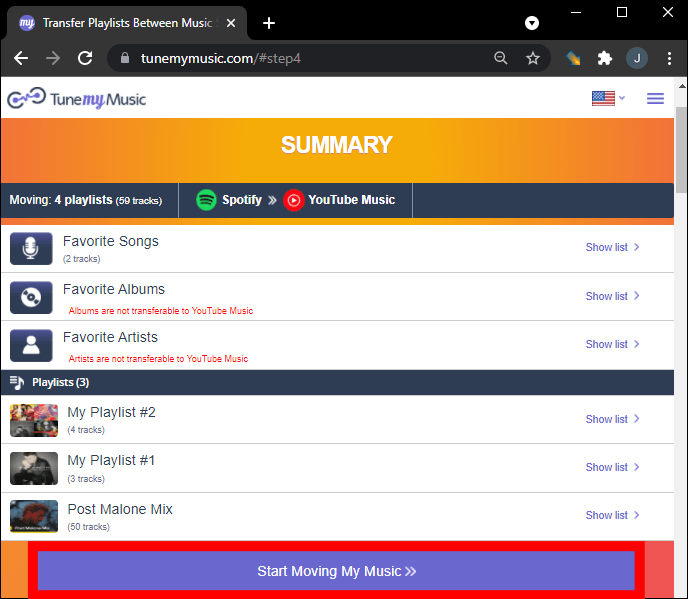
Хотя онлайн-инструменты удобны, иногда у них есть ограничения, такие как лимиты на передачу данных или более низкая производительность при работе с большими плейлистами. Для пользователей с обширными библиотеками более стабильным решением могут стать настольные программы.
Часть 4. Перенос плейлиста Amazon Music на Spotify IOS / Android
Если вы предпочитаете использовать свой смартфон для управления музыкальными библиотеками, существует несколько мобильных приложений, которые также помогут вам перенести Amazon Music на ваш телефон. SpotifyЭти приложения позволяют пользователям переносить плейлисты непосредственно со своих мобильных устройств. Одним из популярных мобильных решений является FreeYourMusic, работающее как на устройствах iOS, так и на Android. Приложение поддерживает множество стриминговых платформ и предоставляет простой интерфейс для переноса плейлистов.
Пошаговое руководство
Шаг 1. После установки приложения откройте его и выберите Amazon Music в качестве исходной платформы. Войдите в свою учетную запись, чтобы приложение могло получить доступ к вашим плейлистам.
Шаг 2. Затем выберите Spotify в качестве целевой платформы и авторизуйте соединение.
Шаг 3. Далее выберите плейлист, который хотите переместить, и начните перенос. Приложение автоматически выполнит поиск соответствующих треков. SpotifyСоздайте каталог и воссоздайте плейлист.
Мобильные приложения, такие как FreeYourMusic, предоставляют удобный способ переноса музыки из Amazon Music на другие устройства. Spotify напрямую со смартфона, особенно для пользователей, которые предпочитают не пользоваться компьютером.
Часть 5. Часто задаваемые вопросы
Все ли песни будут успешно перенесены?
В большинстве случаев большинство треков будут перенесены корректно. Однако некоторые песни могут не отобразиться, если они недоступны на целевой платформе.
Сколько времени занимает процесс перевода?
Необходимое время зависит от количества песен в вашем плейлисте и используемого инструмента. Перенос небольших плейлистов может занять несколько минут, в то время как для больших библиотек может потребоваться больше времени.
Безопасно ли использовать инструменты для переноса плейлистов?
Надежные инструменты используют безопасные системы аутентификации, которые позволяют получить доступ к плейлистам без раскрытия личной информации. Важно использовать проверенные сервисы при попытке перенести Amazon Music на другой сервер. Spotify.
Часть 6. Вывод
Переход на другую платформу потоковой передачи музыки не означает потерю любимых плейлистов. С помощью современных инструментов миграции плейлистов теперь можно перенести песни из Amazon Music на другую платформу. Spotify Быстро и эффективно. Выбрав правильный метод, вы сможете успешно перенести Amazon Music на... Spotify и продолжайте наслаждаться своей любимой музыкальной коллекцией на одной из самых популярных в мире стриминговых платформ, не создавая плейлисты вручную.