


Как перенести Spotify Легко зайти в Deezer: Полное руководство
Многие слушатели, которые изначально использовали Spotify Впоследствии они могут решить перенести свои музыкальные библиотеки в Deezer Благодаря своим уникальным функциям, таким как высокое качество звука, персонализированные рекомендации и совместимость со многими смарт-устройствами, приложение пользуется большой популярностью. Однако главная проблема при переходе на другую платформу — это перенос плейлистов без их ручного создания. Создание плейлистов по одной песне может занять часы, особенно если у вас сотни треков.
К счастью, сейчас существует несколько инструментов, позволяющих пользователям автоматически перемещать плейлисты. Spotify в DeezerЭто позволит сэкономить время и гарантировать упорядоченное хранение вашей любимой музыки. В этом руководстве мы рассмотрим наиболее эффективные способы миграции. Spotify Добавьте плейлисты в Deezer и ответьте на часто задаваемые вопросы, чтобы помочь вам беспрепятственно завершить процесс.
Содержание Руководство Часть 1. Трансфер Spotify Плейлисты для Deezer OnlineЧасть 2. Трансфер Spotify Плейлисты для Deezer Winдоус/макЧасть 3. Часто задаваемые вопросыЧасть 4. Вывод
Часть 1. Трансфер Spotify Плейлисты для Deezer Online
Один из самых простых способов переместить плейлисты. Spotify Перенос плейлистов на Deezer осуществляется с помощью онлайн-сервисов. Эти инструменты работают непосредственно в вашем браузере и не требуют установки. Они подключаются к вашим музыкальным аккаунтам и автоматически создают плейлисты на новой платформе.
Широко используемый онлайн-инструмент для этой задачи — TuneMyMusic. TuneMyMusic — это браузерный инструмент для переноса музыки, разработанный для того, чтобы помочь пользователям переносить плейлисты между различными стриминговыми сервисами. Он поддерживает множество популярных платформ и обеспечивает простой рабочий процесс переноса. Spotify плейлисты для Deezer.
Ключевые особенности
- Работает непосредственно в веб-браузере.
- Поддерживает несколько сервисов потоковой передачи музыки.
- Простой пошаговый интерфейс
- Установка программного обеспечения не требуется
- Позволяет импортировать ссылки на плейлисты или данные учетной записи.
Благодаря своей простоте, TuneMyMusic часто рекомендуют пользователям, которые хотят перенести плейлисты из одного места в другое. Spotify Быстро загрузиться в Deezer без установки дополнительных приложений.
Пошаговое руководство
Шаг 1. Перейдите на сайт TuneMyMusic и нажмите кнопку «Начать», чтобы начать процесс переноса плейлиста.
Шаг 2. Выбрать Spotify в качестве исходной платформы. Вам будет предложено войти в свою учетную запись. Spotify Создайте учетную запись и предоставьте инструменту разрешение на доступ к вашим плейлистам. После авторизации сервис отобразит ваши доступные плейлисты.
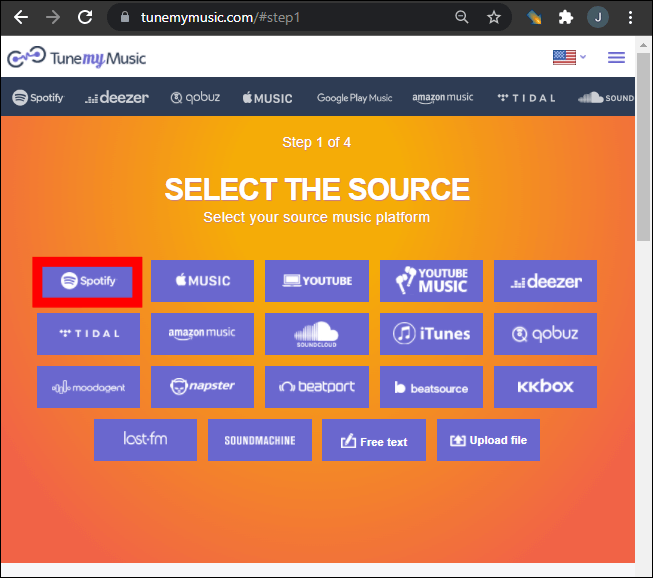
Шаг 3. Вы можете выбрать конкретный плейлист из своей библиотеки или вставить ссылку на плейлист. TuneMyMusic автоматически загрузит все песни, содержащиеся в этом плейлисте.
Шаг 4. Далее выберите Deezer в качестве целевой платформы. Войдите в свою учетную запись Deezer и разрешите инструменту создавать плейлисты в вашей библиотеке.
Шаг 5. Нажмите «Начать перемещение моей музыки». Система начнет сопоставление песен между собой. Spotify и Deezer.
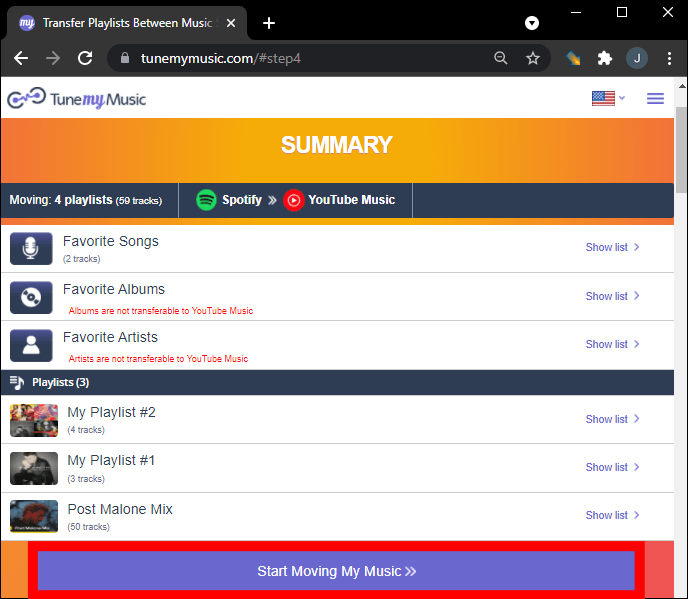
Шаг 6. После завершения передачи откройте свою библиотеку Deezer, чтобы убедиться, что плейлист успешно воссоздан.
Используя этот метод, многие пользователи могут быстро перемещать плейлисты из одного места в другое. Spotify В Deezer за несколько минут.
Ограничения онлайн-инструментов
Хотя онлайн-инструменты удобны, у них могут быть некоторые ограничения:
- В бесплатных версиях может быть ограничено количество передаваемых песен.
- Обработка больших плейлистов может занять больше времени.
- Точность сопоставления песен может варьироваться.
- Наличие интернет-соединения влияет на скорость передачи данных.
Из-за этих ограничений пользователи с большими музыкальными библиотеками часто предпочитают настольное решение для переноса плейлистов. Spotify Для более надежного использования Deezer.
Часть 2. Трансфер Spotify Плейлисты для Deezer Winдоус/мак
Для пользователей, которым нужна большая стабильность и лучшее управление плейлистами, настольное программное обеспечение часто является наиболее надежным вариантом. Одним из наиболее рекомендуемых решений является... DumpMedia Любой музыкальный конвертер, который включает в себя выделенный Перенос плейлиста функцию.
Бесплатная загрузка Бесплатная загрузка
DumpMedia Any Music Converter — это мощное настольное приложение, разработанное для того, чтобы помочь пользователям управлять музыкой и конвертировать её на разных платформах. Оно поддерживает как... WinПрограмма поддерживает операционные системы Windows и macOS и предоставляет расширенные инструменты для миграции плейлистов. Она позволяет пользователям переносить плейлисты из одной операционной системы в другую. Spotify эффективно загружайте треки в Deezer, сохраняя при этом структуру плейлиста.
Ключевые особенности
- Программа включает в себя встроенную функцию переноса плейлистов, которая помогает перемещать целые плейлисты между стриминговыми платформами.
- Пользователи могут переносить несколько плейлистов одновременно, вместо того чтобы переносить их по одному.
- Названия песен, исполнители, информация об альбоме и порядок в плейлисте сохраняются в процессе миграции.
- Поскольку программное обеспечение работает локально на вашем компьютере, оно менее подвержено сбоям в сети по сравнению с инструментами, работающими в браузере.
Пошаговое руководство по переносу Spotify Плейлисты
Шаг 1. Скачайте и установите DumpMedia Любой музыкальный конвертер на вашем Windows или компьютер Mac. Запустите программу после установки.
Бесплатная загрузка Бесплатная загрузка
Шаг 2. Выберите Инструменты > Перенос плейлиста. Spotify как источник.
Шаг 3. Выберите Deezer в качестве места назначения.
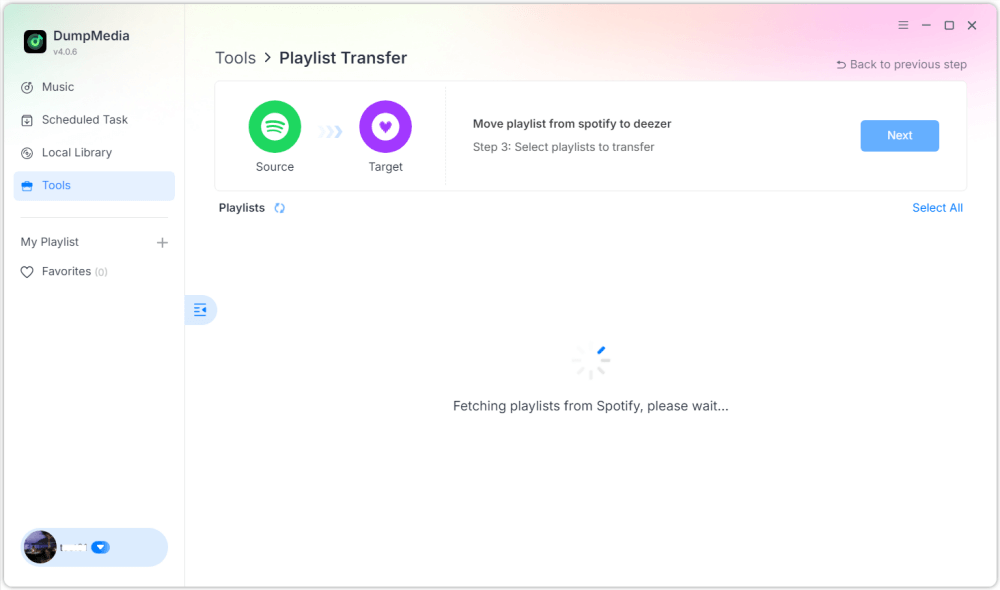
Шаг 4. Выберите, что вы хотите перенести. Мы поддерживаем ваши любимые песни, исполнителей, альбомы и ваши собственные плейлисты.

Шаг 5. Нажмите «Конвертировать», чтобы начать перевод.
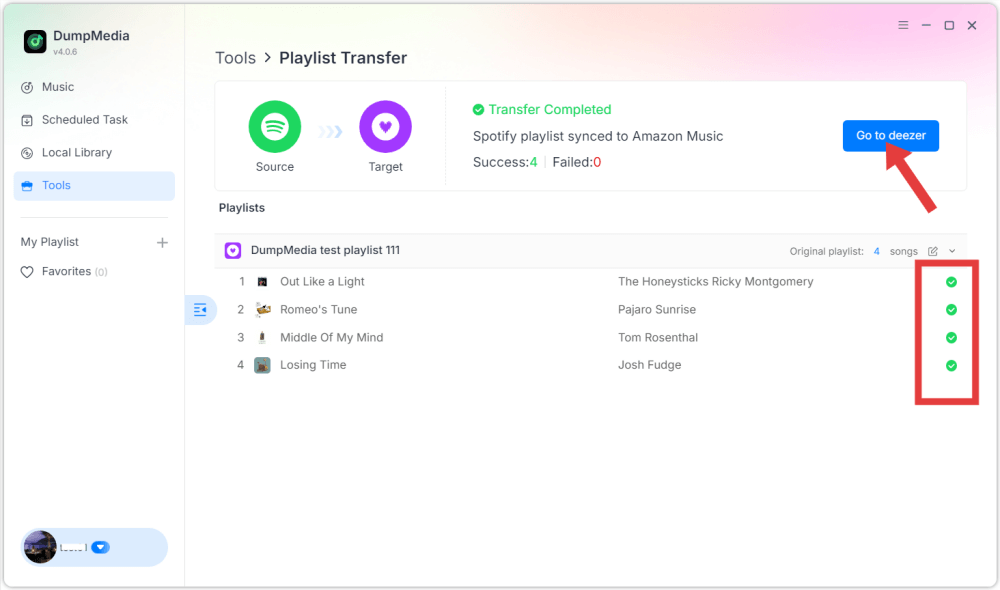
Шаг 6. Передача завершена. Нажмите «Перейти в Deezer». Ваш плейлист должен отобразиться с найденными песнями.
Часть 3. Часто задаваемые вопросы
1. Могу ли я перевести Spotify Бесплатные плейлисты для Deezer?
Некоторые онлайн-инструменты предоставляют бесплатные программы для переноса плейлистов с ограниченным функционалом. Однако эти бесплатные версии могут ограничивать количество песен, которые можно перенести за один раз. Платные программы обычно снимают эти ограничения и обеспечивают более быструю передачу.
2. Все ли песни будут успешно перенесены?
Большинство песен будут успешно перенесены, поскольку обе платформы имеют обширные музыкальные каталоги. Однако иногда некоторые треки могут не отображаться в целевом плейлисте, если они недоступны на Deezer.
3. Сколько времени занимает перенос плейлистов?
Время передачи зависит от размера плейлиста. Передача небольших плейлистов может занять всего несколько минут, в то время как передача больших плейлистов, содержащих сотни песен, может занять больше времени.
4. Безопасно ли использовать инструменты для переноса плейлистов?
Надежные инструменты используют безопасные системы аутентификации для подключения к вашим стриминговым аккаунтам. Всегда выбирайте проверенные приложения и избегайте неизвестных сервисов при переносе плейлистов. Spotify в Дезер.
Часть 4. Вывод
Смена сервиса потоковой передачи музыки больше не означает потерю тщательно организованных плейлистов. Благодаря современным инструментам миграции плейлистов вы можете легко перенести свою музыкальную библиотеку с одного сервиса на другой. Spotify Перенести музыку в Deezer без ручного пересоставления плейлистов. Если у вас большая коллекция музыки или вы хотите большей надежности, используйте настольное программное обеспечение, например... DumpMedia Any Music Converter предлагает более стабильное и эффективное решение.