


Spotify Не отвечает? Исправьте это в 2026 году.
Многие пользователи сталкиваются с досадной проблемой, когда Spotify не отвечает При попытке воспроизвести музыку, открыть плейлисты или использовать автономный режим. Иногда это происходит... Spotify приложение Полностью зависает, неожиданно вылетает или перестает работать во время воспроизведения. Spotify Проблемы с приложениями встречаются крайне часто. В этом руководстве мы объясним, почему. Spotify внезапно перестал работать, как это исправить? Spotify Проблемы с приложением и способы более стабильного воспроизведения музыки в автономном режиме.
Содержание Руководство Часть 1. Почему Spotify Приложение не отвечает?Часть 2. Как исправить Spotify Приложение не отвечает?Часть 3. Лучший способ избежать Spotify Проблемы с воспроизведениемЧасть 4. Часто задаваемые вопросыЧасть 5. Вывод
Часть 1. Почему Spotify Приложение не отвечает?
Есть много причин, почему Spotify Не отвечает во время воспроизведения музыки или использования приложения.
Плохое интернет-соединение
Spotify Для потоковой передачи и подтверждения учетной записи требуется стабильное интернет-соединение. Слабое сетевое соединение может привести к проблемам. Spotify Замереть или перестать отвечать.
Поврежденный Spotify Кэш
Временные файлы, хранящиеся внутри Spotify Со временем данные могут быть повреждены, что приводит к сбоям в работе приложений и проблемам с воспроизведением.
устаревший Spotify Приложение
Старший Spotify В некоторых версиях могут содержаться ошибки, которые вызывают "Spotify ошибка "не отвечает".
Spotify Проблемы с сервером
Иногда Spotify Сбои в работе серверов влияют на воспроизведение контента и производительность приложений во всем мире.
Конфликты фонового программного обеспечения
Конфликты между антивирусным программным обеспечением, настройками брандмауэра или аппаратным ускорением также могут вызывать проблемы. Spotify перестать отвечать.
Проблемы совместимости устройств
Более старые операционные системы или неподдерживаемые устройства могут испытывать проблемы с запуском новейших версий. Spotify Приложение работает без сбоев.
Вот некоторые из наиболее распространенных причин, стоящих за этим:Spotify Проблема "не отвечает".
Часть 2. Как исправить Spotify Приложение не отвечает?
If Spotify Если ваше устройство не отвечает, попробуйте следующие решения.
Исправление 1. Перезагрузить Spotify
Полностью закрыто Spotify и снова откройте приложение. Это простое решение часто устраняет временные проблемы с воспроизведением.
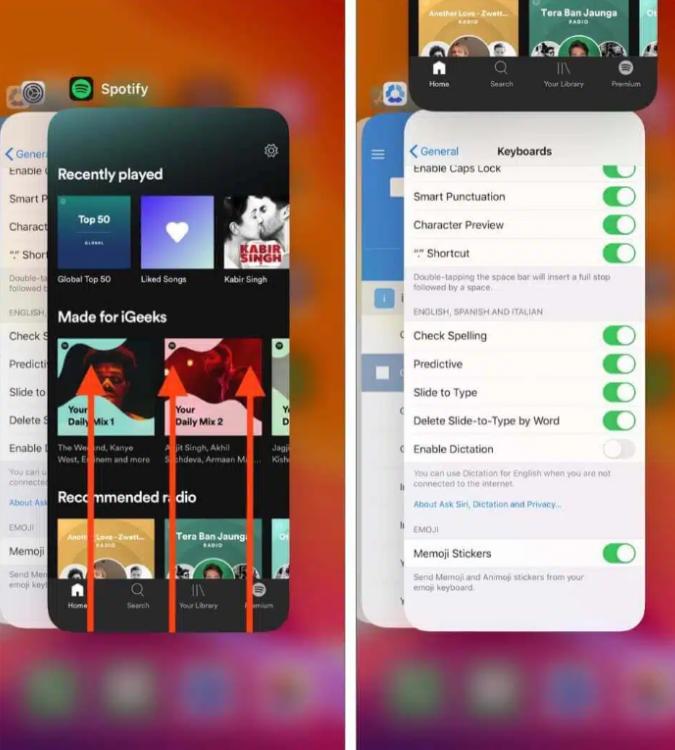
На устройствах iOS (iPhone/iPad): Проведите пальцем вверх от нижнего края экрана и задержитесь посередине (или дважды нажмите кнопку «Домой» на старых устройствах). Найдите Spotify Просмотрите карточку и проведите пальцем вверх, чтобы она исчезла с экрана.
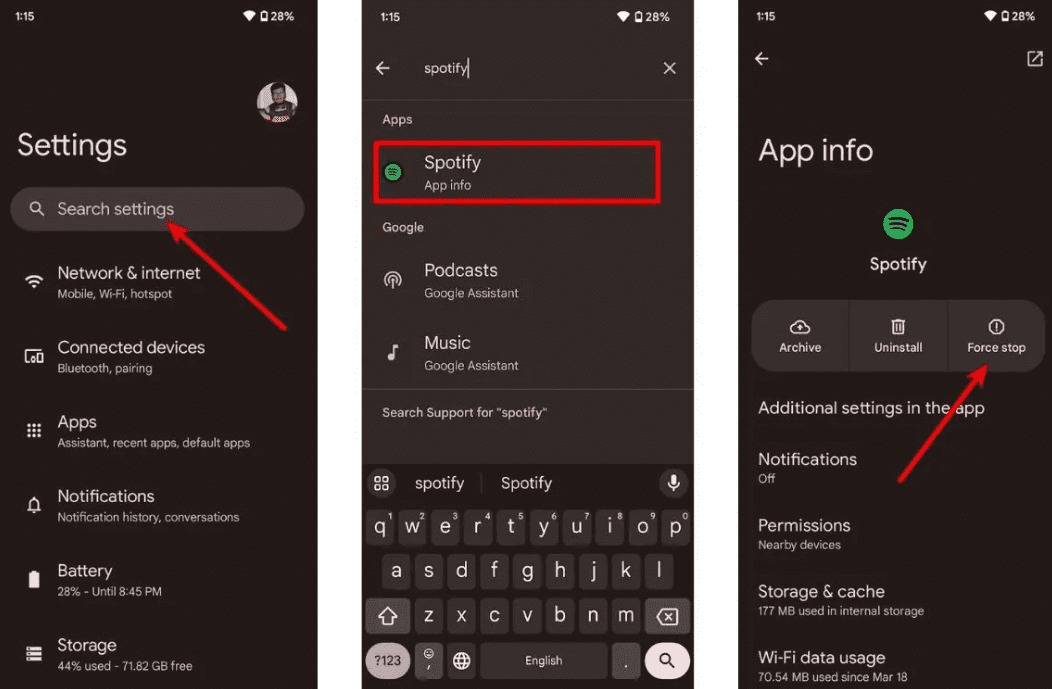
На Android: Перейдите в Настройки > Приложения > Spotify и нажмите «Принудительная остановка». Это завершит все зависшие фоновые задачи. Откройте Spotify из ящика вашего приложения.
В macOS: Нажмите Spotify В верхней строке меню выберите «Выход». Spotifyили просто щелкните по окну и нажмите Command (⌘) + Q.
On Winдоу (10/11): Нажмите кнопку «Файл» в верхнем левом углу. Spotify Откройте окно и выберите «Выход» (нажатие на «X» в правом верхнем углу часто просто сворачивает его в системный трей, а не закрывает).
Исправление 2. Проверьте подключение к Интернету
Чтобы проверить стабильность соединения, переключайтесь между Wi-Fi и мобильными данными.
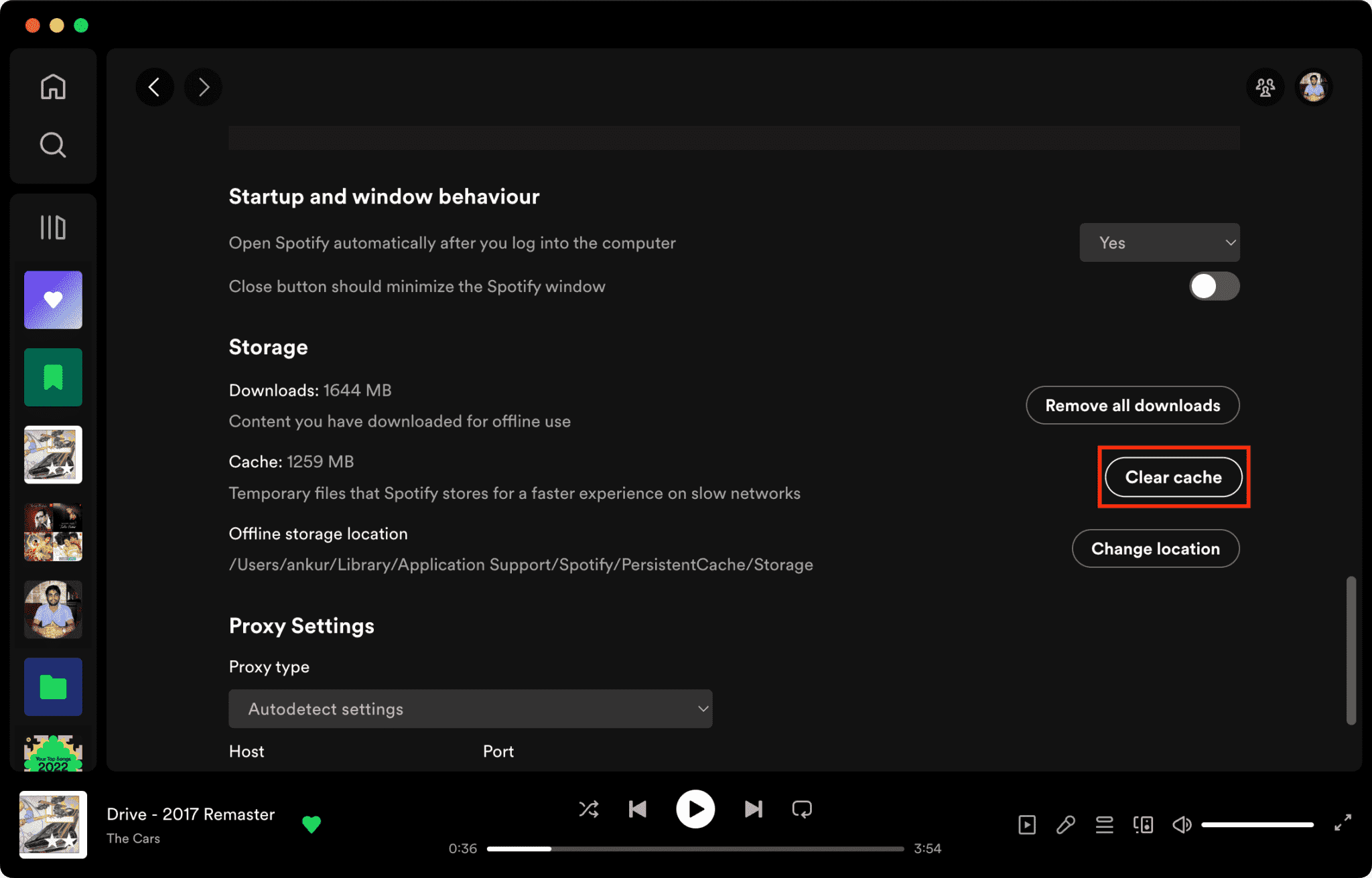
Исправление 3. Очистить Spotify Кэш
Поврежденные файлы кэша — одна из основных причин, почему Spotify не отвечает.
Как очистить Spotify Кэш на Mac/Windows/iPhone/Android >>>>
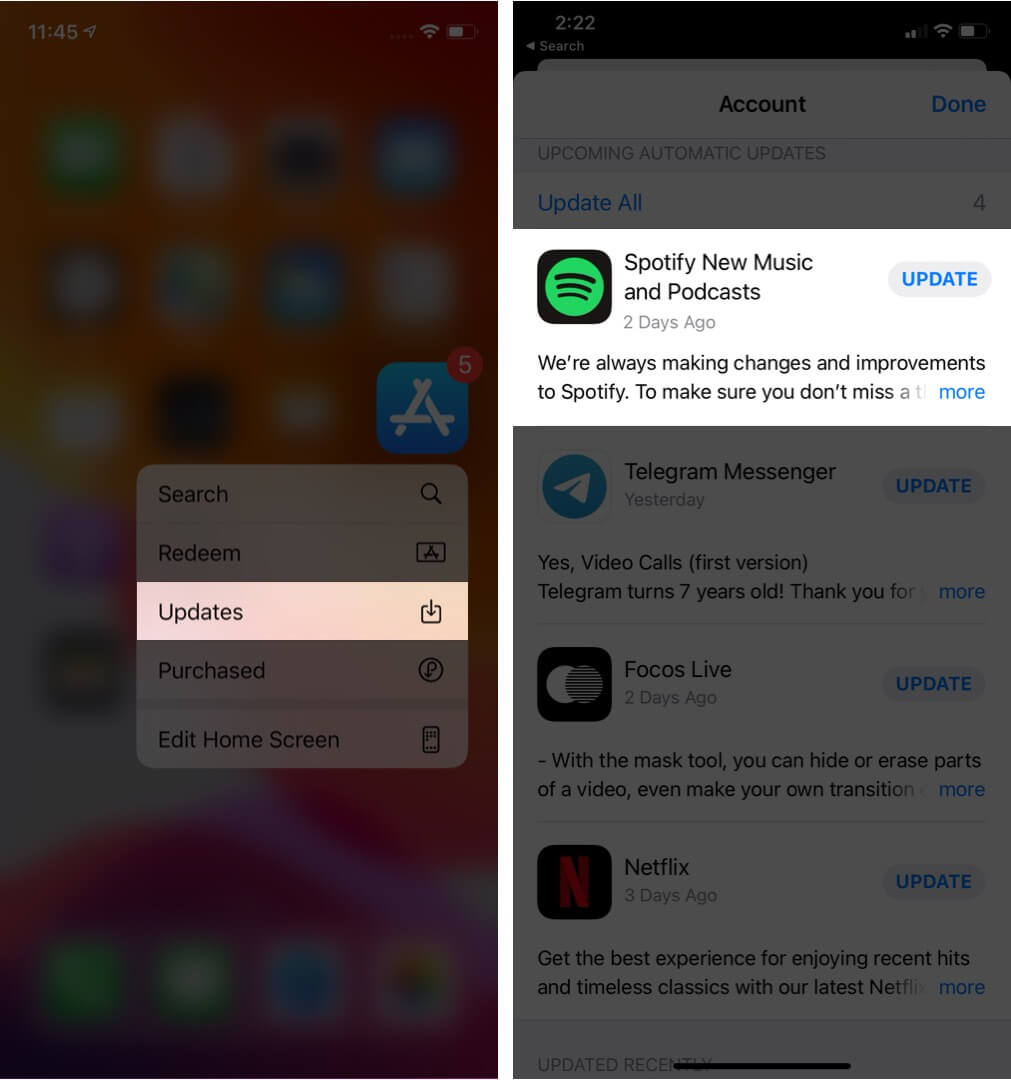
Исправление 4. Обновить Spotify Приложение
Установка последней версии Spotify В этой версии могут быть исправлены известные ошибки программного обеспечения.
Исправление 5. Перезагрузите устройство
Перезагрузка компьютера или телефона может обновить системные ресурсы.
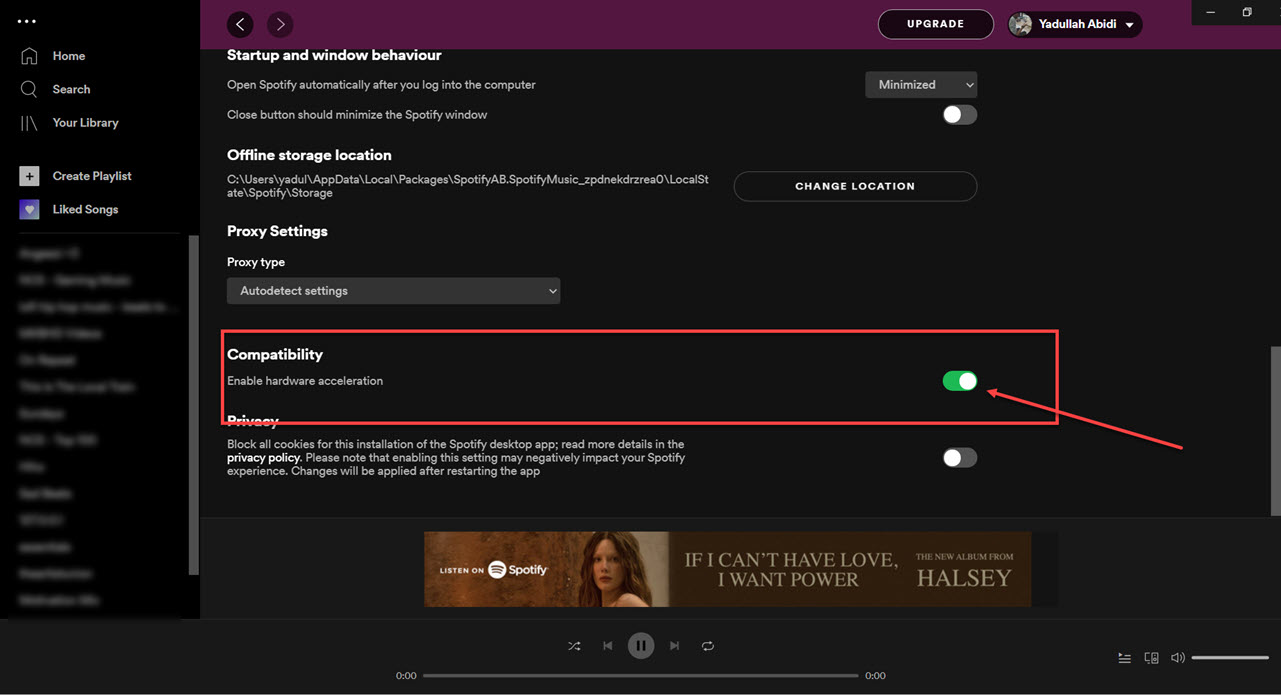
Исправление 6. Отключить аппаратное ускорение
Вы можете отключить аппаратное ускорение. Иногда это решает проблемы с зависанием.
Исправление 7. Проверить Spotify Статус сервера
Глобальный Spotify Периодические сбои влияют на воспроизведение и авторизацию.
Часть 3. Лучший способ избежать Spotify Проблемы с воспроизведением
Многие пользователи предполагают, что загружено Spotify Песни всегда будут работать в автономном режиме, но загруженные песни остаются защищенными DRM, а это значит, что музыка работает только внутри потокового приложения. Загруженные файлы нельзя свободно передавать. Если вы часто сталкиваетесь с "Spotify Если возникла проблема с "не отвечает", одним из популярных инструментов является... DumpMedia Spotify Music ConverterЭто программное обеспечение позволяет пользователям конвертировать Spotify Преобразование музыки в локальные аудиоформаты для более гибкого воспроизведения в автономном режиме. Даже если Spotify Если приложение не работает на вашем устройстве, вы можете... играть Spotify песни офлайн немедленно переключитесь на другой музыкальный плеер.
Бесплатная загрузка Бесплатная загрузка
🏆Основные особенности DumpMedia Spotify Music Converter
- Скачать Spotify музыка для MP3WAV, FLAC и AAC
- Удалить Spotify Защита DRM*
- Сохраните исходное качество звука.
- Пакетная загрузка плейлистов и альбомов.
- Быстрая скорость преобразования
- Сохранение метаданных песни и тегов ID3.
- Поддерживается воспроизведение в автономном режиме на любом устройстве.
Для пользователей, разочарованных Spotify В случае нестабильной работы приложения воспроизведение локальной музыки зачастую кажется гораздо более надежным.
Конвертировать Spotify в MP3 Пошаговая инструкция
Шаг 1. Скачайте и установите DumpMedia Spotify Music Converter на вашем Mac/ПК. Запустите его, и вы увидите интерфейс. Используйте свой Spotify Премиум/бесплатная учетная запись для входа.
Бесплатная загрузка Бесплатная загрузка
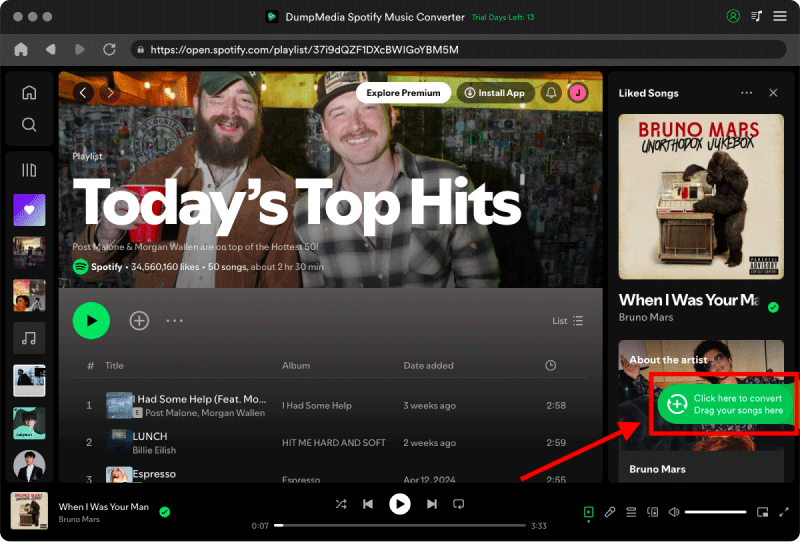
Шаг 2. Найдите плейлист, альбом или конкретную песню, которую хотите конвертировать. Вы можете перетащить отдельную песню на значок «+» в правой части экрана. В качестве альтернативы, откройте весь плейлист/альбом и нажмите значок «Добавить для конвертации», чтобы загрузить весь список в конвертер.
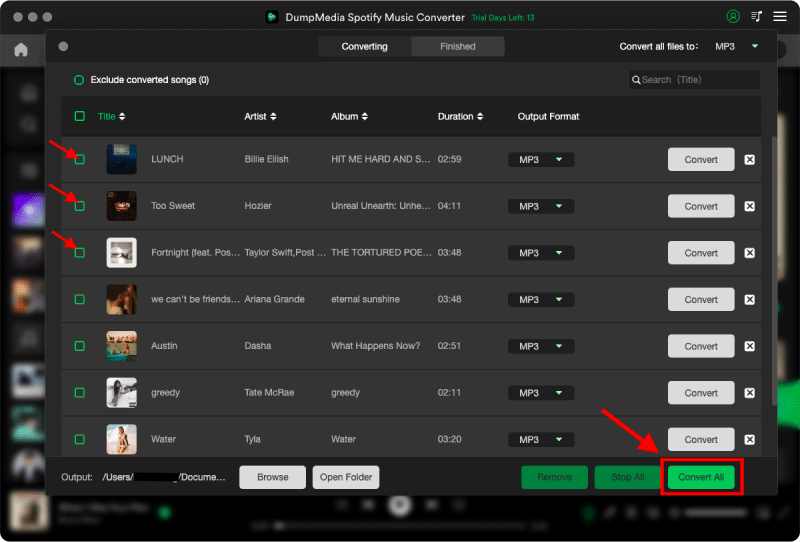
Шаг 3. Выбрать MP3 (Наиболее совместимый вариант). Также можно изменить битрейт или частоту дискретизации. Для оптимального баланса выберите 320 кбит/с.

Шаг 4. После завершения настроек пользователи могут приступить к конвертации, нажав на значок «Конвертировать». Затем DumpMedia скачает Spotify песни для MP3 Благодаря своей сверхвысокой скорости, она обеспечивает скорость работы за считанные секунды.
Часть 4. Часто задаваемые вопросы
Зачем был создан сайт Spotify не отвечает?
Spotify Может перестать отвечать из-за проблем с интернетом, поврежденных файлов кэша, устаревшего программного обеспечения или проблем с сервером.
Почему Spotify Постоянно замерзает?
Spotify Проблемы с зависанием часто связаны с повреждением кэша или конфликтами аппаратного ускорения.
Зачем был создан сайт Spotify У меня на телефоне что-то зависает?
Mobile Spotify Причиной сбоев может быть нехватка места для хранения данных, устаревшие версии приложений или конфликты программного обеспечения.
Зачем был создан сайт Spotify Автономный режим не работает?
Воспроизведение в автономном режиме по-прежнему зависит от Spotify авторизация и стабильность приложения.
Is DumpMedia Spotify Music Converter безопасный?
Да. Он предназначен для Spotify Преобразование музыки и управление локальным воспроизведением.
Примечание: Стриминговые платформы имеют собственные правила и системы мониторинга. В качестве стороннего инструмента, DumpMedia Spotify Music Converter также на него распространяются их ограничения, которые могут повлиять на использование в определенных случаях. Spotify может принять меры, если обнаружит действия, нарушающие ее Условия предоставления услуг; это полностью зависит от ее полномочий. Spotifyусмотрение.
Часть 5. Вывод
"Spotify Проблема "не отвечает" может быть вызвана нестабильностью интернета, поврежденными файлами кэша, устаревшим программным обеспечением или Spotify Проблемы с приложением. Хотя существует множество временных решений, которые могут помочь восстановить воспроизведение, Spotify Качество потокового воспроизведения по-прежнему во многом зависит от стабильности приложения и онлайн-проверки. Для пользователей, желающих более стабильного прослушивания в автономном режиме, DumpMedia Spotify Music Converter предоставляет практичный способ преобразования Spotify песни в местный MP3 файлы для гибкого воспроизведения на различных устройствах.
Бесплатная загрузка Бесплатная загрузка
*DumpMedia работает путем расшифровки и загрузки Spotify Преобразование песен в файлы без DRM-защиты, позволяющее получить чистую, неограниченную копию вашей библиотеки для любого устройства. Функционал не включает удаление DRM-защиты из локальных аудиофайлов.