


Почему Spotify Слишком медленно? Проверенные решения к 2026 году.
Если вам интересно, почему Spotify Если всё работает так медленно, вы не одиноки. Многие пользователи сталкиваются с буферизацией, задержками воспроизведения или медленной загрузкой при использовании... SpotifyДаже при стабильном интернет-соединении. В этом руководстве мы подробно объясним, почему это происходит. Spotify Мы расскажем вам, почему это так медленно, что является причиной и как это можно исправить навсегда. Что еще важнее, мы также покажем вам долгосрочное решение для улучшения вашей работы. Spotify Прослушивание музыки без перерывов.
Содержание Руководство Часть 1. Почему Spotify Внезапное замедление работы? Объяснение основных причин.Часть 2. Как исправить Spotify Постоянно быть медлительнымЧасть 3. Лучший способ улучшить Spotify Опыт прослушиванияЧасть 4. Часто задаваемые вопросыЧасть 5. Вывод
Часть 1. Почему Spotify Внезапное замедление работы? Объяснение основных причин.
Есть несколько причин, почему это Spotify Они работают очень медленно, и большинство проблем связаны с производительностью приложения, состоянием сети или ограничениями устройства.
1. Плохое интернет-соединение.
Одна из самых распространенных причин, почему Spotify Слишком низкая скорость интернета нестабильна. Даже небольшие колебания могут вызвать буферизацию или задержку воспроизведения.
2. Spotify Перегрузка кэша
Со временем Spotify Приложение хранит кэш-файлы для повышения производительности. Однако слишком большой объем кэшированных данных может фактически замедлить работу приложения и является одной из основных причин его проблем. Spotify На многих устройствах работает очень медленно.
3. Устаревшая версия приложения.
Использование устаревшего Spotify Версия может привести к проблемам с производительностью. Ошибки и проблемы совместимости часто объясняют, почему это происходит. Spotify После обновлений приложение стало работать очень медленно.
4. Ограничения производительности устройства
Устройства с недостаточным объемом памяти или устаревшие устройства могут испытывать трудности с обработкой данных. Spotify плавно, что является еще одной распространенной причиной, почему Spotify Приложение работает очень медленно.
5. Фоновые приложения, потребляющие ресурсы.
Если в фоновом режиме работает несколько приложений, Spotify Может наблюдаться задержка из-за ограниченных системных ресурсов, что является одной из причин этого. Spotify Воспроизведение очень медленное.
6. Spotify Настройки
Многие пользователи сообщают, что Spotify Замедление происходит только при потоковой передаче песен. Обычно это связано с настройкой битрейта потоковой передачи или адаптивным переключением качества. Эти факторы объясняют, почему это происходит. Spotify Очень медленно, особенно во время воспроизведения музыки, но не при использовании других приложений.
Часть 2. Как исправить Spotify Постоянно быть медлительным
Ваш Spotify Зависания, подтормаживания или слишком долгая загрузка? Вот несколько эффективных способов улучшить производительность:
1. Очистите Spotify Кэш
Со временем Spotify Для ускорения воспроизведения кэш хранит большие объемы временных данных и «кэшированных» треков. Однако слишком большой или поврежденный кэш может иметь обратный эффект, приводя к значительным задержкам. Очистка кэша в настройках приложения заставляет программу обновить свою структуру данных.
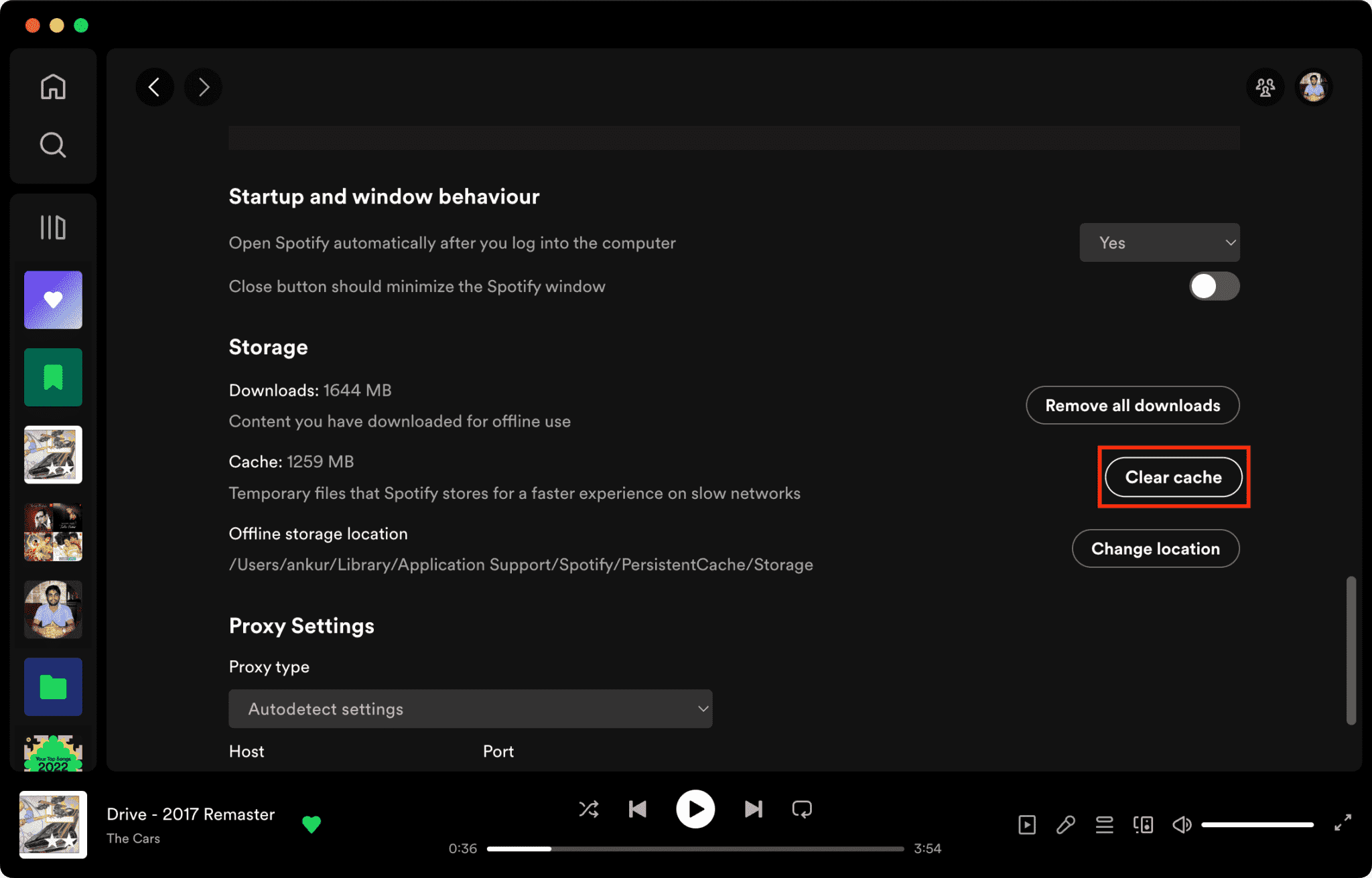
Связанные статьи: Как очистить Spotify Кэш на компьютере/мобильном устройстве >>>>>>
2. Перезапустите приложение.
Выполнение перезагрузки вручную — это основополагающий шаг по устранению неполадок, который эффективно решает многие основные причины возникновения проблемы. Spotify Это очень медленно. Этот процесс очищает временную память (ОЗУ) приложения и принудительно завершает все «зомби-потоки» или избыточные фоновые процессы, которые могут потреблять системные ресурсы. Устранение этих узких мест в выполнении позволяет программному обеспечению инициализировать чистую сессию, что часто устраняет постоянные зависания и задержки интерфейса, которые нарушают качество потоковой передачи.
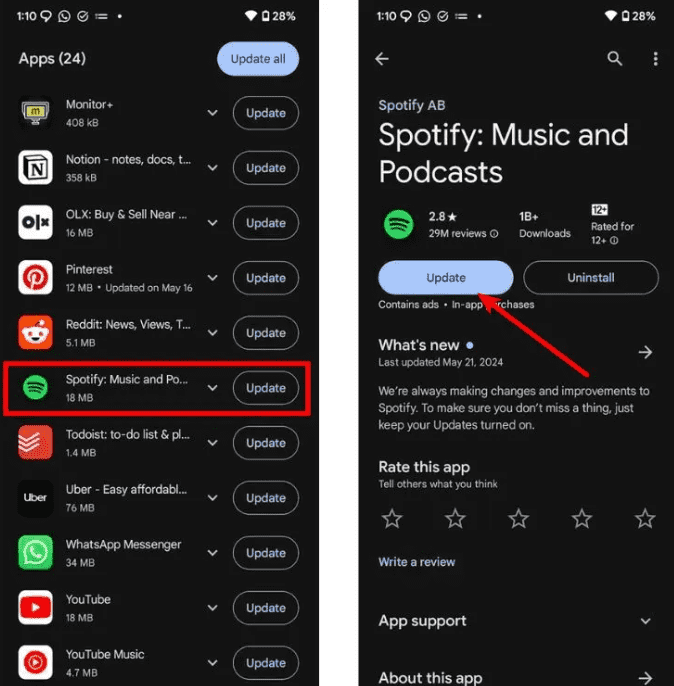
3. Обновитесь до последней версии
Разработчики часто выпускают патчи для исправления утечек памяти и ошибок совместимости. Использование устаревшей версии... Spotify Это означает, что вы упускаете эти критически важные оптимизации производительности.
4. Выполните чистую переустановку.
Если проблемы с производительностью сохраняются, часто требуется чистая переустановка. Это удалит все связанные файлы библиотек и записи реестра, которые могут быть повреждены, обеспечивая «чистую» среду для программного обеспечения.
5. Переключение между Wi-Fi и мобильными данными.
Задержка загрузки часто вызвана перегрузкой сети или «зависанием DNS». Смена типа подключения может обойти локальные сетевые помехи и помочь определить, связана ли проблема с вашим интернет-провайдером, а не с самим приложением.
Эти шаги могут временно уменьшить проблемы, связанные с тем, почему это происходит. Spotify Они работают медленно, но не решают проблему нестабильности потоковой передачи данных навсегда.
Часть 3. Лучший способ улучшить Spotify Опыт прослушивания
Если вы хотите полностью избежать буферизации, задержек или проблем с потоковой передачей, наиболее эффективным решением будет прослушивание музыки в автономном режиме без использования нестабильного потокового вещания. В этом случае мы рекомендуем следующее: DumpMedia Spotify Music Converter.
Бесплатная загрузка Бесплатная загрузка
С помощью этого инструмента вы сможете:
- Конвертировать Spotify Музыка к MP3, WAV, FLAC
- Слушайте в автономном режиме без буферизации.
- Полностью избегайте задержек при потоковой передаче.
- Воспроизводите музыку на любом устройстве.
- Сохранять песни навсегда
Вместо того чтобы постоянно спрашивать «почему?» Spotify Несмотря на медленный темп, этот подход устраняет проблему в источнике: зависимость от потокового вещания в реальном времени. Используя инструменты преобразования зашифрованных потоков в локализованные файлы, пользователи могут обойти присущие онлайн-платформам ограничения, такие как буферизация, зависимость от сети, задержка воспроизведения и другие.
Как загрузить Spotify Песни на MP3
Шаг 1. Скачайте и установите DumpMedia Spotify Music Converter на ваш Mac/Windows. Запустите его и вы увидите интерфейс. Используйте свой Spotify Премиум/бесплатная учетная запись для входа.
Бесплатная загрузка Бесплатная загрузка
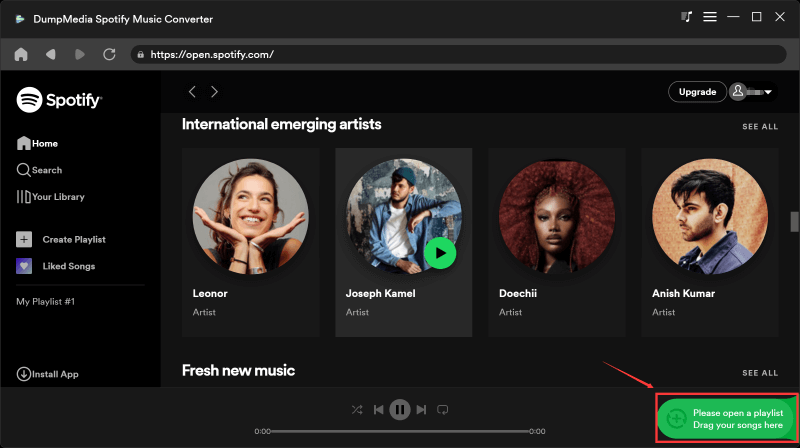
Шаг 2. Теперь вы можете перейти к песням, которые хотите загрузить. Вы можете просто перетащить их в список для конвертации.
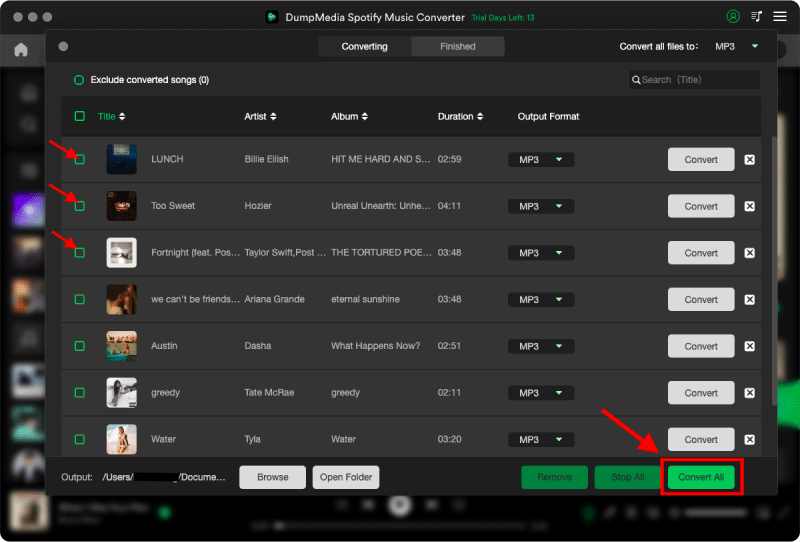
Шаг 3. В интерфейсе преобразования вы можете выбрать выходной формат: MP3и установите частоту дискретизации или битрейт в настройках. Также выберите папку, куда будут сохраняться файлы.

Шаг 4. Наконец, нажмите кнопку «Конвертировать» внизу страницы, и программа начнет процесс конвертации.
Для опытных пользователей, которые отдают приоритет бесперебойной работе с высоким разрешением, DumpMedia Spotify Music Converter Это решение проблемы нестабильности потоковой передачи данных, позволяющее выйти за рамки временных исправлений в приложениях и достичь подлинной автономности в автономном режиме.
Часть 4. Часто задаваемые вопросы
Зачем был создан сайт Spotify Приложение так медленно работает на мобильном устройстве?
Обычно это происходит из-за слабого сигнала, фоновых приложений или перегрузки кэша.
Зачем был создан сайт Spotify Так медленно работает Wi-Fi?
Причиной может быть нестабильность маршрутизатора или проблемы с маршрутизацией DNS.
Зачем был создан сайт Spotify Медленно, а интернет быстрый?
Часто это происходит из-за проблем с кэшем приложения или производительностью устройства.
Как мне это исправить навсегда? Spotify отставание?
Наиболее надежное решение — уменьшить зависимость от потокового воспроизведения, используя инструменты для конвертации музыки в офлайн-режим.
Часть 5. Вывод
Если вы часто спрашиваете, почему это Spotify Если скорость настолько низкая, проблема обычно заключается не в одной конкретной причине, а в сочетании проблем, связанных с сетью, устройством и приложением. Хотя простые решения могут временно улучшить производительность, наиболее стабильное качество прослушивания достигается при полном исключении зависимости от потоковой передачи с помощью таких инструментов, как... DumpMedia Spotify Music Converter.