


Spotify Режим диджея: как им пользоваться (полное руководство 2026 года)
Если вы недавно слышали о Spotify Возможно, вам интересно, что именно делает режим диджея и как им пользоваться в режиме диджея. Spotify Режим AI DJ — один из SpotifyСамые интересные функции приложения — это персонализированный музыкальный опыт, основанный на искусственном интеллекте. Но, несмотря на свою мощь, оно также имеет ограничения, о которых многие пользователи не подозревают. В этом руководстве вы узнаете, что это такое. Spotify Что такое AI DJ и как его включить? Spotify.
Содержание Руководство Часть 1. Что такое Spotify ИИ-диджей?Часть 2. Как включить Spotify ИИ-диджей?Часть 3. Ограничения Spotify ИИ диджейЧасть 4. Как сэкономить Spotify Музыка для диджеев, подходящая для использования в автономном режиме?Часть 5. Часто задаваемые вопросыЧасть 6. Вывод
Часть 1. Что такое Spotify ИИ-диджей?
Spotify Режим диджея — это персонализированный музыкальный гид, работающий как виртуальный радиоведущий, сочетающий передовые технологии машинного обучения с удивительно реалистичным голосом искусственного интеллекта. Доступный подписчикам Premium, он не просто перемешивает песни; он формирует непрерывный поток музыки на основе вашей истории прослушивания, текущих трендов и даже ностальгических хитов, которые вы не слушали годами.
Основные характеристики Spotify ИИ диджей
- Персонализированные рекомендации песен
- Непрерывное воспроизведение без ручного ввода.
- Голосовые комментарии, сгенерированные искусственным интеллектом
- Умные переходы между настроением и жанрами.
Вот почему Spotify Режим диджея становится все более популярным среди пользователей, предпочитающих комфортное прослушивание музыки.
Часть 2. Как включить Spotify ИИ-диджей?
Как получить доступ Spotify Режим диджея? Если у вас есть подписка на Spotify Premium, Следуй этим шагам:
Шаг 1. Убедитесь, что ваше приложение обновлено до последней версии. Перейдите в раздел «Главная».
Шаг 2. Найдите функцию «Диджей» в своей ленте. Начните слушать прямо сейчас.
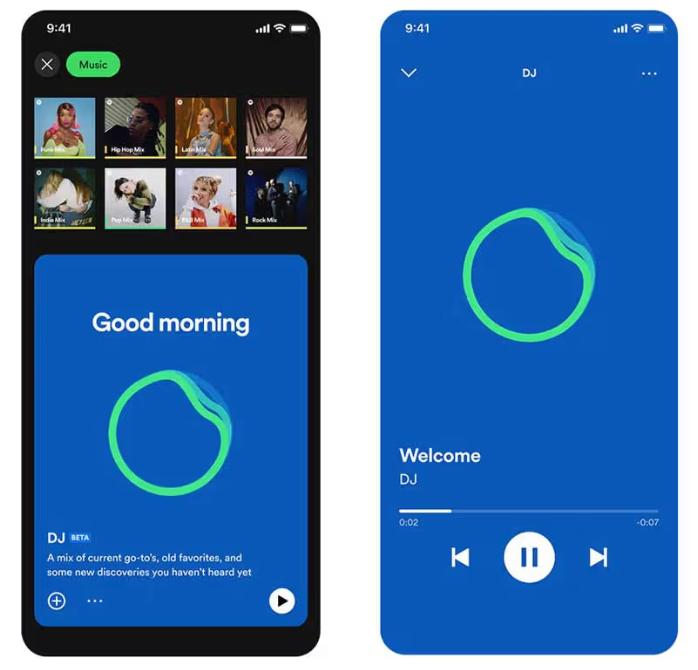
SpotifyТеперь ИИ-диджей поддерживает функцию «Запросы». Как и при общении с живым диджеем, вы можете использовать голосовые команды или текстовые сообщения, например, «Переключитесь на более мягкий жанр» или «Включите больше песен Джея Джастина Бибера», и ИИ мгновенно скорректирует плейлист.
Часть 3. Ограничения Spotify ИИ диджей
Spotify Режим диджея выделяется тем, что избавляет от необходимости вручную искать музыку. Он идеально подходит для фонового прослушивания, открытия новых песен и создания атмосферы, похожей на радио. SpotifyОднако впечатляющий ИИ-диджей имеет ряд важных ограничений.
1. Загрузка файлов навсегда запрещена.
Даже с Premium-подпиской песни нельзя по-настоящему скачать. Файлы заблокированы в приложении и не могут быть переданы.
2. Отсутствие свободы в офлайн-режиме
Вы можете загрузить музыку для прослушивания в автономном режиме, но доступ к ней зависит от наличия подписки. Музыка исчезнет, если вы отмените подписку.
3. Запрещен экспорт и совместное использование.
Вы не можете экспортировать плейлисты диджеев и сохранять миксы на внешние носители.
4. Ограниченный контроль
Spotify Искусственный интеллект управляет выбором и порядком песен. Полной настройки нет.
Эти ограничения становятся важными, если вы хотите иметь больший контроль над своей музыкой.
Часть 4. Как сэкономить Spotify Музыка для диджеев, подходящая для использования в автономном режиме?
Если вам нравится Spotify Если вам нужен режим диджея, но требуется большая гибкость, вам нужен способ постоянного сохранения песен. Вместо того чтобы полагаться на SpotifyВстроенные ограничения программы позволяют выбирать песни из рекомендаций диджеев и конвертировать их в локальные файлы. Это дает вам полный контроль над вашей музыкой. Самый надежный способ сделать это — использовать профессиональный инструмент, например, DumpMedia Spotify Music Converter.
Бесплатная загрузка Бесплатная загрузка
🏅Почему выбрать DumpMedia Spotify Music Converter:
- ⭐Интеграция с Spotify веб-плеер
- ⭐Работа для обоих Spotify Премиум и Spotify Бесплатные пользователи
- ⭐Обеспечивает пакетную конвертацию со скоростью до 35x
- ⭐Конвертировать Spotify песни для MP3, WAV или FLAC
- ⭐Сохраняйте теги ID3, такие как исполнитель, обложка, обложка и т. д.
- ⭐Сохраните оригинальное качество звука
- ⭐100% чистый. Никакого риска при использовании
Пошаговая инструкция: Преобразовать Spotify DJ Музыка
Шаг 1. Загрузите и установите программу на свой компьютер. Она работает с обоими устройствами. WinWindows и Mac. Интерфейс удобен для пользователя, что делает его простым в использовании даже для новичков.
Бесплатная загрузка Бесплатная загрузка
Шаг 2. Откройте встроенную Spotify веб-плеер внутри DumpMedia и войдите с вашим Spotify аккаунт. Просмотреть Spotify и перетащите песни, альбомы или плейлисты, которые хотите загрузить, в конвертер.

Шаг 3. В панели настроек выберите MP3 в качестве выходного формата для обеспечения MP3 Загрузка выбранных вами треков.

Шаг 4. Нажмите кнопку «Конвертировать все» и начните конвертацию. DumpMedia Spotify Music Converter Поддерживается загрузка в 35 раз быстрее, поэтому вам останется только дождаться завершения процесса конвертации.

Часть 5. Часто задаваемые вопросы
1. Что такое Spotify Режим диджея?
Это функция, работающая на основе искусственного интеллекта, которая воспроизводит персонализированную музыку, исходя из ваших предпочтений.
2. Является SpotifyБесплатный диджей с искусственным интеллектом?
Нет, обычно для этого требуется премиум-подписка.
3. Могу ли я скачать Spotify Песни диджея?
Только внутри приложения, не в виде локальных файлов.
4. Могу ли я создать свой собственный диджейский плейлист?
Да, особенно если у вас есть локальные копии вашей музыки.
Часть 6. Вывод
Spotify Режим диджея — это мощная функция, которая делает поиск музыки проще и приятнее. Однако у неё есть ограничения, такие как отсутствие возможности постоянной загрузки и ограниченный доступ в автономном режиме. Если вы хотите в полной мере насладиться преимуществами этого режима, SpotifyИспользование ИИ-диджея без этих ограничений и надежного инструмента для сохранения вашей музыки — лучшее решение. Это позволит вам сохранять любимые треки, создавать собственные плейлисты и наслаждаться полной свободой в выборе музыки.
Бесплатная загрузка Бесплатная загрузка
*DumpMedia работает путем расшифровки и загрузки Spotify Преобразование песен в файлы без DRM-защиты, позволяющее получить чистую, неограниченную копию вашей библиотеки для любого устройства. Функционал приложения не включает преобразование локальных аудиофайлов.