


Как конвертировать песни из Pandora в MP3 в 2026 году: пошаговое руководство
Pandora — одна из самых популярных платформ для потоковой передачи музыки, но её песни часто защищены ограничениями подписки, что препятствует доступу к ним в автономном режиме и гибкому воспроизведению. Многие пользователи спрашивают: как конвертировать песни из Pandora в формат, совместимый с интернетом? MP3 Таким образом, они смогут слушать музыку где угодно, не беспокоясь об истечении срока подписки. В этом руководстве мы объясним, почему вам может понадобиться конвертировать музыку из Pandora в другой формат. MP3Лучшие инструменты для этой работы и пошаговый процесс, позволяющий навсегда удалить вашу музыку из сети.
Содержание Руководство Часть 1. Можно ли напрямую скачивать песни с Pandora? MP3?Часть 2. Лучший инструмент для конвертации музыки из Pandora в... MP3Часть 3. Как конвертировать музыку из Pandora в MP3 Шаг за шагом?Часть 4. FAQЧасть 5. Вывод
Часть 1. Можно ли напрямую скачивать песни с Pandora? MP3?
Pandora позволяет пользователям Premium слушать музыку в автономном режиме, но загруженные песни привязаны к вашей учетной записи и подписке. Pandora (аналогично) Spotify и Apple Music) использует DRM (управление цифровыми правами) Чтобы гарантировать, что вы будете слушать музыку только до тех пор, пока у вас активна подписка. Невозможно перенести треки в офлайн-режиме на другие устройства или создать их резервную копию навсегда. Чтобы перенести песни Pandora на физический носитель, MP3 Для форматирования вам придётся использовать неофициальные методы.
Часть 2. Лучший инструмент для конвертации музыки из Pandora в... MP3
Как конвертировать музыку из Pandora в MP3Наиболее надежное решение — DumpMedia Музыкальный конвертер PandoraЭтот инструмент помогает пользователям конвертировать песни из Pandora в... MP3Pandora позволяет сохранять плейлисты локально и сохранять музыку после смены подписки. Вместо того чтобы полностью зависеть от потокового доступа, пользователи могут создавать долгосрочные музыкальные коллекции из своих плейлистов Pandora. Даже если приложение Pandora не работает на вашем устройстве, вы можете Воспроизводить песни Pandora в автономном режиме немедленно переключитесь на другой музыкальный плеер.
🏅Почему выбрать DumpMedia Музыкальный конвертер Pandora:
- ⭐Интеграция с веб-плеером Pandora
- ⭐Подходит как для пользователей Pandora Premium, так и для бесплатных пользователей.
- ⭐Обеспечивает пакетную конвертацию со скоростью до 35x
- ⭐Сохраняйте теги ID3, такие как исполнитель, обложка, обложка и т. д.
- ⭐Сохраните оригинальное качество звука
- ⭐100% чистый. Никакого риска при использовании
Бесплатная загрузка Бесплатная загрузка
Этот инструмент позволяет легко конвертировать песни из Pandora в... MP3 без сложных настроек и технических знаний.
Часть 3. Как конвертировать музыку из Pandora в MP3 Шаг за шагом?
Выполните следующие простые шаги, чтобы преобразовать песни из Pandora в формат, совместимый с Pandora. MP3 с DumpMedia Музыкальный конвертер Pandora:
Шаг 1. Скачайте и установите DumpMedia Установите Pandora Music Converter на свой Mac/ПК. Запустите программу, и вы увидите интерфейс. Используйте свою учетную запись Pandora Premium/Free для входа.
Бесплатная загрузка Бесплатная загрузка
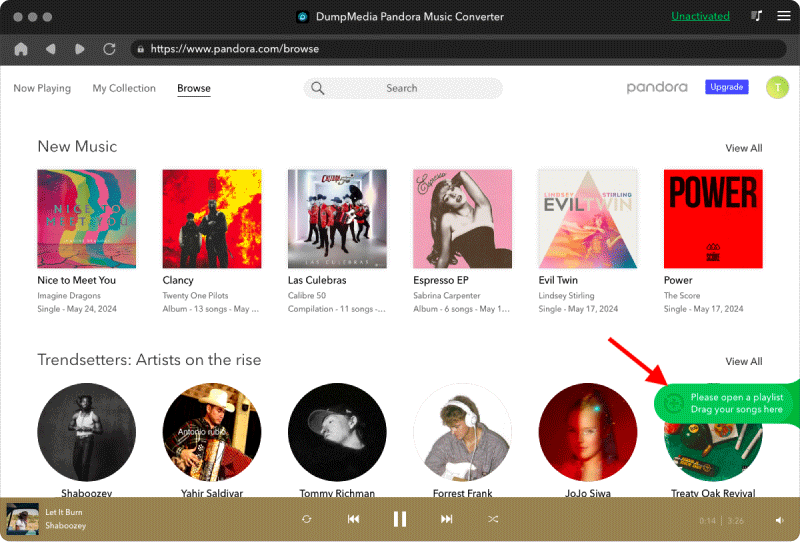
Шаг 2. Затем перетащите песни или плейлисты непосредственно на плавающий значок «+», чтобы добавить их в очередь конвертации и подготовить к загрузке.
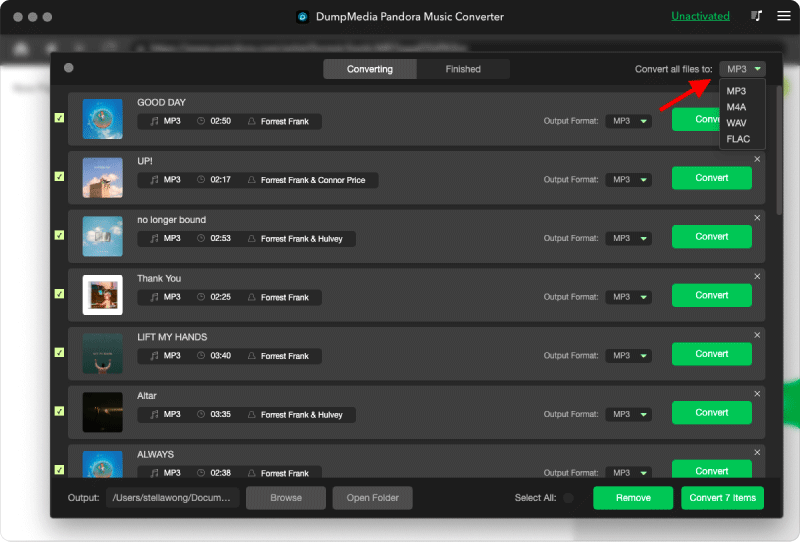
Шаг 3. После того, как вы определитесь с выбранными песнями, вы можете выбрать предпочтительный формат аудиофайла.
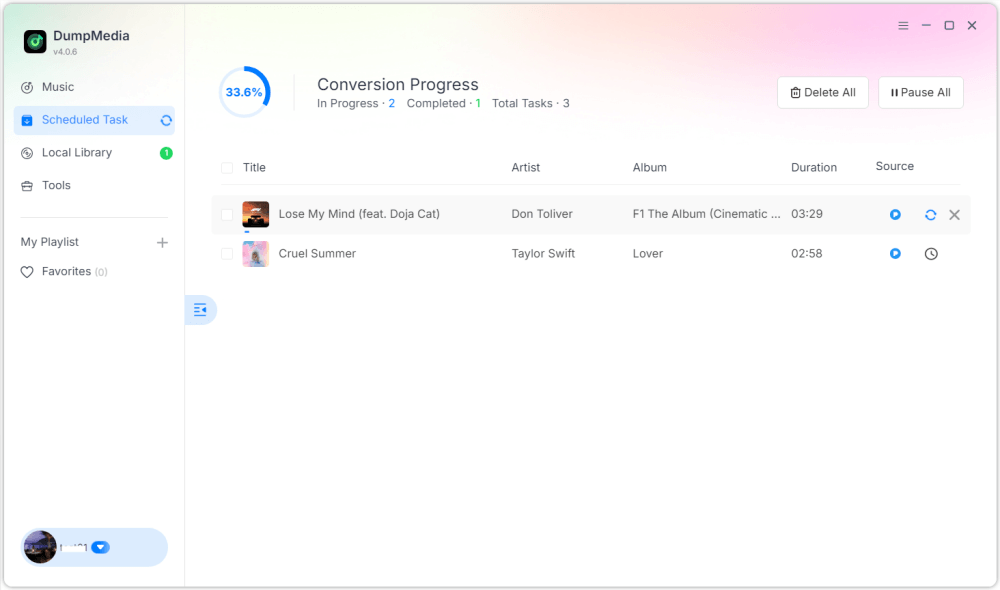
Шаг 4. После завершения настроек пользователи могут приступить к конвертации, нажав на значок «Конвертировать». Затем DumpMedia будет выполнять преобразование песен из Pandora в MP3 Благодаря своей сверхвысокой скорости, она обеспечивает скорость работы за считанные секунды.
Часть 4. FAQ
В1: Можно ли конвертировать песни из Pandora в... MP3 бесплатно?
Да, некоторые инструменты предлагают бесплатные пробные версии, но платные конвертеры, такие как... DumpMedia обеспечивают более высокую скорость и пакетную обработку.
DumpMedia часто запускает рекламные кампании; вы можете связаться с ними. DumpMedia Обратитесь в службу поддержки клиентов, чтобы узнать о дополнительных скидках и предложениях.
Вопрос 2: Законно ли конвертировать песни из Pandora в... MP3?
Конвертация для личного использования в автономном режиме, как правило, считается допустимой, однако распространение или коммерческое использование может нарушать законы об авторском праве.
Вопрос 3: Можно ли конвертировать целые плейлисты Pandora в формат, совместимый с Pandora? MP3 сразу?
Да. DumpMedia Pandora Music Converter поддерживает пакетное преобразование плейлистов и альбомов.
Q4: Будет ли MP3 сохранить информацию о песне?
Да, конвертер сохраняет метаданные, включая название, исполнителя, альбом и обложку.
Часть 5. Вывод
Преобразование песен из Pandora в MP3 Это лучший способ наслаждаться любимой музыкой в автономном режиме, создавать постоянные резервные копии и полностью контролировать воспроизведение на разных устройствах. Как конвертировать песни из Pandora в... MP3? С использованием DumpMedia С помощью Pandora Music Converter вы можете быстро и легко конвертировать песни, альбомы и плейлисты в формат, подходящий для любого устройства. MP3 без потери качества или метаданных. Начните конвертацию сегодня, чтобы навсегда сохранить свою коллекцию музыки Pandora.