


Как скопировать компакт-диск с аудиокнигой в MP3 (Бесплатные методы и лучшие альтернативы)
Копирование аудиокниги на компакт-диск. MP3 Это по-прежнему возможно, но уже не самый удобный способ наслаждаться аудиокнигами. Сегодня многие пользователи сталкиваются с множеством дисков, отсутствием метаданных и устаревшим оборудованием, пытаясь конвертировать свои коллекции аудиокниг. В этом руководстве вы узнаете, как скопировать аудиокнигу с CD на CD. MP3 шаг за шагом, а также рассмотрим распространенные проблемы, с которыми вы можете столкнуться. Что еще важнее, мы покажем вам лучшую, современную альтернативу, которая позволит вам наслаждаться аудиокнигами, вообще не полагаясь на компакт-диски.
Содержание Руководство Часть 1. Можно ли скопировать аудиокнигу с компакт-диска? MP3?Часть 2. Копирование аудиокниги с компакт-диска. MP3 Используя iTunes/Apple MusicЧасть 3. Копирование аудиокниги с компакт-диска. MP3 . Winмедиаплеер dowsЧасть 4. Распространенные проблемы при копировании аудиокниг на компакт-диски.Часть 5. Как скачать аудиокниги Audible MP3 (Наилучшее решение)Часть 6. Вывод
Часть 1. Можно ли скопировать аудиокнигу с компакт-диска? MP3?
Да, вы по-прежнему можете скопировать аудиокнигу с компакт-диска на CD. MP3 Файлы можно скопировать с помощью стандартного программного обеспечения для работы с мультимедиа. Однако вам понадобится компьютер с приводом CD/DVD, программа для копирования CD-дисков и достаточно времени для обработки нескольких дисков.
Хотя сам процесс практически не изменился, используемые технологии устарели. Многие современные ноутбуки больше не оснащены дисководами, что делает работу с CD-дисками менее практичной, чем раньше.
Часть 2. Копирование аудиокниги с компакт-диска. MP3 Используя iTunes/Apple Music
Как скопировать аудиокнигу с компакт-диска на MP3Вот лучшие способы это сделать. WinДоус и Мак.
Шаг 1. Открыто iTunesМузыка > Настройки (или Предпочтения) > Общие > Настройки импорта. Установите параметр «Использовать для импорта» на MP3 Кодировщик. Проверьте: "Использовать коррекцию ошибок при чтении аудиодисков" (помогает при работе с поцарапанными дисками из библиотеки).
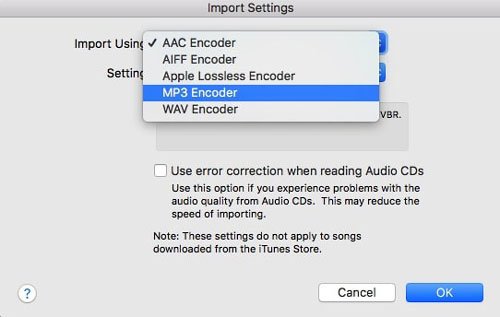
Шаг 2. Вставьте компакт-диск. Когда появится список треков, выделите все треки (Ctrl+A или Cmd+A).
Шаг 3. Нажмите на значок «Параметры» (три точки) или значок шестеренки и выберите «Объединить дорожки CD».
Шаг 4. Нажмите «Импорт CD». Повторите для каждого диска. Программа преобразует каждый трек в формат CD. MP3 формат.
Копирование аудиокниги на компакт-диск. MP3 Использовать iTunes довольно просто, но при работе с аудиокнигами следует обратить внимание на организацию глав и объединение файлов, чтобы в итоге не получилось 100 крошечных файлов для одной книги.
Часть 3. Копирование аудиокниги с компакт-диска. MP3 . Winмедиаплеер dows
Если вы находитесь на WinДля версий 10 или 11 можно использовать... WinDows Media Player Legacy для копирования аудиокниг с компакт-дисков. MP3.
Шаг 1. Открыто WinWindows Media Player. Перейдите в настройки копирования > Формат и выберите MP3.
Шаг 2. Перейдите в настройки копирования > Качество звука и выберите 192 Кбит/с.
Шаг 3. Вставьте компакт-диск и нажмите «Копировать CD».
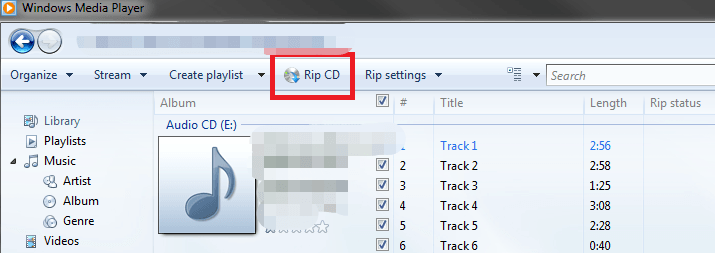
Это один из самых простых и бесплатных способов. Однако, WinВ Windows Media Player отсутствует функция «Объединить треки», поэтому на одном компакт-диске будет несколько файлов. Для этого потребуется ручное управление файлами.
Часть 4. Распространенные проблемы при копировании аудиокниг на компакт-диски.
Хотя копирование содержимого компакт-дисков — это надежный способ оцифровки вашей библиотеки, этот процесс часто сопряжен с рядом досадных трудностей:
- Затраты времени высоки: аудиокниги часто занимают 10 и более дисков, превращая простую задачу в медленную, монотонную рутину.
- Фрагментированный вывод: Многие программы для копирования экспортируют каждый трек как отдельный файл, в результате чего вы получаете сотни крошечных клипов вместо цельного аудиокниги.
- Пробелы в метаданных: Автоматизированные базы данных часто не распознают старые или нишевые аудиокниги, вынуждая вас вручную вводить названия, авторов и маркеры глав.
- Дефицит оборудования: Большинство современных ноутбуков и настольных компьютеров больше не имеют встроенных оптических приводов, что требует дополнительных затрат и создает лишние хлопоты при использовании внешнего CD-привода.
Часть 5. Как скачать аудиокниги Audible MP3 (Наилучшее решение)
Из-за ограничений в воспроизведении многие пользователи отказываются от компакт-дисков и выбирают цифровые платформы для аудиокниг. Цифровые аудиокниги обеспечивают мгновенный доступ (без физических дисков) и совместимость с различными устройствами. Однако есть одна проблема: большинство платформ (например, Audible) используют защиту DRM, что ограничивает возможности и места воспроизведения аудиокниг.
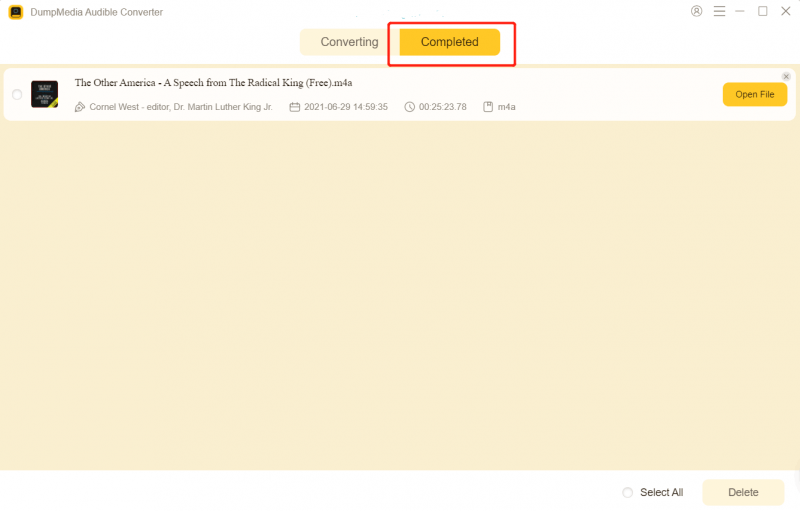
Если вам нужна гибкость MP3 Если не иметь дела с компакт-дисками, наиболее эффективный подход заключается в следующем: преобразовать цифровые аудиокниги в MP3 формат, Это где DumpMedia Звуковой конвертер становится полезным.
Бесплатная загрузка Бесплатная загрузка
Почему именно DumpMedia Звуковой конвертер?
- ✅ Удалить защиту DRM* Этот инструмент удаляет DRM-защиту, позволяя вам полностью контролировать свои файлы.
- ✅ Конвертировать Audible в MP3 С легкостью: Вы можете быстро загрузить аудиокниги Audible. MP3 а также другие форматы, такие как M4A или FLAC.
- ✅ Высокоскоростное преобразование: Преобразуйте целые аудиокниги за считанные минуты.
- ✅ Качество без потерь: При конвертации потери качества отсутствуют.
- ✅ Работает на нескольких устройствах: Слушайте аудиокниги в автономном режиме. в любом месте после конвертации.
Вместо копирования содержимого компакт-дисков вы можете создать полностью цифровую библиотеку аудиокниг, которая будет работать на любом устройстве.
Как использовать DumpMedia Audible Converter (Полное руководство) >>>
Часть 6. Вывод
Копирование компакт-дисков с аудиокнигами в MP3 Это по-прежнему возможно в 2026 году, но становится все более устаревшим и неэффективным. В то время как такие инструменты, как iTunes и другие, WinWindows Media Player справится с задачей, но для его запуска потребуется время, усилия и оборудование, которого у многих пользователей уже нет.
Если вы ищете более быстрое и гибкое решение, перейдите на цифровые аудиокниги и используйте... DumpMedia Audible Converter — более разумный выбор. Нет необходимости в CD-приводах, более быстрая обработка (нет необходимости менять диски) и возможность прослушивания в автономном режиме. Эти преимущества делают его лучшим выбором. DumpMedia Современная альтернатива традиционным рабочим процессам на компакт-дисках.
Бесплатная загрузка Бесплатная загрузка
*DumpMedia Эта программа расшифровывает и загружает ваши аудиокниги в файлы без DRM-защиты, позволяя получить чистую, неограниченную копию вашей библиотеки для любого устройства.

Скидка 30% >>>