


PC Audible App: How to Download Audible on WinDows
Looking for a PC Audible app to listen to your audiobooks on a Windows computer? You’re not alone. Many users prefer using a PC for longer listening sessions, better audio control, and multitasking. The good news is that Audible does support PC playback, but not in the way you might expect. While you can use Audible on a computer, some limitations affect flexibility, file access, and offline listening. In this guide, you’ll learn how to download and use the Audible app on PC, along with a smarter way to enjoy your audiobooks without restrictions.
Содержание Руководство Part 1. Is There an Audible App for PC? Part 2. How to Use Audible on PC? Part 3. Limitations of the Audible App on PCPart 4. Best Way to Listen to Audible on PC Without LimitsЧасть 5. Часто задаваемые вопросыЧасть 6. Резюме
Part 1. Is There an Audible App for PC?
Yes, but with some important details. Unlike mobile devices, there is no full-featured standalone Звуковой app for all Windows users. Instead, you have two main options:
1. Audible Web Player
- Accessible via your browser
- Не требуется установка
- Works on any PC
2. Audible App (Limited Windows Support)
- Available only in certain environments (e.g., Windows Store versions)
- Сегодня используется реже
For most users, the web player is the primary way to use Audible on PC.
Part 2. How to Use Audible on PC?
As of now, the dedicated Audible app for Windows has been discontinued. However, using Audible on your PC is still very straightforward, you just use your browser or a small sync tool. Here is the step-by-step guide to listen on your computer.
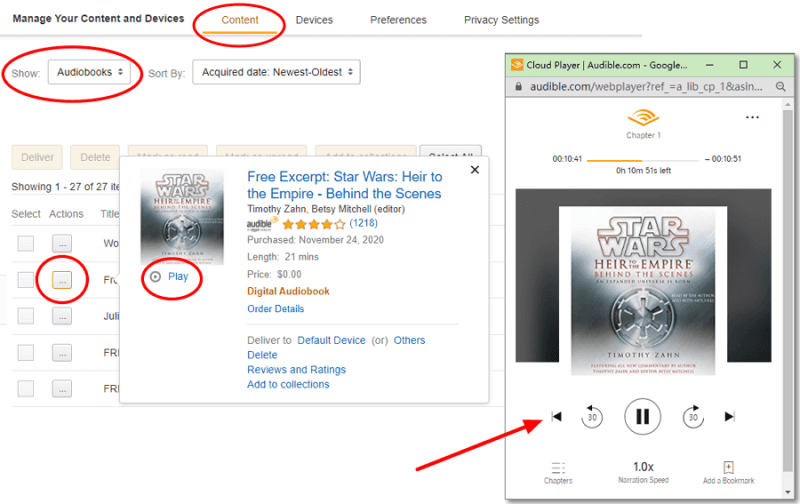
Шаг 1. Open Audible.com (or your regional site like .ca or .co.uk) and sign in.
Шаг 2. Click on Library in the top navigation bar.
Шаг 3. Find the book you want to hear and click the Listen Now button.
Шаг 4. A separate "Cloud Player" window will pop up. You can adjust narration speed, skip chapters, and add bookmarks here.
Советы по быстрому устранению неполадок
- Pop-up Blocker: If the Cloud Player doesn't open when you click "Listen Now," check your browser's address bar for a "Pop-up blocked" icon and select "Always allow."
- Audio Quality: In the Cloud Player settings (the gear icon), you can toggle between "Standard" and "High" quality if your internet connection is stable.
Part 3. Limitations of the Audible App on PC
While the PC Audible app (or web player) works, it comes with several restrictions:
1. No True File Access: You don’t actually own the audiobook files, you’re streaming or accessing them within Audible’s system.
2. Защита DRM: Audible files are locked in AAX format, meaning:
- Cannot be played on most media players
- Cannot be transferred freely
- Restricted to authorized apps
3. Limited Offline Flexibility: Offline playback is not always straightforward on PC compared to mobile devices.
4. Device Restrictions: You can’t easily move audiobooks to MP3 players, smartwatches, or car systems.
Part 4. Best Way to Listen to Audible on PC Without Limits
If you want full control over your audiobooks, such as playing them on any device, keeping them permanently, or using your preferred media player, you need a different approach. Instead of relying solely on the Audible app, many users choose to convert Audible books into standard formats like MP3. This removes restrictions and gives you complete flexibility. To do this efficiently, you can use DumpMedia Звуковой конвертер.
Бесплатная загрузка Бесплатная загрузка
Почему именно DumpMedia Звуковой конвертер?
- ✅ Удалить защиту DRM* Этот инструмент удаляет DRM-защиту, позволяя вам полностью контролировать свои файлы.
- ✅ Конвертировать Audible в MP3 С легкостью: Вы можете быстро скачать книги Audible в MP3 а также другие форматы, такие как M4A или FLAC.
- ✅ Высокоскоростное преобразование: Преобразуйте целые аудиокниги за считанные минуты.
- ✅ Качество без потерь: При конвертации потери качества отсутствуют.
- ✅ Работает на нескольких устройствах: Слушайте аудиокниги в автономном режиме. в любом месте после конвертации.
Как использовать DumpMedia Звуковой конвертер
Шаг 1. Откройте программу на своем компьютере. Она работает с обоими устройствами. WinWindows и Mac. Интерфейс удобен для пользователя, что делает его простым в использовании даже для новичков.
Бесплатная загрузка Бесплатная загрузка
Шаг 2. Откройте встроенный веб-плеер Audible. DumpMedia Войдите в свою учетную запись Audible. Найдите Audible и перетащите книгу, которую хотите загрузить, в конвертер.
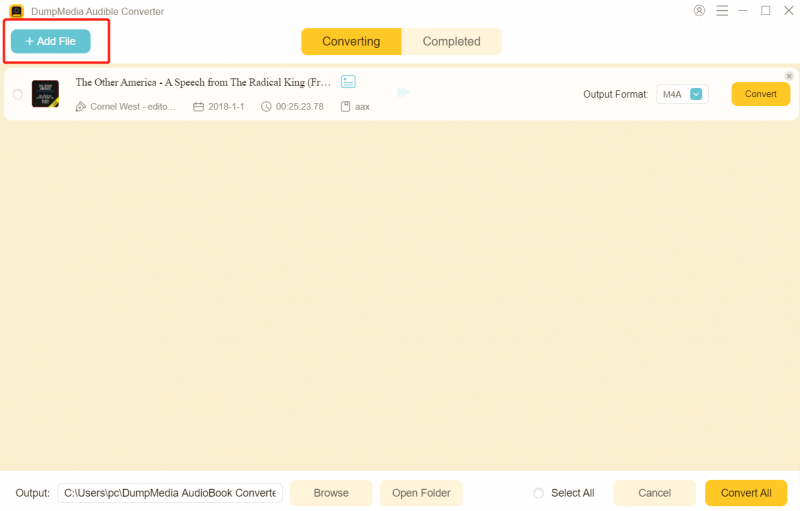
Шаг 3. В панели настроек выберите формат, в котором хотите загрузить файл.

Шаг 4. Последним шагом будет нажатие кнопки «Конвертировать», чтобы начать процесс конвертации.

Часть 5. Часто задаваемые вопросы
1. Can I download the Audible app on PC?
Yes, but not in the same way as on mobile devices. Most users access Audible on PC through the web player instead of a dedicated app. Some Windows versions may support an app, but availability and features are limited.
2. Why can’t I play Audible files on other media players?
Audible files are in AAX format and protected by DRM. This means they can only be played on authorized platforms like the Audible app or web player. Standard media players do not support this format.
3. Can I listen to Audible offline on PC?
Offline listening on PC is limited compared to mobile devices. In most cases, you need to stay within the Audible platform, and offline access may not always be available depending on your setup.
4. How do I transfer Audible books to other devices?
By default, you cannot freely transfer Audible books because of DRM restrictions. They are tied to your account and supported apps only. If you want to move audiobooks to devices like MP3 players, smartwatches, or car systems, you need to convert them into a compatible format such as MP3.
5. Is it legal to convert Audible books to MP3?
This depends on your local copyright laws. In many regions, converting content for personal use is allowed, but sharing or distributing converted files is not. Always check your local regulations before proceeding.
6. Do I still need the Audible app after converting files?
No. Once your Audible books are converted into MP3 or other standard formats, you can play them on any media player without using the Audible app.
Часть 6. Резюме
Using a PC Audible app is a convenient way to access your audiobooks, especially through the web player. However, it comes with limitations that restrict how you use and manage your files. If you’re looking for a more flexible solution, one that lets you play Audible books anywhere, anytime, without restrictions, converting them to MP3 is the best option. Take full control of your audiobook library with DumpMedia Audible Converter and enjoy unrestricted listening on your PC and beyond.
Бесплатная загрузка Бесплатная загрузка
*DumpMedia Эта программа расшифровывает и загружает ваши аудиокниги в файлы без DRM-защиты, позволяя получить чистую, неограниченную копию вашей библиотеки для любого устройства.

Скидка 30% >>>