


Как скачать Amazon Music для прослушивания в автономном режиме?
Многие пользователи хотят загрузить Amazon Music для прослушивания в автономном режиме , чтобы наслаждаться любимыми треками без подключения к интернету. Хотя Amazon Music позволяет загружать файлы для прослушивания в автономном режиме официально, они зашифрованы, не могут быть переданы на другие устройства и исчезают после окончания подписки. Если вам нужен постоянный доступ к офлайн-контенту и большая гибкость, это руководство покажет вам, как воспроизводить Amazon Music в автономном режиме, используя как официальные методы, так и профессиональное решение.
Содержание. Часть 1: Можно ли скачать Amazon Music для воспроизведения в автономном режиме? Часть 2: Как официально скачать Amazon Music для воспроизведения в автономном режиме? Часть 3: Лучший способ навсегда скачать Amazon Music. Часть 4: Часто задаваемые вопросы. Часть 5: Заключение.
Часть 1: Можно ли скачать Amazon Music для воспроизведения в автономном режиме?
Да, Amazon Music официально поддерживает прослушивание в автономном режиме для подписчиков, но есть некоторые ограничения:
- Доступно только пользователям Amazon Music Prime или Unlimited.
- Песни — это DRM-защищенный и не может быть свободно скопирован
- Загруженные файлы можно воспроизводить только в приложении Amazon Music.
- Отмена подписки лишит вас доступа к загруженным трекам.
Короче говоря, официальные загрузки позволяют временно воспроизводить музыку в автономном режиме, но не оставляют права собственности на неё навсегда. Пользователям, ищущим способы загрузить Amazon Music для прослушивания в автономном режиме, часто требуется решение, которое сохранит их музыку навсегда.
Часть 2: Как официально скачать Amazon Music для прослушивания в автономном режиме?
Как скачать Amazon Music для прослушивания в автономном режиме? Это очень просто. Вот пошаговая инструкция для вашей учетной записи Prime Music и Unlimited.
На мобильных устройствах (iOS / Android)
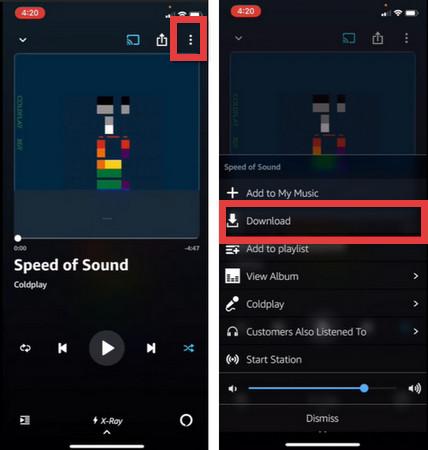
- Запустите приложение Amazon Music и убедитесь, что вы вошли в свою учетную запись.
- Перейдите к песне, альбому или плейлисту, который хотите скачать.
- Нажмите на значок с тремя точками (⋮) рядом с треком или вверху альбома/плейлиста.
- Выберите «Загрузить» из списка.
- После завершения загрузки рядом с музыкой появится синий значок «загружено» (обычно это галочка или стрелка вниз).
- Перейдите в раздел «Библиотека» > «Загруженные», чтобы увидеть только музыку, хранящуюся на вашем устройстве.
На рабочем столе (Win(dows / Mac)
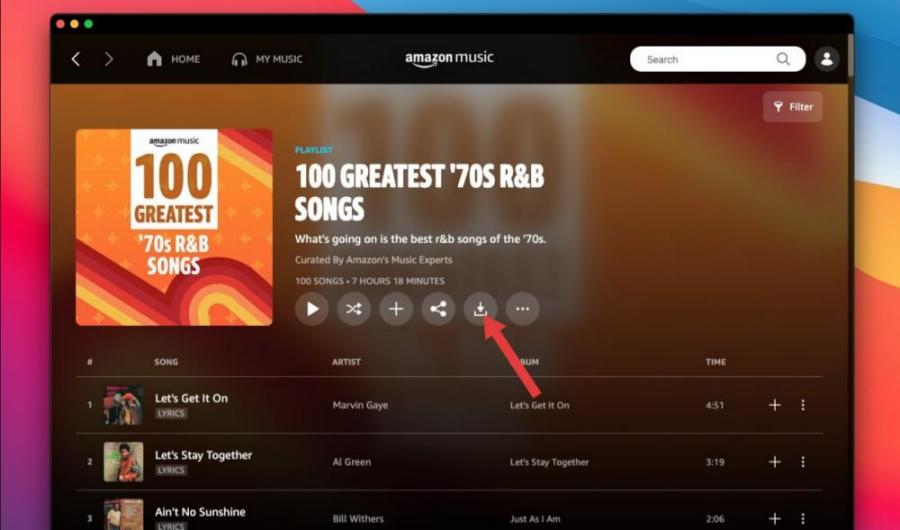
- Загрузите и установите приложение Amazon Music с веб-сайта Amazon или из магазина приложений.
- Перейдите в раздел «Библиотека» или воспользуйтесь поисковой строкой, чтобы найти нужную музыку.
- Нажмите на значок стрелки вниз рядом с названием песни или альбома.
- Вы можете просмотреть свои активные загрузки на вкладке «Загрузки» в боковой панели.
Ограничения при загрузке музыки в офлайн-режиме на Amazon Music.
Несмотря на возможность загрузки Amazon Music для прослушивания в автономном режиме, существуют существенные ограничения. Защита DRM при загрузке предотвращает копирование или передачу музыки. Воспроизведение в автономном режиме ограничено приложением Amazon Music. Кроме того, песни исчезают после окончания подписки. Эти ограничения делают невозможным полноценное владение музыкой в автономном режиме. Для пользователей, желающих получить постоянный доступ к музыке в автономном режиме, лучшим решением станет профессиональный загрузчик Amazon Music.
Часть 3: Лучший способ навсегда загрузить Amazon Music
Для преодоления этих ограничений мы рекомендуем DumpMedia Amazon Music ConverterПрофессиональный инструмент, предназначенный для загрузки музыки из Amazon Music для постоянного прослушивания в автономном режиме.
Бесплатная загрузка Бесплатная загрузка
DumpMedia Amazon Music Converter помогает пользователям загружать музыку из Amazon Music. MP3, WAV, FLAC и AAC. Таким образом, вы можете сохранять песни навсегда, хранить плейлисты в автономном режиме навсегда и передавать музыку на любое устройство. Даже если Приложение Amazon Music не работает. На вашем устройстве вы можете сразу же воспроизводить песни Amazon Music в автономном режиме на другом музыкальном плеере.
🏆Основные особенности DumpMedia Amazon Music Converter
- 🎵Удалите защиту DRM Amazon Music*
- 🎵Сохраните оригинальное качество звука
- 🎵Пакетная загрузка плейлистов и альбомов
- 🎵Высокая скорость конвертации
- 🎵Сохранение метаданных песни и тегов ID3
- 🎵Поддерживается воспроизведение в автономном режиме на любом устройстве
Скачайте Amazon Music, чтобы MP3 Пошаговая инструкция
Выполните следующие простые шаги, чтобы загрузить Amazon Music для прослушивания в автономном режиме. DumpMedia Музыкальный конвертер Amazon:
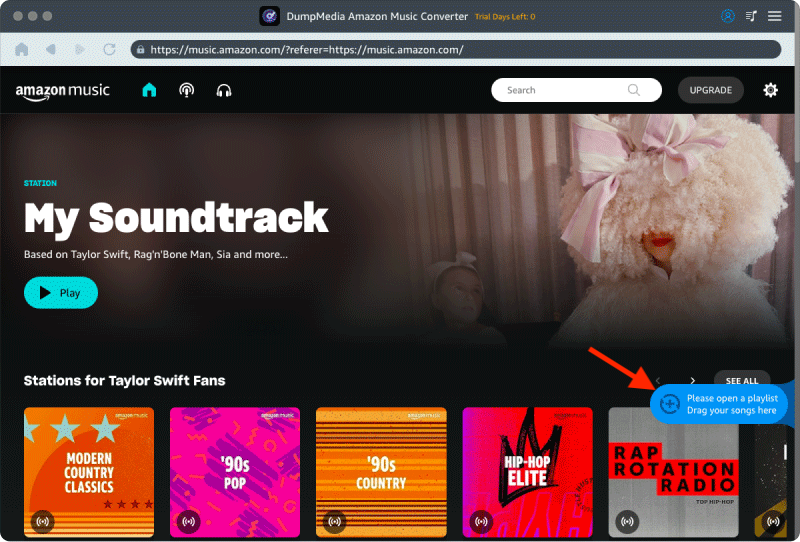
Шаг 1. Скачайте и установите DumpMedia Amazon Music Converter на вашем Mac/ПК. DumpMedia Используется встроенный веб-плеер Amazon Music. Для входа используйте свою учетную запись Amazon Music Premium/Free.
Бесплатная загрузка Бесплатная загрузка
Шаг 2. Найдите плейлист, альбом или конкретную песню, которую хотите конвертировать. Вы можете перетащить отдельную песню на значок «+» в правой части экрана. В качестве альтернативы, откройте весь плейлист/альбом и нажмите значок «Добавить для конвертации», чтобы загрузить весь список в конвертер.
Шаг 3. Выбрать MP3 (Наиболее совместимый вариант). Также можно изменить битрейт или частоту дискретизации. Для оптимального баланса выберите 320 кбит/с.
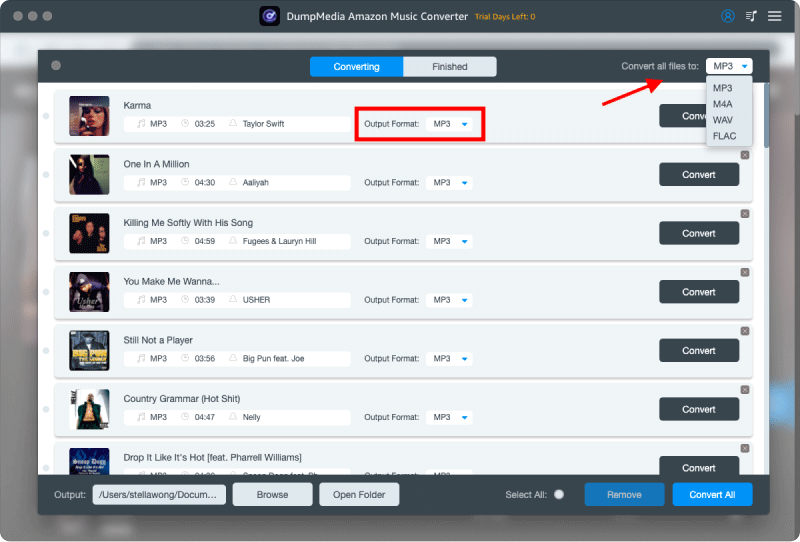
Шаг 4. После завершения настроек пользователи могут приступить к конвертации, нажав на значок «Конвертировать». Затем DumpMedia конвертирует Amazon Music в MP3 Благодаря своей сверхвысокой скорости, она обеспечивает скорость работы за считанные секунды.
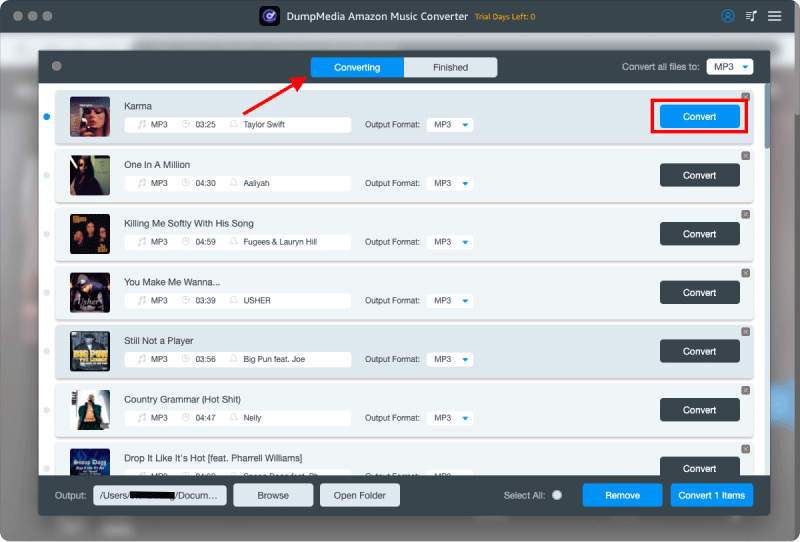
После конвертации вы сможете наслаждаться воспроизведением в автономном режиме на любом устройстве без ограничений. Это идеальное решение для пользователей, которые действительно хотят загрузить Amazon Music для постоянного прослушивания в автономном режиме.
Часть 4: часто задаваемые вопросы
В1. Могу ли я загрузить Amazon Music для прослушивания в автономном режиме?
Да, но официальные загрузки доступны только в приложении Amazon Music и исчезают после окончания подписки. DumpMedia позволяет постоянный MP3 загрузок.
Вопрос 2. Истекает ли время ожидания воспроизведения музыки в автономном режиме в Amazon Music?
Да, официальные офлайн-загрузки теряют силу, если вы отмените подписку.
Вопрос 3. Как мне конвертировать Amazon Music в... MP3?
Используйте DumpMedia Amazon Music Converter — конвертер песен, плейлистов и альбомов в формат, аналогичный Amazon Music Converter. MP3.
Вопрос 4. Можно ли перенести Amazon Music на USB-накопитель?
Официальные загрузки невозможны, но могут быть конвертированы. MP3 Файлы можно свободно передавать.
Q5. Является DumpMedia Безопасен ли Amazon Music Converter?
Да, это надежное программное обеспечение, которому доверяют тысячи пользователей.
Часть 5: Резюме
Хотя Amazon Music позволяет воспроизводить музыку в автономном режиме, официальные загрузки ограничены DRM-защитой, подпиской и ограничениями устройства. Наиболее эффективный способ загрузить Amazon Music для постоянного прослушивания в автономном режиме — использовать DumpMedia Amazon Music Converter. С DumpMediaВы можете конвертировать треки Amazon Music в... MP3Сохраняйте их навсегда и наслаждайтесь музыкой в автономном режиме на любом устройстве. Начните загружать свои любимые песни из Amazon Music уже сегодня и больше никогда не беспокойтесь о потере доступа.
Бесплатная загрузка Бесплатная загрузка
*DumpMedia Эта программа расшифровывает и загружает песни из Amazon Music в файлы без DRM-защиты, позволяя получить чистую, неограниченную копию вашей библиотеки для любого устройства. Ее функциональность не включает удаление DRM-защиты из локальных аудиофайлов.