


Come trasferire Spotify Creare playlist su YouTube Music (2 metodi collaudati)
Se stai cercando come trasferire Spotify Quando si tratta di spostare le playlist su YouTube Music, probabilmente stai cercando di trasferire le tue playlist accuratamente selezionate senza perdere brani, struttura o esperienza di ascolto. Sfortunatamente, Spotify YouTube Music non offre una funzione di trasferimento nativo diretto, il che significa che gli utenti devono affidarsi a strumenti di terze parti o a metodi alternativi. In questa guida, analizzeremo due soluzioni affidabili. Entrambi i metodi sono pratici, ma soddisfano esigenze diverse a seconda della velocità, del controllo e della qualità audio.
Guida ai contenuti Perché non è possibile trasferire direttamente Spotify su YouTube Musica Metodo 1: Converti Spotify Playlist a MP3 (Ideale per il controllo offline)Metodo 2: trasferimento Spotify Playlist su YouTube Music (Migrazione diretta)DOMANDE FREQUENTISintesi
Perché non è possibile trasferire direttamente Spotify su YouTube Musica
Prima di esplorare le possibili soluzioni, è essenziale comprendere i limiti tecnici intrinseci.
Perché Spotify Poiché YouTube Music e altri sistemi di licenza sono completamente diversi, le playlist non possono essere migrate direttamente tra le due piattaforme. Inoltre, le strutture delle librerie e i metadati sono in gran parte incompatibili e i singoli brani rimangono protetti da rigide restrizioni DRM. Ecco perché chiunque cerchi informazioni su come trasferire le playlist non può sapere come fare. Spotify La pubblicazione di playlist su YouTube Music deve avvalersi di soluzioni di terze parti.
Metodo 1: Converti Spotify Playlist a MP3 (Ideale per il controllo offline)
Come trasferire Spotify playlist su YouTube Music? Una delle soluzioni più affidabili è utilizzare un convertitore professionale come DumpMedia Spotify Music ConverterQuesto metodo è ideale se desideri avere il pieno controllo sui tuoi file musicali o se preferisci caricare manualmente i brani su YouTube Music.
🏅Perché scegliere DumpMedia Spotify Music Converter:
- ⭐Integrazione con Spotify lettore web
- ⭐Lavora per entrambi Spotify Premium e Spotify Utenti gratuiti
- ⭐Fornisce conversione batch fino a 35 volte più veloce
- ⭐convertire Spotify canzoni per MP3, WAV o FLAC
- ⭐Conserva i tag ID3 come artista, copertina, grafica, ecc.
- ⭐Preserva la qualità audio originale
- ⭐100% pulito. Nessun rischio nell'uso
Guida passo-passo
Passo 1: Scarica e installa il software sul tuo computer. Funziona con entrambi Windows e Mac. L'interfaccia è intuitiva, il che la rende adatta anche ai principianti.
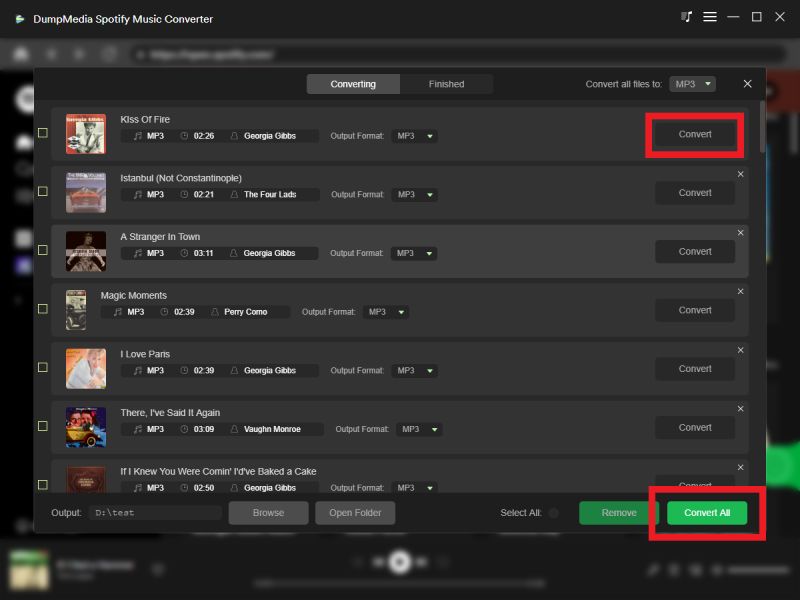
Passo 2: Apri l'integrato Spotify lettore web all'interno DumpMedia e accedi con il tuo Spotify account. Sfoglia Spotify e trascina i brani, gli album o le playlist che desideri scaricare nel convertitore.

Passo 3: Nel pannello delle impostazioni, selezionare MP3 come formato di output per consentire un MP3 Scarica i brani che hai selezionato.

Passo 4: Fai clic su Converti e scarica i brani direttamente come MP3 File.
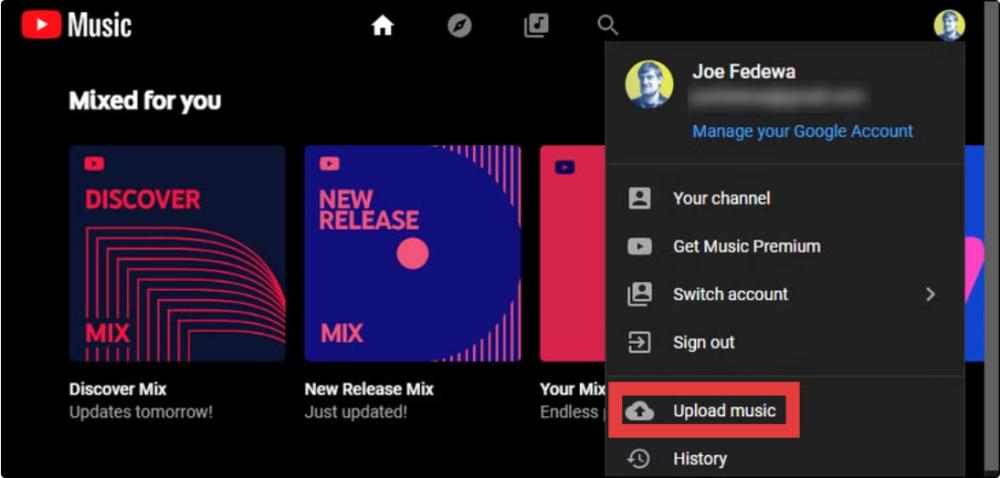
Passo 5: Come trasferire Spotify Vuoi caricare una playlist su YouTube Music? Apri music.youtube.com nel tuo browser. Clicca sulla tua immagine del profilo nell'angolo in alto a destra del sito e seleziona "Carica musica".
Vantaggi
- Conversione audio di alta qualità
- Controllo completo sui file
- Nessuna dipendenza dalle API della piattaforma
Svantaggi
- Richiede il caricamento manuale
- Processo leggermente più lungo
Metodo 2: trasferimento Spotify Playlist su YouTube Music (Migrazione diretta)
Come trasferire Spotify playlist su YouTube Music? Se il tuo obiettivo è velocità e comodità, uno strumento automatizzato come Trasferimento playlist di Any Music Converter questa funzionalità è un'opzione migliore. Questo metodo si collega direttamente Spotify e gli account YouTube Music e trasferisce automaticamente le playlist.
Guida passo-passo
Passo 1: Apri DumpMedia Qualsiasi Music Converter sul tuo computer. Vedrai un'interfaccia pulita e intuitiva, progettata per semplificare la conversione, anche per gli utenti alle prime armi.
Passo 2: Seleziona Strumenti > Trasferimento playlist.
Passo 3: Scegli Spotify come fonte.

Passo 4: Seleziona YouTube Music come piattaforma su cui desideri spostare la tua playlist.
Passo 5: Trova le playlist da cui vuoi trasferire Spotify Vai su YouTube Music e seleziona tutte le playlist che desideri spostare.
Passo 6: Avvia il processo di migrazione. Lo strumento abbina e trasferisce automaticamente i brani. Fai clic su "Vai a YouTube Music". Le tue playlist sono state spostate sul nuovo servizio e puoi iniziare ad ascoltare la tua nuova musica in streaming.
Vantaggi
- Trasferimento con un clic
- Nessun download manuale
- Veloce e adatto ai principianti
Svantaggi
- L'abbinamento dei brani potrebbe non essere 100% preciso
- Richiede una connessione API stabile
- Alcuni brani potrebbero mancare o essere stati sostituiti
DOMANDE FREQUENTI
1. Posso trasferire direttamente? Spotify playlist su YouTube Music?
No. Non esiste una funzione di trasferimento integrata ufficiale tra Spotify e YouTube Music.
2. Qual è il modo più semplice per trasferire Spotify playlist su YouTube Music?
Il metodo più semplice consiste nell'utilizzare uno strumento automatico di trasferimento delle playlist, che sincronizza entrambi gli account.
Nota: DumpMedia Gli abbonati ad Any Music Converter possono utilizzare gratuitamente la funzione di trasferimento delle playlist. Non sei ancora abbonato? Acquista prima Any Music Converter per usufruire di trasferimenti fluidi e velocissimi con il pieno controllo.
3. è DumpMedia Spotify Music Converter sicuro da usare?
Sì, è progettato per la conversione di musica personale e consente l'archiviazione offline dei brani.
4. Tutti i brani verranno trasferiti correttamente?
Non sempre. Gli strumenti automatici potrebbero non riuscire ad abbinare alcuni brani a causa di differenze di licenza.
5. Ho bisogno Spotify È possibile trasferire le playlist con un piano Premium?
No. La maggior parte degli strumenti di terze parti funziona con software gratuito. Spotify conti.
Sintesi
Se stai cercando di capire come trasferire Spotify playlist su YouTube Music, ci sono due approcci principali, Spotify Music Converter oppure la funzione di trasferimento playlist di Any Music Converter. Entrambe le soluzioni sono efficaci a seconda delle priorità.

Sconto del 30% >>>