


Come scaricare YouTube Music (guida per dispositivi mobili, PC e offline)
Molti amanti della musica desiderano scaricare YouTube Music per l'ascolto offline, soprattutto quando viaggiano, si spostano quotidianamente o desiderano risparmiare dati mobili. Sebbene YouTube Music offra la possibilità di scaricare ufficialmente i brani offline, esistono ancora diverse limitazioni che gli utenti spesso scoprono solo in seguito.
In questa guida, spiegheremo come scaricare brani da YouTube Music su dispositivi mobili e PC e come salvare i brani di YouTube Music in modo permanente per la riproduzione offline. Se stai cercando il modo migliore per scaricare brani da YouTube Music, questa guida completa ti aiuterà a comprendere tutte le opzioni disponibili.
Indice dei contenuti Parte 1. È possibile scaricare brani da YouTube Music? Parte 2. Scaricare brani da YouTube Music su dispositivi mobili Parte 3. Il modo migliore per scaricare brani da YouTube Music in modo permanente Parte 4. Domande frequenti sul download da YouTube Music Parte 5. Conclusione
Parte 1. È possibile scaricare brani da YouTube Music?
Sì, ma ci sono delle condizioni. Per scaricare ufficialmente YouTube Music, gli utenti di solito necessitano di un abbonamento attivo a YouTube Music Premium e dell'app YouTube Music.
I download ufficiali sono pensati principalmente per l'ascolto offline temporaneo all'interno dell'app. Questo è importante perché molti utenti che cercano come scaricare YouTube Music si aspettano di ottenere file locali permanenti, cosa che YouTube Music non offre direttamente.
Parte 2. Scaricare brani da YouTube Music su dispositivi mobili
Se desideri scaricare YouTube Music su Android o iPhone, segui questi passaggi.
Passaggio 1. Avvia l'app YouTube Music sul tuo dispositivo. Il download offline in genere richiede YouTube Music Premium.
Passaggio 2. Cerca i brani, gli album o le playlist che desideri salvare offline.
Passaggio 3. Tocca l'icona di download per avviare il download offline.
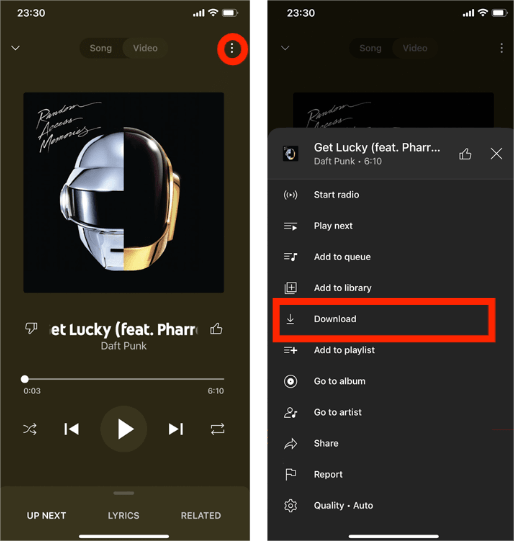
Una volta completato il download, la tua musica sarà disponibile offline all'interno dell'app. Questo è il metodo standard per scaricare ufficialmente YouTube Music.
Perché i brani musicali scaricati da YouTube Music presentano ancora delle limitazioni
Molti utenti credono che i brani scaricati diventino file permanenti, ma non è così che funzionano i download in streaming. I download ufficiali di YouTube Music rimangono all'interno dell'app e non possono essere trasferiti liberamente. Inoltre, i brani scaricati potrebbero scadere dopo la disdetta dell'abbonamento. Ciò significa che gli utenti non possiedono mai completamente i brani scaricati. Di conseguenza, gli utenti spesso cercano metodi migliori per scaricare YouTube Music senza le restrizioni dell'app.
Parte 3. Il modo migliore per scaricare definitivamente brani da YouTube Music
Una volta terminato l'abbonamento, i download offline potrebbero scomparire e la riproduzione dei brani potrebbe interrompersi. Se desideri conservare i brani in modo permanente, convertire YouTube Music in file audio locali è spesso la soluzione più semplice. DumpMedia Convertitore di musica su YouTube aiuta gli utenti a scaricare YouTube Music MP3. In questo modo, puoi salvare i brani in modo permanente, mantenere le playlist offline per sempre e trasferire la musica su qualsiasi dispositivo. Anche se il L'app YouTube Music non funziona Sul tuo dispositivo, puoi riprodurre immediatamente i brani di YouTube Music offline su un altro lettore musicale.
Download gratuito Download gratuito
🏅Perché scegliere DumpMedia Convertitore di musica di YouTube:
- ⭐Integrazione con il lettore web di YouTube Music
- ⭐Funziona sia per gli utenti di YouTube Music Premium che per quelli gratuiti
- ⭐Fornisce conversione batch fino a 35 volte più veloce
- ⭐Conserva i tag ID3 come artista, copertina, grafica, ecc.
- ⭐Preserva la qualità audio originale
- ⭐100% pulito. Nessun rischio nell'uso
Converti la musica di YouTube in MP3 Passo dopo Passo per La
Passo 1: Scarica e installa DumpMedia Installa YouTube Music Converter sul tuo Mac/PC. Avvialo e vedrai l'interfaccia. Accedi utilizzando il tuo account YouTube Music Premium/Gratuito.
Download gratuito Download gratuito
Passaggio 2. Quindi, trascina direttamente i brani o le playlist sull'icona "+" fluttuante per aggiungerli alla coda di conversione e prepararli per il download.
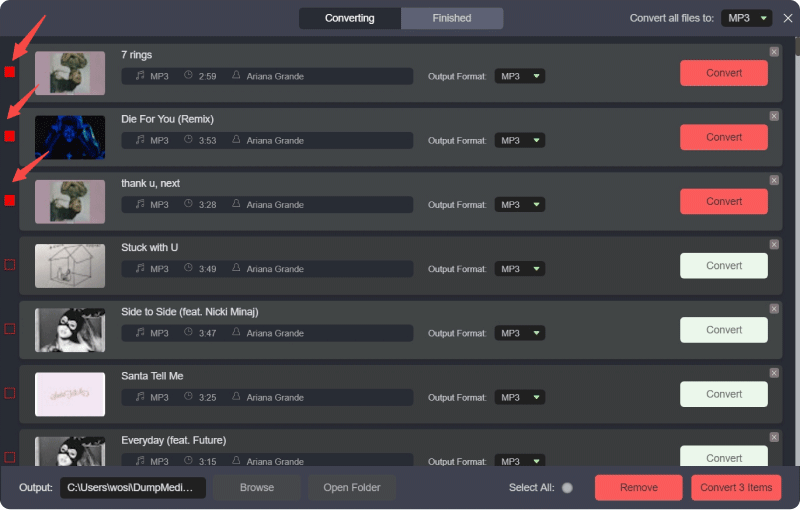
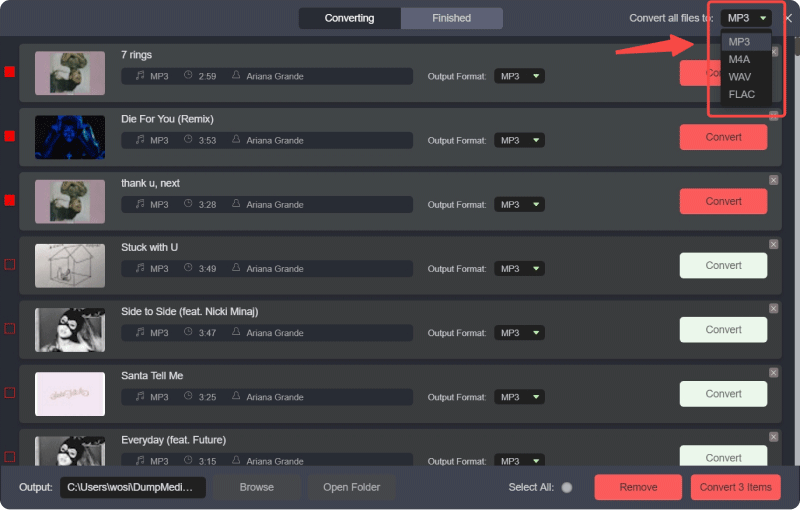
Passaggio 3. Una volta che sei soddisfatto dei brani che hai selezionato, puoi scegliere il formato di file audio che preferisci.
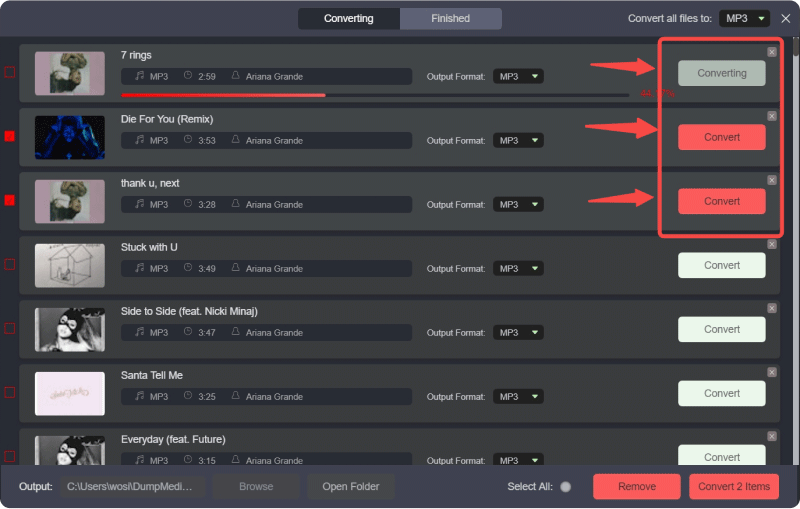
Passo 4: Una volta completate le impostazioni, gli utenti possono procedere con la conversione facendo clic sull'icona "Converti". Quindi DumpMedia convertirà i brani di YouTube in MP3 in pochi secondi grazie alla sua velocità superveloce.
Parte 4. Domande frequenti sul download di musica da YouTube
È possibile scaricare YouTube Music gratuitamente?
Il download offline ufficiale richiede in genere YouTube Music Premium.
I brani scaricati da YouTube Music scadono?
Sì. I download offline potrebbero smettere di funzionare dopo la scadenza dell'abbonamento o in caso di errore nella verifica dell'account.
È possibile trasferire i brani scaricati da YouTube Music su un altro dispositivo?
Le app scaricate ufficialmente di solito non possono essere trasferite liberamente.
È possibile convertire i brani di YouTube Music in MP3?
Sì. Strumenti come DumpMedia YouTube Music Converter consente agli utenti di salvare i brani di YouTube Music come MP3 file per la riproduzione offline permanente.
Parte 5. Conclusione
Imparare a scaricare YouTube Music è facile con YouTube Music Premium, ma i download ufficiali presentano comunque restrizioni dell'app e dipendono dall'abbonamento. Gli utenti che desiderano un accesso offline permanente, file musicali trasferibili e flessibilità di riproduzione a lungo termine spesso preferiscono convertire YouTube Music in file locali. MP3 file audio per il controllo completo delle proprie collezioni musicali.