


Transfer Spotify ad Apple Music: Guida completa (2026)
Molti ascoltatori che inizialmente utilizzavano Spotify alla fine decidono di spostare le loro librerie musicali su Apple Music Per una migliore integrazione con i dispositivi Apple, una migliore gestione della libreria o preferenze personali. Tuttavia, una delle principali sfide quando si cambia piattaforma è conservare le playlist accuratamente selezionate.
Fortunatamente, diversi strumenti possono aiutarti trasferimento Spotify ad Apple Music in modo rapido ed efficiente. In questa guida, ti guideremo attraverso i metodi migliori per trasferire Spotify playlist su Apple Music. Parleremo anche di strumenti online alternativi e di consigli pratici per rendere il processo di migrazione fluido e preciso.
Guida ai contenuti Parte 1. Perché gli utenti vogliono trasferire Spotify Playlist per Apple MusicParte 2. Il modo migliore per trasferire Spotify Playlist per Apple MusicParte 3. Strumenti online alternativi per il trasferimento Spotify Playlist per Apple MusicParte 4. Domande frequentiParte 5. Conclusione
Parte 1. Perché gli utenti vogliono trasferire Spotify Playlist per Apple Music
Prima di esplorare gli strumenti disponibili, è utile capire perché molti utenti decidono di trasferire Spotify in primo luogo ad Apple Music.
- Cambio di ecosistema musicale: per gli utenti che fanno molto affidamento sull'hardware Apple, Apple Music offre un'esperienza di ascolto più fluida.
- Mantenere le playlist esistenti: perdere le playlist durante un cambio di piattaforma può essere frustrante. Ecco perché gli strumenti di migrazione delle playlist sono così importanti.
- Il trasferimento manuale è inefficiente: questo approccio presenta diversi problemi, ad esempio la ricerca di ogni brano singolarmente richiede ore; alcune tracce potrebbero essere dimenticate, l'ordine della playlist potrebbe non corrispondere all'originale e altro ancora.
A causa di queste sfide, la maggior parte degli utenti si affida a strumenti specializzati per trasferire Spotify automaticamente su Apple Music.
Parte 2. Il modo migliore per trasferire Spotify Playlist per Apple Music
Tra gli strumenti disponibili, DumpMedia Qualsiasi convertitore di musica è una delle soluzioni più affidabili per gli utenti che desiderano trasferire Spotify su Apple Music in modo rapido e preciso. La sua funzione dedicata al trasferimento delle playlist semplifica l'intero processo di migrazione e garantisce che le playlist vengano ricreate correttamente.
Download gratuito Download gratuito
DumpMedia funziona su entrambi WinWindows e macOS, rendendolo accessibile a un'ampia gamma di utenti. La funzionalità di trasferimento delle playlist è progettata specificamente per la migrazione multipiattaforma delle playlist. Ecco alcune delle sue funzionalità più preziose:
- Trasferimento batch di playlist: puoi spostare più playlist contemporaneamente anziché trasferirle singolarmente.
- Smart Track Matching: il software identifica automaticamente i brani corrispondenti in Apple Music, migliorando la precisione del trasferimento.
- Conservazione dei metadati: durante la migrazione è possibile conservare informazioni importanti come titoli dei brani, artisti, album e ordine delle playlist.
Guida passo passo al trasferimento Spotify ad Apple Music
Per completare il processo di migrazione, segui questi semplici passaggi.
Passo 1: Scarica e installa DumpMedia Qualsiasi convertitore musicale sul tuo Wincomputer Windows o Mac. Dopo l'installazione, avviare il programma per accedere all'interfaccia principale.
Download gratuito Download gratuito
Passo 2: Vai alla funzione di trasferimento della playlist all'interno del programma. Scegli Spotify come fonte.

Passaggio 3. Seleziona Apple Music come piattaforma su cui desideri spostare la tua playlist.
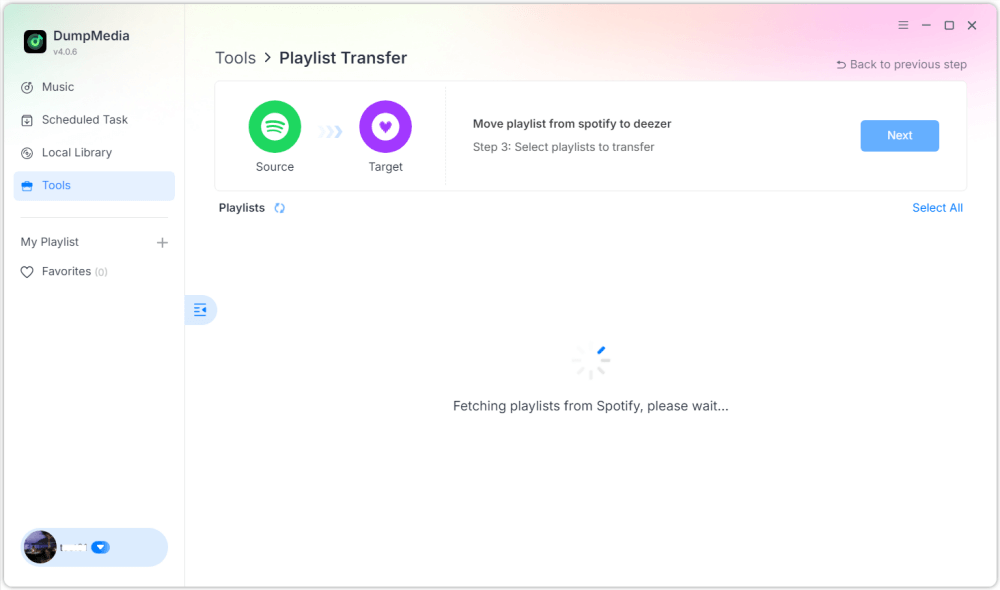
Passo 4: Trova le playlist da cui vuoi trasferire Spotify su Apple Music e seleziona tutte le playlist che vuoi spostare.

Passaggio 5. Fare clic su Converti per avviare il trasferimento.
Passaggio 6. Il trasferimento è terminato. Fai clic su "Vai ad Apple Music". Le tue playlist sono state trasferite al nuovo servizio e puoi iniziare ad ascoltare la tua nuova musica in streaming.
Per gli utenti con grandi raccolte musicali, questa soluzione fornisce uno dei modi più semplici per trasferire Spotify su Apple Music senza errori o tracce mancanti.
Parte 3. Strumenti online alternativi per il trasferimento Spotify Playlist per Apple Music
Sebbene il software desktop sia spesso l'opzione più affidabile, alcuni utenti preferiscono gli strumenti online perché non richiedono installazione. Diversi servizi basati sul web consentono di trasferire Spotify su Apple Music direttamente da un browser. Due scelte popolari sono TuneMyMusic e Soundiiz.
Utilizzo di TuneMyMusic
TuneMyMusic è un semplice servizio di trasferimento playlist online che supporta numerose piattaforme musicali. Offre un'interfaccia intuitiva per gli utenti che desiderano spostare le playlist tra i servizi.
Passaggio 1. Visita il sito web di TuneMyMusic e fai clic su "Iniziamo".
Passo 2: Seleziona Spotify come piattaforma di origine e accedi al tuo account.
Passaggio 3. Seleziona la playlist che desideri migrare oppure incolla l'URL della playlist.
Passaggio 4. Accedi al tuo account Apple Music per autorizzare il trasferimento.

Passaggio 5. Fai clic su "Avvia lo spostamento della mia musica". Il servizio abbinerà i brani e creerà la playlist in Apple Music.
Utilizzo di Soundiiz
Soundiiz è un'altra potente piattaforma di gestione delle playlist online che supporta molti servizi di streaming.
Passaggio 1. Registrati o accedi alla dashboard di Soundiiz.
Passo 2: Autorizzare Spotify così Soundiiz potrà accedere alle tue playlist.
Passaggio 3. Aggiungi Apple Music come servizio connesso.
Passaggio 4. Scegli la playlist che desideri trasferire.
Passaggio 5. Fai clic su Converti e scegli Apple Music come destinazione.
Una volta completato il processo, la playlist dovrebbe apparire nella libreria di Apple Music.
Limitazioni degli strumenti online
Sebbene gli strumenti online siano comodi, possono presentare diversi svantaggi:
- Le versioni gratuite spesso limitano il numero di brani trasferiti
- La precisione della corrispondenza può variare
- Le playlist di grandi dimensioni potrebbero richiedere più tempo per essere elaborate
- La connettività Internet influisce sulle prestazioni
Parte 4. Domande frequenti
Posso trasferire Spotify ad Apple Music gratuitamente?
Alcuni strumenti online offrono trasferimenti gratuiti di playlist, ma potrebbero limitare il numero di brani. Gli strumenti premium in genere offrono trasferimenti più rapidi e funzionalità aggiuntive.
Tutti i brani verranno trasferiti correttamente?
La maggior parte dei brani può essere abbinata tra i due servizi, ma occasionalmente alcune tracce potrebbero non essere disponibili a causa di differenze di licenza.
Quanto tempo ci vuole per trasferire le playlist?
Il tempo necessario dipende dalle dimensioni della playlist. Le playlist più piccole possono essere trasferite in pochi minuti, mentre le librerie più grandi potrebbero richiedere più tempo.
Posso trasferire più playlist contemporaneamente?
Sì. Alcuni strumenti, tra cui DumpMedia Any Music Converter supporta i trasferimenti batch, così puoi spostare più playlist contemporaneamente.
È sicuro utilizzare strumenti di trasferimento playlist?
Gli strumenti affidabili utilizzano metodi di autenticazione sicuri per connettersi ai tuoi account di streaming. Scegli sempre servizi affidabili quando effettui trasferimenti. Spotify ad Apple Music.
Parte 5. Conclusione
Spostare le playlist tra i servizi di streaming non è più un problema. Con gli strumenti giusti, puoi trasferire Spotify su Apple Music rapidamente mantenendo intatta la tua libreria musicale. Grazie alla sua potente funzione di trasferimento playlist, DumpMedia ti permette di trasferire Spotify Trasferisci i brani su Apple Music in modo accurato, mantieni la struttura delle playlist e trasferisci più playlist con facilità. Scegliendo il metodo giusto, puoi ascoltare la tua musica preferita su Apple Music senza perdere le playlist che hai creato per anni.