


Come trasferire Spotify Playlist di Amazon Music?
I servizi di streaming musicale hanno trasformato il modo in cui le persone ascoltano la musica. Tuttavia, cambiare piattaforma a volte può essere scomodo, soprattutto quando si hanno playlist accuratamente selezionate e create nel tempo. Molti utenti che in precedenza si affidavano a Spotify può decidere di provare Amazon Musica per la sua integrazione con i dispositivi Amazon, l'ampia libreria musicale e la compatibilità con gli smart speaker abilitati per Alexa.
Fortunatamente, diversi strumenti ora consentono di spostare automaticamente le playlist tra i servizi di streaming. In questa guida, spiegheremo i metodi più efficaci per trasferimento Spotify playlist su Amazon Music utilizzando strumenti online, software desktop e app mobili. Sia che tu stia utilizzando WinChe tu abbia un dispositivo iOS, un Mac o un Android, troverai una soluzione che ti aiuterà a migrare le tue playlist in modo rapido e preciso.
Guida ai contenuti Parte 1. Trasferimento Spotify Playlist per Amazon Music OnlineParte 2. Trasferimento Spotify Playlist su Amazon Music su Windows/MacParte 3. Trasferimento Spotify Playlist su Amazon Music su iOSParte 4. Trasferimento Spotify Playlist per Amazon Music su AndroidParte 5. Domande frequentiParte 6. Conclusione
Parte 1. Trasferimento Spotify Playlist per Amazon Music Online
Per gli utenti che desiderano un metodo rapido e semplice senza installare software, gli strumenti di trasferimento playlist online rappresentano un'opzione pratica. Questi servizi consentono di collegare i propri account di streaming tramite un browser web e di migrare automaticamente le playlist tra le piattaforme.
Uno degli strumenti online più popolari per questo scopo è TuneMyMusic. TuneMyMusic è uno strumento di migrazione delle playlist basato sul web che supporta molte piattaforme di streaming. Consente agli utenti di trasferire Spotify playlist su Amazon Music in pochi semplici passaggi.
Funzionalità principali
- Funziona direttamente nel tuo browser web
- Supporta molte piattaforme di streaming
- Interfaccia semplice con guida passo passo
- Non è necessaria alcuna installazione del software
Passaggi per il trasferimento Spotify Playlist su Amazon Music con TuneMyMusic
Passaggio 1. Visita il sito web di TuneMyMusic e fai clic sul pulsante "Iniziamo" per avviare la procedura.
Passo 2: Scegli Spotify come piattaforma di origine e accedi al tuo account. Lo strumento ti chiederà l'autorizzazione per accedere alle tue playlist.
Passaggio 3. Una volta stabilita la connessione, è possibile selezionare la playlist specifica che si desidera migrare oppure incollare il link della playlist. Il sistema caricherà tutti i brani presenti in quella playlist.
Passaggio 4. Successivamente, scegli Amazon Music come servizio di destinazione e accedi al tuo account Amazon per autorizzare il trasferimento.

Passo 5: Fai clic su "Inizia a spostare la mia musica". Lo strumento abbinerà automaticamente i brani da Spotify con il catalogo Amazon Music.
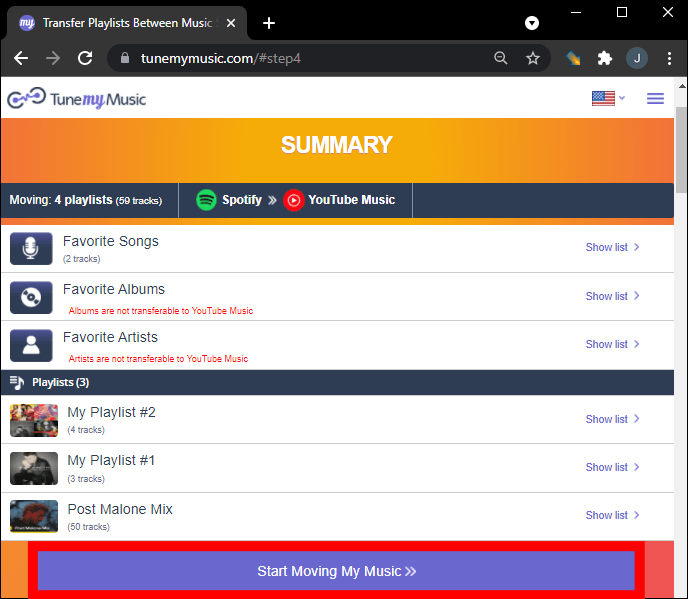
Passaggio 6. Al termine della procedura, apri la tua libreria di Amazon Music per verificare che la playlist sia stata creata correttamente.
Utilizzare uno strumento online come TuneMyMusic è uno dei modi più veloci per trasferire Spotify playlist su Amazon Music per playlist di piccole o medie dimensioni. Tuttavia, per gli utenti con librerie musicali di grandi dimensioni o per coloro che desiderano maggiore stabilità, una soluzione desktop potrebbe essere la scelta migliore.
Parte 2. Trasferimento Spotify Playlist su Amazon Music su Windows/Mac
Se si desidera una soluzione più affidabile e ricca di funzionalità, l'utilizzo di un software desktop è spesso la soluzione migliore. DumpMedia Qualsiasi convertitore di musica è un potente programma progettato per gestire e convertire la musica, offrendo anche una funzione dedicata al trasferimento delle playlist. DumpMedia consente agli utenti di trasferire Spotify playlist su Amazon Music in modo efficiente, preservando al contempo le informazioni sulla playlist e i metadati dei brani.
Download gratuito Download gratuito
Funzionalità principali
- supporti Windows e macOS
- Funzione di trasferimento playlist dedicata
- Migrazione batch della playlist
- Abbinamento intelligente delle tracce
- Mantiene metadati come artista, album e titoli delle tracce
- Elaborazione locale stabile senza limitazioni del browser
Queste caratteristiche lo rendono uno dei modi più efficienti per trasferire Spotify playlist su Amazon Music per gli utenti con playlist di grandi dimensioni.
Guida passo-passo
Passo 1: Scarica e installa DumpMedia Qualsiasi convertitore musicale sul tuo Wincomputer Windows o Mac. Avviare il programma dopo l'installazione.
Download gratuito Download gratuito
Passo 2: Scegli Strumenti > Trasferimento playlist. Seleziona Spotify come fonte.

Passaggio 3. Seleziona Amazon Music come destinazione.
Passaggio 4. Seleziona cosa trasferire: supportiamo i tuoi brani, artisti, album preferiti e le tue playlist personalizzate.

Passaggio 5. Fare clic su Converti per avviare il trasferimento.
Passaggio 6. Il trasferimento è terminato. Fai clic su "Vai ad Amazon Music". Le tue playlist sono state trasferite a un nuovo servizio e puoi iniziare ad ascoltare le nuove playlist su Amazon Music.
Rispetto ai servizi online, questo metodo garantisce maggiore stabilità e precisione durante il trasferimento Spotify playlist su Amazon Music.
Parte 3. Trasferimento Spotify Playlist su Amazon Music su iOS
Se preferisci utilizzare un dispositivo mobile, diverse app possono aiutarti a trasferire Spotify Trasferisci playlist su Amazon Music direttamente dal tuo iPhone o iPad. Una delle opzioni più popolari è SongShift. SongShift è una nota app per la migrazione delle playlist progettata per gli utenti iOS. Supporta molti servizi di streaming musicale e offre un'interfaccia intuitiva per il trasferimento delle playlist.
Funzionalità principali
- Interfaccia mobile facile da usare
- Supporta più piattaforme di streaming
- Consente trasferimenti batch di playlist
- Creato appositamente per dispositivi iOS
Passaggi per il trasferimento Spotify Playlist su Amazon Music con SongShift
Passo 1: Scarica SongShift dall'App Store e apri l'app. Autorizza Spotify in modo che l'app possa accedere alle tue playlist.
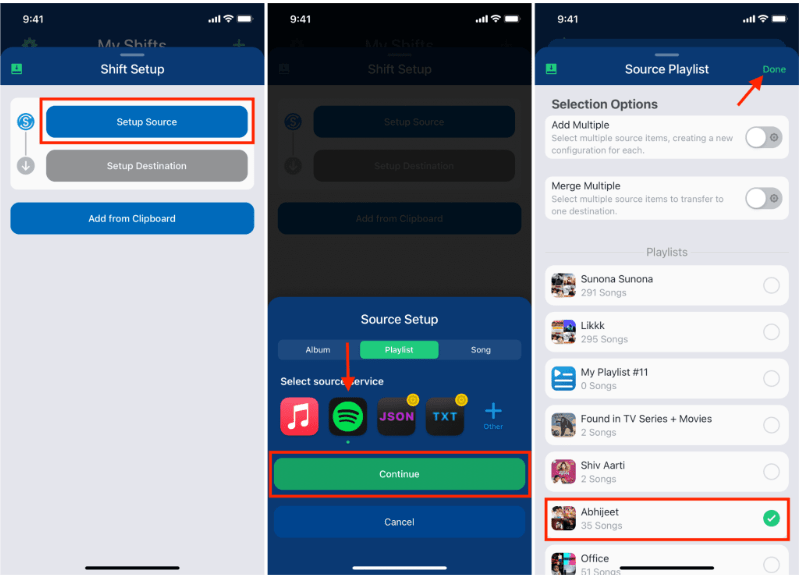
Passaggio 2. Aggiungi Amazon Music come servizio di destinazione accedendo al tuo account Amazon.
Passo 3: Scegliere il Spotify playlist che vuoi migrare.
Passaggio 4. Tocca Avvia Shift e lascia che l'app abbini i brani tra le diverse piattaforme.
Una volta completato il processo, la tua playlist dovrebbe apparire su Amazon Music. SongShift è un'opzione comoda per gli utenti che desiderano trasferire Spotify playlist su Amazon Music senza utilizzare un computer.
Parte 4. Trasferimento Spotify Playlist per Amazon Music su Android
Gli utenti Android possono anche trasferire playlist tra servizi di streaming utilizzando app dedicate. Una soluzione ampiamente utilizzata è FreeYourMusic. FreeYourMusic è uno strumento di trasferimento musicale multipiattaforma compatibile con Android, iOS e altri dispositivi. Wine macOS. Consente agli utenti di spostare le playlist tra i servizi di streaming con il minimo sforzo.
Funzionalità principali
- Supporta molte piattaforme di streaming
- Semplice processo di trasferimento
- Funziona su più dispositivi
- Consente trasferimenti batch di playlist
Passaggi per il trasferimento Spotify Playlist su Amazon Music con FreeYourMusic
Passo 1: Scarica FreeYourMusic dal Google Play Store e apri l'applicazione. Seleziona Spotify come piattaforma di origine e accedi al tuo account.
Passaggio 2. Seleziona Amazon Music e accedi al tuo account.
Passo 3: Scegli il Spotify playlist che vuoi migrare.
Passaggio 4. Tocca Trasferisci per avviare la migrazione. L'app abbinerà i brani e ricreerà la playlist in Amazon Music.
Parte 5. Domande frequenti
1. Posso trasferire Spotify playlist su Amazon Music gratuitamente?
Alcuni strumenti offrono trasferimenti gratuiti di playlist con limitazioni, come un numero massimo di brani per trasferimento. Le versioni premium solitamente eliminano queste restrizioni.
2. Ogni brano verrà trasferito correttamente?
La maggior parte dei brani verrà trasferita correttamente, ma occasionalmente alcune tracce potrebbero non essere disponibili su entrambe le piattaforme a causa di differenze di licenza.
3. Quanto tempo ci vuole per trasferire le playlist?
Il tempo necessario dipende dalle dimensioni della playlist. Le playlist più piccole potrebbero richiedere pochi minuti, mentre quelle più grandi potrebbero richiedere più tempo.
4. È sicuro utilizzare strumenti di trasferimento playlist?
Gli strumenti affidabili utilizzano un'autenticazione sicura per accedere ai tuoi account. Scegli sempre applicazioni affidabili quando effettui trasferimenti. Spotify playlist su Amazon Music.
Parte 6. Conclusione
Che tu preferisca un servizio online, un programma desktop o un'app mobile, ci sono diversi modi per trasferire Spotify playlist su Amazon Music in modo rapido ed efficiente. Per gli utenti che desiderano risultati più stabili e accurati, soprattutto per playlist di grandi dimensioni, DumpMedia Any Music Converter offre una delle migliori soluzioni.