


Come trasferire Spotify su USB: Riproduci Spotify Musica ovunque
Voglio trasferirmi Spotify su USB per la riproduzione offline? Molti utenti cercano di spostare i loro preferiti Spotify canzoni su un'unità USB da utilizzare in auto, altoparlanti o altri dispositivi, ma ti rendi subito conto che non è così semplice come trascinare i file. Il problema principale è che Spotify La musica è protetta da copyright e non può essere copiata direttamente. In questa guida, condivideremo il metodo migliore per renderlo possibile.
Guida ai contenuti Parte 1. Puoi scaricare Spotify Trasferire musica direttamente su USB?Parte 2. L'unico modo per trasferirsi Spotify Musica su USBParte 3. Domande frequentiParte 4. Conclusione
Parte 1. Puoi scaricare Spotify Trasferire musica direttamente su USB?
La risposta breve è no. Non è possibile trasferire direttamente Spotify su USB. Ecco perché:
- Spotify I download sono crittografati
- I file vengono memorizzati in un formato protetto
- La musica può essere riprodotta solo all'interno Spotify App
Anche se tu scaricare brani per l'ascolto offline, questi file non possono essere copiati su un'unità USB o utilizzati all'esterno SpotifyCiò significa trasferire Spotify La connessione tramite USB richiede un passaggio aggiuntivo.
Parte 2. L'unico modo per trasferirsi Spotify Musica su USB
Per trasferire correttamente i brani da Spotify per l'unità USB, devi prima convertire le tracce in formato senza DRM MP3 formatoQuesto è il metodo più affidabile per garantire la piena compatibilità. Una volta convertiti, i file diventano completamente accessibili, liberamente trasferibili e pronti per essere riprodotti su qualsiasi dispositivo.
DumpMedia Spotify Music Converter è specificamente progettato per colmare questo divario. Come strumento di livello professionale, semplifica il processo di conversione rimuovendo la protezione DRM* mantenendo 100% qualità audio originale. Sia che tu voglia eseguire il backup di una singola traccia o di una playlist enorme, DumpMedia Garantisce che la tua musica sia pronta per qualsiasi dispositivo USB in pochi clic.
🏅 Altre fantastiche funzionalità
- ⭐Integrazione con Spotify lettore web
- ⭐Lavora per entrambi Spotify Premium e Spotify Utenti gratuiti
- ⭐Fornisce conversione batch fino a 35 volte più veloce
- ⭐Conserva i tag ID3 come artista, copertina, grafica, ecc.
- ⭐Preserva la qualità audio originale
- ⭐100% pulito. Nessun rischio nell'uso
Come convertire Spotify Musica per MP3
Passo 1: Scarica e installa DumpMedia Spotify Music Converter al tuo Mac/Windows. Avvialo e vedrai l'interfaccia. Usa il tuo Spotify Account Premium/Gratuito per accedere.
Download gratuito Download gratuito
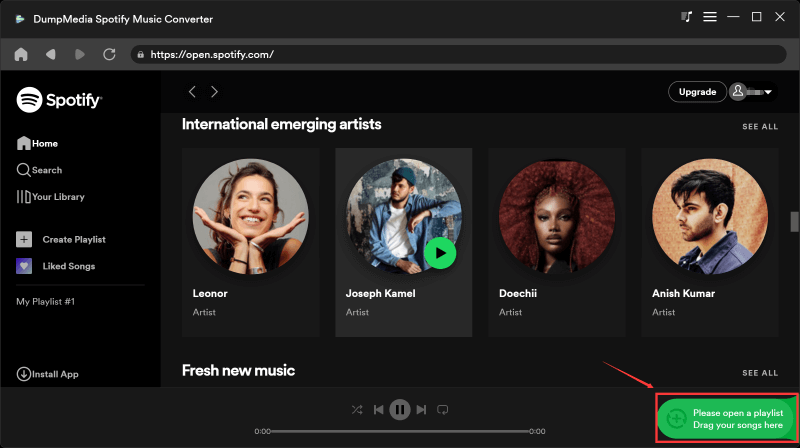
Passaggio 2. Ora puoi navigare fino ai brani che desideri scaricare. Puoi trascinare direttamente un album o una playlist per aggiungere tutti i brani all'elenco di conversione.
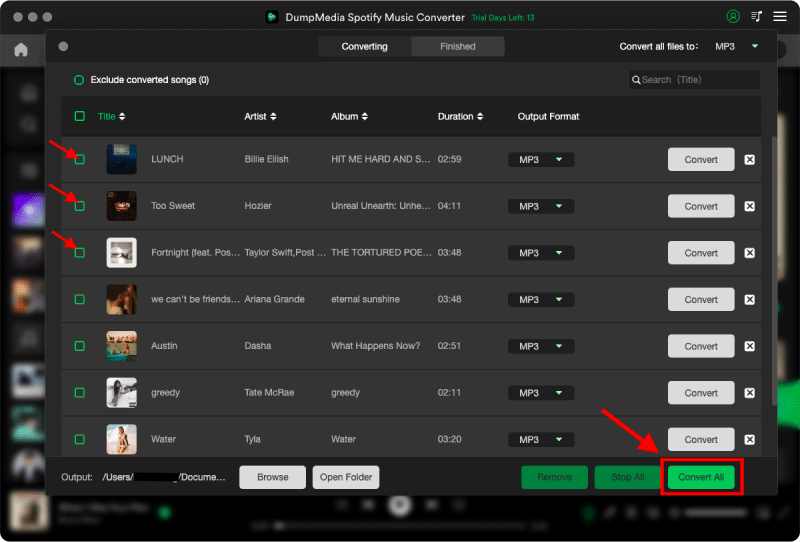
Passo 3: Nell'interfaccia di conversione, puoi scegliere il formato di output come MP3, e imposta Sample Rate o Bitrate su Preference. Scegli anche una cartella in cui salvare i file musicali.

Passaggio 4. Infine, tocca il pulsante "Converti" in fondo alla pagina e il software avvierà il processo di conversione.
Trasferimento convertito Spotify Musica su USB
Dopo la conversione, spostando le canzoni da Spotify La conversione in USB diventa semplice e veloce.
Passo 1: Inserisci l'unità USB nel computer. Apri la cartella con i file convertiti. MP3 File.
Passaggio 2. Seleziona i brani o le playlist. Trascinali e rilasciali sull'unità USB.
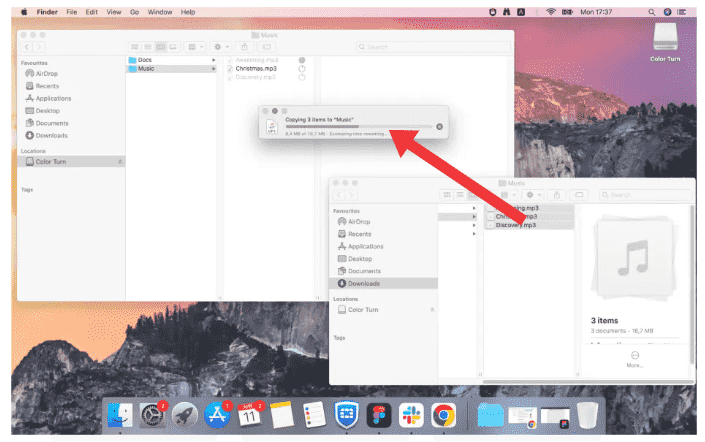
Passaggio 3. Espellere in modo sicuro la chiavetta USB.
Parte 3. Domande frequenti
1. Posso trasferire Spotify collegarlo direttamente alla porta USB?
No, non è possibile trasferire Spotify canzoni direttamente su USB. Spotify la musica è protetta da DRM e i brani scaricati vengono memorizzati in un formato crittografato che non può essere copiato o utilizzato al di fuori del Spotify app.
2. Come faccio a trasferire? Spotify Canzoni da trasferire su USB per la mia auto?
Trasferire Spotify Per riprodurre musica in auto su USB, è necessario:
- convertire Spotify musica in MP3 formato
- Copia i file convertiti sulla tua unità USB
Dopodiché, l'autoradio dovrebbe essere in grado di riprodurre i file normalmente.
3. Qual è il formato migliore per Spotify Trasferimento su USB?
MP3 è il formato migliore per Spotify È possibile trasferire brani su USB perché questo formato è supportato da quasi tutti i dispositivi, inclusi autoradio, altoparlanti e televisori.
Altri formati come WAV o FLAC offrono una qualità superiore, ma potrebbero non essere compatibili con tutti i dispositivi USB.
4. Ho bisogno Spotify Premio da trasferire Spotify su USB?
Non necessariamente. Mentre Spotify Premium consente l'ascolto offline all'interno dell'app, trasferendo Spotify Trasferire musica su USB richiede comunque la conversione dei file in un formato standard.
5. È sicuro da usare Spotify convertitori?
Non tutti gli strumenti sono sicuri. Alcuni servizi online possono contenere pubblicità o presentare rischi per la sicurezza. È importante scegliere un software affidabile per garantire prestazioni stabili e proteggere i propri dati.
Parte 4. Conclusione
Trasferimento Spotify La conversione in USB non è possibile direttamente a causa della protezione DRM, ma diventa facile una volta compreso il processo corretto. Convertendo Spotify musica in MP3 e copiandolo su un'unità USB, sblocchi la piena flessibilità e compatibilità su tutti i dispositivi. Se desideri un modo semplice e affidabile per spostare Spotify canzoni su una chiavetta USB, utilizzando uno strumento professionale come DumpMedia Spotify Music Converter è la soluzione più efficace.
Download gratuito Download gratuito
*DumpMedia funziona decrittando e scaricando Spotify converte i brani in file senza DRM, consentendoti di ottenere una copia pulita e illimitata della tua libreria per qualsiasi dispositivo. La sua funzionalità non include la conversione di file audio locali.