


Spotify Modalità DJ: come utilizzarla (Guida completa 2026)
Se hai sentito parlare di recente di Spotify Modalità DJ: potreste chiedervi cosa fa esattamente e come si usa. Spotify La modalità AI DJ è una delle SpotifyLe funzionalità più interessanti di , che offrono un'esperienza musicale personalizzata basata sull'intelligenza artificiale. Ma sebbene sia potente, presenta anche dei limiti di cui molti utenti non sono consapevoli. In questa guida, imparerai cosa Spotify AI DJ è e come abilitare AI DJ su Spotify.
Guida ai contenuti Parte 1. Cosa è Spotify DJ AI?Parte 2. Come abilitare Spotify DJ AI?Parte 3. Limitazioni di Spotify DJ AIParte 4. Come salvare Spotify Musica per DJ da utilizzare offline?Parte 5. Domande frequentiParte 6. Conclusione
Parte 1. Cosa è Spotify DJ AI?
Spotify La modalità DJ è una guida musicale personalizzata che funziona come un conduttore radiofonico virtuale, combinando l'apprendimento automatico avanzato con una voce AI incredibilmente realistica. Disponibile per gli abbonati Premium, non si limita a riprodurre i brani in modo casuale; crea un flusso continuo di musica basato sulla cronologia di ascolto, sulle tendenze del momento e persino su successi nostalgici che non ascoltavi da anni.
Caratteristiche principali di Spotify DJ AI
- Consigli musicali personalizzati
- Riproduzione continua senza intervento manuale
- commento vocale generato dall'intelligenza artificiale
- Transizioni intelligenti tra stati d'animo e generi
Ecco perché nello studio legale Spotify La modalità DJ sta diventando sempre più popolare tra gli utenti che preferiscono un ascolto senza sforzo.
Parte 2. Come abilitare Spotify DJ AI?
Come accedere Spotify Modalità DJ? Se ti sei abbonato a Spotify Premium, Segui questi passi:
Passo 1: Assicurati che l'app sia aggiornata all'ultima versione. Vai alla sezione Home.
Passo 2: Cerca la funzione DJ nel tuo feed. Inizia subito ad ascoltare.
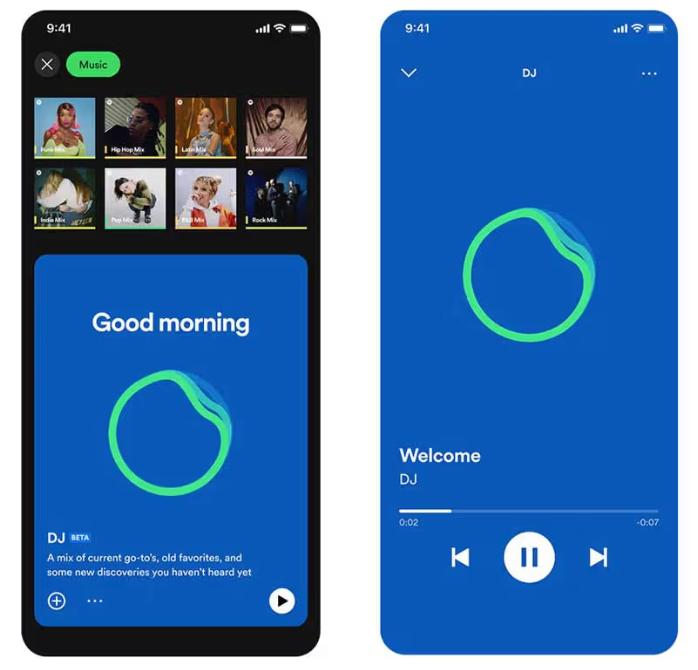
SpotifyL'IA DJ di ora supporta la funzione "Richieste". Proprio come faresti con un DJ umano, puoi usare comandi vocali o messaggi di testo, dicendo cose come "Passa a un genere più soft" o "Riproduci più canzoni di Jay Justin Bieber", e l'IA adatterà immediatamente la playlist.
Parte 3. Limitazioni di Spotify DJ AI
Spotify La modalità DJ si distingue perché elimina la necessità di cercare manualmente la musica. È ideale per l'ascolto in sottofondo, per scoprire nuove canzoni e per creare un'esperienza simile a quella della radio. SpotifyLa funzione AI DJ di 's è impressionante, ma presenta alcune importanti limitazioni.
1. Nessun download permanente
Anche con l'abbonamento Premium, i brani non sono effettivamente scaricabili. I file sono bloccati all'interno dell'app e non possono essere trasferiti.
2. Nessuna libertà offline
È possibile scaricare i brani per l'ascolto offline, ma l'accesso dipende da un abbonamento. La musica scompare se si annulla l'abbonamento.
3. Vietata l'esportazione e la condivisione.
Non è possibile esportare le playlist del DJ e salvare i mix esternamente.
4. Controllo limitato
Spotify L'IA controlla la selezione e l'ordine dei brani. Non è possibile personalizzare completamente l'esperienza.
Queste limitazioni diventano importanti se si desidera avere un maggiore controllo sulla propria musica.
Parte 4. Come salvare Spotify Musica per DJ da utilizzare offline?
Se vi piace Spotify Modalità DJ ma desideri maggiore flessibilità, hai bisogno di un modo per salvare i brani in modo permanente. Invece di affidarti a SpotifyA causa delle limitazioni intrinseche di , selezioni brani dai consigli del DJ e li converti in file locali. Questo ti dà il pieno controllo sulla tua musica. Il modo più affidabile per farlo è utilizzare uno strumento professionale come DumpMedia Spotify Music Converter.
🏅Perché scegliere DumpMedia Spotify Music Converter:
- ⭐Integrazione con Spotify lettore web
- ⭐Lavora per entrambi Spotify Premium e Spotify Utenti gratuiti
- ⭐Fornisce conversione batch fino a 35 volte più veloce
- ⭐convertire Spotify canzoni per MP3, WAV o FLAC
- ⭐Conserva i tag ID3 come artista, copertina, grafica, ecc.
- ⭐Preserva la qualità audio originale
- ⭐100% pulito. Nessun rischio nell'uso
Passo dopo passo: Convertire Spotify Musica da dj
Passo 1: Scarica e installa il software sul tuo computer. Funziona con entrambi Windows e Mac. L'interfaccia è intuitiva, il che la rende adatta anche ai principianti.
Passo 2: Apri l'integrato Spotify lettore web all'interno DumpMedia e accedi con il tuo Spotify account. Sfoglia Spotify e trascina i brani, gli album o le playlist che desideri scaricare nel convertitore.

Passo 3: Nel pannello delle impostazioni, selezionare MP3 come formato di output per consentire un MP3 Scarica i brani che hai selezionato.

Passo 4: Fai clic sul pulsante "Converti tutto" e avvia la conversione. DumpMedia Spotify Music Converter Supporta una velocità di download 35 volte superiore, quindi puoi semplicemente attendere il completamento del processo di conversione.

Parte 5. Domande frequenti
1. Cosa è Spotify Modalità DJ?
Si tratta di una funzionalità basata sull'intelligenza artificiale che riproduce musica personalizzata in base ai tuoi gusti.
2. è SpotifyL'IA DJ è gratuita?
No, in genere richiede un abbonamento Premium.
3. Posso scaricare Spotify Canzoni da DJ?
Solo all'interno dell'app, non come file locali.
4. Posso creare la mia playlist da DJ?
Sì, soprattutto se possiedi copie locali della tua musica.
Parte 6. Conclusione
Spotify La modalità DJ è una funzionalità potente che rende la scoperta della musica più facile e piacevole. Tuttavia, presenta delle limitazioni, come la mancanza di download permanenti e l'accesso offline limitato. Se vuoi godere appieno dei vantaggi di SpotifySenza le limitazioni imposte dall'IA per i DJ, utilizzare uno strumento affidabile per salvare la propria musica è la soluzione migliore. Questo permette di conservare i brani preferiti, creare playlist personalizzate e godere di completa libertà nell'esperienza di ascolto.
*DumpMedia funziona decrittando e scaricando Spotify converte i brani in file senza DRM, consentendoti di ottenere una copia pulita e illimitata della tua libreria per qualsiasi dispositivo. Questa funzionalità non include la conversione di file audio locali.

Sconto del 30% >>>