


Come mettere la musica MP3 Giocatore da Spotify in 2026
Come mettere la musica MP3 giocatore da Spotify rimane una delle domande più comuni tra Spotify utenti, principalmente perché Spotify non consente download diretti su nessuno MP3 dispositivo a causa di DRMSe si tenta di trasferire i file scaricati Spotify tracce, la maggior parte MP3 i giocatori non riusciranno a riconoscerli.
Per aggirare questa limitazione, è necessario uno strumento in grado di convertire Spotify musica in un formato audio standard come MP3. DumpMedia Spotify Music Converter è una delle soluzioni più affidabili per questo compito. Se il tuo obiettivo è spostare il tuo Spotify libreria su un dispositivo portatile per l'ascolto offline, questo convertitore fornisce il metodo più rapido e semplice.
Guida ai contenuti Parte 1. Perché non puoi mettere Spotify Canzoni su MP3 Giocatore?Parte 2. Come mettere Spotify Musica accesa MP3 Giocatore?Parte 3. FAQParte 4. Per riassumere tutto
Parte 1. Perché non puoi mettere Spotify Canzoni su MP3 Giocatore?
Spotify non consente agli utenti di trasferire brani direttamente su un MP3 giocatore perché tutti Spotify le tracce sono protette da Digital Rights Management (DRM). Questa crittografia DRM impedisce agli utenti di copiare, esportare o convertire Spotifyi file audio in formati standard come MP3Anche se scarichi canzoni utilizzando un Spotify Premium account, quei file rimangono in un formato OGG bloccato che solo il Spotify app può leggere. Di conseguenza, i tradizionali MP3 I lettori, in particolare i dispositivi non intelligenti, non riescono a riconoscere o riprodurre questi file crittografati.
In breve, il sistema DRM garantisce che Spotify la musica può essere riprodotta solo all'interno Spotifyecosistema autorizzato. Ecco perché semplicemente trascinando Spotify canzoni a un MP3 il lettore non funzionerà mai.
Come mettere la musica MP3 giocatore da Spotify? Per aggirare questa limitazione, è necessario uno strumento in grado di rimozione Spotifyprotezione DRM e convertire le tracce in formati universali. DumpMedia Spotify Music Converter soddisfa esattamente questo scopo. Converte Spotify brani, album e playlist in DRM-free MP3, file M4A, WAV o FLAC, rendendoli compatibili con qualsiasi MP3 lettore e consentendo la vera proprietà offline della tua musica.
Parte 2. Come mettere Spotify Musica accesa MP3 Giocatore?
Come mettere la musica MP3 giocatore da Spotify? Prima di mettere Spotify musica sul tuo MP3 giocatore, assicurati di avere DumpMedia Spotify Music Converter installato.
Download gratuito Download gratuito
DumpMedia Spotify Music Converter sta guadagnando popolarità tra Spotify ascoltatori per il suo meraviglioso servizio di download di musica. Non importa se sei un utente di Spotify Libero o Spotify Premium, puoi scaricare e convertire Spotify brani, playlist e album a MP3, AAC, ALAC, FLAC o altri formati che utilizzano DumpMediaMeglio ancora, i download saranno sempre disponibili anche se l'abbonamento scade.
Guida passo passo: come mettere Spotify Musica accesa MP3 Giocatore
Passo 1: Apri il software sul tuo computer. Funziona con entrambi Windows e Mac. L'interfaccia è intuitiva, il che la rende adatta anche ai principianti.
Passo 2: Vai su Spotify e scegli il brano, l'album o la playlist che desideri convertire. Il software rileverà automaticamente le tracce.

Passo 3: Seleziona un formato compatibile con il tuo MP3 giocatore. Le scelte comuni sono MP3, M4A, WAV o FLAC. Puoi anche impostare la qualità di output e la velocità di conversione.

Passo 4: Fare clic sul pulsante "Converti" per iniziare il processo di conversione. DumpMedia Spotify Music Converter rimuoverà il DRM e convertirà tutte le tracce selezionate nel formato scelto. La conversione preserva un'elevata qualità audio.

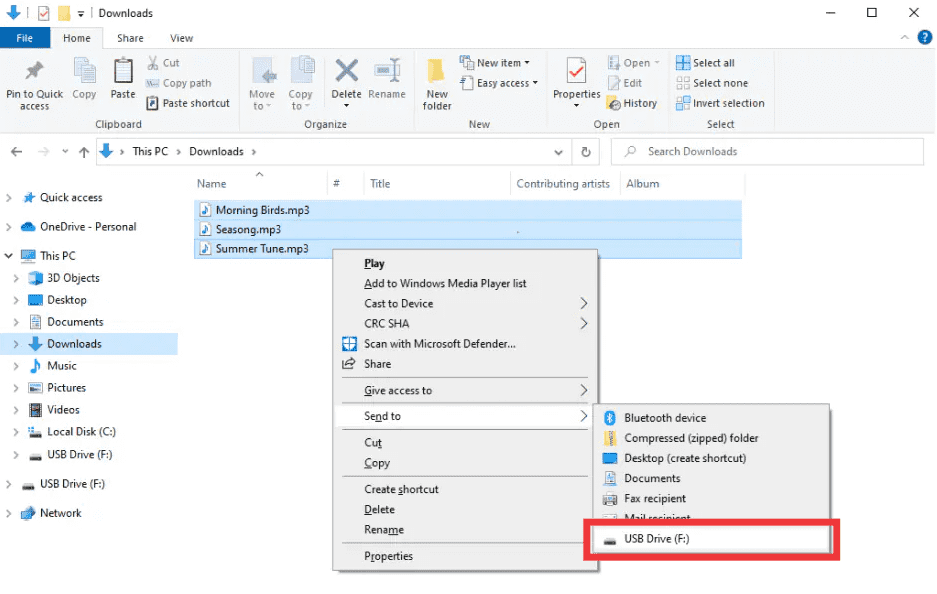
Passo 5: Come mettere la musica MP3 giocatore da Spotify? Dopo la conversione, individua la cartella di output. Collega il tuo MP3 lettore al computer tramite USB e copiare i file convertiti. Il tuo Spotify la musica è ora pronta per essere riprodotta offline su qualsiasi MP3 e leggero dispositivo.
Parte 3. FAQ
1. Posso mettere Spotify canzoni direttamente su MP3 Giocatori?
No. SpotifyLe tracce di sono protette da DRM e non possono essere esportate direttamente. È necessario un convertitore come DumpMedia Spotify Music Converter per renderli compatibili.
2. Come faccio a convertire Spotify playlist a MP3?
Usa il DumpMedia Spotify Music Converter: copia i link della playlist, seleziona MP3 come output e converti. Quindi trasferisci i file sul tuo MP3 giocatore.
3. È legale convertirsi Spotify musica?
Conversione Spotify La musica per uso personale offline è generalmente consentita. Evitare di distribuire file convertiti ad altri, poiché ciò potrebbe violare le leggi sul copyright.
4. Quali formati posso utilizzare per MP3 Giocatori?
MP3 è il più comune. DumpMedia Spotify Music Converter supporta anche M4A, WAV e FLAC, tutti compatibili con la maggior parte dei dispositivi.
5. Posso trasferire Spotify musica su più dispositivi?
Sì. Una volta convertito con DumpMedia, il tuo Spotify i brani sono privi di DRM e possono essere riprodotti su qualsiasi MP3 lettore, telefono o tablet.
Parte 4. Per riassumere tutto
Se ti sei mai chiesto come mettere la musica su un MP3 giocatore da Spotify, la soluzione è chiara: SpotifyIl DRM impedisce i trasferimenti diretti, ma DumpMedia Spotify Music Converter rimuove queste restrizioni. Converte i tuoi brani, album o playlist preferiti in MP3 o altri formati universali, mantenendo un'elevata qualità e consentendo la riproduzione offline su qualsiasi dispositivo.
STIMA SMART DI DumpMedia Spotify Music Converter oggi e divertiti Spotify musica ovunque, in qualsiasi momento, senza più limiti, senza più problemi di DRM.