


Come convertire Spotify Musica per FLAC nel 2026
Molti appassionati di musica vogliono convertire Spotify musica su FLAC per una migliore qualità audio, riproduzione offline permanente ed esperienze di ascolto HiFi. Sebbene Spotify offre streaming di alta qualità, Spotify I brani non sono forniti come file FLAC standard che gli utenti possono gestire o archiviare localmente liberamente. In questa guida, spiegheremo cos'è FLAC, perché gli audiofili preferiscono l'audio FLAC, Spotifylimiti audio ufficiali e il modo migliore per convertire Spotify brani in formato FLAC per l'ascolto offline.
Guida ai contenuti Parte 1. Cos'è il FLAC e perché gli utenti lo preferiscono?Parte 2. Can Spotify Convertire ufficialmente la musica in FLAC?Parte 3. Il modo migliore per convertire Spotify Canzone in FLACParte 4. Domande frequentiParte 5. Conclusione
Parte 1. Cos'è il FLAC e perché gli utenti lo preferiscono?
Prima di imparare come convertire Spotify Quando si converte la musica in FLAC, è importante capire perché il formato FLAC sia così popolare tra gli appassionati di audio.
Cos'è FLAC?
FLAC sta per Free Lossless Audio Codec. A differenza dei formati audio compressi come MP3Il formato FLAC preserva le informazioni audio originali senza perdita di qualità. Questo rende FLAC uno dei formati più diffusi per l'ascolto Hi-Fi, i sistemi audiofili, la riproduzione da DAC o l'audio di qualità da studio.
FLAC vs MP3
Una delle principali ragioni per cui gli utenti si convertono Spotify La conversione da musica a FLAC è la differenza tra audio senza perdita di dati e audio con perdita di dati.
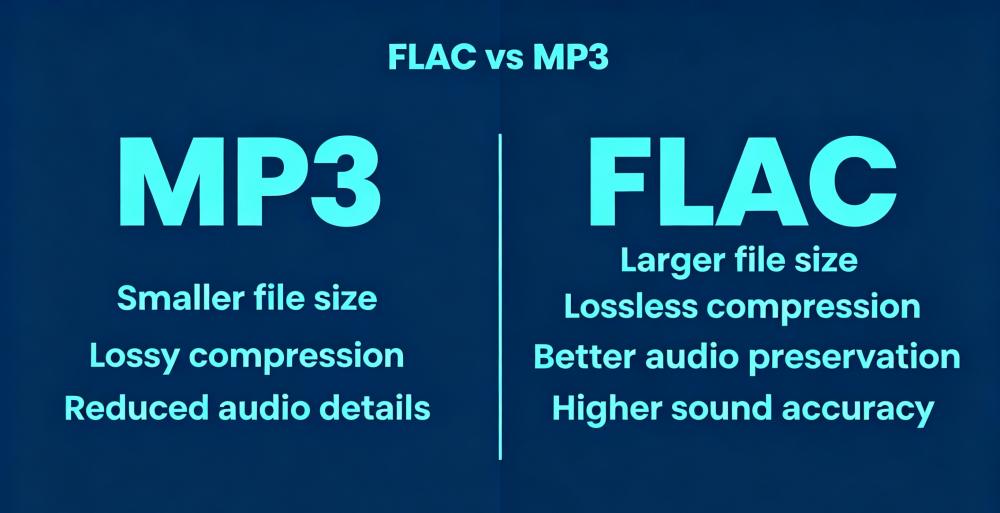
Per gli utenti che possiedono cuffie di alta gamma, DAC o monitor da studio, il formato FLAC offre spesso un'esperienza di ascolto sensibilmente più ricca.
Parte 2. Can Spotify Convertire ufficialmente la musica in FLAC?
No. Spotify non consente ufficialmente agli utenti di convertire Spotify musica su FLAC.
Spotify Formato audio in streaming
Spotify trasmette principalmente musica utilizzando la compressione OGG Vorbis. Spotify Premium L'audio rimane un flusso audio compresso anziché un vero file FLAC senza perdita di dati.
Spotify I download offline non sono in formato FLAC
Sebbene gli utenti Premium possano scaricare brani per l'ascolto offline, i file scaricati rimangono crittografati e i brani funzionano solo all'interno SpotifyNon è possibile trasferirli su un altro dispositivo e convertirli in file FLAC.
Ecco perché molti utenti cercano modi per convertire Spotify musica in formato FLAC per una riproduzione più flessibile.
Parte 3. Il modo migliore per convertire Spotify Canzone in FLAC
I file FLAC conservano più informazioni audio per l'archiviazione a lungo termine. Inoltre, molti utenti desiderano mantenere la musica disponibile anche se gli abbonamenti cambiano. Questi motivi spiegano la crescente popolarità degli strumenti progettati per convertire Spotify musica in FLAC. Uno degli strumenti più popolari per convertire Spotify la musica in formato FLAC è DumpMedia Spotify Music Converter.
🏆Caratteristiche principali di DumpMedia Spotify Music Converter
- Scaricare Spotify musica per MP3, WAV, FLAC e AAC
- Rimuovere Spotify Protezione DRM*
- Mantieni la qualità audio originale
- Download in blocco di playlist e album
- Velocità di conversione veloce
- Conserva i metadati del brano e i tag ID3
- Supporta la riproduzione offline su qualsiasi dispositivo.
Per gli utenti che cercano come convertire Spotify convertire musica in FLAC in modo efficiente, DumpMedia fornisce una soluzione comoda per la riproduzione di musica locale. Anche se il Spotify L'app non funziona sul tuo dispositivo, puoi PLAY Spotify canzoni offline su un altro lettore musicale immediatamente.
convertire Spotify Conversione del brano in FLAC passo dopo passo
Passo 1: Scarica e installa DumpMedia Spotify Music Converter sul tuo Mac/PC. Avvialo e vedrai l'interfaccia. Usa il tuo Spotify Account Premium/Gratuito per accedere.
Passo 2: Trova la playlist, l'album o il brano specifico che desideri convertire. Puoi trascinare un singolo brano sull'icona "+" sul lato destro dello schermo. In alternativa, apri un'intera playlist/album e fai clic sull'icona "Aggiungi alla conversione" per caricare l'intero elenco nel convertitore.
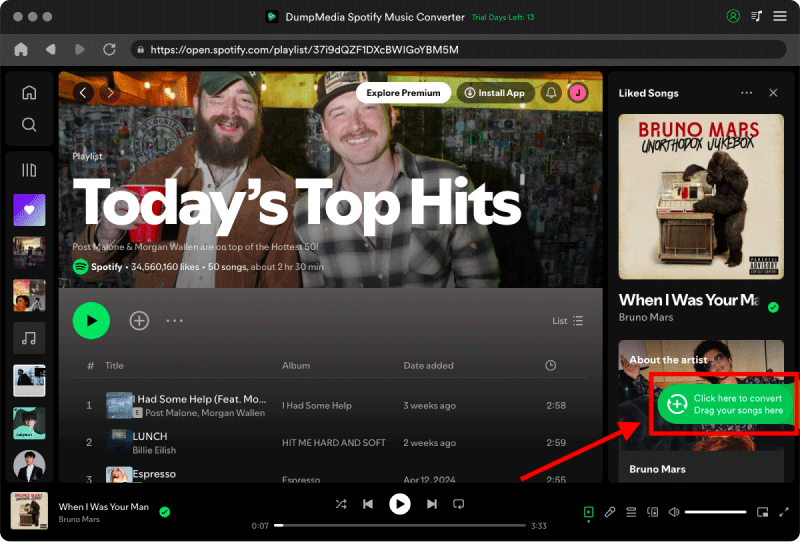
Passo 3: Seleziona FLAC. Puoi anche modificare il bitrate o la frequenza di campionamento.

Passo 4: Una volta completate le impostazioni, gli utenti possono procedere con la conversione facendo clic sull'icona "Converti". Quindi DumpMedia convertirà Spotify Converti la musica in formato FLAC in pochi secondi grazie alla sua velocità elevatissima.

Dopo la conversione, il tuo Spotify La musica può essere riprodotta in modo più flessibile su sistemi Hi-Fi e lettori multimediali locali.
Parte 4. Domande frequenti
Può Spotify Come convertire la musica in FLAC?
No. Spotify non offre ufficialmente la conversione in FLAC.
Is Spotify audio senza perdita di qualità?
No. Spotify Attualmente utilizza formati di streaming compressi anziché il vero audio lossless FLAC.
Le normative Spotify Utilizzare il formato FLAC?
No. Spotify Trasmette principalmente musica in streaming utilizzando la compressione OGG Vorbis.
FLAC vs MP3Quale suona meglio?
FLAC conserva più informazioni audio e generalmente fornisce una qualità del suono superiore rispetto a MP3.
Posso tenere Spotify canzoni per sempre?
Molti utenti usano DumpMedia Spotify Music Converter salvare Spotify musica in locale per la riproduzione offline.
Is DumpMedia Spotify Music Converter sicuro?
Sì. È progettato per Spotify Conversione musicale e gestione della riproduzione locale.
Nota: le piattaforme di streaming hanno le proprie regole e i propri sistemi di monitoraggio. Come strumento di terze parti, DumpMedia Spotify Music Converter è inoltre soggetto alle loro restrizioni, che potrebbero influire sull'utilizzo in determinati casi. Spotify può intraprendere azioni se rileva attività che violano i suoi Termini di servizio; ciò è interamente a sua discrezione Spotifyla discrezione.
Parte 5. Conclusione
Molti utenti vogliono convertire Spotify musica in FLAC perché FLAC offre una migliore conservazione dell'audio, una qualità di riproduzione HiFi e un ascolto offline flessibile. Sebbene Spotify Lo streaming è comodo, ufficiale Spotify I file scaricati non sono veri file FLAC e dipendono ancora dalle restrizioni dell'applicazione.
Per gli utenti che desiderano la riproduzione locale senza perdita di dati e la flessibilità musicale a lungo termine, DumpMedia Spotify Music Converter offre una soluzione efficace per la conversione Spotify musica convertita in formato FLAC per l'ascolto offline su più dispositivi.
*DumpMedia funziona decrittando e scaricando Spotify converte i brani in file senza DRM, consentendoti di ottenere una copia pulita e illimitata della tua libreria per qualsiasi dispositivo. La sua funzionalità non include la rimozione del DRM dai file audio locali.

Sconto del 30% >>>