


Come creare una playlist Pandora nel 2026 (Guida passo passo)
Molti amanti della musica usano Pandora per scoprire nuovi brani, organizzare i preferiti e creare esperienze di ascolto personalizzate. Se stai cercando informazioni su come creare una playlist su Pandora, sappi che il procedimento è in realtà semplice una volta compreso il funzionamento del sistema. In questa guida, ti spiegheremo esattamente come creare una playlist su Pandora, come gestire la tua libreria musicale e come rendere disponibili le tue playlist preferite per l'ascolto offline.
Guida ai contenuti Parte 1. È possibile creare una playlist su Pandora?Parte 2. Come creare una playlist Pandora su dispositivo mobileParte 3. Come creare una playlist Pandora sul computerParte 4. Il modo migliore per mantenere le playlist di Pandora offline in modo permanente.Parte 5. Domande frequenti su come creare una playlist PandoraParte 6. Conclusione
Parte 1. È possibile creare una playlist su Pandora?
Sì. Pandora consente agli utenti di creare playlist utilizzando brani, album e stazioni raccolti. Tuttavia, le funzionalità delle playlist possono variare a seconda dell'account gratuito, di Pandora Plus e Pandora PremiumComprendere il tipo di account è il primo passo per imparare a creare una playlist su Pandora.
Gli utenti gratuiti e gli utenti di Pandora Plus non possono creare o modificare manualmente le playlist. La loro esperienza è limitata alle Stazioni, che utilizzano il Music Genome Project per riprodurre brani simili in base a un artista o a un brano di riferimento.
Pandora Premium offre le funzionalità più complete per la gestione delle playlist, tra cui la creazione di playlist personalizzate, l'aggiunta manuale di brani, il download offline e la condivisione delle playlist.
Parte 2. Come creare una playlist Pandora su dispositivo mobile
Se vuoi imparare come creare una playlist su Pandora usando il tuo telefono, segui questi passaggi.
Passo 1: Avvia Pandora sul tuo iPhone o dispositivo Android.
Passo 2: Tocca "La mia collezione" nella parte inferiore dello schermo.
Passo 3: Tocca "+ Crea playlist". Inserisci un nome e una descrizione per la playlist.
Passo 4: Cerca i brani, gli album o gli artisti che desideri includere. Tocca "Aggiungi alla playlist".
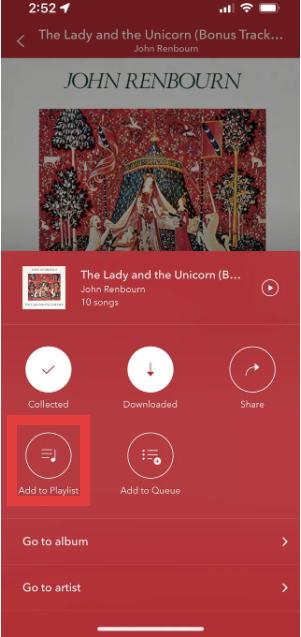
Passo 5: Dopo aver aggiunto i brani, salva la playlist per poterla ascoltare in futuro.
Questo è il metodo più semplice per creare una playlist di Pandora su dispositivi mobili.
Parte 3. Come creare una playlist Pandora sul computer
Puoi anche imparare come creare una playlist su Pandora utilizzando il lettore web di Pandora.
Passo 1: Apri il lettore web di Pandora. Accedi al tuo account Pandora. Seleziona "La mia collezione" dal menu.
Passo 2: Fai clic su "Crea playlist".
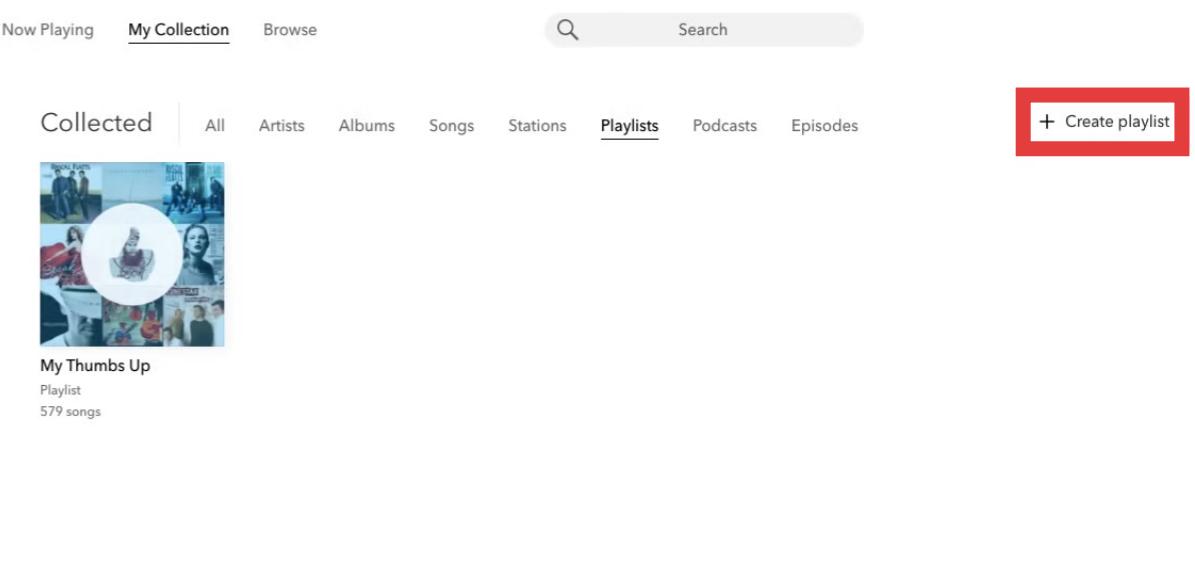
Passo 3: Cerca e aggiungi brani alla tua playlist.
Passo 4: È possibile riordinare i brani, rinominare le playlist, rimuovere i brani o aggiornare i dettagli delle playlist.
Parte 4. Il modo migliore per mantenere le playlist di Pandora offline in modo permanente.
Sebbene le playlist di Pandora siano comode, presentano comunque alcune limitazioni. Per gli utenti di Pandora Plus o Premium, i download offline potrebbero essere limitati poiché le playlist richiedono un abbonamento attivo. La riproduzione potrebbe interrompersi dopo la disdetta dell'abbonamento. Questo può risultare frustrante per gli utenti che dedicano tempo alla creazione di playlist personalizzate.
Se vuoi salvare le playlist di Pandora oltre i limiti dell'app, una soluzione pratica è DumpMedia Convertitore musicale PandoraQuesto strumento aiuta gli utenti convertire le canzoni di Pandora in MP3In questo modo è possibile salvare le playlist localmente e conservare la musica anche dopo aver modificato l'abbonamento. Invece di dipendere esclusivamente dallo streaming, gli utenti possono creare raccolte musicali a lungo termine a partire dalle loro playlist di Pandora.
🏅Perché scegliere DumpMedia Convertitore di musica Pandora:
- ⭐Integrazione con il lettore web Pandora
- ⭐Funziona sia per gli utenti Pandora Premium che per quelli gratuiti
- ⭐Fornisce conversione batch fino a 35 volte più veloce
- ⭐Conserva i tag ID3 come artista, copertina, grafica, ecc.
- ⭐Preserva la qualità audio originale
- ⭐100% pulito. Nessun rischio nell'uso
Come convertire le playlist di Pandora in MP3
Passo 1: Scarica e installa DumpMedia Installa Pandora Music Converter sul tuo Mac/PC. Avvialo e visualizzerai l'interfaccia. Accedi utilizzando il tuo account Pandora Premium/Gratuito.
Passo 2: Quindi, trascina direttamente i brani o le playlist sull'icona mobile "+" per aggiungerli alla coda di conversione e preparare il download.
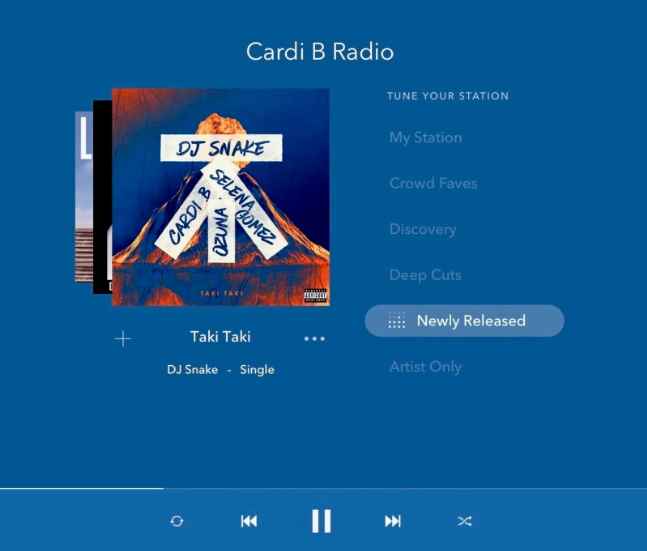
Passo 3: Una volta che sei soddisfatto dei brani che hai selezionato, puoi scegliere il formato di file audio che preferisci.
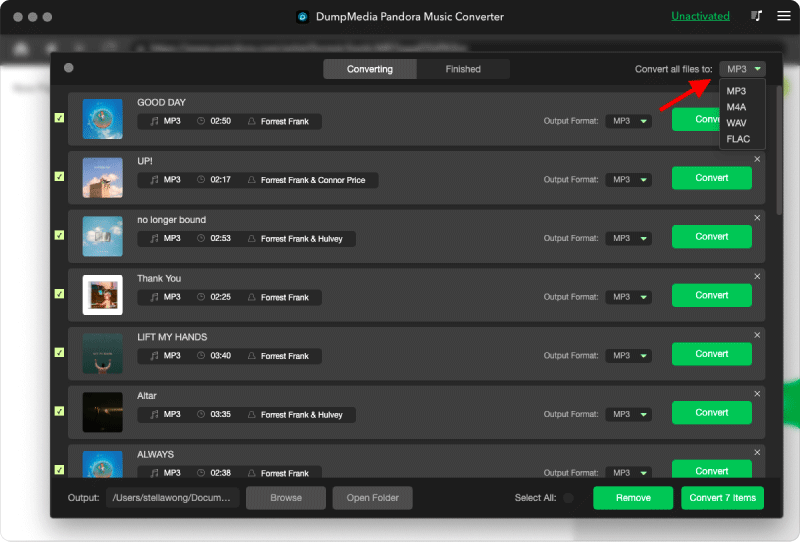
Passo 4: Una volta completate le impostazioni, gli utenti possono procedere con la conversione facendo clic sull'icona "Converti". Quindi DumpMedia Permetterà di scaricare i brani di Pandora in pochi secondi grazie alla sua velocità elevatissima.
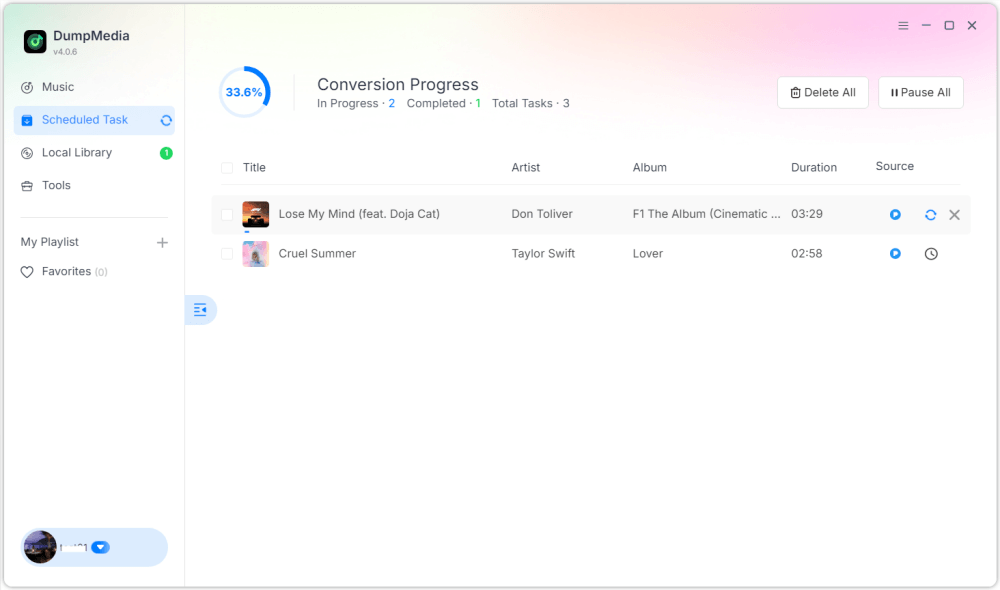
Una volta completate, le playlist diventano molto più flessibili per l'ascolto offline. Puoi avere accesso permanente e riprodurle su MP3 lettori o dispositivi USB. Ecco perché molti utenti che cercano come creare una playlist su Pandora finiscono per cercare modi per conservare le playlist in modo permanente.
Parte 5. Domande frequenti su come creare una playlist Pandora
È possibile creare playlist su Pandora?
Sì. Pandora Premium consente agli utenti di creare e personalizzare le playlist.
La creazione di playlist su Pandora è gratuita?
Alcune funzionalità delle playlist potrebbero richiedere Pandora Premium.
È possibile scaricare le playlist di Pandora per la modalità offline?
Sì, ma l'accesso offline dipende dal piano di abbonamento. I download offline potrebbero non essere più disponibili al termine dell'abbonamento.
È possibile convertire le playlist di Pandora in MP3?
Sì. Strumenti come DumpMedia Pandora Music Converter permette agli utenti di salvare i brani di Pandora come file audio locali.
Parte 6. Conclusione
Creare una playlist su Pandora è facile, sia su dispositivi mobili che su computer. Le playlist di Pandora sono utili per organizzare la musica, scoprire nuovi brani e creare esperienze di ascolto personalizzate. Tuttavia, gli utenti che desiderano accedere alla musica offline a lungo termine spesso preferiscono salvarla come file audio locali per una riproduzione più flessibile e un'archiviazione permanente.

Sconto del 30% >>>