


Apple Music funziona offline? Tutto quello che devi sapere (2026)
If you're planning a long flight, traveling to an area with limited internet access, or simply want to save mobile data, you may be wondering: Does Apple Music work offline? The answer is yes. However, there are some important limitations. In this guide, we'll explain whether Apple Music works offline, how offline listening works, how to download music on different devices, common issues you may encounter, and how to enjoy greater flexibility with your music library.
Guida ai contenuti Part 1. How Does Apple Music Offline Listening Work?Part 2. How to Download Apple Music for Offline Listening?Part 3. Why Isn't Apple Music Working Offline?Part 4. Can You Keep Apple Music Downloads Forever?Part 5. Enjoy Apple Music Offline Without RestrictionsParte 6. Domande frequentiParte 7. Pensieri finali
Part 1. How Does Apple Music Offline Listening Work?
Does Apple Music work offline? Yes, Apple Music works offline, but only after you've downloaded your music in advance.
To use Apple Music offline listening, you'll need:
- Un abbonamento Apple Music attivo
- L'app Apple Music
- Songs, albums, or playlists downloaded to your device
- Enough available storage space
Once downloaded, you can listen without Wi-Fi or mobile data, making Apple Music a convenient choice for commuting, traveling, or areas with poor network coverage.
Part 2. How to Download Apple Music for Offline Listening?
Downloading music is simple across all supported devices.
Su iPhone e iPad
- Apri l'app Apple Music.
- Trova la canzone, l'album o la playlist che desideri.
- Tap + Add if it isn't already in your library.
- Tocca l'icona Scarica.
- Attendi il completamento del download.
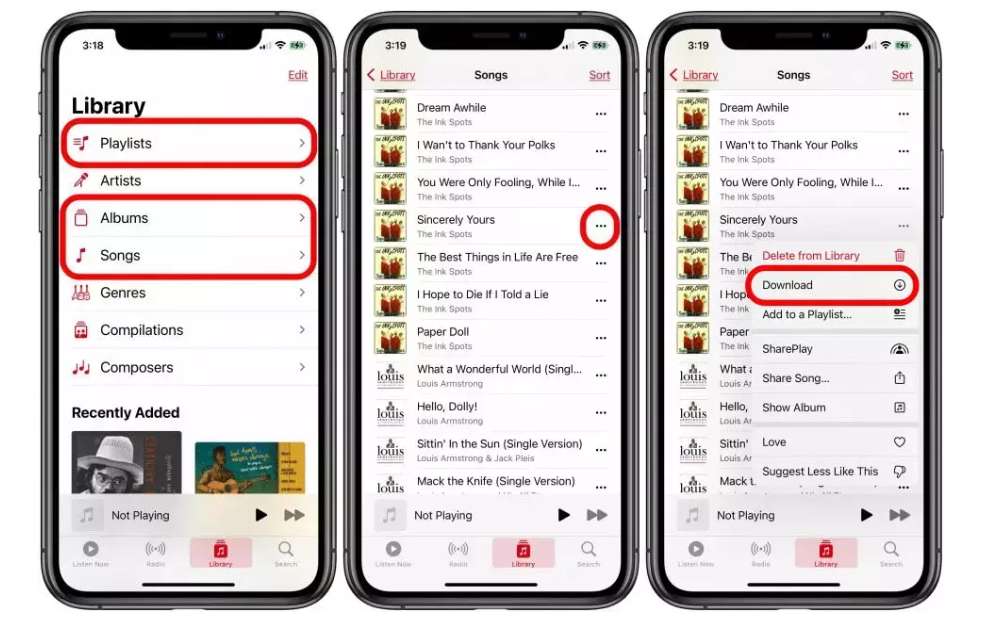
Your downloaded music will now be available for Apple Music offline listening.
Su Android
- Apri Apple Music.
- Registrati.
- Add music to your library.
- Tocca Scarica.
- Attendere il completamento.
Android users can also enjoy Apple Music without internet once downloads finish.
Su Mac
- Avvia l'app Apple Music.
- Browse your library.
- Click the download icon beside the music you want.
- Wait for the files to finish downloading.
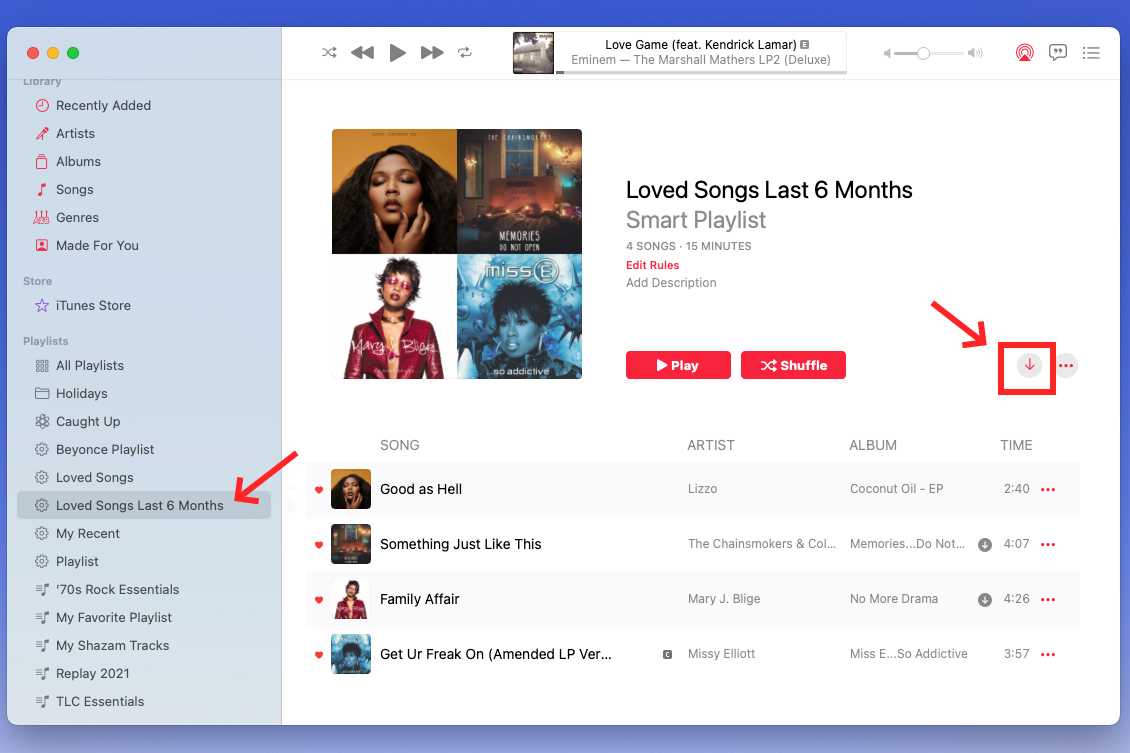
On Winrabbiosi
Using the Apple Music app or compatible Apple software:
- Accedi con il tuo ID Apple.
- Apri la tua libreria.
- Select music.
- Fare clic su Download.
After downloading, you can listen offline through the Apple Music app.
Part 3. Why Isn't Apple Music Working Offline?
Sometimes users discover that Apple Music won't play downloaded songs, or they may find their downloaded Canzoni di Apple Music disattivate entirely. Here are the most common reasons for these issues.
The Songs Were Never Downloaded
Adding music to your library isn't the same as downloading it. Be sure you've tapped the download button before going offline.
Your Device Is Running Out of Storage
Insufficient storage may prevent downloads from completing successfully. Check your available storage and remove unnecessary files if needed.
Your Subscription Has Expired
Offline playback requires an active Apple Music subscription. If you have canceled your Apple Music subscription, downloaded songs become unavailable.
Sync Library Is Disabled
If Sync Library on your device is turned off, downloaded songs may not appear across all your devices. Enable it by going to Settings > Music > Sync Library.
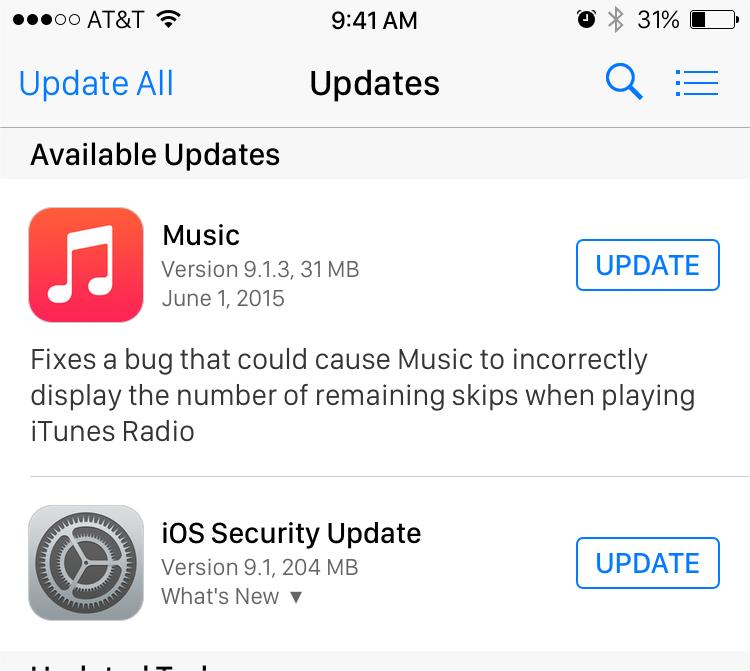
The Apple Music App Needs Updating
Using an outdated version of Apple Music can sometimes cause offline playback issues. Install the latest version of the app to improve stability and compatibility.
Part 4. Can You Keep Apple Music Downloads Forever?
One of the most common follow-up questions after does Apple Music work offline is whether downloaded songs remain available permanently. Unfortunately, the answer is no.
Downloaded Apple Music tracks are protected by DRM and remain tied to your subscription. If you stop paying for your Apple Music subscription, the downloaded songs will no longer play, even if they remain stored on your device.
Part 5. Enjoy Apple Music Offline Without Restrictions
Apple Music's offline mode is convenient, but downloads require an active subscription. Songs can only be played within the Apple Music app. Also, downloads become unavailable if your subscription expires. If you'd like greater flexibility in managing your personal music library, DumpMedia Apple Music Converter offre una soluzione alternativa.
DumpMedia Apple Music Converter can help you download singles, albums, playlists, and podcasts from Apple Music and convert them to MP3, M4A, FLAC, AAC, and ALAC without quality loss. So you can easily manage them as backups or play Apple Music songs offline using any media device you own.
👍Altre caratteristiche chiave di DumpMedia Apple Music Converter
- ✔️Access Full Music Library from Built-In Apple Music Web Player
- ✔️Goditi conversioni rapide con velocità 35 volte più elevate
- ✔️Conserva le informazioni sui metadati e i tag ID3
- ✔️Mantieni la qualità audio originale
- ✔️100% Pulito. Nessun rischio nell'utilizzo
- ✔️Aggiornamenti gratuiti e supporto tecnico
For users who enjoy Apple Music offline listening but want more control over their personal music collection, DumpMedia provides a practical way to expand playback options.
Scarica Apple Music su MP3 utilizzando DumpMedia
Passo 1: Scarica e installa DumpMedia Installa Apple Music Converter sul tuo Mac/PC. Avvialo e visualizzerai l'interfaccia. Accedi utilizzando il tuo account Apple Music.
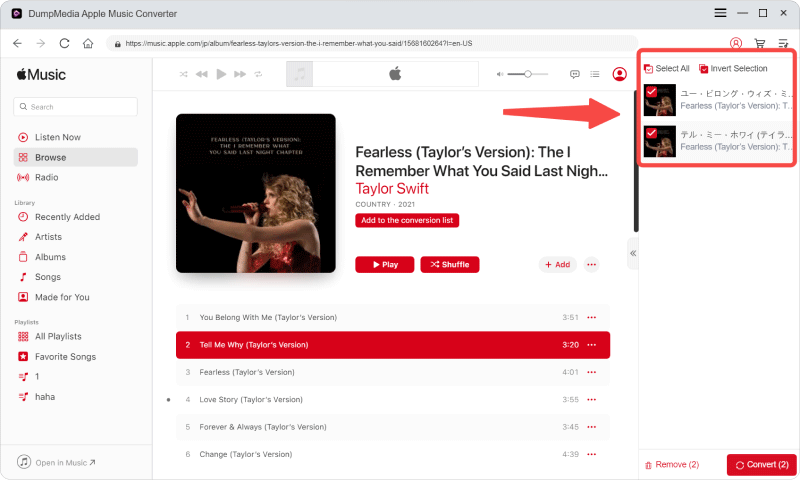
Passo 2: Browse or search for tracks, playlists, and albums using the built-in Spotify web player. Click the "Add to Convert" button to start the analysis process. After parsing, the selected songs will appear on the conversion list on the right side of the interface.
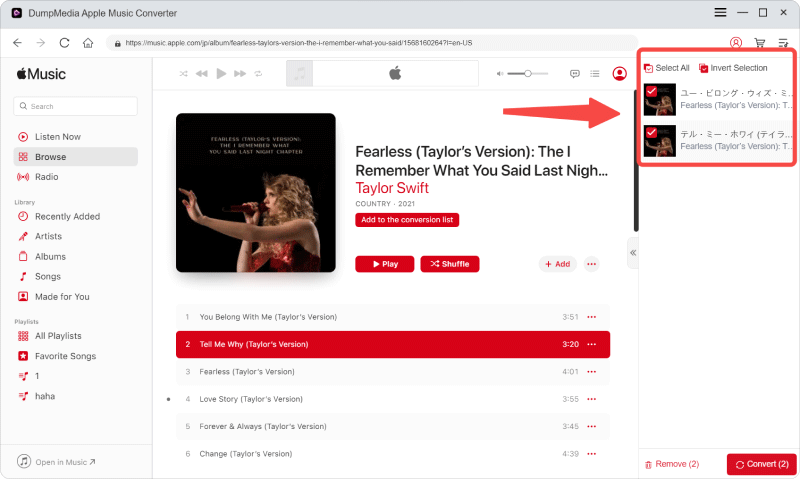
Passo 3: On the conversion list, select the songs you want to download and set the output format, bitrate, and sample rate to your preference.
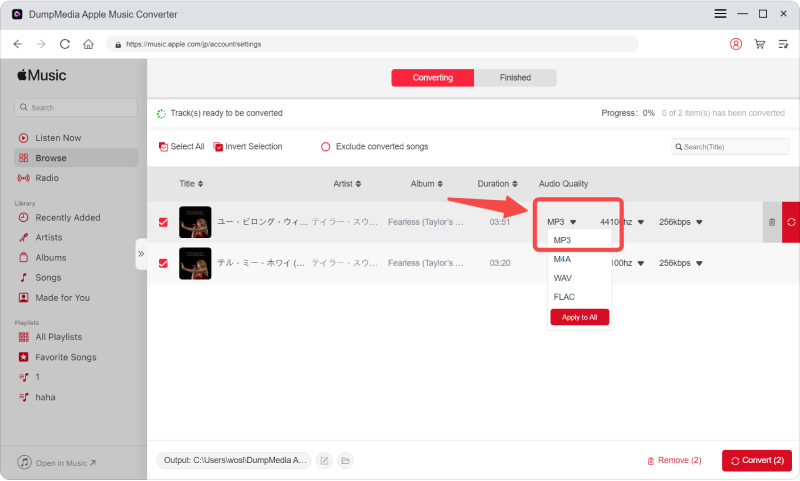
Passo 4: Una volta completate le impostazioni, gli utenti possono procedere con la conversione facendo clic sull'icona "Converti". Quindi DumpMedia convertirà i brani di Apple Music in MP3 in pochi secondi grazie alla sua velocità superveloce.
Parte 6. Domande frequenti
Does Apple Music work offline without internet?
Yes. Once you've downloaded songs, albums, or playlists, you can listen to them without Wi-Fi or mobile data using the Apple Music app.
Do I need a subscription for offline listening?
Yes. An active Apple Music subscription is required to download music and use offline listening.
Can I listen to Apple Music offline after canceling my subscription?
No. Downloaded songs are protected by DRM and become unavailable after your Apple Music subscription expires.
Can I transfer Apple Music downloads to a USB drive?
Not directly. Songs downloaded through the Apple Music app are encrypted and intended for playback only within the app.
What's the best way to save Apple Music for offline playback?
If you want greater flexibility for personal offline listening across compatible devices, DumpMedia Apple Music Converter can convert Apple Music songs into widely supported audio formats while preserving sound quality and metadata.
Parte 7. Pensieri finali
So, does Apple Music work offline? Absolutely. As long as you have an active subscription and download your favorite songs in advance, Apple Music provides a smooth offline listening experience on iPhone, iPad, Android, Mac, and Windows devices. However, it's important to understand that offline downloads are subscription-based and protected by DRM, meaning they can't be kept permanently or played outside the Apple Music app.
If you're looking for more flexibility in managing your personal music library, DumpMedia Apple Music Converter offers an easy way to convert Apple Music tracks into standard audio formats for convenient offline playback on a wide range of compatible devices.

Sconto del 30% >>>