


Transferts Spotify Apple Music : Guide complet (2026)
De nombreux auditeurs qui utilisaient initialement Spotify ils décident finalement de transférer leurs bibliothèques musicales vers Apple Music Pour une meilleure intégration avec les appareils Apple, une gestion de bibliothèque améliorée ou par préférence personnelle. Cependant, l'un des principaux défis lors du changement de plateforme est de conserver ses playlists soigneusement sélectionnées.
Heureusement, plusieurs outils peuvent vous aider. transférer Spotify à Apple Musique rapidement et efficacement. Dans ce guide, nous vous présenterons les meilleures méthodes pour transférer Spotify Nous aborderons également les outils en ligne alternatifs et des conseils pratiques pour une migration simple et précise de vos playlists vers Apple Music.
Guide des matières Partie 1. Pourquoi les utilisateurs souhaitent transférer Spotify Listes de lecture sur Apple MusicPartie 2. Meilleure façon de transférer Spotify Listes de lecture sur Apple MusicPartie 3. Outils en ligne alternatifs pour le transfert Spotify Listes de lecture sur Apple MusicPartie 4. FAQPartie 5. Conclusion
Partie 1. Pourquoi les utilisateurs souhaitent transférer Spotify Listes de lecture sur Apple Music
Avant d'explorer les outils disponibles, il est utile de comprendre pourquoi de nombreux utilisateurs décident de transférer leurs données. Spotify à Apple Music en premier lieu.
- Changement d'écosystème musical : pour les utilisateurs qui dépendent fortement du matériel Apple, Apple Music offre une expérience d'écoute plus fluide.
- Conserver ses playlists : Perdre ses playlists lors d’un changement de plateforme peut être frustrant. C’est pourquoi les outils de migration de playlists sont si importants.
- Le transfert manuel est inefficace : cette approche présente plusieurs problèmes, comme le fait que la recherche de chaque chanson individuellement prend des heures ; certains titres peuvent être oubliés, l’ordre de la liste de lecture peut ne pas correspondre à l’original, et plus encore.
En raison de ces difficultés, la plupart des utilisateurs s'appuient sur des outils spécialisés pour transférer Spotify à Apple Music automatiquement.
Partie 2. Meilleure façon de transférer Spotify Listes de lecture sur Apple Music
Parmi les outils disponibles, DumpMedia N'importe quel convertisseur de musique est l'une des solutions les plus fiables pour les utilisateurs qui souhaitent transférer Spotify Transférez vos playlists vers Apple Music rapidement et sans erreur. Sa fonction dédiée de transfert de playlists simplifie l'ensemble du processus de migration et garantit la recréation correcte de vos playlists.
Téléchargement gratuit Téléchargement gratuit
DumpMedia fonctionne sur les deux WinCompatible avec Windows et macOS, cette fonctionnalité est accessible à un large public. Le transfert de playlists est spécialement conçu pour la migration de playlists entre plateformes. Voici quelques-unes de ses fonctionnalités les plus utiles :
- Transfert par lots de listes de lecture : vous pouvez déplacer plusieurs listes de lecture à la fois au lieu de les transférer individuellement.
- Correspondance intelligente des pistes : le logiciel identifie automatiquement les morceaux correspondants dans Apple Music, améliorant ainsi la précision du transfert.
- Préservation des métadonnées : les informations importantes telles que les titres des chansons, les artistes, les albums et l’ordre des listes de lecture peuvent être conservées lors de la migration.
Guide étape par étape du transfert Spotify à Apple Musique
Suivez ces étapes simples pour mener à bien le processus de migration.
Étape 1 : Téléchargez et installez DumpMedia N'importe quel convertisseur de musique sur votre WinOrdinateur Windows ou Mac. Après l'installation, lancez le programme pour accéder à l'interface principale.
Téléchargement gratuit Téléchargement gratuit
Étape 2 : Accédez à la fonction Transfert de liste de lecture dans le programme. Choisissez Spotify comme source.

Étape 3. Sélectionnez Apple Music comme plateforme sur laquelle vous souhaitez transférer votre playlist.
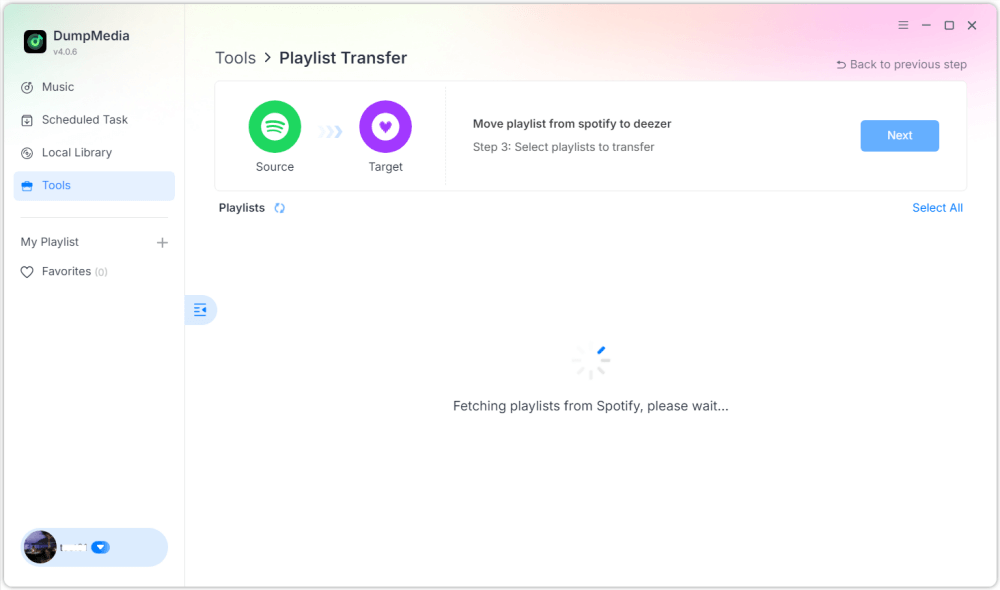
Étape 4 : Trouvez les listes de lecture que vous souhaitez transférer depuis Spotify Rendez-vous sur Apple Music et sélectionnez toutes les playlists que vous souhaitez déplacer.

Étape 5. Cliquez sur Convertir pour démarrer le transfert.
Étape 6. Le transfert est terminé. Cliquez sur « Accéder à Apple Music ». Vos playlists ont été transférées vers le nouveau service et vous pouvez commencer à profiter de votre nouvelle plateforme de streaming musical.
Pour les utilisateurs possédant d'importantes collections musicales, cette solution offre l'un des moyens les plus simples de transférer Spotify vers Apple Music sans erreurs ni morceaux manquants.
Partie 3. Outils en ligne alternatifs pour le transfert Spotify Listes de lecture sur Apple Music
Bien que les logiciels de bureau soient souvent l'option la plus fiable, certains utilisateurs préfèrent les outils en ligne car ils ne nécessitent aucune installation. Plusieurs services web permettent le transfert de fichiers. Spotify Écoutez de la musique sur Apple Music directement depuis votre navigateur. TuneMyMusic et Soundiiz sont deux options populaires.
Utilisation de TuneMyMusic
TuneMyMusic est un service en ligne simple de transfert de playlists compatible avec de nombreuses plateformes musicales. Son interface intuitive permet aux utilisateurs de transférer facilement leurs playlists entre différents services.
Étape 1. Visitez le site Web de TuneMyMusic et cliquez sur « Commençons ».
Étape 2 : Sélectionner Spotify Utilisez cette plateforme comme source et connectez-vous à votre compte.
Étape 3. Sélectionnez la playlist que vous souhaitez migrer ou collez l'URL de la playlist.
Étape 4. Connectez-vous à votre compte Apple Music pour autoriser le transfert.

Étape 5. Cliquez sur « Commencer à déplacer ma musique ». Le service associera les morceaux et créera la playlist dans Apple Music.
Utilisation de Soundiiz
Soundiiz est une autre plateforme de gestion de playlists en ligne performante qui prend en charge de nombreux services de streaming.
Étape 1. Inscrivez-vous ou connectez-vous au tableau de bord Soundiiz.
Étape 2 : Autoriser Spotify Soundiiz peut ainsi accéder à vos listes de lecture.
Étape 3. Ajoutez Apple Music comme service connecté.
Étape 4. Choisissez la liste de lecture que vous souhaitez transférer.
Étape 5. Cliquez sur Convertir et choisissez Apple Music comme destination.
Une fois le processus terminé, la playlist devrait apparaître dans votre bibliothèque Apple Music.
Limites des outils en ligne
Bien que les outils en ligne soient pratiques, ils peuvent présenter plusieurs inconvénients :
- Les versions gratuites limitent souvent le nombre de chansons transférées
- La précision de la correspondance peut varier.
- Le traitement des listes de lecture volumineuses peut prendre plus de temps.
- La connectivité Internet influe sur les performances
Partie 4. FAQ
Puis-je transférer Spotify accéder gratuitement à Apple Music ?
Certains outils en ligne proposent des transferts de listes de lecture gratuits, mais ils peuvent limiter le nombre de morceaux. Les outils premium offrent généralement des transferts plus rapides et des fonctionnalités supplémentaires.
Toutes les chansons seront-elles transférées avec succès ?
La plupart des chansons sont disponibles sur les deux services, mais il arrive que certains titres soient indisponibles en raison de différences de licences.
Combien de temps faut-il pour transférer les listes de lecture ?
Le temps nécessaire dépend de la taille de la liste de lecture. Les petites listes peuvent être transférées en quelques minutes, tandis que les plus grandes peuvent prendre plus de temps.
Puis-je transférer plusieurs listes de lecture simultanément ?
Oui. Certains outils, notamment DumpMedia Any Music Converter prend en charge les transferts par lots, ce qui vous permet de déplacer plusieurs listes de lecture simultanément.
L'utilisation d'outils de transfert de listes de lecture est-elle sûre ?
Les outils réputés utilisent des méthodes d'authentification sécurisées pour se connecter à vos comptes de streaming. Choisissez toujours des services de confiance lors de vos transferts. Spotify à Apple Musique.
Partie 5. Conclusion
Transférer des playlists entre services de streaming n'est plus compliqué. Avec les bons outils, vous pouvez les transférer facilement. Spotify Transférez rapidement votre musique vers Apple Music tout en conservant votre bibliothèque musicale intacte. Grâce à sa puissante fonction de transfert de playlists, DumpMedia vous permet de transférer Spotify Transférez vos morceaux sur Apple Music en toute précision, conservez la structure de vos playlists et migrez facilement plusieurs playlists. En choisissant la bonne méthode, vous profiterez de votre musique préférée sur Apple Music sans perdre les playlists que vous avez mises des années à créer.