


Comment transférer Spotify Liste de lecture sur Amazon Music ?
Les services de streaming musical ont transformé notre façon d'écouter de la musique. Cependant, changer de plateforme peut parfois s'avérer contraignant, surtout lorsqu'on a constitué des playlists avec soin au fil du temps. De nombreux utilisateurs qui s'appuyaient auparavant sur… Spotify peut décider d'essayer Amazon Music pour son intégration avec les appareils Amazon, sa vaste bibliothèque musicale et sa compatibilité avec les enceintes intelligentes compatibles avec Alexa.
Heureusement, plusieurs outils permettent désormais de transférer automatiquement des playlists entre les services de streaming. Dans ce guide, nous vous expliquerons les méthodes les plus efficaces pour… transférer Spotify liste de lecture sur Amazon Music en utilisant des outils en ligne, des logiciels de bureau et des applications mobiles. Que vous utilisiez WinQue ce soit pour Windows, Mac, iOS ou Android, vous trouverez une solution qui vous permettra de migrer vos listes de lecture rapidement et avec précision.
Guide des matières Partie 1. Transfert Spotify Listes de lecture sur Amazon Music OnlinePartie 2. Transfert Spotify Listes de lecture sur Amazon Music Windows/MacPartie 3. Transfert Spotify Ajouter des playlists à Amazon Music sur iOSPartie 4. Transfert Spotify Listes de lecture sur Amazon Music sur AndroidPartie 5. FAQPartie 6. Conclusion
Partie 1. Transfert Spotify Listes de lecture sur Amazon Music Online
Pour les utilisateurs qui souhaitent une méthode rapide et simple sans installation de logiciel, les outils de transfert de playlists en ligne constituent une option pratique. Ces services permettent de connecter ses comptes de streaming via un navigateur web et de transférer automatiquement les playlists entre les plateformes.
L'un des outils en ligne les plus populaires pour cela est TuneMyMusic. TuneMyMusic est un outil de migration de playlists en ligne compatible avec de nombreuses plateformes de streaming. Il permet aux utilisateurs de transférer leurs playlists. Spotify Ajoutez votre playlist à Amazon Music en quelques étapes seulement.
Fonctionnalités clés
- Fonctionne directement dans votre navigateur web
- Compatible avec de nombreuses plateformes de streaming
- Interface simple avec instructions étape par étape
- Aucune installation de logiciel requise
Étapes pour transférer Spotify Créez une playlist sur Amazon Music avec TuneMyMusic
Étape 1. Rendez-vous sur le site web de TuneMyMusic et cliquez sur le bouton « Commençons » pour démarrer le processus.
Étape 2 : Choisissez Spotify Sélectionnez la plateforme source et connectez-vous à votre compte. L'outil demandera l'autorisation d'accéder à vos listes de lecture.
Étape 3. Une fois connecté, vous pouvez sélectionner la liste de lecture à migrer ou coller son lien. Le système chargera alors tous les morceaux qu'elle contient.
Étape 4. Ensuite, choisissez Amazon Music comme service de destination et connectez-vous à votre compte Amazon pour autoriser le transfert.

Étape 5 : Cliquez sur « Commencer à déplacer ma musique ». L’outil fera correspondre automatiquement les chansons de Spotify avec le catalogue Amazon Music.
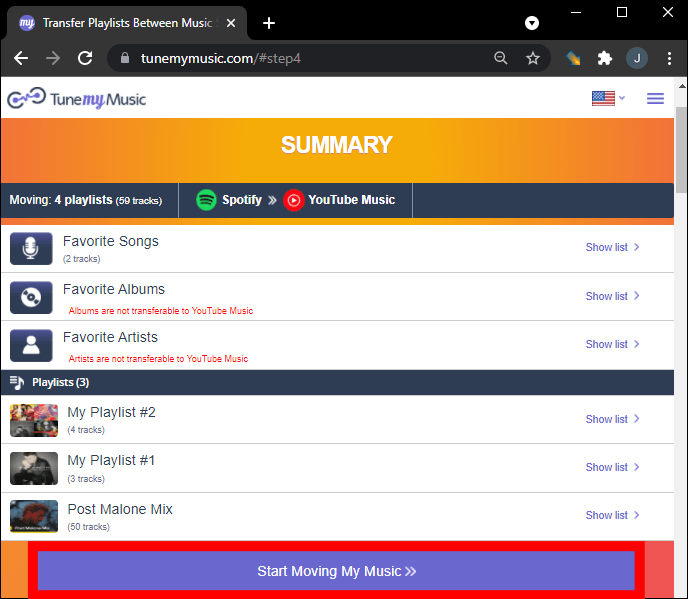
Étape 6. Une fois le processus terminé, ouvrez votre bibliothèque Amazon Music pour confirmer que la playlist a bien été créée.
L'utilisation d'un outil en ligne comme TuneMyMusic est l'un des moyens les plus rapides de transférer Spotify Pour les petites et moyennes listes de lecture, Amazon Music est une bonne option. Cependant, pour les utilisateurs possédant une bibliothèque musicale importante ou recherchant une plus grande stabilité, une solution sur ordinateur peut s'avérer plus adaptée.
Partie 2. Transfert Spotify Listes de lecture sur Amazon Music Windows/Mac
Si vous souhaitez une solution plus fiable et plus riche en fonctionnalités, l'utilisation d'un logiciel de bureau est souvent la meilleure option. DumpMedia N'importe quel convertisseur de musique est un programme puissant conçu pour gérer et convertir de la musique, tout en offrant une fonction dédiée au transfert de listes de lecture. DumpMedia permet aux utilisateurs de transférer Spotify Importez efficacement votre playlist sur Amazon Music tout en préservant les informations de la playlist et les métadonnées des morceaux.
Téléchargement gratuit Téléchargement gratuit
Fonctionnalités clés
- accompagne Windows et macOS
- Fonction de transfert de liste de lecture dédiée
- Migration par lots des listes de lecture
- Correspondance intelligente des pistes
- Conserve les métadonnées telles que les titres des artistes, des albums et des morceaux.
- Traitement local stable sans limitations du navigateur
Ces caractéristiques en font l'un des moyens les plus efficaces de transférer Spotify Pour les utilisateurs ayant de longues listes de lecture, téléchargez-les sur Amazon Music.
Guide étape par étape
Étape 1 : Téléchargez et installez DumpMedia N'importe quel convertisseur de musique sur votre WinOrdinateur Windows ou Mac. Lancez le programme après l'installation.
Téléchargement gratuit Téléchargement gratuit
Étape 2 : Choisissez Outils > Transfert de playlist. Sélectionnez Spotify comme source.

Étape 3. Sélectionnez Amazon Music comme destination.
Étape 4. Sélectionnez les éléments à transférer : nous prenons en charge vos chansons, artistes, albums préférés et vos listes de lecture personnalisées.

Étape 5. Cliquez sur Convertir pour démarrer le transfert.
Étape 6. Le transfert est terminé. Cliquez sur « Accéder à Amazon Music ». Vos playlists ont été transférées vers un nouveau service et vous pouvez désormais profiter de vos nouvelles playlists sur Amazon Music.
Comparée aux services en ligne, cette méthode offre une plus grande stabilité et une meilleure précision lors du transfert. Spotify playlist sur Amazon Music.
Partie 3. Transfert Spotify Ajouter des playlists à Amazon Music sur iOS
Si vous préférez utiliser un appareil mobile, plusieurs applications peuvent vous aider à effectuer le transfert. Spotify Transférez vos playlists vers Amazon Music directement depuis votre iPhone ou iPad. SongShift est une application très populaire pour iOS. Compatible avec de nombreux services de streaming musical, elle offre une interface intuitive pour faciliter le transfert de vos playlists.
Fonctionnalités clés
- Interface mobile facile à utiliser
- Prend en charge plusieurs plates-formes de streaming
- Permet les transferts de listes de lecture par lots
- Conçu spécifiquement pour les appareils iOS
Étapes pour transférer Spotify Ajoutez votre playlist à Amazon Music avec SongShift
Étape 1 : Téléchargez SongShift depuis l'App Store et ouvrez l'application. Autorisez Spotify L'application peut ainsi accéder à vos listes de lecture.
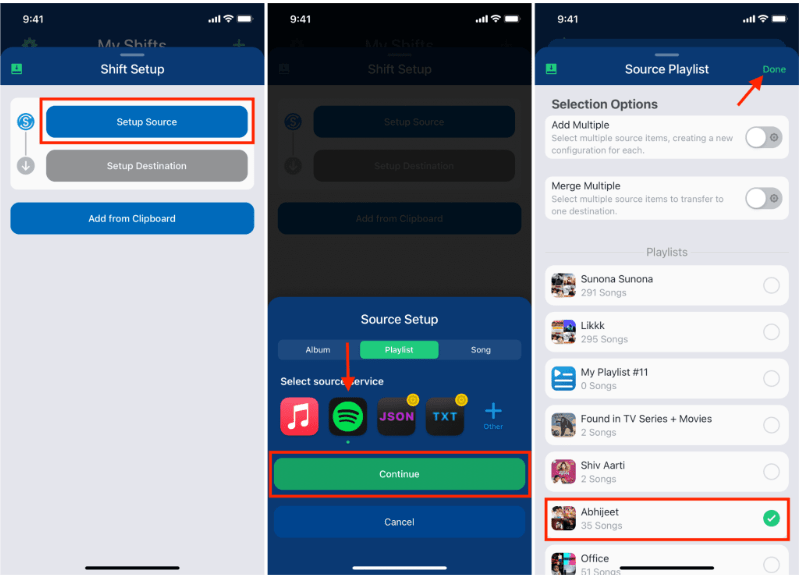
Étape 2. Ajoutez Amazon Music comme service de destination en vous connectant à votre compte Amazon.
Étape 3 : Choisissez le Spotify playlist que vous souhaitez migrer.
Étape 4. Appuyez sur Démarrer Shift et laissez l'application faire correspondre les chansons sur différentes plateformes.
Une fois le processus terminé, votre playlist devrait apparaître dans Amazon Music. SongShift est une option pratique pour les utilisateurs qui souhaitent transférer leurs playlists. Spotify Ajouter une playlist à Amazon Music sans utiliser d'ordinateur.
Partie 4. Transfert Spotify Listes de lecture sur Amazon Music sur Android
Les utilisateurs Android peuvent également transférer des listes de lecture entre services de streaming grâce à des applications dédiées. FreeYourMusic est une solution largement utilisée. FreeYourMusic est un outil de transfert de musique multiplateforme compatible avec Android, iOS et Android. WinIl est compatible avec dows et macOS. Il permet aux utilisateurs de déplacer facilement leurs listes de lecture entre les services de streaming.
Fonctionnalités clés
- Compatible avec de nombreuses plateformes de streaming
- Processus de transfert simple
- Fonctionne sur plusieurs appareils
- Permet les transferts de listes de lecture par lots
Étapes pour transférer Spotify Créez une playlist sur Amazon Music avec FreeYourMusic
Étape 1 : Téléchargez FreeYourMusic depuis le Google Play Store et ouvrez l'application. Sélectionnez Spotify en tant que plateforme source et connectez-vous à votre compte.
Étape 2. Choisissez Amazon Music et connectez-vous à votre compte.
Étape 3 : Choisissez le Spotify playlist que vous souhaitez migrer.
Étape 4. Appuyez sur Transférer pour lancer la migration. L'application associera les morceaux et recréera la playlist dans Amazon Music.
Partie 5. FAQ
1. Puis-je transférer Spotify Ajouter une playlist à Amazon Music gratuitement ?
Certains outils proposent des transferts de playlists gratuits avec des limitations, comme un nombre maximal de chansons par transfert. Les versions premium suppriment généralement ces restrictions.
2. Toutes les chansons seront-elles transférées avec succès ?
La plupart des chansons seront transférées avec succès, mais il arrive que certains titres ne soient pas disponibles sur les deux plateformes en raison de différences de licences.
3. Combien de temps faut-il pour transférer les listes de lecture ?
Le temps nécessaire dépend de la taille de votre liste de lecture. Les petites listes de lecture peuvent être transférées en quelques minutes, tandis que les plus volumineuses peuvent prendre plus de temps.
4. L'utilisation d'outils de transfert de listes de lecture est-elle sûre ?
Les outils réputés utilisent une authentification sécurisée pour accéder à vos comptes. Choisissez toujours des applications de confiance pour vos transferts. Spotify playlist sur Amazon Music.
Partie 6. Conclusion
Que vous préfériez un service en ligne, un logiciel de bureau ou une application mobile, il existe plusieurs façons de transférer Spotify Ajoutez rapidement et efficacement vos playlists à Amazon Music. Pour les utilisateurs qui souhaitent des résultats optimaux et précis, notamment pour les playlists volumineuses, DumpMedia Any Music Converter offre l'une des meilleures solutions.