


Comment transférer Apple Music vers Spotify: Guide complet
La fidélité numérique est fluctuante. Alors que les mélomanes recherchent une meilleure compatibilité multiplateforme et de nouveaux algorithmes de découverte, nombreux sont ceux qui franchissent le pas. Apple Music à SpotifyCependant, le principal obstacle au changement n'est pas le prix de l'abonnement, mais la crainte de perdre une décennie d'histoire musicale. Heureusement, plusieurs outils permettent désormais de… transférer Apple Music vers Spotify automatiquement. Dans ce guide, nous explorerons les méthodes les plus efficaces pour transférer des morceaux Apple Music vers Spotify sur différents appareils.
Guide des matières Partie 1. Transférer la playlist Apple Music vers Spotify on Windows/MacPartie 2. Transférer la playlist Apple Music vers Spotify En lignePartie 3. Transférer la playlist Apple Music vers Spotify sur iOS/AndroidPartie 4. FAQPartie 5. Pour tout résumer
Partie 1. Transférer la playlist Apple Music vers Spotify on Windows/Mac
L'un des moyens les plus fiables de transférer Apple Music vers Spotify Il s'agit d'utiliser un outil de bureau dédié offrant des fonctionnalités avancées de migration de listes de lecture. Une option fortement recommandée est DumpMedia N'importe quel convertisseur de musique, qui comprend une fonction de transfert de liste de lecture performante.
Téléchargement gratuit Téléchargement gratuit
DumpMedia Any Music Converter est une application de bureau professionnelle conçue pour gérer et convertir de la musique sur différentes plateformes. Elle fonctionne sur les deux Winet macOS. Grâce à sa fonction intégrée de transfert de playlists, les utilisateurs peuvent transférer efficacement Apple Music vers Spotify tout en préservant la structure de la liste de lecture et les métadonnées des chansons.
Fonctionnalités clés
- Fonction de transfert de liste de lecture : DumpMedia Vous pouvez ainsi déplacer des listes de lecture entières au lieu de transférer les morceaux individuellement. Cela représente un gain de temps considérable pour les grandes collections musicales.
- Migration par lots de listes de lecture : vous pouvez sélectionner plusieurs listes de lecture et les transférer simultanément, ce qui facilite la gestion des grandes bibliothèques.
- Performances stables sur ordinateur de bureau : depuis DumpMedia Fonctionnant localement sur votre ordinateur, il offre un processus de transfert plus stable que de nombreux outils basés sur un navigateur.
- Correspondance intelligente des chansons : le logiciel identifie automatiquement les chansons correspondantes. SpotifyLe catalogue de [nom de l'entreprise], garantissant que la liste de lecture transférée contient les morceaux corrects.
- Préservation des métadonnées : les titres des chansons, les noms des artistes, les albums et l’ordre de la liste de lecture restent intacts pendant le processus de transfert.
Guide étape par étape
Étape 1 : Tout d'abord, téléchargez DumpMedia Utilisez n'importe quel convertisseur musical disponible sur le site officiel. Installez le programme sur votre appareil. WinSur un ordinateur Windows ou Mac, lancez l'application. Ouvrez-la et choisissez Outils > Transfert de playlist.
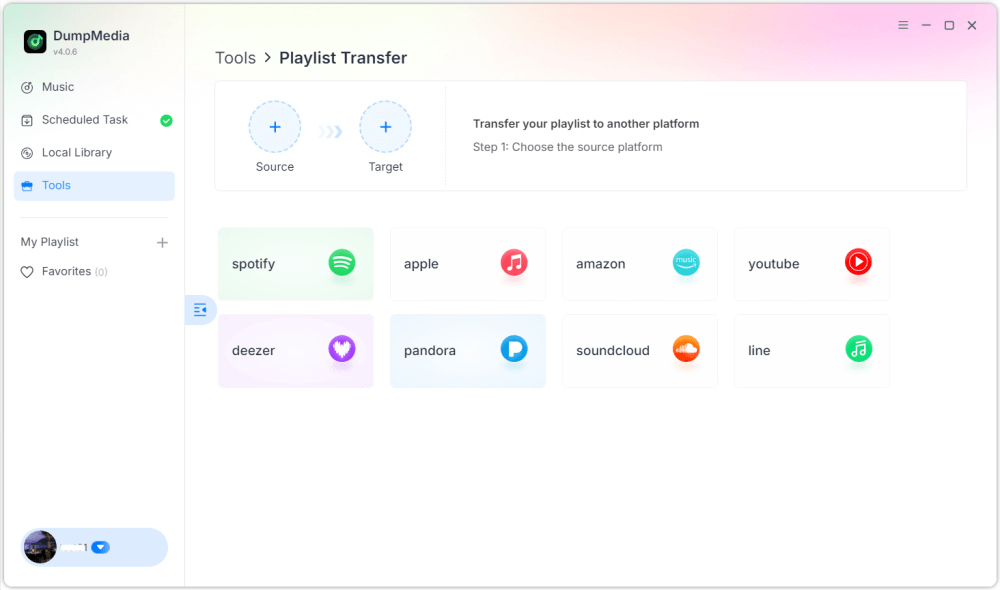
Étape 2 : Sélectionnez Apple Music comme source. Puis sélectionnez Spotify comme plate-forme cible.
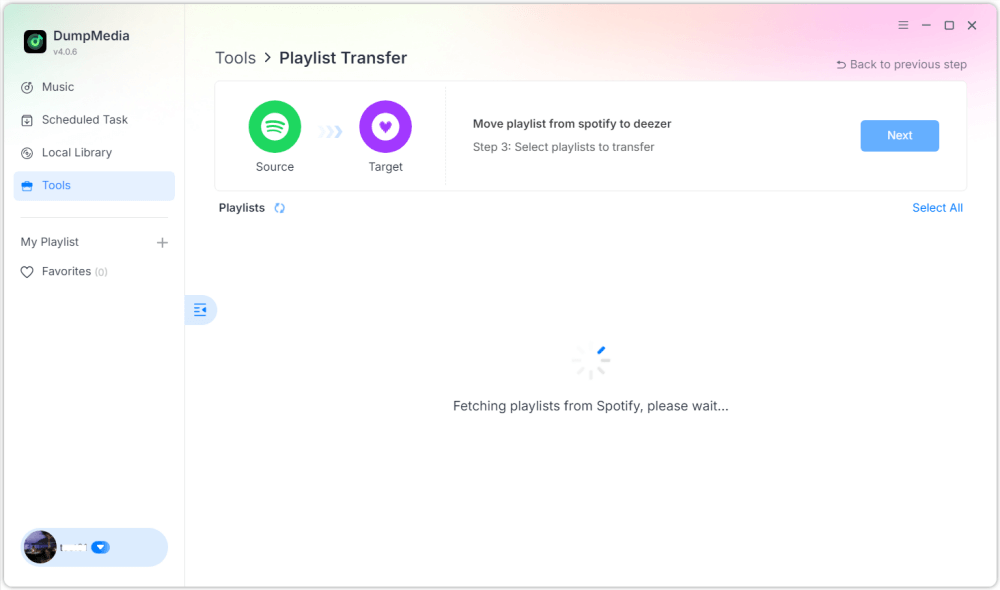
Étape 3 : Trouvez les playlists que vous souhaitez transférer d'Apple Music vers Spotify, et sélectionnez toutes les listes de lecture que vous souhaitez déplacer.

Étape 4 : Cliquez sur le bouton Convertir pour lancer la migration de la liste de lecture. DumpMedia recréera automatiquement la liste de lecture sur Spotify.
Étape 5 : Le transfert est terminé. Cliquez sur « Aller à ». SpotifyVos listes de lecture ont été transférées vers un nouveau service, et vous pouvez commencer à profiter de votre nouveau service de streaming musical.
Utiliser cette méthode sur ordinateur est l'une des façons les plus efficaces de transférer Apple Music vers Spotify, surtout si vous avez plusieurs listes de lecture ou une grande bibliothèque musicale.
Partie 2. Transférer la playlist Apple Music vers Spotify En ligne
Si vous préférez ne pas installer de logiciel supplémentaire, un outil de transfert de listes de lecture en ligne peut également vous aider à transférer Apple Music vers Spotify Rapidement. Soundiiz est une option populaire. Cette plateforme de gestion de playlists en ligne permet de transférer des playlists entre de nombreux services de streaming musical. Fonctionnant entièrement dans un navigateur, elle est compatible avec la quasi-totalité des appareils.
Fonctionnalités clés
- Interface web ne nécessitant aucune installation
- Compatible avec de nombreuses plateformes de streaming musical
- outils de conversion de listes de lecture
- Gestion par lots des listes de lecture
Étapes pour transférer Apple Music vers Spotify avec Soundiiz
Étape 1. Rendez-vous sur le site web de Soundiiz et créez un compte. Connectez-vous à votre compte Apple Music et autorisez Soundiiz à accéder à vos playlists.
Étape 2 : Connectez ensuite votre Spotify compte.
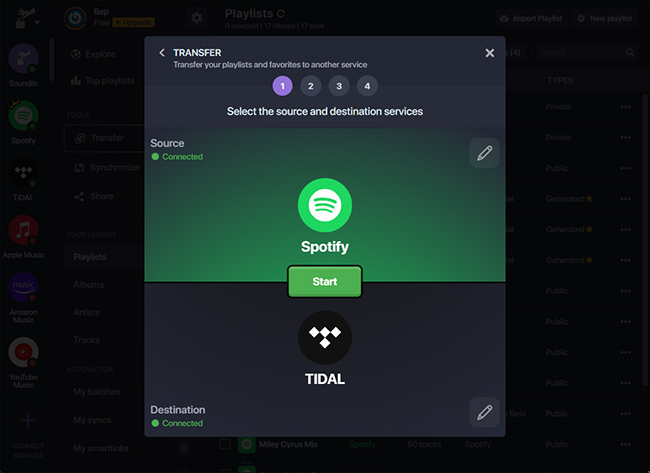
Étape 3 : Parcourez vos playlists Apple Music et sélectionnez celle que vous souhaitez transférer. Cliquez sur Convertir et choisissez Spotify comme plate-forme de destination.
Étape 4 : Soundiiz commencera à associer les chansons et à recréer la liste de lecture dans Spotify.
Les outils en ligne comme Soundiiz constituent une option pratique pour les utilisateurs qui souhaitent transférer des morceaux Apple Music vers Spotify sans installer de logiciel sur ordinateur. Cependant, elles peuvent présenter des limitations, comme des limites de transfert ou un traitement plus lent pour les listes de lecture volumineuses.
Partie 3. Transférer la playlist Apple Music vers Spotify sur iOS/Android
Si vous préférez gérer vos playlists directement depuis un smartphone, plusieurs applications mobiles peuvent vous aider à transférer Apple Music vers Spotify Facilement. Deux des applications les plus utilisées sont FreeYourMusic et SongShift.
Utilisation de FreeYourMusic (iOS et Android)
FreeYourMusic est un outil de transfert de musique multiplateforme disponible sur iOS et Android. Il permet aux utilisateurs de transférer des playlists entre différents services de streaming directement depuis leur téléphone.
- Installez l'application FreeYourMusic depuis l'App Store ou Google Play.
- Ouvrez l'application et sélectionnez Apple Music comme plateforme source.
- Connectez-vous à votre compte Apple Music.
- Choisissez Spotify comme plate-forme de destination.
- Sélectionnez la liste de lecture que vous souhaitez migrer.
- Appuyez sur Transfert pour démarrer le processus.
Votre playlist devrait apparaître dans quelques minutes. Spotify.
Utilisation de SongShift (iOS uniquement)
SongShift est une autre application mobile populaire conçue spécifiquement pour les utilisateurs iOS. Elle permet de transférer rapidement des listes de lecture entre plusieurs services musicaux.
- Téléchargez SongShift depuis l'App Store.
- Connectez votre Apple Music et Spotify comptes.
- Appuyez sur Créer un changement.
- Sélectionnez Apple Music comme source et Spotify comme destination.
- Choisissez la liste de lecture que vous souhaitez transférer.
- Démarrez le processus de transfert.
L'utilisation d'applications mobiles est une excellente option si vous souhaitez transférer Apple Music vers Spotify directement depuis votre téléphone, sans utiliser d'ordinateur.
Partie 4. FAQ
1. Puis-je transférer Apple Music vers Spotify gratuitement?
Certains outils proposent des transferts de listes de lecture gratuits, mais avec des limitations, comme un nombre maximal de chansons. Les versions payantes permettent généralement des transferts illimités et un traitement plus rapide.
2. Toutes les chansons seront-elles transférées avec succès ?
La plupart des chansons seront transférées correctement, mais il arrive que certains titres n'apparaissent pas s'ils ne sont pas disponibles sur la plateforme de destination.
3. Combien de temps dure le transfert ?
Le temps nécessaire dépend de la taille de la liste de lecture. Les petites listes peuvent être transférées en quelques minutes, tandis que les plus volumineuses peuvent prendre plus de temps.
4. L'utilisation d'outils de transfert de listes de lecture est-elle sûre ?
Les outils réputés utilisent des méthodes d'authentification sécurisées pour se connecter à vos comptes musicaux. Choisissez toujours un logiciel de confiance lorsque vous transférez Apple Music vers un autre appareil. Spotify.
Partie 5. Pour tout résumer
Changer de plateforme de streaming musical ne signifie plus perdre vos playlists soigneusement sélectionnées. Grâce aux outils modernes de migration de playlists, transférer Apple Music vers une autre plateforme est désormais plus facile que jamais. Spotify sans avoir à reconstruire manuellement votre bibliothèque musicale. En choisissant la méthode qui convient le mieux à votre appareil et à la taille de votre liste de lecture, vous pouvez transférer avec succès les morceaux Apple Music vers Spotify et continuez à profiter de vos chansons préférées en toute fluidité sur votre nouvelle plateforme de streaming.