


Comment transférer de la musique Amazon vers Spotify [3 solutions]
Les plateformes de streaming offrent de vastes catalogues musicaux, mais les utilisateurs changent souvent de service pour bénéficier de meilleures fonctionnalités. Si vous passez de Amazon Music à SpotifyLe principal obstacle réside dans le transfert de vos playlists soigneusement sélectionnées, sans la tâche fastidieuse de les recréer manuellement. Ce guide compare les deux plateformes et explore les méthodes les plus efficaces pour vous aider. transférer Amazon Music vers Spotify sans avoir à recréer les listes de lecture à partir de zéro.
Guide des matières Partie 1. Aperçu : Amazon Music vs. SpotifyPartie 2. Transférer la playlist Amazon Music vers Spotify on Windows/MacPartie 3. Transférer la playlist Amazon Music vers Spotify En lignePartie 4. Transférer la playlist Amazon Music vers Spotify iOS / AndroidPartie 5. FAQPartie 6. Conclusion
Partie 1. Aperçu : Amazon Music vs. Spotify
Amazon Music et Spotify Elles offrent de vastes bibliothèques musicales et des expériences de streaming pratiques, mais elles diffèrent sur plusieurs points importants qui influencent les préférences des utilisateurs.
Tarifs et plans d'abonnement
Amazon Music propose plusieurs formules d'abonnement, dont une version gratuite, Amazon Music Prime pour les membres Amazon Prime et Amazon Music Unlimited. Spotify propose également des formules gratuites et premium. SpotifyLa version gratuite de [nom de l'application] inclut des publicités et des fonctionnalités de lecture limitées, tandis que [nom de l'application] Spotify La version Premium offre une écoute sans publicité, des téléchargements hors ligne et des sauts de piste illimités.
- Lisez notre comparatif détaillé pour découvrir la différence entre Spotify Gratuit vs Premium.
Qualité audio
Amazon Music est connu pour proposer des options audio haute résolution via Amazon Music Unlimited, qui inclut des titres HD et Ultra HD. Spotify Elle propose également un streaming de haute qualité et est largement reconnue pour la constance de ses performances de lecture sur tous les appareils. Pour de nombreux utilisateurs, les deux plateformes offrent une excellente qualité sonore, bien qu'Amazon Music privilégie davantage les options audio haute résolution.
Fonctionnalités et outils de découverte musicale
Spotify Amazon Music est largement plébiscité pour son système de recommandations avancé et ses playlists algorithmiques, telles que Discover Weekly et Daily Mix. Ces playlists personnalisées aident les utilisateurs à découvrir de nouveaux morceaux en fonction de leurs habitudes d'écoute. Amazon Music propose des playlists thématiques et une intégration vocale avec Amazon Alexa, ce qui la rend particulièrement pratique pour les maisons connectées.
Compatibilité des appareils et intégration à l'écosystème
Amazon Music s'intègre parfaitement aux appareils Amazon tels que les enceintes Echo, tandis que Spotify Il fonctionne parfaitement avec une large gamme d'appareils tiers, notamment les téléviseurs intelligents, les consoles de jeux et les systèmes audio embarqués. En raison de ces différences, de nombreux utilisateurs décident de transférer Amazon Music vers Spotify prendre avantage de Spotifyses fonctionnalités de découverte et sa compatibilité étendue avec les appareils.
Partie 2. Transférer la playlist Amazon Music vers Spotify on Windows/Mac
L'un des moyens les plus fiables de transférer Amazon Music vers Spotify Il s'agit d'utiliser un logiciel de bureau qui inclut des fonctionnalités de migration de listes de lecture. Une solution recommandée est DumpMedia N'importe quel convertisseur de musique, qui fonctionne sur les deux WinCe logiciel est compatible avec Windows et macOS. Il inclut une fonction de transfert de playlists conçue pour aider les utilisateurs à migrer rapidement et efficacement leurs playlists entre les plateformes de streaming.
Téléchargement gratuit Téléchargement gratuit
DumpMedia Any Music Converter permet aux utilisateurs de connecter leurs comptes musicaux et de recréer automatiquement leurs playlists sur la plateforme de destination. Au lieu de rechercher manuellement chaque morceau, le programme analyse votre playlist, associe les titres entre les services et recrée la playlist sur la plateforme de destination. SpotifyCette approche permet de gagner un temps considérable, notamment pour les utilisateurs qui gèrent d'importantes bibliothèques musicales.
Guide étape par étape
Étape 1 : Téléchargez et installez DumpMedia N'importe quel convertisseur de musique sur votre WinOrdinateur Windows ou Mac. Lancez le programme après l'installation.
Téléchargement gratuit Téléchargement gratuit
Étape 2. Une fois votre bibliothèque chargée, accédez à la section Transfert de liste de lecture du programme.
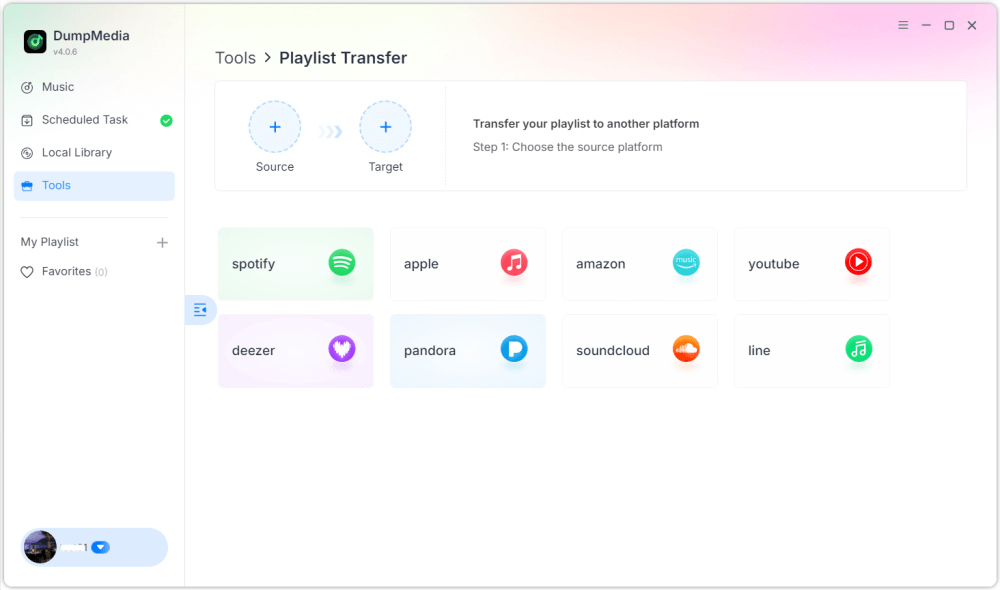
Étape 3. Choisissez Amazon Music comme source.
Étape 4 : Sélectionner Spotify comme destination.
Étape 5. Sélectionnez les éléments à transférer : nous prenons en charge vos chansons, artistes, albums et listes de lecture préférés.
Étape 6. Cliquez sur Convertir pour démarrer le transfert.
Étape 7 : Le transfert est terminé. Cliquez sur « Aller à ». SpotifyVotre liste de lecture devrait maintenant afficher les chansons correspondantes.
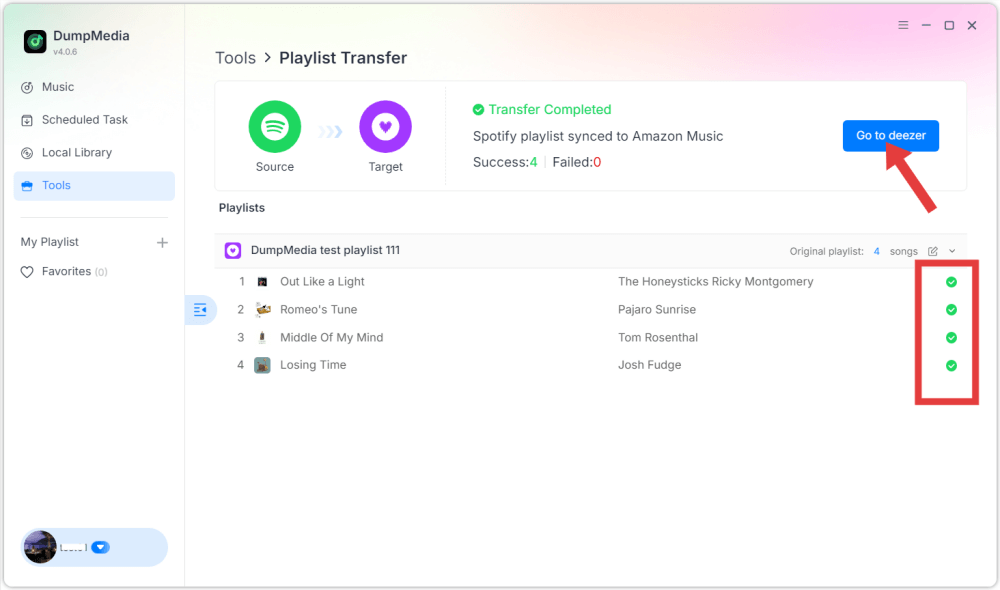
Grâce à cette méthode, les utilisateurs peuvent transférer efficacement Amazon Music vers Spotify tout en préservant l'ordre de la liste de lecture et les informations sur les pistes.
Partie 3. Transférer la playlist Amazon Music vers Spotify En ligne
Une autre façon pratique de transférer Amazon Music vers Spotify Il est possible d'utiliser un service de migration de playlists en ligne. TuneMyMusic est un outil très répandu qui fonctionne directement dans un navigateur web et ne nécessite aucune installation. Les outils en ligne sont particulièrement pratiques pour les utilisateurs qui souhaitent une solution rapide sans installer de logiciel supplémentaire.
Guide étape par étape
Étape 1. Pour commencer, rendez-vous sur le site web de TuneMyMusic et lancez un nouveau transfert. Choisissez Amazon Music comme plateforme source et connectez-vous à votre compte pour que le service puisse accéder à vos playlists.
Étape 2. Une fois votre compte connecté, la plateforme affichera vos playlists disponibles. Sélectionnez la playlist que vous souhaitez migrer et passez à l'étape suivante.
Étape 3 : Ensuite, choisissez Spotify Choisissez cette plateforme comme destination et connectez-vous pour autoriser la connexion. TuneMyMusic analysera ensuite votre playlist et tentera d'associer chaque morceau à un autre. Spotifyle catalogue.
Étape 4 : Une fois le processus terminé, la liste de lecture sera recréée automatiquement dans votre Spotify bibliothèque. Cela facilite le transfert d'Amazon Music vers Spotify sans nécessiter de compétences techniques.
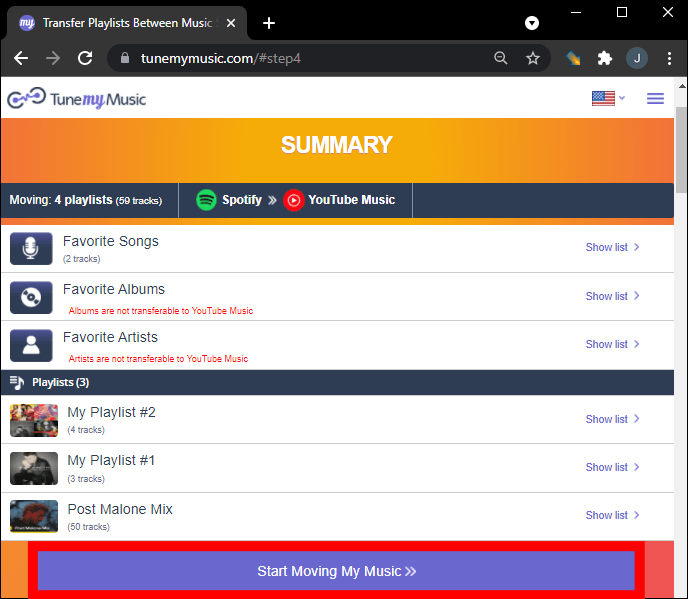
Bien que pratiques, les outils en ligne présentent parfois des limitations, comme des restrictions de transfert ou des performances réduites pour les listes de lecture volumineuses. Pour les utilisateurs disposant de bibliothèques importantes, les logiciels de bureau offrent une solution plus stable.
Partie 4. Transférer la playlist Amazon Music vers Spotify iOS / Android
Si vous préférez utiliser votre smartphone pour gérer vos bibliothèques musicales, plusieurs applications mobiles peuvent également vous aider à transférer Amazon Music vers SpotifyCes applications permettent aux utilisateurs de transférer leurs playlists directement depuis leurs appareils mobiles. FreeYourMusic, compatible avec iOS et Android, est une solution mobile populaire. L'application prend en charge plusieurs plateformes de streaming et offre une interface simple pour transférer les playlists.
Guide étape par étape
Étape 1. Après avoir installé l'application, ouvrez-la et sélectionnez Amazon Music comme plateforme source. Connectez-vous à votre compte pour que l'application puisse accéder à vos playlists.
Étape 2 : Alors choisi Spotify en tant que plateforme de destination et autoriser la connexion.
Étape 3 : Ensuite, sélectionnez la playlist que vous souhaitez déplacer et lancez le transfert. L'application recherchera automatiquement les morceaux correspondants. SpotifyLe catalogue de [nom de l'entreprise] et recréer la playlist.
Les applications mobiles comme FreeYourMusic offrent un moyen pratique de transférer Amazon Music vers Spotify directement depuis un smartphone, notamment pour les utilisateurs qui préfèrent ne pas utiliser d'ordinateur.
Partie 5. FAQ
Toutes les chansons seront-elles transférées avec succès ?
Dans la plupart des cas, la majorité des morceaux seront transférés correctement. Cependant, certains titres peuvent ne pas apparaître s'ils ne sont pas disponibles sur la plateforme de destination.
Combien de temps dure le processus de transfert ?
Le temps nécessaire dépend du nombre de morceaux dans votre liste de lecture et de l'outil utilisé. Les petites listes de lecture peuvent être transférées en quelques minutes, tandis que les plus grandes peuvent prendre plus de temps.
L'utilisation d'outils de transfert de listes de lecture est-elle sûre ?
Les outils réputés utilisent des systèmes d'authentification sécurisés qui permettent d'accéder aux playlists sans exposer d'informations personnelles. Il est important d'utiliser des services de confiance lorsque vous tentez de transférer Amazon Music vers Spotify.
Partie 6. Conclusion
Changer de plateforme de streaming musical ne signifie pas perdre vos playlists préférées. Grâce aux outils modernes de migration de playlists, il est désormais possible de transférer les titres d'Amazon Music vers d'autres plateformes. Spotify rapidement et efficacement. En choisissant la bonne méthode, vous pouvez transférer avec succès votre musique Amazon vers Spotify et continuez à profiter de votre collection musicale préférée sur l'une des plateformes de streaming les plus populaires au monde sans avoir à recréer vos listes de lecture manuellement.