


Comment transférer Spotify Accéder facilement à Deezer : Guide complet
De nombreux auditeurs qui utilisaient à l'origine Spotify peuvent décider plus tard de transférer leurs bibliothèques musicales vers Deezer Grâce à ses fonctionnalités uniques, comme la haute qualité audio, les recommandations personnalisées et la compatibilité avec de nombreux appareils intelligents, cette plateforme présente un attrait certain. Cependant, la principale difficulté lors du changement de plateforme réside dans la possibilité de transférer ses listes de lecture sans avoir à les recréer manuellement. Recréer une liste de lecture titre par titre peut prendre des heures, surtout si elle contient des centaines de morceaux.
Heureusement, plusieurs outils permettent désormais aux utilisateurs de déplacer automatiquement leurs listes de lecture depuis Spotify sur DeezerVous gagnerez du temps et votre musique préférée restera bien organisée. Ce guide vous présente les méthodes les plus efficaces pour migrer. Spotify Nous vous proposons des playlists à ajouter à Deezer et répondons à quelques questions fréquentes pour vous aider à mener à bien ce processus sans encombre.
Guide des matières Partie 1. Transfert Spotify Playlists sur Deezer en lignePartie 2. Transfert Spotify Playlists sur Deezer Windows/MacPartie 3. FAQPartie 4. Conclusion
Partie 1. Transfert Spotify Playlists sur Deezer en ligne
L'un des moyens les plus simples de déplacer des listes de lecture Spotify Pour transférer vos playlists de Deezer vers Deezer, vous pouvez utiliser un service de transfert en ligne. Ces outils fonctionnent directement dans votre navigateur et ne nécessitent aucune installation. Ils se connectent à vos comptes musicaux et recréent automatiquement vos playlists sur la nouvelle plateforme.
TuneMyMusic est un outil en ligne largement utilisé pour cette tâche. TuneMyMusic est un outil de migration musicale basé sur un navigateur, conçu pour aider les utilisateurs à transférer des listes de lecture entre différents services de streaming. Il prend en charge de nombreuses plateformes populaires et offre un processus simple pour le transfert. Spotify playlists sur Deezer.
Fonctionnalités clés
- Fonctionne directement dans un navigateur web
- Compatible avec plusieurs services de streaming musical
- Interface simple étape par étape
- Aucune installation de logiciel requise
- Permet l'importation de liens de listes de lecture ou de comptes
Grâce à sa simplicité, TuneMyMusic est souvent recommandé aux utilisateurs qui souhaitent transférer des listes de lecture depuis Spotify Accéder à Deezer rapidement sans installer d'applications supplémentaires.
Guide étape par étape
Étape 1. Rendez-vous sur le site web de TuneMyMusic et cliquez sur le bouton « Commencer » pour lancer le processus de transfert de la liste de lecture.
Étape 2 : Sélectionner Spotify en tant que plateforme source. Vous serez invité à vous connecter à votre compte. Spotify Créez un compte et autorisez l'outil à accéder à vos listes de lecture. Une fois l'autorisation accordée, le service affichera vos listes de lecture disponibles.
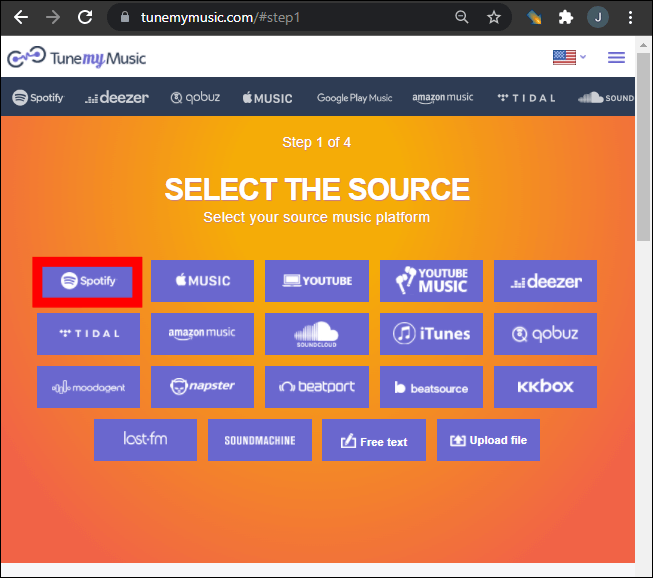
Étape 3. Vous pouvez choisir une playlist spécifique dans votre bibliothèque ou coller un lien de playlist. TuneMyMusic chargera automatiquement tous les morceaux contenus dans cette playlist.
Étape 4. Ensuite, sélectionnez Deezer comme plateforme de destination. Connectez-vous à votre compte Deezer et autorisez l'outil à créer des playlists dans votre bibliothèque.
Étape 5 : Cliquez sur « Commencer à déplacer ma musique ». Le système commencera à associer les chansons entre elles. Spotify et Deezer.
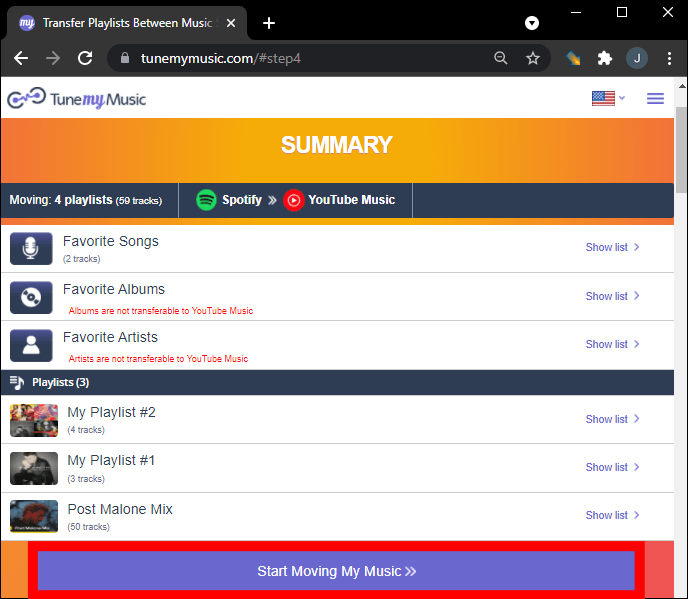
Étape 6. Une fois le transfert terminé, ouvrez votre bibliothèque Deezer pour vérifier que la playlist a bien été recréée.
Grâce à cette méthode, de nombreux utilisateurs peuvent rapidement déplacer des listes de lecture depuis Spotify sur Deezer en quelques minutes.
Limites des outils en ligne
Bien que les outils en ligne soient pratiques, ils peuvent présenter certaines limites :
- Les versions gratuites peuvent limiter le nombre de chansons transférées
- Le traitement des listes de lecture volumineuses peut prendre plus de temps.
- La précision de la correspondance des chansons peut varier.
- La connectivité Internet influe sur la vitesse de transfert.
En raison de ces limitations, les utilisateurs possédant d'importantes bibliothèques musicales préfèrent souvent une solution de bureau pour transférer leurs listes de lecture depuis Spotify vers Deezer de manière plus fiable.
Partie 2. Transfert Spotify Playlists sur Deezer Windows/Mac
Pour les utilisateurs qui souhaitent une plus grande stabilité et une meilleure gestion des listes de lecture, les logiciels de bureau constituent souvent l'option la plus fiable. Une solution fortement recommandée est DumpMedia N'importe quel convertisseur de musique, qui comprend un espace dédié Transfert de playlist .
Téléchargement gratuit Téléchargement gratuit
DumpMedia Any Music Converter est une application de bureau puissante conçue pour aider les utilisateurs à gérer et convertir de la musique sur différentes plateformes. Elle prend en charge les deux WinWindows et macOS et fournit des outils avancés pour la migration des listes de lecture. Le logiciel permet aux utilisateurs de transférer des listes de lecture depuis Spotify transférer efficacement vers Deezer tout en préservant la structure de la playlist et les informations sur les morceaux.
Fonctionnalités clés
- Le programme inclut une fonction intégrée de transfert de listes de lecture qui permet de déplacer des listes de lecture entières entre les plateformes de streaming.
- Les utilisateurs peuvent migrer plusieurs listes de lecture simultanément au lieu de les transférer une par une.
- Les titres des chansons, les artistes, les informations sur les albums et l'ordre de la liste de lecture sont conservés pendant le processus de migration.
- Comme le logiciel s'exécute localement sur votre ordinateur, il est moins affecté par les interruptions réseau que les outils basés sur un navigateur.
Guide étape par étape du transfert Spotify Playlists
Étape 1 : Téléchargez et installez DumpMedia N'importe quel convertisseur de musique sur votre WinOrdinateur Windows ou Mac. Lancez le programme après l'installation.
Téléchargement gratuit Téléchargement gratuit
Étape 2 : Choisissez Outils > Transfert de playlist. Sélectionnez Spotify comme source.
Étape 3. Sélectionnez Deezer comme destination.
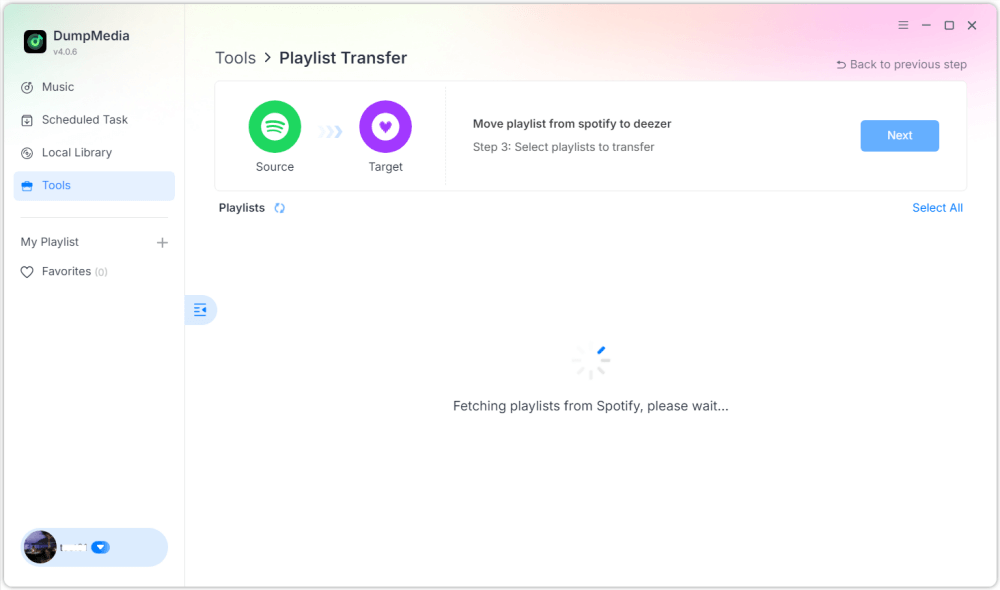
Étape 4. Sélectionnez les éléments à transférer : nous prenons en charge vos chansons, artistes, albums préférés et vos listes de lecture personnalisées.

Étape 5. Cliquez sur Convertir pour démarrer le transfert.
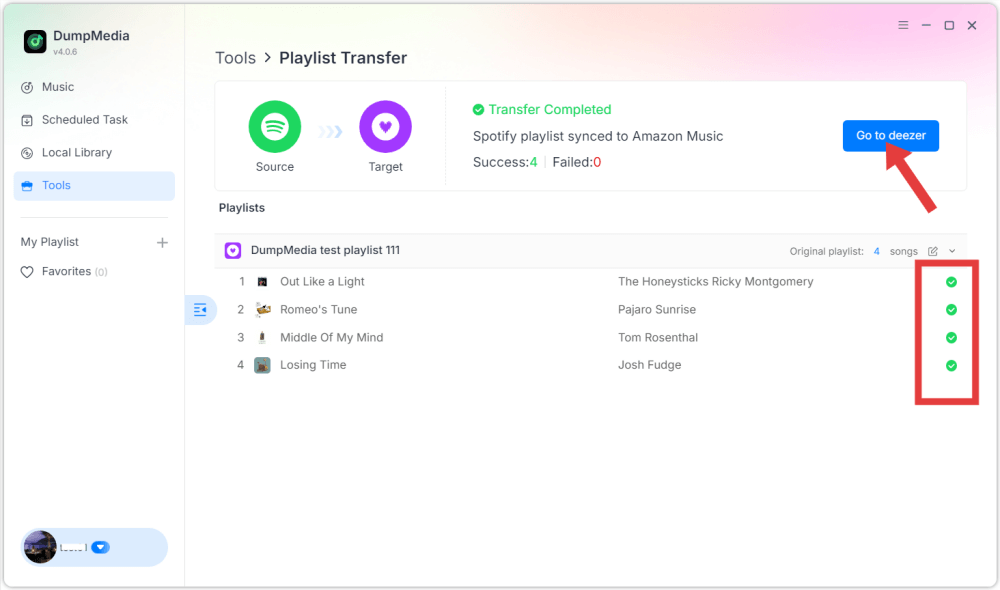
Étape 6. Le transfert est terminé. Cliquez sur « Accéder à Deezer ». Votre playlist devrait maintenant s'afficher avec les titres correspondants.
Partie 3. FAQ
1. Puis-je transférer Spotify Des playlists gratuites sur Deezer ?
Certains outils en ligne proposent des transferts de playlists gratuits, mais avec des fonctionnalités limitées. Ces versions gratuites peuvent notamment restreindre le nombre de morceaux transférables simultanément. Les outils premium suppriment généralement ces restrictions et offrent des transferts plus rapides.
2. Toutes les chansons seront-elles transférées avec succès ?
La plupart des morceaux seront transférés sans problème car les deux plateformes possèdent de vastes catalogues musicaux. Cependant, il arrive que certains titres n'apparaissent pas dans la playlist de destination s'ils ne sont pas disponibles sur Deezer.
3. Combien de temps faut-il pour transférer les listes de lecture ?
Le temps de transfert dépend de la taille de la liste de lecture. Les petites listes peuvent ne prendre que quelques minutes, tandis que les listes plus volumineuses contenant des centaines de chansons peuvent prendre plus de temps.
4. L'utilisation d'outils de transfert de listes de lecture est-elle sûre ?
Les outils réputés utilisent des systèmes d'authentification sécurisés pour se connecter à vos comptes de streaming. Choisissez toujours des applications de confiance et évitez les services inconnus lors de la migration de vos playlists. Spotify à Deezer.
Partie 4. Conclusion
Changer de service de streaming musical ne signifie plus perdre vos playlists soigneusement organisées. Grâce aux outils modernes de migration de playlists, vous pouvez facilement transférer votre bibliothèque musicale depuis votre plateforme habituelle. Spotify à Deezer sans avoir à recréer manuellement les playlists. Si vous avez une grande collection musicale ou si vous souhaitez une plus grande fiabilité, un logiciel de bureau comme DumpMedia Any Music Converter offre une solution plus stable et plus efficace.