


Comment mettre de la musique MP3 Joueur de Spotify en 2026.
Comment mettre de la musique MP3 joueur de Spotify reste l'une des questions les plus courantes parmi Spotify les utilisateurs, principalement parce que Spotify n'autorise pas les téléchargements directs vers aucun MP3 appareil à cause de DRMSi vous essayez de transférer des fichiers téléchargés Spotify pistes, la plupart MP3 Les joueurs ne les reconnaîtront pas.
Pour contourner cette limitation, vous avez besoin d'un outil capable de convertir Spotify convertir de la musique en un format audio standard tel que MP3. DumpMedia Spotify Music Converter est l'une des solutions les plus fiables pour cette tâche. Si votre objectif est de déplacer votre Spotify Transférer une bibliothèque vers un appareil portable pour une écoute hors ligne : ce convertisseur offre la méthode la plus rapide et la plus simple.
Guide des matières Partie 1. Pourquoi vous ne pouvez pas mettre Spotify Chansons sur MP3 Player?Partie 2. Comment mettre Spotify Musique allumée MP3 Player?Partie 3. FAQPartie 4. Pour tout résumer
Partie 1. Pourquoi vous ne pouvez pas mettre Spotify Chansons sur MP3 Player?
Spotify ne permet pas aux utilisateurs de transférer directement des chansons vers un MP3 joueur parce que tous Spotify Les morceaux sont protégés par la gestion des droits numériques (DRM). Ce chiffrement DRM empêche les utilisateurs de copier, d'exporter ou de convertir. Spotifyconvertir les fichiers audio de dans des formats standard comme MP3Même si vous téléchargez des chansons en utilisant un Spotify Premium compte, ces fichiers restent dans un format OGG verrouillé que seul le Spotify L'application peut lire. Par conséquent, les applications traditionnelles MP3 Les lecteurs, notamment les appareils non intelligents, ne peuvent ni reconnaître ni lire ces fichiers cryptés.
En bref, le système DRM garantit que Spotify La musique ne peut être jouée qu'à l'intérieur Spotifyécosystème autorisé. C'est pourquoi il suffit de glisser Spotify des chansons à un MP3 Le lecteur ne fonctionnera jamais.
Comment mettre de la musique MP3 joueur de SpotifyPour contourner cette limitation, vous avez besoin d'un outil capable de enlever Spotifyprotection DRM de . et la conversion des pistes en formats universels. DumpMedia Spotify Music Converter Il remplit précisément cet objectif. Il convertit Spotify chansons, albums et listes de lecture dans un format sans DRM MP3, les fichiers M4A, WAV ou FLAC, les rendant compatibles avec n'importe quel MP3 lecteur et permettant une véritable propriété hors ligne de votre musique.
Partie 2. Comment mettre Spotify Musique allumée MP3 Player?
Comment mettre de la musique MP3 joueur de Spotify? Avant de mettre Spotify de la musique sur votre MP3 joueur, assurez-vous d'avoir DumpMedia Spotify Music Converter installé.
Téléchargement gratuit Téléchargement gratuit
DumpMedia Spotify Music Converter gagne en popularité parmi Spotify auditeurs pour son merveilleux service de téléchargement de musique. Peu importe si vous êtes un utilisateur de Spotify Gratuit ou Spotify Avec la version Premium, vous pouvez télécharger et convertir Spotify chansons, listes de lecture et albums à MP3, AAC, ALAC, FLAC ou d'autres formats utilisant DumpMediaMieux encore, les téléchargements resteront toujours disponibles même si votre abonnement expire.
Guide étape par étape : Comment mettre Spotify Musique allumée MP3 Joueur
Étape 1 : Ouvrez le logiciel sur votre ordinateur. Il fonctionne avec les deux WinCompatible avec Windows et Mac. Son interface intuitive facilite la prise en main, même pour les débutants.
Étape 2 : Allez dans Spotify Choisissez ensuite le morceau, l'album ou la playlist que vous souhaitez convertir. Le logiciel détectera automatiquement les pistes.

Étape 3 : Sélectionnez un format compatible avec votre MP3 joueur. Les choix courants sont MP3, M4A, WAV ou FLAC. Vous pouvez également régler la qualité de sortie et la vitesse de conversion.

Étape 4 : Cliquez sur le bouton "Convertir" pour lancer le processus de conversion. DumpMedia Spotify Music Converter Supprimera la protection DRM et convertira tous les morceaux sélectionnés au format de votre choix. La conversion préserve une haute qualité audio.

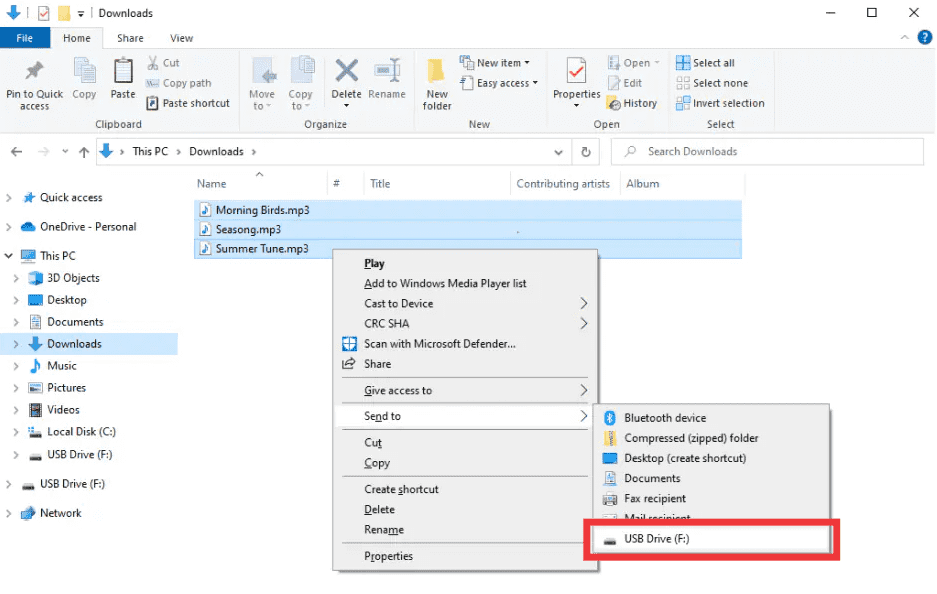
Étape 5 : Comment mettre de la musique MP3 joueur de SpotifyAprès la conversion, localisez le dossier de sortie. Connectez votre MP3 Connectez le lecteur à votre ordinateur via USB et copiez les fichiers convertis. Spotify La musique est désormais prête à être lue hors ligne sur n'importe quel appareil. MP3 appareil.
Partie 3. FAQ
1. Puis-je mettre Spotify chansons directement sur MP3 joueurs?
Non. SpotifyLes morceaux de [nom de l'entreprise] sont protégés par DRM et ne peuvent pas être exportés directement. Vous avez besoin d'un convertisseur comme [nom du convertisseur]. DumpMedia Spotify Music Converter pour les rendre compatibles.
2. Comment puis-je convertir Spotify listes de lecture à MP3?
Utilisez le DumpMedia Spotify Music Converter: copier les liens de la liste de lecture, sélectionner MP3 comme sortie, et convertissez. Ensuite, transférez les fichiers vers votre MP3 joueur.
3. Est-il légal de se convertir Spotify la musique?
Façonnage Spotify L'utilisation personnelle hors ligne de la musique est généralement autorisée. Évitez de distribuer les fichiers convertis à des tiers, car cela pourrait constituer une violation du droit d'auteur.
4. Quels formats puis-je utiliser pour MP3 joueurs?
MP3 est le plus courant. DumpMedia Spotify Music Converter Il prend également en charge les formats M4A, WAV et FLAC, tous compatibles avec la plupart des appareils.
5. Puis-je transférer Spotify De la musique sur plusieurs appareils ?
Oui. Une fois converti avec DumpMedia, votre Spotify Les chansons sont sans DRM et peuvent être lues sur n'importe quel appareil. MP3 lecteur, téléphone ou tablette.
Partie 4. Pour tout résumer
Si vous vous êtes déjà demandé comment mettre de la musique sur un MP3 joueur de SpotifyLa solution est claire : SpotifyLe système de gestion des droits numériques (DRM) de [nom de l'entreprise] empêche les transferts directs, mais DumpMedia Spotify Music Converter supprime ces restrictions. Il convertit vos chansons, albums ou listes de lecture préférés en MP3 ou d'autres formats universels, préservant une haute qualité et permettant une lecture hors ligne sur n'importe quel appareil.
Essayez DumpMedia Spotify Music Converter aujourd'hui et profitez Spotify De la musique partout, tout le temps, sans limites, sans problèmes de DRM.