


Comment télécharger Spotify Chansons à MP3 sur Mac en 2026
Spotify est l'une des plateformes de streaming musical les plus populaires au monde, mais de nombreux utilisateurs de Mac souhaitent toujours pouvoir télécharger Spotify chansons à MP3 sur Mac pour une lecture hors ligne permanente. Bien que Spotify Premium Permet l'écoute hors ligne ; les morceaux téléchargés sont chiffrés et ne peuvent pas être exportés de manière standard. MP3 fichiers. Dans ce guide, nous expliquerons s'il est possible de convertir Spotify musique dans MP3 sur Mac et présenter le meilleur Spotify à MP3 Convertisseur pour les utilisateurs macOS.
Guide des matières Partie 1. Pouvez-vous télécharger Spotify Musique à MP3 sur Mac?Partie 2. Meilleur Spotify Chansons à MP3 Convertisseur pour MacPartie 3. FAQPartie 4. Résumé
Partie 1. Pouvez-vous télécharger Spotify Musique à MP3 sur Mac?
De nombreux utilisateurs se demandent si Spotify permet officiellement aux utilisateurs de télécharger Spotify chansons à MP3 sur Mac. La réponse est non.
Spotify ne fournit pas de services directs MP3 Téléchargements, même pour les abonnés Premium. Officiel Spotify Les téléchargements sont protégés par DRM (Gestion des droits numériques), ce qui signifie :
- Les chansons ne peuvent être jouées qu'à l'intérieur de Spotify appli
- Les téléchargements disparaissent après la résiliation de l'abonnement.
- Les fichiers musicaux ne peuvent pas être transférés librement.
- Spotify Les pistes ne peuvent pas être exportées en tant que MP3
Même si les utilisateurs activent l'écoute hors ligne, les fichiers téléchargés restent chiffrés et inaccessibles en dehors de la connexion internet. SpotifyEn raison de ces limitations, les utilisateurs qui souhaitent télécharger Spotify chansons à MP3 Sur Mac, il faut généralement un tiers Spotify convertisseur.
Partie 2. Meilleur Spotify Chansons à MP3 Convertisseur pour Mac
Si vous souhaitez télécharger le plus facilement possible Spotify chansons à MP3 sur Mac, DumpMedia Spotify Music Converter est l'une des meilleures solutions disponibles. Ce professionnel Spotify Ce convertisseur est spécialement conçu pour les utilisateurs qui souhaitent une lecture hors ligne et une gestion musicale flexible sous macOS.
Téléchargement gratuit Téléchargement gratuit
🏆Caractéristiques principales DumpMedia Spotify Music Converter
- Convertir Spotify chansons à MP3, WAV, FLAC et AAC
- Supprimer Spotify DRM musical protection*
- Préserver la qualité audio originale
- Conserver les balises et métadonnées ID3
- Conversion par lots de listes de lecture et d'albums
- Vitesse de conversion rapide
- Entièrement compatible avec les appareils Mac
- Lecture hors ligne prise en charge sur tous les appareils
Contrairement à Spotify téléchargements officiels, convertis MP3 Les fichiers peuvent être stockés de façon permanente et transférés librement. De nombreux utilisateurs de Mac choisissent cette option. DumpMedia Spotify Music Converter car il offre un moyen stable et simple de télécharger Spotify chansons à MP3 sur Mac sans complications techniques.
Télécharger Spotify à MP3 sur Mac en utilisant DumpMedia Spotify Music Converter
Étape 1 : Téléchargez et installez DumpMedia Spotify Music Converter sur votre Mac/PC. Lancez-le et vous verrez l'interface. Utilisez votre Spotify Compte Premium/Gratuit pour se connecter.
Téléchargement gratuit Téléchargement gratuit
Étape 2 : Trouvez la playlist, l'album ou le morceau que vous souhaitez convertir. Vous pouvez glisser un morceau sur l'icône « + » à droite de l'écran. Vous pouvez également ouvrir une playlist ou un album entier et cliquer sur l'icône « Ajouter à la conversion » pour charger la liste complète dans le convertisseur.
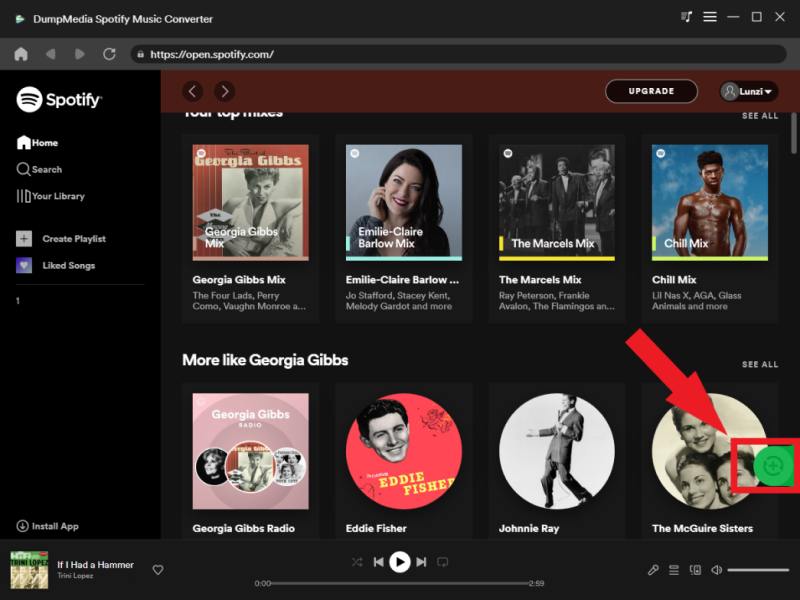
Étape 3 : Choisir MP3 (Compatibilité optimale). Vous pouvez également modifier le débit binaire ou la fréquence d'échantillonnage. Pour un équilibre optimal, choisissez 320 kbps.

Étape 4 : Une fois les paramètres configurés, les utilisateurs peuvent lancer la conversion en cliquant sur l'icône « Convertir ». DumpMedia va convertir Spotify chansons à MP3 en quelques secondes grâce à sa vitesse ultra-rapide.
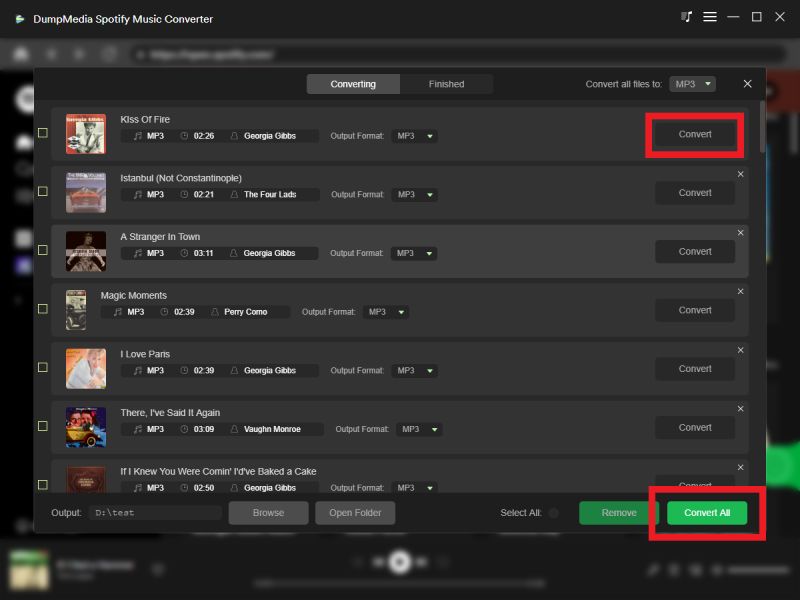
Après conversion, votre Spotify Les voies deviendront la norme locale MP3 des fichiers qui peuvent être lus gratuitement hors ligne.
Conseils supplémentaires
Si vous voulez télécharger Spotify chansons à MP3 Sur Mac, sans installer aucun programme, vous pouvez essayer DumpMedia outil en ligne. DumpMedia a développé un Spotify à MP3 convertisseurL'outil en ligne fonctionne selon un flux de travail simple de type « Copier-Coller-Télécharger ».
Les principales caractéristiques de DumpMedia Spotify à MP3 Converter
- Convertir Spotify chansons à MP3
- Entièrement compatible avec Mac et Winles sourds
- Lecture hors ligne prise en charge sur tous les appareils
Télécharger Spotify à MP3 sur Mac en utilisant DumpMedia Spotify à MP3 Converter
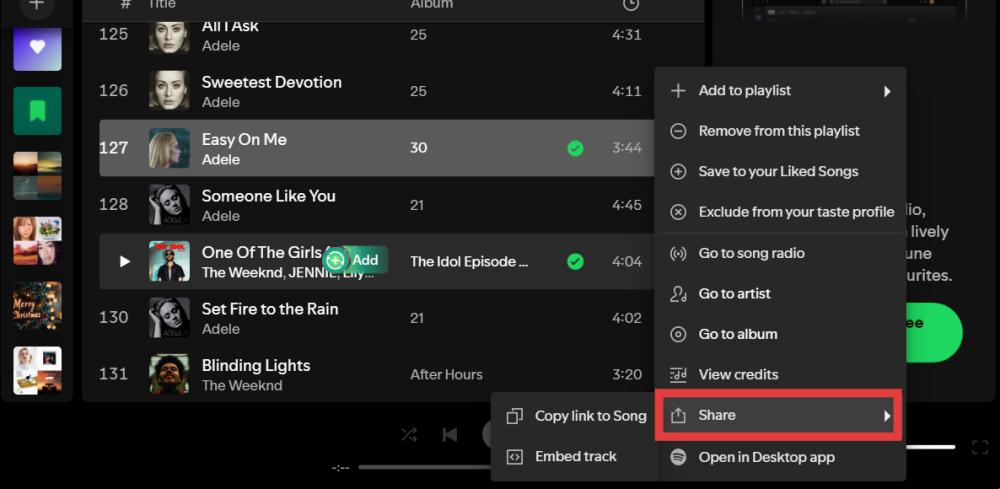
Étape 1 : Ouvrez Spotify Sur votre appareil (application de bureau ou version web), trouvez le morceau que vous souhaitez télécharger. Appuyez sur l'icône à trois points (⋯) à côté du nom du morceau. Sélectionnez « Partager », puis « Copier le lien du morceau ».
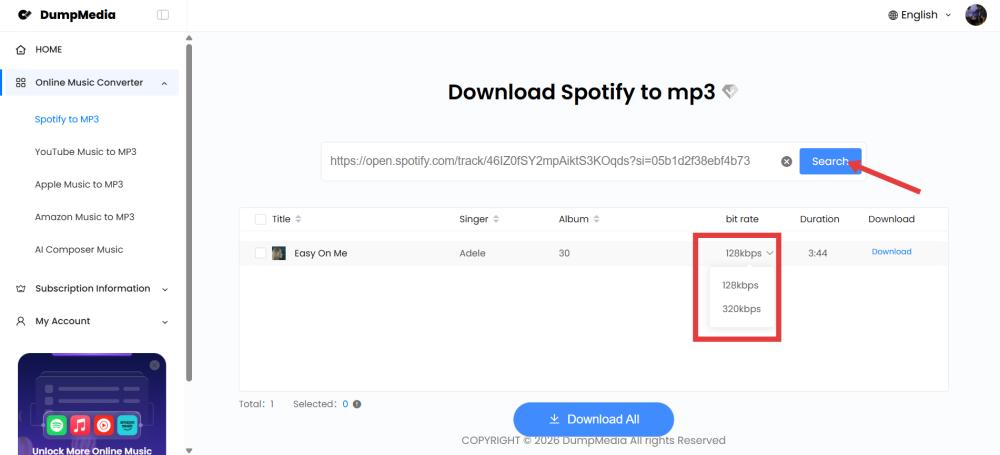
Étape 2 : Collez le lien dans le champ de saisie sur «Spotify à MP3Cliquez sur « Rechercher » et attendez que le lien soit traité.
Étape 3 : Cliquez sur le bouton « Télécharger » à côté du morceau souhaité. Le fichier sera enregistré dans MP3 le format.
Partie 3. FAQ
Puis-je télécharger Spotify chansons à MP3 sur Mac?
Spotify ne prend pas officiellement en charge MP3 téléchargements, mais les utilisateurs peuvent convertir Spotify musique dans MP3 format en utilisant DumpMedia Spotify Music Converter.
Le Spotify permettre MP3 téléchargements?
Non. Spotify Les téléchargements sont cryptés et ne peuvent être lus qu'à l'intérieur du système. Spotify app.
Puis-je transférer Spotify Enregistrer des chansons sur une clé USB avec un Mac ?
Les téléchargements officiels ne peuvent pas être transférés directement, mais convertis. MP3 Les fichiers peuvent être copiés librement.
Is DumpMedia Spotify Music Converter sûr?
Oui. Il est conçu pour Spotify Conversion musicale et gestion de la lecture hors ligne.
Remarque : Les plateformes de streaming ont leurs propres règles et systèmes de surveillance. En tant qu’outil tiers, nous sommes également soumis à leurs restrictions, ce qui peut affecter l’utilisation dans certains cas. Spotify peut prendre des mesures si elle détecte une activité qui enfreint ses conditions d'utilisation ; ceci relève pleinement de sa compétence. Spotifyla discrétion.
Partie 4. Résumé
Bien que Spotify n'autorise pas officiellement les utilisateurs à télécharger Spotify chansons à MP3 Sur Mac, il existe encore des solutions efficaces pour la lecture hors ligne permanente. Pour les utilisateurs Mac qui souhaitent plus de flexibilité, DumpMedia Spotify Music Converter offre un moyen simple et fiable de convertir Spotify chansons en MP3 format tout en préservant la qualité audio et les métadonnées.
En choisissant de télécharger Spotify chansons à MP3 Sur Mac, les utilisateurs peuvent profiter d'une lecture hors ligne illimitée, de la liberté de transférer leurs jeux entre appareils et d'un accès permanent à leurs favoris. Spotify la musique.
Téléchargement gratuit Téléchargement gratuit
*DumpMedia fonctionne en décryptant et en téléchargeant Spotify Cette fonction permet de convertir des morceaux en fichiers sans DRM, vous offrant ainsi une copie propre et sans restriction de votre bibliothèque pour n'importe quel appareil. Elle ne permet cependant pas de supprimer la protection DRM des fichiers audio locaux.

30% de réduction >>>