


M4A gratuit vers MP3 Convertisseurs pour WinDows 10 : Logiciels et outils en ligne
If you have downloaded songs from iTunes, you may have noticed that some music files come with DRM protection, which can limit playback on devices and applications outside the Apple ecosystem. For Windows 10 users, this can make it difficult to enjoy certain downloaded songs with other media players or devices.
In this article, we will introduce several free ways to convert M4A to MP3 on Windows 10. Whether you prefer dedicated software or an online converter that does not require installation, you can find a suitable solution here.
With the right conversion tool, you can convert compatible M4A audio files into MP3 and save them in a more widely supported format. MP3 files can then be played on Windows computers, car audio systems, portable players, and many other devices.
Guide des matières Recommended M4A to MP3 Convertisseur pour Winsourcils 10Recommended Online M4A to MP3 Convertisseur pour Winsourcils 10Which M4A to MP3 Converter Should You Choose?
Recommended M4A to MP3 Convertisseur pour Winsourcils 10
DumpMedia Apple Music Converter is a dedicated music conversion tool designed to help users convert Apple Music and iTunes audio into commonly supported formats such as MP3.
It supports batch conversion, allowing you to select multiple songs at once. You can also configure the output format, audio quality, and output folder according to your needs. Music metadata can be retained after conversion as well.
The software features an intuitive interface, so converting M4A to MP3 only takes a few simple steps.
Here's how to convert M4A to MP3 on Windows 10 avec DumpMedia Convertisseur de musique Apple.
Téléchargement gratuit Téléchargement gratuit
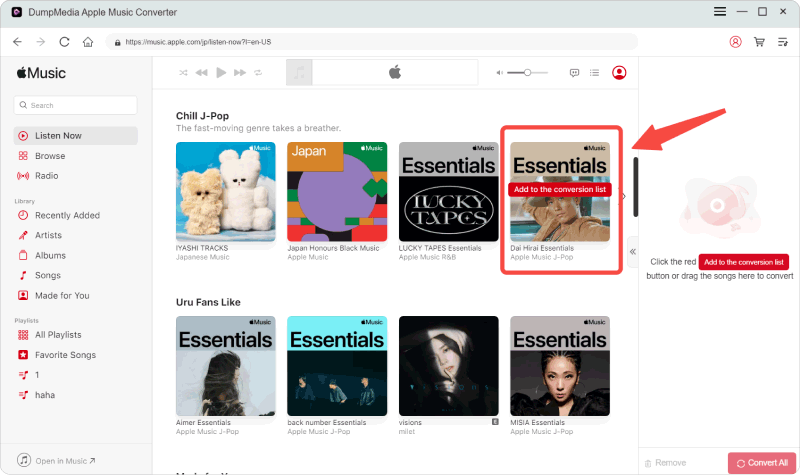
Étape 1 : Lancement DumpMedia Apple Music Converter sur votre Windows 10 computer. Select the songs you want to convert to MP3. You can select multiple songs at the same time if you want to process them in batches.
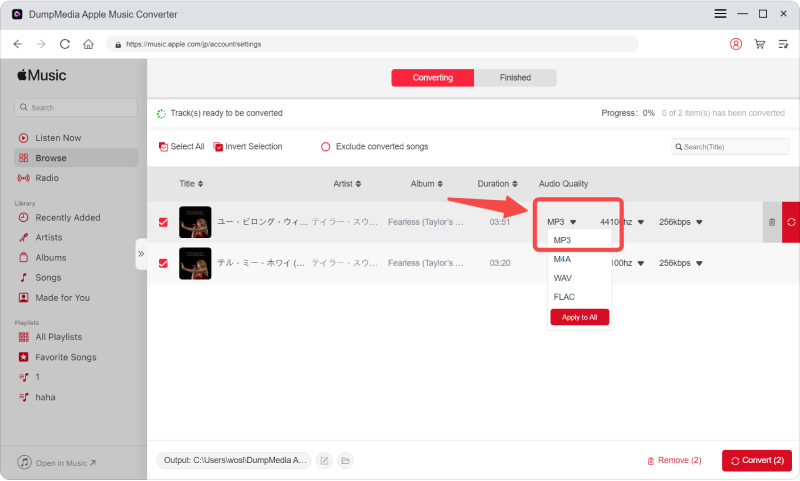
Étape 2 : Find the Output Settings section at the bottom of the interface. Select MP3 as the output format. You can also adjust the output quality and choose the destination folder where you want to save the converted files. Choose the settings that best match your needs.
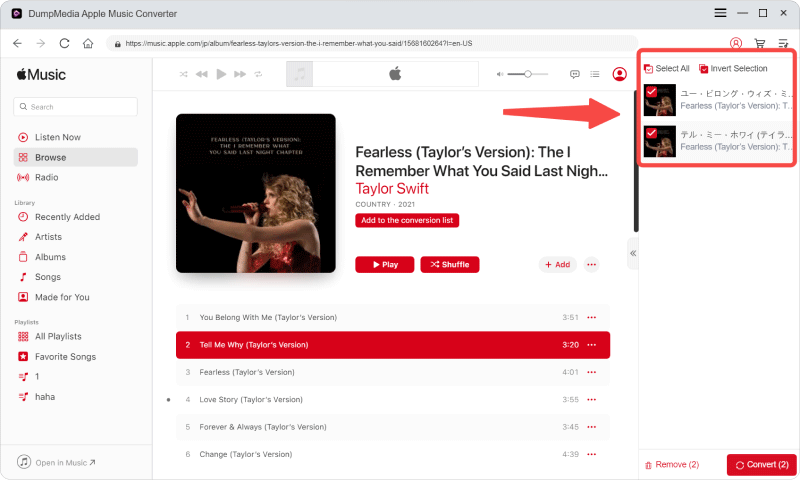
Étape 3 : Once you have finished configuring the output settings, click the Convert button. The software will begin converting the selected M4A files to MP3. Depending on the number of songs you selected, the conversion may take a little while. After the process is complete, you can find the converted MP3 files in your selected output folder.
Recommended Online M4A to MP3 Convertisseur pour Winsourcils 10
Convertio
If you don't want to install additional software on your computer, an online M4A to MP3 converter can be a convenient alternative. Convertio is an online file conversion service that allows you to convert M4A files to MP3 directly from your web browser.
Comment convertir M4A en MP3 with Convertio:
Étape 1 : Visit the Convertio website and upload the M4A file you want to convert. You can generally drag and drop your audio file into the designated area on the website.
Étape 2 : Choisissez MP3 as the output format. You can also adjust the available audio quality settings based on your preferences.
Étape 3 : After configuring the output settings, click the Convert button to begin converting your M4A file to MP3. Wait for the conversion process to finish. Once completed, you can download the converted MP3 fichier.
Convertio is convenient because it can be used directly online without installing dedicated conversion software. This can be particularly useful if you only need to convert a small number of files occasionally.
However, uploading audio files to an online service may take some time, especially when dealing with larger files or multiple songs. If you need to convert a large number of songs or prefer a desktop-based solution, dedicated conversion software may be more convenient.
Which M4A to MP3 Converter Should You Choose?
Both desktop software and online converters can be useful for converting M4A files to MP3 on Windows 10.
An online converter such as Convertio can be a convenient choice when you only need to convert a few files and don't want to install software.
D'autre part, DumpMedia Apple Music Converter is designed for users who need a dedicated solution for converting Apple Music and iTunes audio. It supports batch conversion and allows you to customize output settings, making it suitable for handling multiple songs.
DumpMedia Apple Music Converter also offers a free trial, so you can try its conversion features before deciding whether it meets your needs.
If you regularly need to convert M4A files to MP3 on Windows 10, a dedicated converter can provide a more convenient workflow than repeatedly uploading files to an online service.