


Ce titre Apple Music n'est pas disponible dans votre région ? 5 solutions simples pour y remédier.
L'erreur « Morceau Apple Music indisponible dans votre région » peut être frustrante, surtout lorsque vous essayez d'écouter votre morceau préféré. Ce problème survient généralement en raison de restrictions de licence, de paramètres de compte ou de limitations géographiques. Heureusement, il existe plusieurs solutions pour résoudre ce problème. Dans ce guide, nous vous expliquons pourquoi cette erreur se produit et vous proposons des solutions pratiques et efficaces.
Guide des matières Partie 1 : Pourquoi Apple Music indique « Non disponible dans votre région »Partie 2 : Comment résoudre le problème « Ce titre d’Apple Music n’est pas disponible dans votre région »Partie 3 : Que faire si la chanson n'est toujours pas disponible ?Partie 4 : Meilleure façon d’accéder aux morceaux d’Apple Music sans restrictions géographiquesPartie 5: FAQPartie 6. Résumé
Partie 1 : Pourquoi Apple Music indique « Non disponible dans votre région »
Si vous rencontrez l'erreur « Morceau Apple Music non disponible dans votre région », cela est généralement dû à l'une des raisons suivantes :
1. Restrictions de licence
La disponibilité de la musique varie selon les pays en raison des accords de droits d'auteur. Une chanson disponible dans une région peut être bloquée dans une autre.
2. Réglages de région de l'identifiant Apple
Votre identifiant Apple détermine le contenu auquel vous pouvez accéder. Si la région de votre compte ne correspond pas à votre emplacement réel, le message « Morceau Apple Music non disponible dans votre région » peut s’afficher.
3. Problèmes d'abonnement ou de synchronisation
Les abonnements expirés ou les problèmes de synchronisation peuvent également déclencher cette erreur.
4. Contenu supprimé par les artistes ou les labels
Il arrive que des chansons soient supprimées ou remplacées, ce qui peut entraîner le problème de chanson indisponible dans votre région sur Apple Music.
Partie 2 : Comment résoudre le problème « Ce titre d’Apple Music n’est pas disponible dans votre région »
Voici des solutions éprouvées pour résoudre le problème « Morceau Apple Music non disponible dans votre région » :
Solution 1 : Changer la région de l’identifiant Apple
La mise à jour de la région de votre identifiant Apple permet souvent de résoudre ces restrictions géographiques.
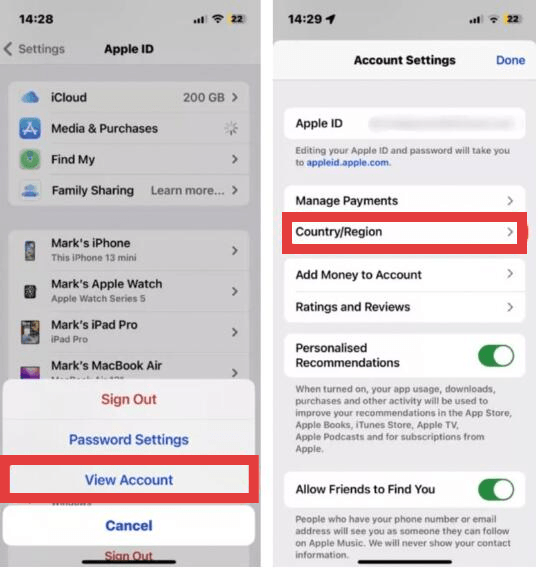
- Sur iPhone/iPad : ouvrez l’application Réglages, touchez votre nom en haut, puis sélectionnez Médias et achats. Touchez Afficher le compte (vous devrez peut-être vous authentifier). Identifiant du visage ou votre mot de passe). Sur Mac : ouvrez l’application Apple Music, choisissez Compte dans la barre de menus, puis sélectionnez Réglages du compte.
- Sélectionnez Pays/Région, puis appuyez sur Changer de pays ou de région.
- Choisissez votre nouvelle localisation dans la liste. Consultez les conditions générales, appuyez sur « Accepter » et saisissez un mode de paiement valide ainsi qu’une adresse de facturation pour cette région.
Fix 2: utiliser un VPN
Comment résoudre le problème de titre indisponible dans votre région sur Apple Music ? Lorsque les licences régionales vous empêchent d'écouter certains morceaux en streaming, un réseau privé virtuel (VPN) peut s'avérer très utile pour contourner ces restrictions géographiques. En faisant transiter votre connexion Internet par un serveur situé dans un autre pays, un VPN masque votre véritable adresse IP et vous fait apparaître comme si vous accédiez à Apple Music depuis une région où le contenu est légalement disponible.
Bien qu'efficace, cette méthode n'est pas idéale. Vous pourriez rencontrer des ralentissements, une latence plus élevée ou des interruptions fréquentes lors de la lecture, ce qui peut dégrader votre expérience d'écoute. De plus, Apple Music est fortement lié à la région de votre identifiant Apple, et non à votre seule adresse IP. Par conséquent, un VPN seul ne suffira pas toujours, sauf si les paramètres de votre compte correspondent également à la localisation simulée.
Solution 3 : Rechercher des versions alternatives
Il arrive parfois qu'une même chanson existe dans une autre version ou sur un autre album.
Solution 4 : Resynchronisez votre bibliothèque
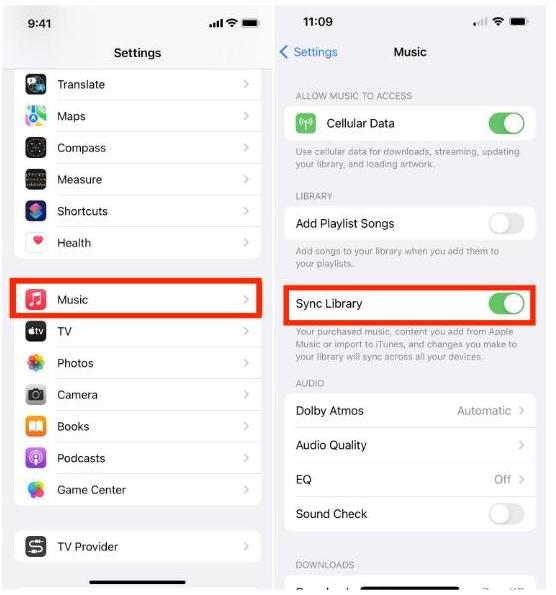
Si votre bibliothèque Apple Music présente des titres manquants ou grisés, la resynchronisation de votre compte peut actualiser la connexion aux serveurs d'Apple et résoudre les problèmes de bibliothèque. Ce processus force l'application à reconstruire son index et à revérifier votre abonnement.
- Sur le mobile: Allez dans Paramètres > Music et s'assurer Bibliothèque de synchronisation est basculé ON. S'il était déjà activé, essayez de le désactiver, d'attendre quelques secondes, puis de le réactiver pour déclencher une nouvelle analyse..
- Sur le bureau: Ouvrez l'application Musique, allez à Paramètres (ou Préférences) > Généralitéset assurez-vous Bibliothèque de synchronisation est vérifié. Vous pouvez également déclencher manuellement une mise à jour en allant sur Fichier > Bibliothèque > Mettre à jour la bibliothèque cloud.
Correctif 5 : Vérifier l’état de l’abonnement
Une autre solution consiste à vérifier que votre abonnement Apple Music est toujours actif. En cas de défaut de paiement ou d'interruption d'abonnement, Apple Music restreint immédiatement l'accès au catalogue de streaming et aux titres téléchargés pour une écoute hors ligne.
Ces méthodes peuvent résoudre de nombreux cas où une chanson Apple Music n'est pas disponible dans votre région, mais pas tous.
Partie 3 : Que faire si la chanson n'est toujours pas disponible ?
Même après avoir essayé toutes les solutions, il est possible que l'erreur « Morceau Apple Music non disponible dans votre région » persiste. Cela se produit car certains morceaux sont soumis à des restrictions permanentes dans certaines régions, et il est difficile de contourner ces limitations de licence. Face à ce problème, de nombreux utilisateurs se demandent : « Existe-t-il un moyen d'éviter complètement ce problème ? »
Partie 4 : Meilleure façon d’accéder aux morceaux d’Apple Music sans restrictions géographiques
Au lieu de vous heurter sans cesse au problème de l'indisponibilité des morceaux Apple Music dans votre région, une solution plus durable consiste à sauvegarder votre musique sans DRM. MP3 En supprimant les restrictions numériques liées à la localisation de votre compte, vous pouvez garantir l'accessibilité de votre bibliothèque musicale, quelles que soient les modifications de licences régionales ou vos déplacements.
Dans ce but, DumpMedia Apple Music Converter est une solution fortement recommandée. Elle est spécialement conçue pour contourner les limitations techniques du système de gestion des droits numériques FairPlay d'Apple*, vous permettant ainsi de conserver une collection locale permanente de votre musique.
Téléchargement gratuit Téléchargement gratuit
Principales caractéristiques et avantages
- Accès hors ligne permanent : Une fois Les chansons sont converties en MP3Elles ne dépendent plus d'un abonnement Apple Music actif ni de la disponibilité des serveurs régionaux. Vous pouvez les conserver indéfiniment sur votre appareil personnel.
- Conversion de qualité sans perte : Cet outil est conçu pour préserver la fidélité audio d'origine, garantissant ainsi que votre MP3Les fichiers M4A ou FLAC exportés offrent une qualité sonore identique à celle du flux audio original.
- Traitement par lots à grande vitesse : Vous pouvez convertir des listes de lecture ou des albums entiers en une seule fois à une vitesse jusqu'à 10 fois supérieure aux méthodes d'enregistrement standard, ce qui vous permet de gagner un temps considérable.
- Préservation des métadonnées : Il conserve automatiquement les métadonnées ID3 essentielles, notamment le titre du morceau, le nom de l'artiste, la pochette de l'album et le genre, assurant ainsi une organisation parfaite de votre bibliothèque locale.
- Compatibilité universelle: Puisque la sortie est standard MP3Vous pouvez transférer votre musique sur n'importe quel appareil, y compris MP3 lecteurs, autoradios et enceintes connectées non Apple, sans avoir besoin de l'application Apple Music.
Comment utiliser DumpMedia Apple Music Converter
Étape 1 : Téléchargez et installez le logiciel sur votre ordinateur. Il fonctionne avec les deux WinCompatible avec Windows et Mac. Son interface intuitive facilite la prise en main, même pour les débutants.
Téléchargement gratuit Téléchargement gratuit
Étape 2 : Ouvrez le lecteur web Apple Music intégré à l'intérieur DumpMedia Connectez-vous avec votre compte Apple Music. Parcourez votre catalogue Apple Music et glissez-déposez les morceaux, albums ou playlists que vous souhaitez télécharger dans le convertisseur.

Étape 3 : Dans le panneau des paramètres, sélectionnez MP3 comme format de sortie pour permettre un MP3 Téléchargement des morceaux sélectionnés.

Étape 4 : Cliquez sur Convertir et téléchargez les chansons directement MP3 fichiers.

Partie 5: FAQ
Pourquoi Apple Music indique-t-il que le morceau n'est pas disponible dans votre région ?
Cela est généralement dû à des restrictions de licence ou aux paramètres du compte.
Est-il possible de résoudre définitivement le problème de la disponibilité des chansons Apple Music dans ma région ?
Vous pouvez résoudre certains problèmes, mais pas tous. Certaines chansons sont soumises à des restrictions géographiques.
Existe-t-il un moyen d'éviter ce problème à l'avenir ?
Oui. Convertir des chansons en MP3 vous garantit de ne plus jamais être confronté à des restrictions régionales.
Quelle est la meilleure solution ?
L'utilisation de DumpMedia Apple Music Converter est la solution la plus fiable pour garder votre musique accessible.
Partie 6. Résumé
L'erreur « Morceau non disponible dans votre région » sur Apple Music peut être frustrante, mais dans de nombreux cas, quelques ajustements suffisent pour la résoudre. Cependant, pour un confort optimal à long terme, se fier uniquement aux plateformes de streaming peut s'avérer insuffisant. Si vous souhaitez un contrôle total sur votre musique et éviter toute restriction géographique, il est conseillé de convertir vos morceaux en MP3 est la meilleure solution. Essayez DumpMedia Apple Music Converter dès aujourd'hui et profitez de votre musique sans limites.
Téléchargement gratuit Téléchargement gratuit
*DumpMedia Ce logiciel fonctionne en décryptant et en téléchargeant les morceaux d'Apple Music dans des fichiers sans DRM, vous permettant ainsi d'obtenir une copie propre et sans restriction de votre bibliothèque pour n'importe quel appareil. Il ne prend pas en charge la conversion des fichiers audio locaux.

30% de réduction >>>