


Apple Music n'est pas disponible dans votre région ? Ce problème sera résolu en 2026.
De nombreux utilisateurs d'Apple Music rencontrent le message frustrant : «Apple Music n'est pas disponible dans votre régionLes restrictions régionales, les accords de licence, la protection DRM et les problèmes de vérification de compte empêchent souvent la lecture normale des morceaux sur Apple Music. Ce guide explique pourquoi Apple Music affiche « Non disponible dans votre pays », comment résoudre ce problème sur iPhone, Mac et PC, et comment écouter vos morceaux Apple Music hors ligne sans restriction géographique.
Guide des matières Partie 1. Pourquoi Apple Music indique-t-il « Non disponible dans votre région » ?Partie 2. Comment résoudre le problème « Apple Music n'est pas disponible dans votre pays » ?Partie 3. La meilleure façon de rendre Apple Music accessible partoutPartie 4. FAQPartie 5. Résumé
Partie 1. Pourquoi Apple Music indique-t-il « Non disponible dans votre région » ?
Les utilisateurs recherchent souvent « Apple Music n’est pas disponible dans votre région » dans les situations suivantes.
- Les morceaux d'Apple Music sont grisés.
- Les chansons apparaissent dans les listes de lecture mais ne peuvent pas être lues.
- Chansons téléchargées soudainement indisponibles
- Les titres hors ligne cessent de fonctionner après la vérification de l'abonnement ou de la région.
- Problèmes avec Apple Music en voyage
- Problèmes liés au changement de pays de l'identifiant Apple
- Apple Music ne fonctionne pas sur iPhone ou Mac
Plusieurs raisons peuvent expliquer l'affichage du message d'erreur « Apple Music n'est pas disponible dans votre région ».
Restrictions de licence
Apple Music applique des licences différentes selon les pays et les régions. Certains titres peuvent être disponibles dans un pays, mais restreints dans un autre en raison d'accords de droits d'auteur. C'est l'une des causes les plus fréquentes du problème « Apple Music n'est pas disponible dans votre pays ».
Paramètres de région de l'identifiant Apple
Si la région de votre identifiant Apple change, certaines chansons peuvent disparaître. De nombreux utilisateurs rencontrent le message « Apple Music n’est pas disponible dans votre pays » après un déménagement à l’étranger ou une modification de leurs paramètres de paiement.
Protection DRM
Les chansons Apple Music sont protégées par DRM (gestion des droits numériques)L'utilisation de ce service nécessite une vérification de compte et une autorisation régionale. En raison des restrictions liées à la gestion des droits numériques (DRM), la lecture hors ligne peut échouer.
Problèmes de vérification d'abonnement
Apple Music vérifie régulièrement l'état de votre abonnement en ligne. En cas d'échec de la vérification, vous risquez de perdre soudainement l'accès aux morceaux téléchargés.
Chansons retirées du catalogue local
Il arrive que les maisons de disques retirent des chansons de catalogues régionaux spécifiques, rendant ainsi des titres indisponibles même s'ils étaient auparavant jouables.
Partie 2. Comment résoudre le problème « Apple Music n'est pas disponible dans votre pays » ?
Si vous continuez à voir le message « Apple Music n’est pas disponible dans votre région », les méthodes suivantes peuvent vous aider à résoudre le problème.
Vérifiez la région de votre identifiant Apple
Un paramétrage régional incorrect est l'une des principales raisons pour lesquelles Apple Music n'est pas disponible dans votre région. Ouvrez les réglages de votre identifiant Apple et vérifiez que votre pays ou région correspond bien à votre localisation actuelle et à votre mode de paiement.
Mettre à jour les informations de paiement
Les méthodes de paiement expirées ou non prises en charge peuvent affecter la vérification du compte et l'accès régional.
Resynchroniser la bibliothèque musicale Apple
Désactivez puis réactivez la synchronisation de la bibliothèque pour actualiser les informations de disponibilité des morceaux.
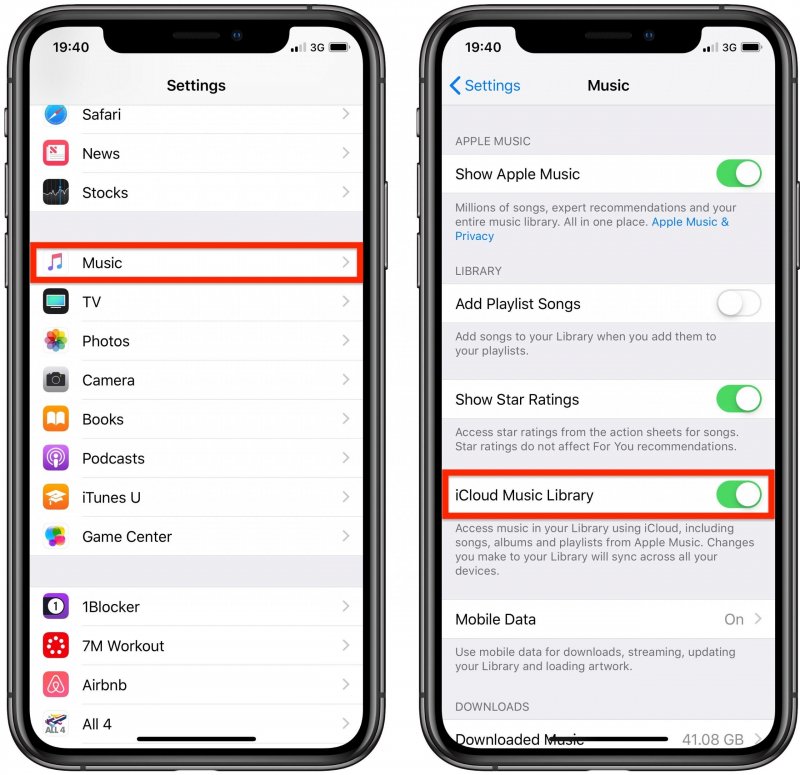
Pour iOS (iPhone) : Ouvrez Réglages > Applications > Musique. Désactivez la synchronisation de la bibliothèque. Attendez 30 secondes, puis réactivez-la. Ouvrez l'application Musique ; une barre de progression indiquant « Chargement de la bibliothèque musicale » devrait s'afficher en haut.
Pour Android: Ouvrez l’application Apple Music. Touchez le menu à trois points (⋮) en haut à droite et sélectionnez Réglages. Trouvez Synchroniser la bibliothèque et désactivez-la, puis réactivez-la.
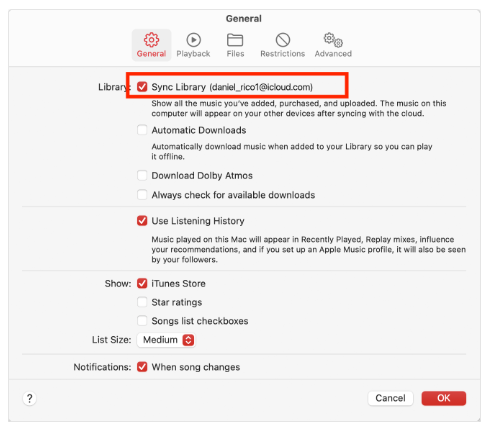
Pour macOS (Tahoe / 2026) : Allez dans Musique > Réglages > Général et décochez Synchroniser la bibliothèque, cliquez sur OK, puis revenez en arrière et recochez-la.
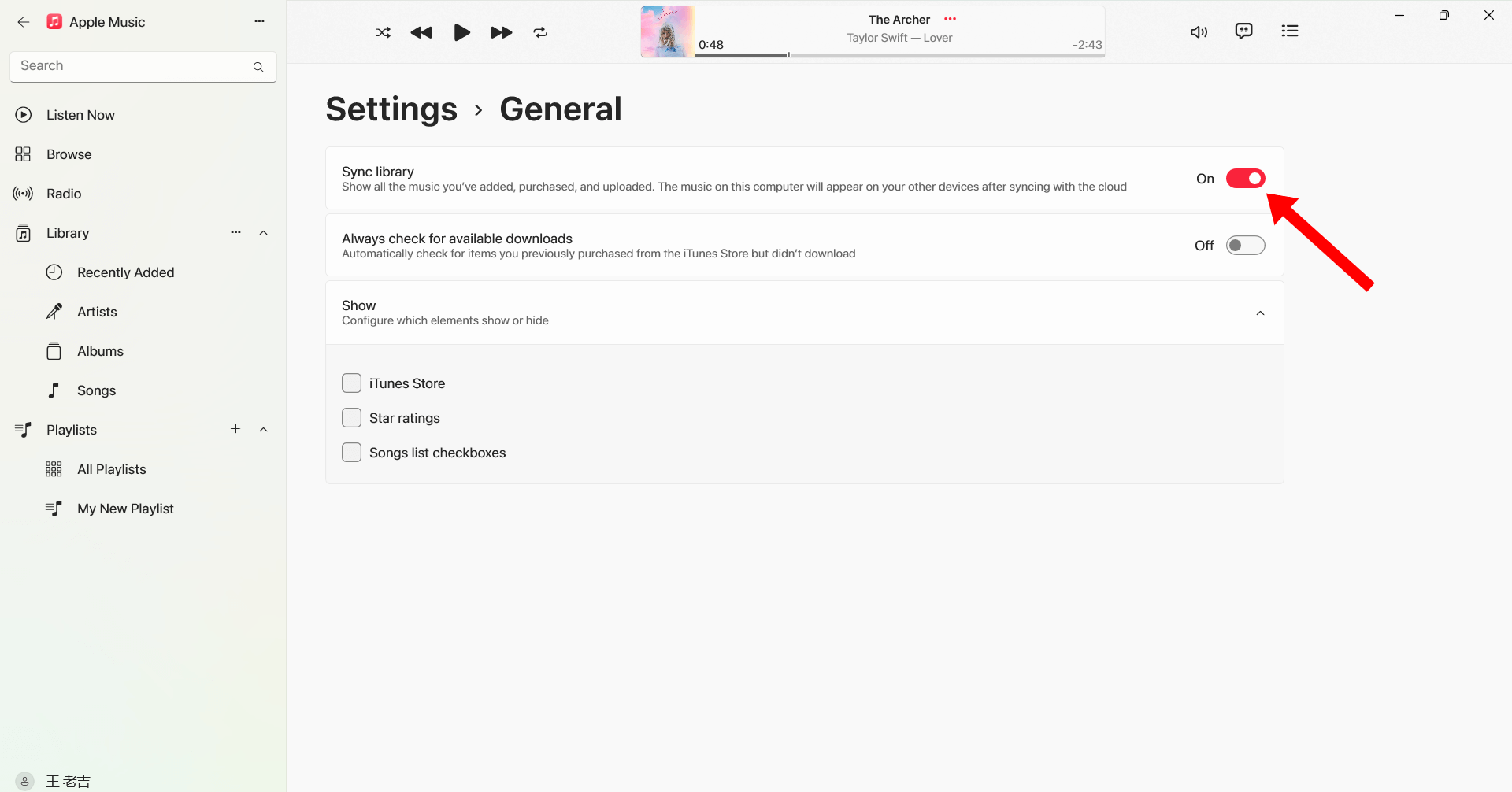
Pour WinDows (10/11) : Ouvrez l'application Apple Music. Cliquez sur votre nom/icône de profil en bas de la barre latérale. Accédez à Réglages > Général. Désactivez puis réactivez la synchronisation de la bibliothèque.
Déconnectez-vous et reconnectez-vous
Se reconnecter à votre identifiant Apple peut actualiser l'autorisation Apple Music et résoudre les problèmes de lecture liés à la région.
Télécharger à nouveau les chansons
Certains morceaux téléchargés peuvent être corrompus ou ne plus être autorisés. Le téléchargement d'un nouveau morceau peut rétablir la lecture.
Mettre à jour iOS ou macOS
Les versions système plus anciennes peuvent entraîner des problèmes de compatibilité avec Apple Music.

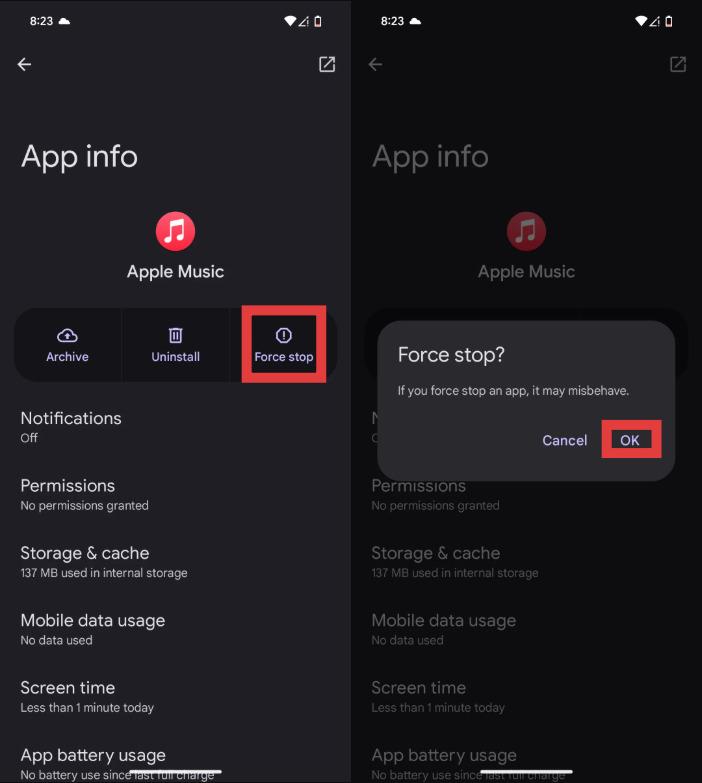
Redémarrez l'application Apple Music
Des bugs temporaires peuvent également déclencher le message « Apple Music n’est pas disponible dans votre région ».
Si ces solutions ne fonctionnent pas, le problème peut être lié à des restrictions DRM et à des limitations de licences régionales indépendantes de votre volonté.
Partie 3. La meilleure façon de rendre Apple Music accessible partout
Pour éviter les problèmes récurrents du type « Apple Music n'est pas disponible dans votre région », de nombreux utilisateurs convertir les chansons Apple Music en local MP3 fichiersL'un des meilleurs outils pour cela est DumpMedia Apple Music ConverterCe convertisseur professionnel pour Apple Music permet aux utilisateurs d'enregistrer des morceaux localement pour une lecture hors ligne stable, sans dépendre d'une autorisation régionale.
Téléchargement gratuit Téléchargement gratuit
🏆Pourquoi choisir DumpMedia Apple Music Converter
- Supprimer la protection DRM d'Apple Music*
- Préserver la qualité sonore originale
- Téléchargement par lots de listes de lecture et d'albums
- Vitesse de conversion rapide
- Conserver les métadonnées et les balises ID3 des morceaux
- Lecture hors ligne prise en charge sur tous les appareils
Pour les utilisateurs rencontrant régulièrement le message « Apple Music n'est pas disponible dans votre région », les ressources locales MP3 La lecture en différé offre une solution plus fiable à long terme.
Comment convertir Apple Music en MP3 pour la lecture hors ligne
Étape 1 : Téléchargez et installez DumpMedia Installez Apple Music Converter sur votre Mac/PC. Lancez-le pour afficher son interface. Connectez-vous avec votre compte Apple Music.
Téléchargement gratuit Téléchargement gratuit
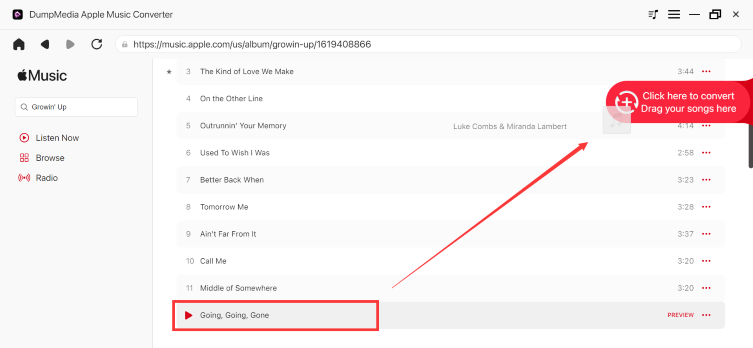
Étape 2 : Trouvez la playlist, l'album ou le morceau que vous souhaitez convertir. Vous pouvez glisser un morceau sur l'icône « + » à droite de l'écran. Vous pouvez également ouvrir une playlist ou un album entier et cliquer sur l'icône « Ajouter à la conversion » pour charger la liste complète dans le convertisseur.
Étape 3 : Sélectionner MP3 (Compatibilité optimale). Vous pouvez également modifier le débit binaire ou la fréquence d'échantillonnage. Pour un équilibre optimal, choisissez 320 kbps.
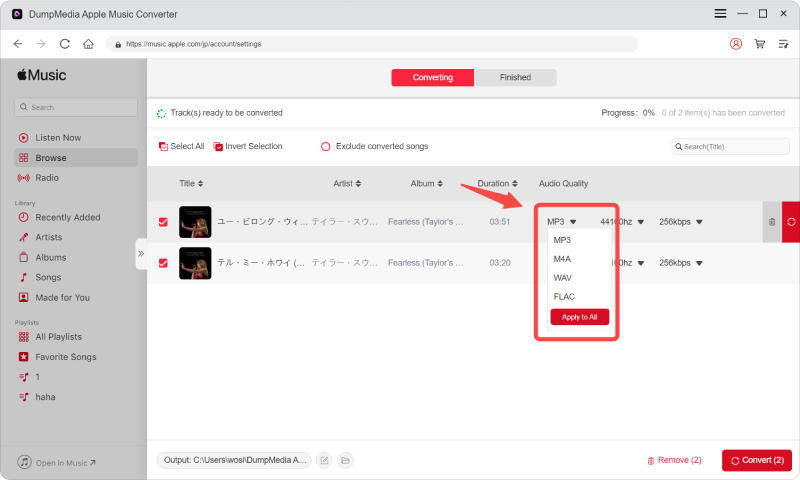
Étape 4 : Une fois les paramètres configurés, les utilisateurs peuvent lancer la conversion en cliquant sur l'icône « Convertir ». DumpMedia convertira les chansons Apple Music en MP3 en quelques secondes grâce à sa vitesse ultra-rapide.

Après conversion, vos morceaux pourront être écoutés hors ligne sans vérification de région par Apple Music.
Partie 4. FAQ
Pourquoi Apple Music indique-t-il qu'il n'est pas disponible dans votre région ?
Cela se produit généralement en raison de restrictions de licence, des paramètres régionaux de l'identifiant Apple ou de problèmes d'autorisation DRM.
Comment résoudre le problème « Apple Music n'est pas disponible dans ma région » ?
Vous pouvez essayer de mettre à jour les paramètres régionaux de votre identifiant Apple, de resynchroniser votre bibliothèque, de retélécharger les morceaux ou de redémarrer l'application.
Pourquoi mes chansons Apple Music sont-elles grisées ?
Les chansons grisées indiquent souvent des problèmes de licences régionales ou de synchronisation.
Puis-je écouter Apple Music pendant mes voyages à l'étranger ?
Oui, mais certaines chansons peuvent devenir indisponibles en raison de restrictions régionales liées aux droits d'auteur.
Comment conserver définitivement les morceaux d'Apple Music ?
De nombreux utilisateurs utilisent DumpMedia Apple Music Converter permet de convertir des chansons en format local. MP3 fichiers pour une lecture hors ligne permanente.
Is DumpMedia Apple Music Converter est-il sûr ?
Oui. Il est conçu pour la conversion de musique Apple Music et la gestion de la lecture hors ligne.
Partie 5. Résumé
L’erreur « Apple Music n’est pas disponible dans votre région » est généralement due à des restrictions de licence, à la protection DRM, aux paramètres régionaux de l’identifiant Apple ou à des problèmes de vérification d’abonnement. Pour les utilisateurs qui souhaitent une écoute hors ligne stable sans restrictions régionales, DumpMedia Apple Music Converter offre une solution pratique pour convertir Apple Music en un fichier local permanent MP3 En supprimant les fichiers, les utilisateurs peuvent profiter d'Apple Music plus librement sur différents appareils et lieux, grâce à la suppression des dépendances à l'application et des restrictions de streaming.
Téléchargement gratuit Téléchargement gratuit
*DumpMedia Ce logiciel fonctionne en décryptant et en téléchargeant les morceaux d'Apple Music dans des fichiers sans DRM, vous permettant ainsi d'obtenir une copie propre et sans restriction de votre bibliothèque pour n'importe quel appareil. Il ne permet pas de supprimer la protection DRM des fichiers audio locaux.

30% de réduction >>>