


Spotify Ne répond pas ? À corriger en 2026
De nombreux utilisateurs rencontrent le problème frustrant où Spotify ne répond pas lorsque vous essayez de lire de la musique, d'ouvrir des listes de lecture ou d'utiliser le mode hors ligne. Parfois, Spotify appli Se bloque complètement, plante de manière inattendue ou cesse de fonctionner pendant la lecture. Spotify Les problèmes d'applications sont extrêmement fréquents. Dans ce guide, nous expliquerons pourquoi. Spotify Le fonctionnement s'interrompt soudainement, comment résoudre les problèmes courants Spotify Problèmes liés à l'application et comment profiter d'une lecture musicale hors ligne plus stable.
Guide des matières Partie 1. Pourquoi est-ce Spotify L'application ne répond pas ?Partie 2. Comment réparer Spotify L'application ne répond pas ?Partie 3. Meilleur moyen d'éviter Spotify Problèmes de lecturePartie 4. FAQPartie 5. Conclusion
Partie 1. Pourquoi est-ce Spotify L'application ne répond pas ?
Il y a plusieurs raisons pour lesquelles Spotify ne répond pas pendant la lecture de musique ou l'utilisation de l'application.
Mauvaise connexion Internet
Spotify L'utilisation de ce service dépend fortement d'une connexion internet stable pour le streaming et la vérification des comptes. Une connexion réseau faible peut entraîner des problèmes. Spotify se figer ou cesser de répondre.
Corrompu Spotify Cache
Fichiers temporaires stockés à l'intérieur Spotify peuvent se corrompre avec le temps, provoquant des plantages d'applications et des problèmes de lecture.
Désuet Spotify Application
Plus agé Spotify Les versions peuvent contenir des bogues qui déclenchent le «Spotify Erreur « ne répond pas ».
Spotify Problèmes de serveur
Sometimes Spotify Les pannes de serveur affectent la lecture des applications et les performances des applications à l'échelle mondiale.
Conflits logiciels en arrière-plan
Les conflits liés aux logiciels antivirus, aux paramètres du pare-feu ou à l'accélération matérielle peuvent également en être la cause. Spotify pour arrêter de répondre.
Problèmes de compatibilité des appareils
Les systèmes d'exploitation plus anciens ou les appareils non pris en charge peuvent avoir des difficultés à exécuter la dernière version. Spotify L'application fonctionne sans problème.
Voici quelques-unes des causes les plus fréquentes à l'origine du «Spotify Problème « ne répond pas ».
Partie 2. Comment réparer Spotify L'application ne répond pas ?
If Spotify Si votre appareil ne répond pas, essayez les solutions suivantes.
Correctif 1. Redémarrer Spotify
Complètement proche Spotify et rouvrez l'application. Cette simple manipulation résout souvent les problèmes de lecture temporaires.
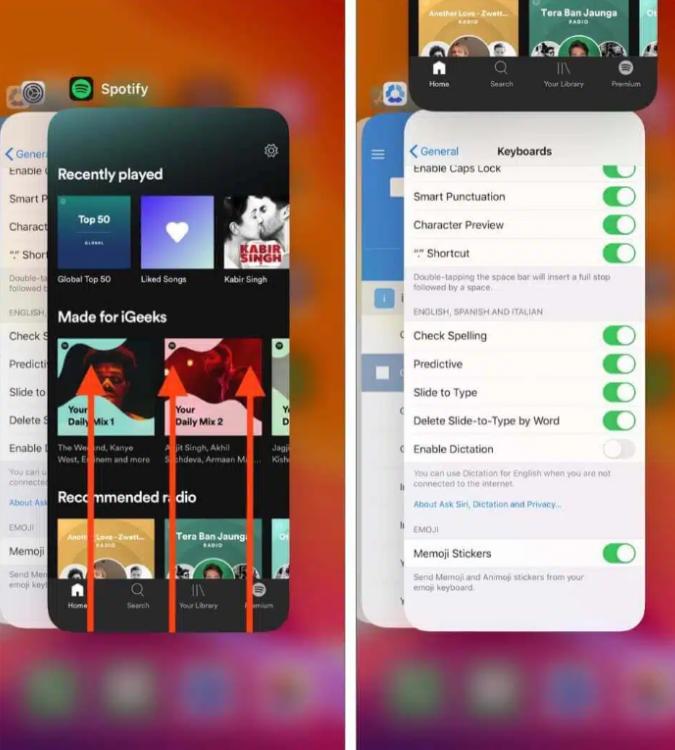
Sur iOS (iPhone / iPad) : Faites glisser votre doigt du bas vers le haut de l'écran et marquez une pause au milieu (ou double-cliquez sur le bouton Accueil sur les appareils plus anciens). Trouvez le Spotify Prévisualisez la carte et faites-la glisser complètement vers le haut pour la faire sortir de l'écran.
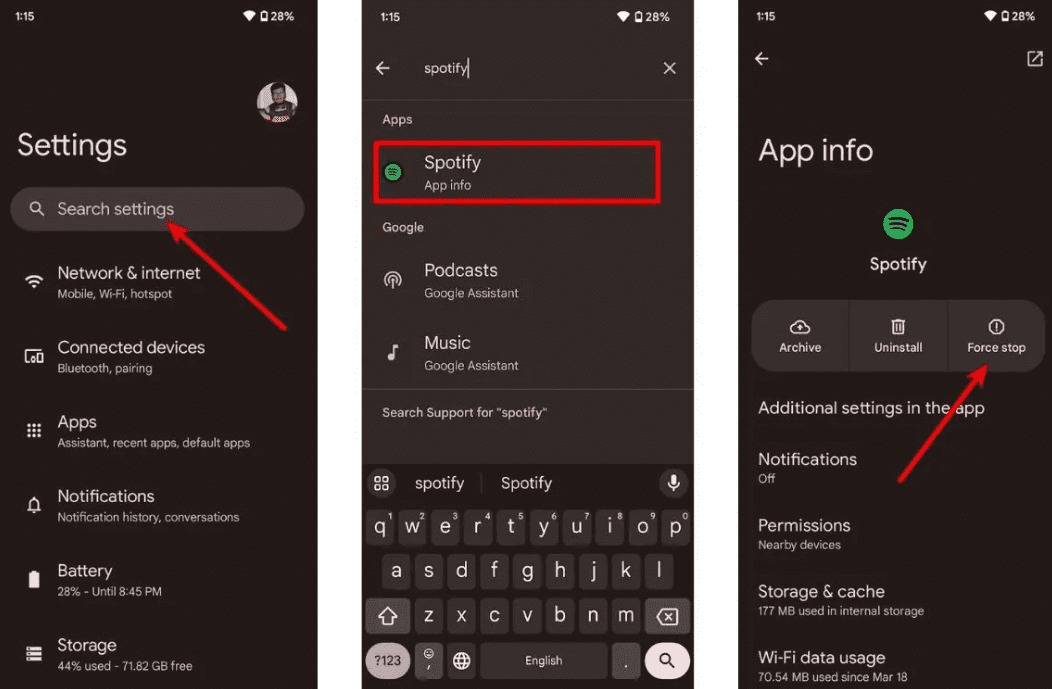
Sur Android: Accédez à Paramètres > Applications > Spotify et appuyez sur Forcer l'arrêt. Cela met fin à toutes les tâches en arrière-plan bloquées. Ouvrir Spotify depuis le tiroir de votre application.
Sur macOS : Cliquez à nouveau Spotify dans la barre de menu supérieure et sélectionnez Quitter Spotify, ou cliquez simplement sur la fenêtre et appuyez sur Commande (⌘) + Q.
On WinDows (10/11) : Cliquez sur Fichier dans le coin supérieur gauche de la fenêtre Spotify fermez la fenêtre et sélectionnez Quitter (appuyer sur le « X » dans le coin supérieur droit ne fait souvent que la réduire dans la barre d'état système au lieu de la fermer).
Solution 2. Vérifiez votre connexion Internet
Alternez entre le Wi-Fi et les données mobiles pour tester la stabilité de la connexion.
Correctif 3. Effacer Spotify Cache
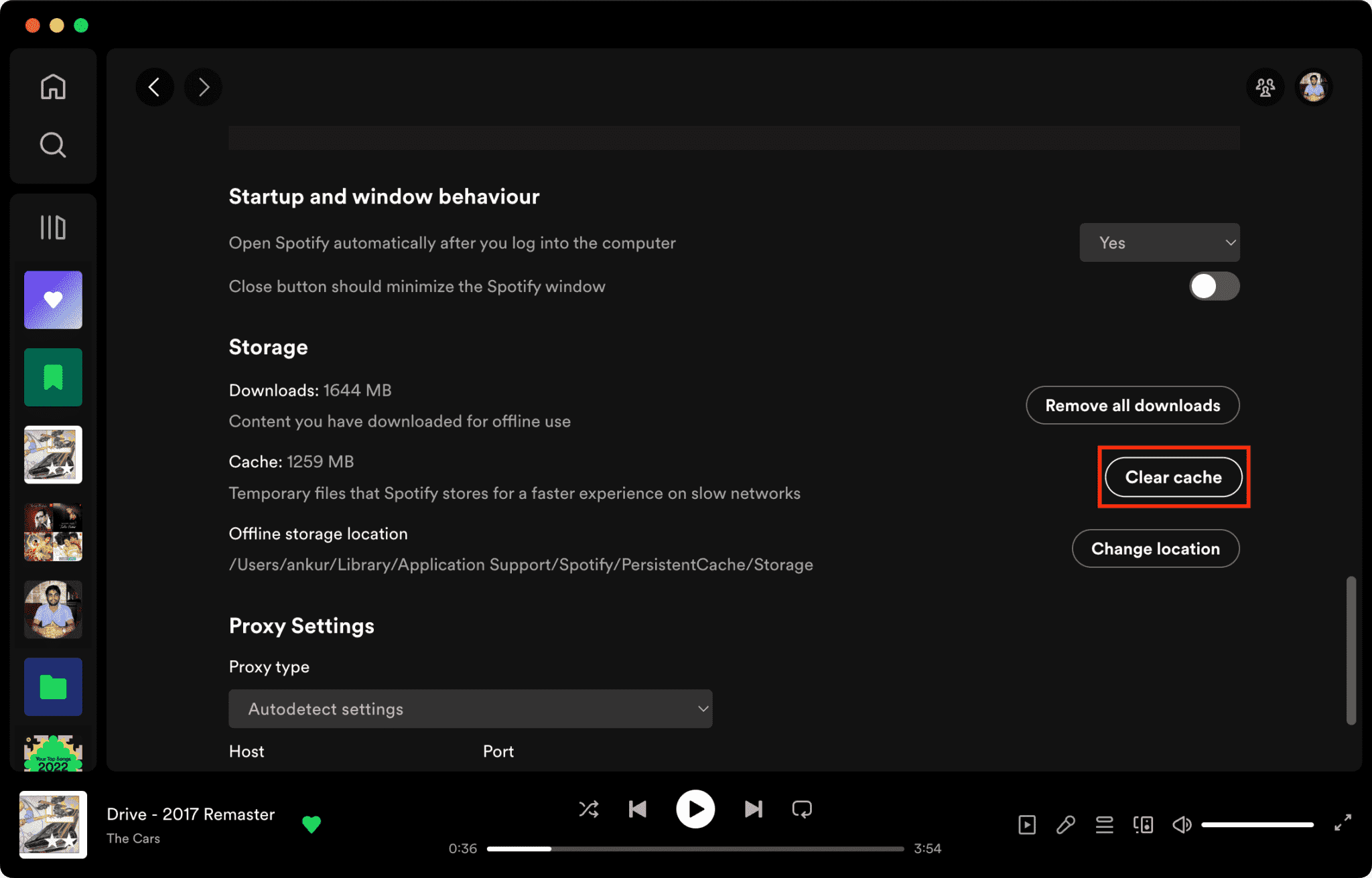
Les fichiers cache corrompus constituent l'une des principales raisons pour lesquelles Spotify ne répond pas.
Comment effacer Spotify Cache sur Mac/Windows/iPhone/Android >>>>
Correctif 4. Mise à jour Spotify Application
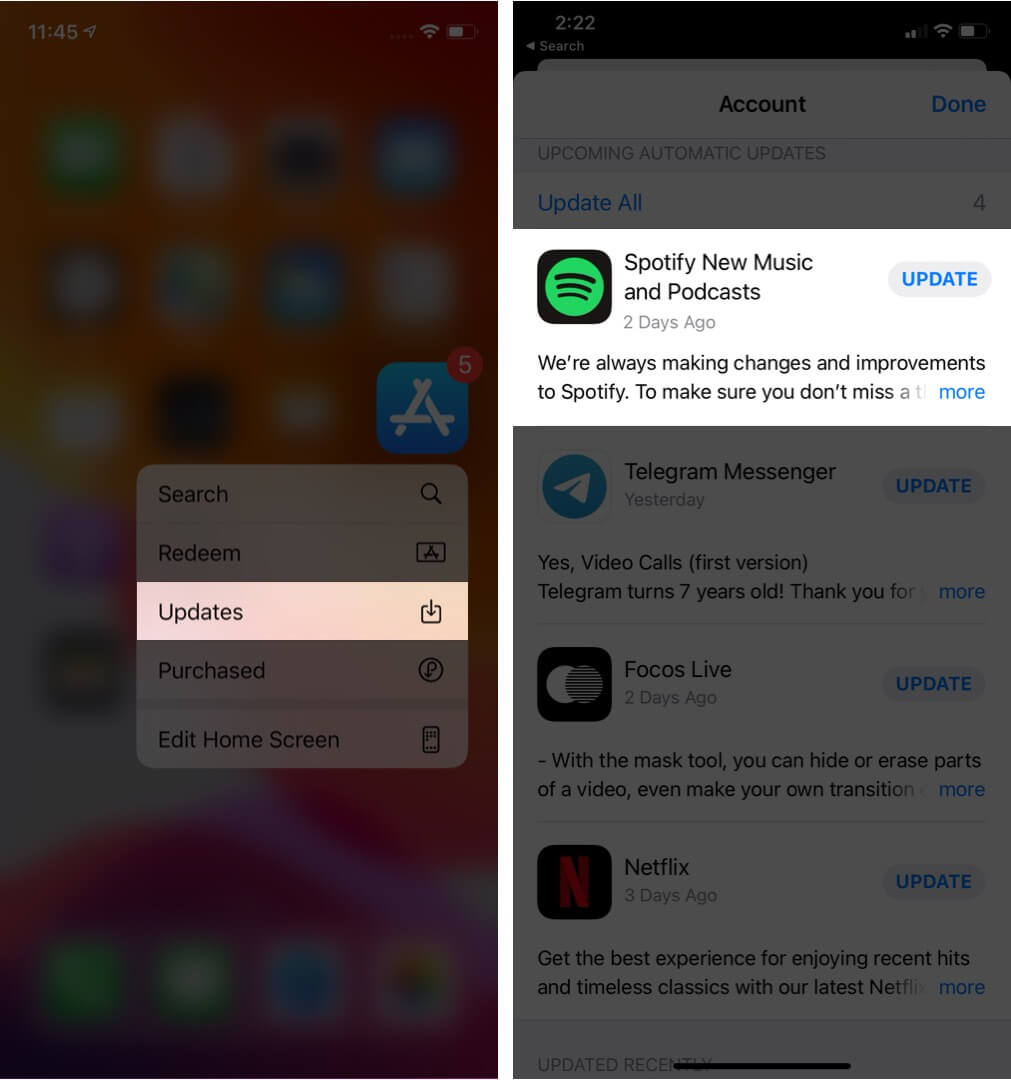
Installation de la dernière version Spotify Cette version peut corriger des bogues logiciels connus.
Correctif 5. Redémarrez votre appareil
Redémarrer votre ordinateur ou votre téléphone permet de rafraîchir les ressources système.
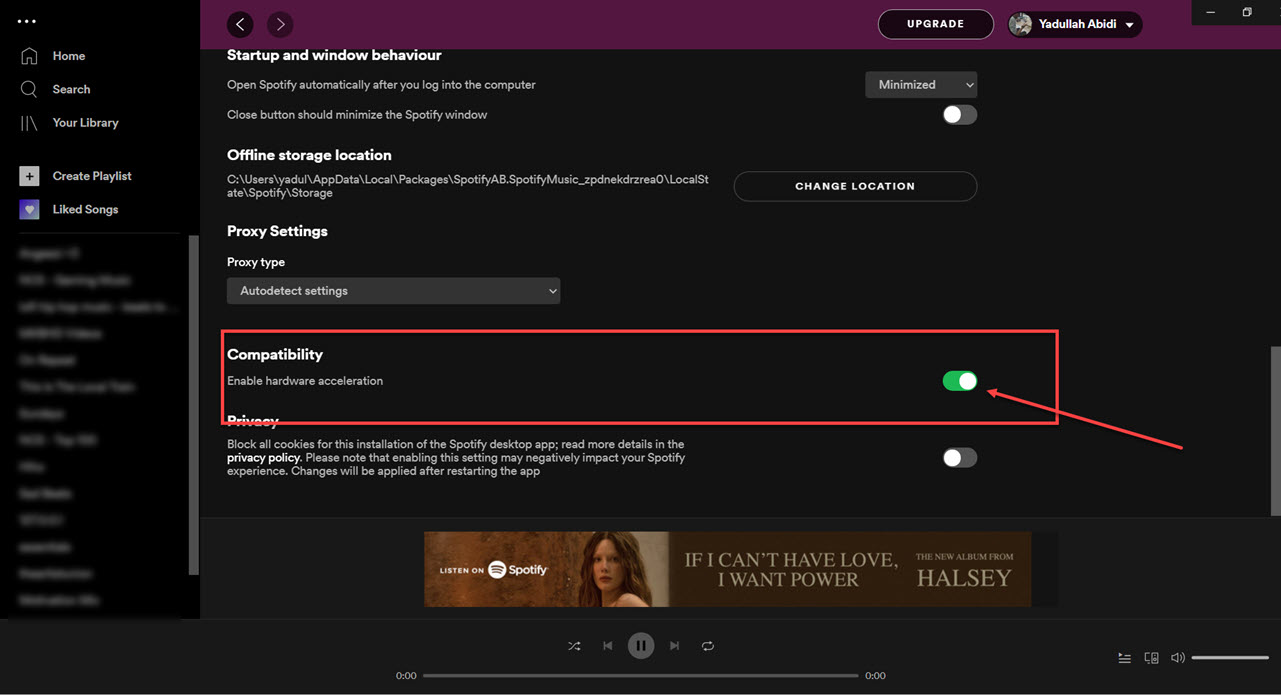
Correctif 6. Désactiver l'accélération matérielle
Vous pouvez désactiver l'accélération matérielle. Cela résout parfois les problèmes de blocage.
Correction 7. Vérifiez Spotify L'état du serveur
Importation Spotify Des interruptions ponctuelles affectent occasionnellement les services de lecture et de connexion.
Partie 3. Meilleur moyen d'éviter Spotify Problèmes de lecture
De nombreux utilisateurs supposent avoir téléchargé Spotify Les chansons fonctionneront toujours hors ligne, mais les chansons téléchargées restent protégées par DRM, ce qui signifie que la musique ne peut être lue qu'à l'intérieur de l'application de streaming. Les téléchargements ne peuvent pas être transférés librement. Si vous rencontrez fréquemment le «Spotify En cas de problème de « ne répond pas », un outil populaire est DumpMedia Spotify Music ConverterCe logiciel permet aux utilisateurs de convertir Spotify La musique convertie en formats audio locaux pour une lecture hors ligne plus flexible. Même si le Spotify L'application ne fonctionne pas sur votre appareil, vous pouvez jeux et sport Spotify chansons hors ligne sur un autre lecteur de musique immédiatement.
Téléchargement gratuit Téléchargement gratuit
🏆Caractéristiques principales DumpMedia Spotify Music Converter
- Télécharger Spotify musique à MP3, WAV, FLAC et AAC
- Supprimer Spotify Protection DRM*
- Préserver la qualité sonore originale
- Téléchargement par lots de listes de lecture et d'albums
- Vitesse de conversion rapide
- Conserver les métadonnées et les balises ID3 des morceaux
- Lecture hors ligne prise en charge sur tous les appareils
Pour les utilisateurs frustrés par Spotify L'instabilité de l'application fait que la lecture de musique locale est souvent beaucoup plus fiable.
Convertir Spotify à MP3 Étape par Étape
Étape 1 : Téléchargez et installez DumpMedia Spotify Music Converter sur votre Mac/PC. Lancez-le et vous verrez l'interface. Utilisez votre Spotify Compte Premium/Gratuit pour se connecter.
Téléchargement gratuit Téléchargement gratuit
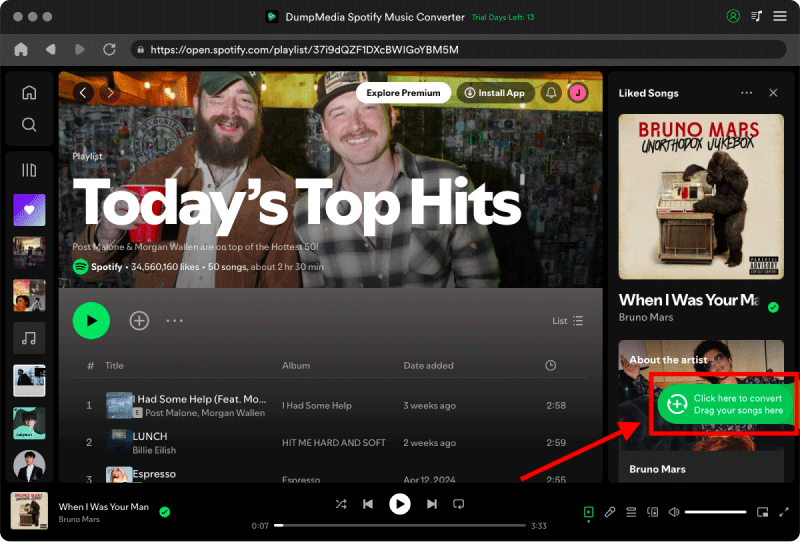
Étape 2. Trouvez la playlist, l'album ou le morceau que vous souhaitez convertir. Vous pouvez glisser un morceau sur l'icône « + » à droite de l'écran. Vous pouvez également ouvrir une playlist ou un album entier et cliquer sur l'icône « Ajouter à la conversion » pour charger la liste complète dans le convertisseur.
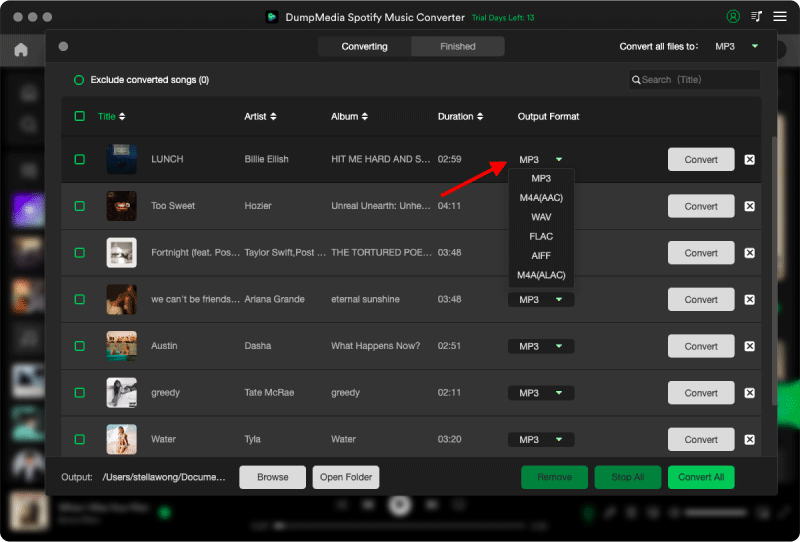
Étape 3 : Sélectionner MP3 (Compatibilité optimale). Vous pouvez également modifier le débit binaire ou la fréquence d'échantillonnage. Pour un équilibre optimal, choisissez 320 kbps.
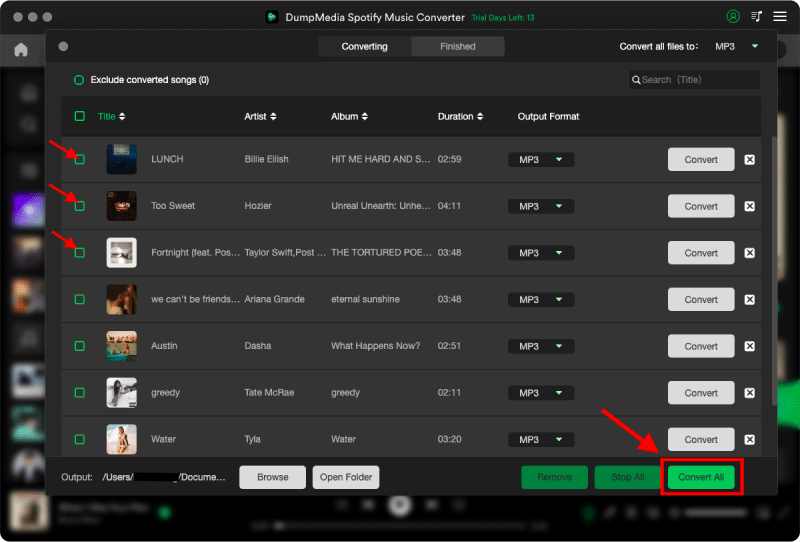
Étape 4 : Une fois les paramètres configurés, les utilisateurs peuvent lancer la conversion en cliquant sur l'icône « Convertir ». DumpMedia va télécharger Spotify chansons à MP3 en quelques secondes grâce à sa vitesse ultra-rapide.
Partie 4. FAQ
Pourquoi est- Spotify Vous ne répondez pas ?
Spotify Le service peut cesser de répondre en raison de problèmes de connexion Internet, de fichiers cache corrompus, de logiciels obsolètes ou de problèmes de serveur.
Pourquoi Spotify continuer à geler ?
Spotify Les problèmes de blocage sont souvent liés à une corruption du cache ou à des conflits d'accélération matérielle.
Pourquoi est- Spotify plantage sur mon téléphone ?
Mobile Spotify Les plantages peuvent être causés par un espace de stockage insuffisant, des versions d'applications obsolètes ou des conflits logiciels.
Pourquoi est- Spotify Le mode hors ligne ne fonctionne pas ?
La lecture hors ligne dépend toujours de Spotify autorisation et stabilité de l'application.
Is DumpMedia Spotify Music Converter sûr?
Oui. Il est conçu pour Spotify Conversion musicale et gestion de la lecture locale.
Remarque : Les plateformes de streaming ont leurs propres règles et systèmes de surveillance. En tant qu’outil tiers, DumpMedia Spotify Music Converter est également soumise à leurs restrictions, qui peuvent affecter son utilisation dans certains cas. Spotify peut prendre des mesures si elle détecte une activité qui enfreint ses conditions d'utilisation ; cette décision relève entièrement de sa responsabilité. Spotifyla discrétion.
Partie 5. Conclusion
"Spotify Le problème « ne répond pas » peut être causé par une instabilité de la connexion Internet, des fichiers cache corrompus, un logiciel obsolète ou Spotify Problèmes d'application. Bien que de nombreuses solutions temporaires puissent aider à rétablir la lecture, Spotify Le streaming dépend toujours fortement de la stabilité de l'application et de la vérification en ligne. Pour les utilisateurs qui souhaitent une écoute hors ligne plus stable, DumpMedia Spotify Music Converter offre un moyen pratique de convertir Spotify des chansons locales MP3 Des fichiers pour une lecture flexible sur différents appareils.
Téléchargement gratuit Téléchargement gratuit
*DumpMedia fonctionne en décryptant et en téléchargeant Spotify Cette fonction permet de convertir des morceaux en fichiers sans DRM, vous offrant ainsi une copie propre et sans restriction de votre bibliothèque pour n'importe quel appareil. Elle ne permet cependant pas de supprimer la protection DRM des fichiers audio locaux.