


Comment transférer Spotify vers USB : Jouer Spotify Musique n'importe où
Je souhaite effectuer un transfert Spotify Transférer sur une clé USB pour une lecture hors ligne ? De nombreux utilisateurs essaient de transférer leurs favoris Spotify Transférer des chansons sur une clé USB pour les utiliser dans une voiture, sur des enceintes ou d'autres appareils est une chose, mais on se rend vite compte que ce n'est pas aussi simple que de glisser-déposer des fichiers. Le principal problème est que Spotify La musique est protégée et ne peut être copiée directement. Ce guide vous explique comment contourner cette protection.
Guide des matières Partie 1. Pouvez-vous télécharger Spotify Lire de la musique directement sur une clé USB ?Partie 2. Le seul moyen de transférer Spotify Musique vers USBPartie 3. FAQPartie 4. Conclusion
Partie 1. Pouvez-vous télécharger Spotify Lire de la musique directement sur une clé USB ?
La réponse courte est non. Vous ne pouvez pas effectuer de transfert direct. Spotify vers USB. Voici pourquoi :
- Spotify Les téléchargements sont cryptés
- Les fichiers sont stockés dans un format protégé
- La musique ne peut être jouée qu'à l'intérieur de Spotify appli
Même si vous télécharger des chansons pour une écoute hors ligneCes fichiers ne peuvent pas être copiés sur une clé USB ni utilisés en dehors de celle-ci. SpotifyCela signifie transférer Spotify La connexion USB nécessite une étape supplémentaire.
Partie 2. Le seul moyen de transférer Spotify Musique vers USB
Pour transférer avec succès des chansons depuis Spotify Pour utiliser une clé USB, vous devez d'abord… convertir les pistes en versions sans DRM MP3 le formatC’est la méthode la plus fiable pour garantir une compatibilité totale. Une fois convertis, vos fichiers deviennent entièrement accessibles, librement transférables et prêts à être lus sur n’importe quel appareil.
DumpMedia Spotify Music Converter est spécifiquement conçu pour combler cette lacune. En tant qu'outil professionnel, il simplifie le processus de conversion en supprimant la protection DRM* tout en préservant 100% Qualité audio originale. Que vous souhaitiez sauvegarder un seul morceau ou une longue liste de lecture, DumpMedia garantit que votre musique est prête pour n'importe quel périphérique USB en quelques clics seulement.
🏅Plus de fonctionnalités incroyables
- ⭐Intégration avec Spotify lecteur web
- ⭐Travailler pour les deux Spotify Premium et Spotify Utilisateurs gratuits
- ⭐Fournit une conversion par lots jusqu'à 35 fois plus rapide
- ⭐Conservez les balises ID3 telles que l'artiste, la couverture, l'illustration, etc.
- ⭐Préserver la qualité audio d'origine
- ⭐100% propre. Aucun risque à utiliser
Comment faire pour convertir Spotify Musique à MP3
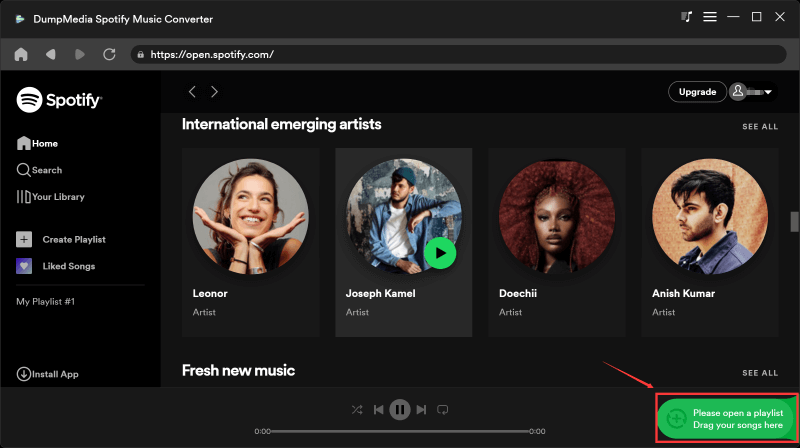
Étape 1 : Téléchargez et installez DumpMedia Spotify Music Converter sur votre Mac/Windows. Lancez-le et vous verrez l'interface. Utilisez votre Spotify Compte Premium/Gratuit pour se connecter.
Téléchargement gratuit Téléchargement gratuit
Étape 2. Vous pouvez maintenant sélectionner les morceaux que vous souhaitez télécharger. Vous pouvez glisser-déposer un album ou une playlist pour ajouter tous les morceaux à la liste de conversion.
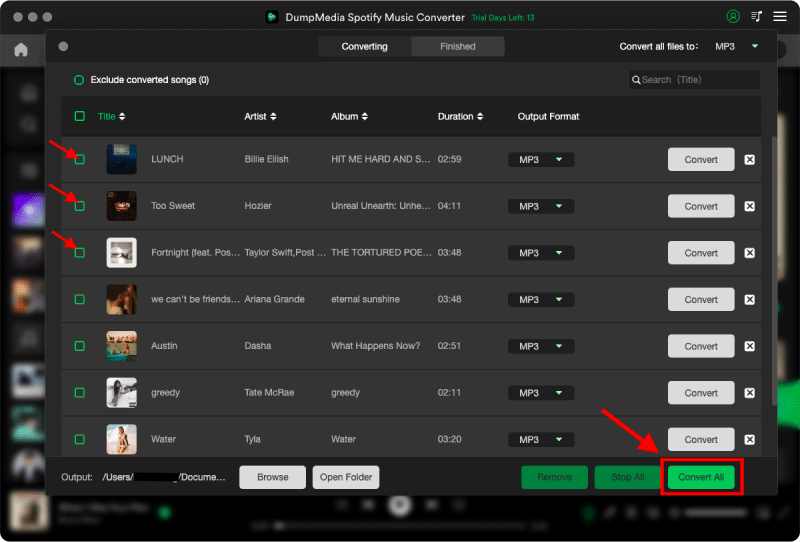
Étape 3 : Sur l'interface de conversion, vous pouvez choisir le format de sortie comme MP3, et définissez la fréquence d'échantillonnage ou le débit binaire dans Préférences. Choisissez également un dossier dans lequel les fichiers musicaux seront enregistrés.

Étape 4. Enfin, appuyez sur le bouton « Convertir » en bas de la page, et le logiciel lancera le processus de conversion.
Transfert converti Spotify Musique vers USB
Après conversion, déplacement des chansons depuis Spotify La conversion USB devient simple et rapide.
Étape 1 : Insérez votre clé USB dans votre ordinateur. Ouvrez le dossier contenant les fichiers convertis. MP3 fichiers.
Étape 2. Sélectionnez les chansons ou les listes de lecture. Glissez-les et déposez-les sur la clé USB.
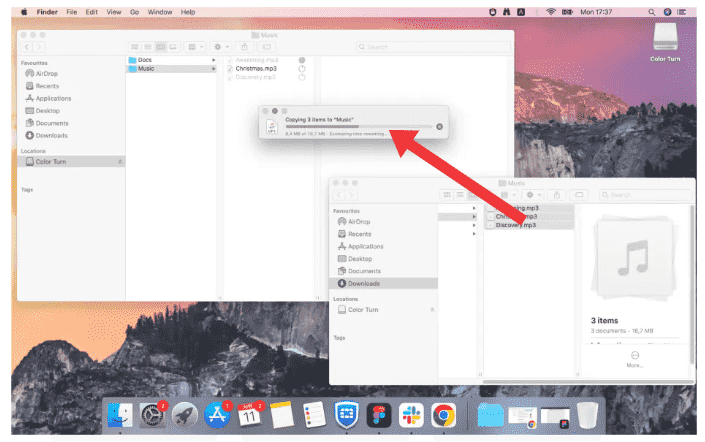
Étape 3. Éjectez la clé USB en toute sécurité.
Partie 3. FAQ
1. Puis-je transférer Spotify directement vers USB ?
Non, vous ne pouvez pas transférer Spotify Des chansons directement sur une clé USB. Spotify La musique est protégée par DRM et les chansons téléchargées sont stockées dans un format crypté qui ne peut être copié ni utilisé en dehors de l'application. Spotify app.
2. Comment effectuer le transfert Spotify Des chansons sur une clé USB pour ma voiture ?
Transférer Spotify Pour écouter de la musique sur une clé USB en voiture, vous devez :
- Convertir Spotify musique dans MP3 le format
- Copiez les fichiers convertis sur votre clé USB
Après cela, votre autoradio devrait pouvoir lire les fichiers normalement.
3. Quel est le meilleur format pour Spotify vers un transfert USB ?
MP3 est le meilleur format pour Spotify Transférez des chansons sur une clé USB car ce format est compatible avec la quasi-totalité des appareils, y compris les autoradios, les haut-parleurs et les téléviseurs.
D'autres formats comme WAV ou FLAC offrent une meilleure qualité, mais peuvent ne pas être compatibles avec tous les périphériques USB.
4. Ai-je besoin Spotify Prime de transfert Spotify vers USB ?
Pas nécessairement. Alors que Spotify Premium permet l'écoute hors ligne au sein de l'application, le transfert Spotify Le transfert de musique vers une clé USB nécessite toujours la conversion des fichiers dans un format standard.
5. Est-il sûr d'utiliser Spotify convertisseurs ?
Tous les outils ne sont pas sûrs. Certains services en ligne peuvent contenir des publicités ou présenter des failles de sécurité. Il est important de choisir un logiciel fiable pour garantir un fonctionnement stable et protéger vos données.
Partie 4. Conclusion
Transfert Spotify Le transfert direct vers une clé USB n'est pas possible en raison de la protection DRM, mais cela devient facile une fois la procédure comprise. En convertissant Spotify musique dans MP3 et en le copiant sur une clé USB, vous bénéficiez d'une flexibilité et d'une compatibilité totales sur tous vos appareils. Si vous souhaitez une méthode de transfert simple et fiable Spotify transférer des chansons sur une clé USB, à l'aide d'un outil professionnel comme DumpMedia Spotify Music Converter est la solution la plus efficace.
Téléchargement gratuit Téléchargement gratuit
*DumpMedia fonctionne en décryptant et en téléchargeant Spotify Convertissez vos chansons en fichiers sans DRM, ce qui vous permet d'obtenir une copie propre et sans restriction de votre bibliothèque pour n'importe quel appareil. Ses fonctionnalités n'incluent pas la conversion des fichiers audio locaux.