


Spotify Mode DJ : Comment l’utiliser (Guide complet 2026)
Si vous avez récemment entendu parler de Spotify Le mode DJ, vous vous demandez peut-être à quoi il sert et comment l'utiliser. Spotify Le mode DJ IA est l'un des SpotifyParmi ses fonctionnalités les plus intéressantes, on trouve une expérience musicale personnalisée grâce à l'intelligence artificielle. Cependant, malgré sa puissance, cette application présente aussi des limites que beaucoup d'utilisateurs ignorent. Ce guide vous permettra de découvrir lesquelles. Spotify L'IA DJ est et comment l'activer sur Spotify.
Guide des matières Partie 1. Quel est Spotify DJ IA ?Partie 2. Comment activer Spotify DJ IA ?Partie 3. Limites de Spotify DJ AIPartie 4. Comment économiser Spotify Musique de DJ pour une utilisation hors ligne ?Partie 5. FAQPartie 6. Conclusion
Partie 1. Quel est Spotify DJ IA ?
Spotify Le mode DJ est un guide musical personnalisé qui fonctionne comme un animateur radio virtuel, alliant apprentissage automatique avancé et voix d'IA remarquablement réaliste. Réservé aux abonnés Premium, il ne se contente pas de lire des morceaux en mode aléatoire ; il crée un flux musical continu en fonction de votre historique d'écoute, des tendances actuelles et même de tubes nostalgiques que vous n'avez pas écoutés depuis des années.
Les principales caractéristiques de Spotify DJ AI
- Recommandations de chansons personnalisées
- Lecture continue sans intervention manuelle
- Commentaires vocaux générés par l'IA
- Transitions intelligentes entre l'ambiance et le genre
C'est pourquoi Spotify Le mode DJ est de plus en plus populaire auprès des utilisateurs qui privilégient une écoute sans effort.
Partie 2. Comment activer Spotify DJ IA ?
Comment accéder Spotify Mode DJ ? Si vous êtes abonné à Spotify Premium, Suivez ces étapes:
Étape 1 : Assurez-vous que votre application est à jour. Accédez à la section Accueil.
Étape 2 : Recherchez la fonctionnalité DJ dans votre flux. Commencez à écouter instantanément.
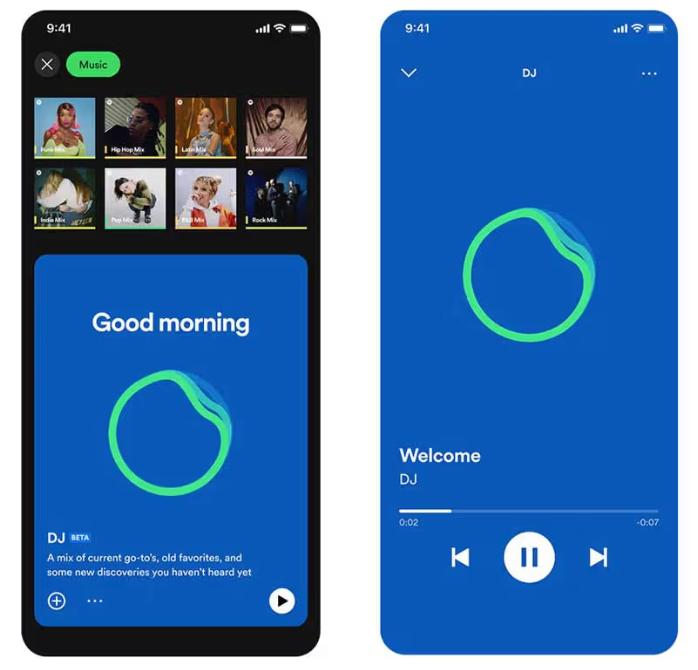
SpotifyL'IA DJ de [nom de l'application] prend désormais en charge la fonction « Demandes ». Comme si vous parliez à un DJ humain, vous pouvez utiliser des commandes vocales ou des messages texte, en disant par exemple : « Passe à un genre plus doux » ou « Joue plus de chansons de Jay Justin Bieber », et l'IA ajustera instantanément la playlist.
Partie 3. Limites de Spotify DJ AI
Spotify Le mode DJ se distingue par le fait qu'il élimine la nécessité de rechercher manuellement la musique. Il est idéal pour une écoute en fond sonore, la découverte de nouveaux morceaux et la création d'une expérience similaire à celle de la radio. SpotifyL'IA DJ de [Nom de la société] est impressionnante, mais elle présente plusieurs limitations importantes.
1. Aucun téléchargement permanent
Même avec l'abonnement Premium, les chansons ne sont pas réellement téléchargeables. Les fichiers sont verrouillés dans l'application et ne peuvent pas être transférés.
2. Aucune liberté hors ligne
Vous pouvez télécharger des morceaux pour une écoute hors ligne, mais l'accès nécessite un abonnement. La musique disparaît si vous résiliez votre abonnement.
3. Interdiction d'exportation ou de partage
Vous ne pouvez pas exporter les listes de lecture DJ ni enregistrer les mix en externe.
4. Contrôle limité
Spotify L'IA gère la sélection et l'ordre des chansons. La personnalisation n'est pas complète.
Ces limitations deviennent importantes si vous souhaitez avoir plus de contrôle sur votre musique.
Partie 4. Comment économiser Spotify Musique de DJ pour une utilisation hors ligne ?
Si vous aimez Spotify Vous souhaitez un mode DJ mais plus de flexibilité ? Il vous faut un moyen de sauvegarder vos morceaux définitivement. Au lieu de dépendre du mode DJ, vous pouvez utiliser le mode DJ. SpotifyEn raison des limitations intégrées, vous sélectionnez des morceaux parmi les recommandations de DJ et les convertissez en fichiers locaux. Vous conservez ainsi un contrôle total sur votre musique. La méthode la plus fiable consiste à utiliser un outil professionnel comme [nom de l'outil/du logiciel]. DumpMedia Spotify Music Converter.
Téléchargement gratuit Téléchargement gratuit
🏅Pourquoi choisir DumpMedia Spotify Music Converter:
- ⭐Intégration avec Spotify lecteur web
- ⭐Travailler pour les deux Spotify Premium et Spotify Utilisateurs gratuits
- ⭐Fournit une conversion par lots jusqu'à 35 fois plus rapide
- ⭐Convertir Spotify chansons à MP3, WAV ou FLAC
- ⭐Conservez les balises ID3 telles que l'artiste, la couverture, l'illustration, etc.
- ⭐Préserver la qualité audio d'origine
- ⭐100% propre. Aucun risque à utiliser
Étape par étape : Convertir Spotify Musique DJ
Étape 1 : Téléchargez et installez le logiciel sur votre ordinateur. Il fonctionne avec les deux WinCompatible avec Windows et Mac. Son interface intuitive facilite la prise en main, même pour les débutants.
Téléchargement gratuit Téléchargement gratuit
Étape 2 : Ouvrez le Spotify lecteur Web à l'intérieur DumpMedia et connectez-vous avec votre Spotify Compte. Parcourir Spotify Faites glisser les chansons, albums ou listes de lecture que vous souhaitez télécharger dans le convertisseur.

Étape 3 : Dans le panneau des paramètres, sélectionnez MP3 comme format de sortie pour permettre un MP3 Téléchargement des morceaux sélectionnés.

Étape 4 : Appuyez sur le bouton « Tout convertir » et lancez la conversion. DumpMedia Spotify Music Converter Il prend en charge une vitesse de téléchargement 35 fois plus rapide, vous pouvez donc simplement attendre la fin du processus de conversion.

Partie 5. FAQ
1. Ce qui est Spotify Mode DJ ?
Il s'agit d'une fonctionnalité basée sur l'IA qui diffuse une musique personnalisée en fonction de vos goûts.
2. Est SpotifyDJ IA gratuit ?
Non, cela nécessite généralement un abonnement Premium.
3. Puis-je télécharger Spotify Des chansons de DJ ?
Uniquement au sein de l'application, pas en tant que fichiers locaux.
4. Puis-je créer ma propre playlist DJ ?
Oui, surtout si vous avez des copies locales de votre musique.
Partie 6. Conclusion
Spotify Le mode DJ est une fonctionnalité puissante qui rend la découverte musicale plus facile et plus agréable. Cependant, il présente des limitations, comme l'absence de téléchargements permanents et un accès hors ligne restreint. Si vous souhaitez profiter pleinement des avantages du mode DJ, vous devrez peut-être utiliser le mode DJ. SpotifyPour profiter pleinement de votre musique sans ces restrictions, l'utilisation d'un outil fiable pour sauvegarder vos morceaux est la meilleure solution. Vous pourrez ainsi conserver vos titres préférés, créer vos propres playlists et vivre une expérience d'écoute totalement libre.
Téléchargement gratuit Téléchargement gratuit
*DumpMedia fonctionne en décryptant et en téléchargeant Spotify Ce logiciel permet de convertir des morceaux en fichiers sans DRM, vous offrant ainsi une copie propre et sans restriction de votre bibliothèque pour tous vos appareils. Il ne prend cependant pas en charge la conversion des fichiers audio locaux.

30% de réduction >>>