


Comment lire des chansons illisibles sur Spotify10 solutions éprouvées qui fonctionnent
Avez-vous déjà ouvert Spotify Vous vous apercevez soudain que l'une de vos chansons préférées est grisée ou refuse de se lancer ? Si c'est votre cas, vous n'êtes pas seul. De nombreux utilisateurs recherchent… comment jouer des chansons illisibles sur Spotify après avoir rencontré des chansons indisponibles, des chansons ignorées automatiquement ou des messages d'erreur. La bonne nouvelle est que la plupart Spotify Les problèmes de lecture peuvent être résolus. Ce guide vous apprendra comment lire les chansons indisponibles sur SpotifyDécouvrez pourquoi certaines chansons deviennent indisponibles et explorez 10 solutions éprouvées pour rétablir une lecture normale.
Guide des matières Partie 1. Pourquoi certaines chansons sont-elles illisibles sur Spotify?Partie 2. 10 façons de jouer des chansons injouables sur SpotifyPartie 3. Pouvez-vous jouer ? Indisponible Spotify Chansons hors ligne ?Partie 4. Meilleure façon de conserver Spotify Des chansons jouables à tout momentPartie 5. FAQPartie 6. Dernières pensées
Partie 1. Pourquoi certaines chansons sont-elles illisibles sur Spotify?
Avant d'apprendre à jouer des chansons injouables sur SpotifyIl est utile de comprendre pourquoi le problème survient.
Certaines des raisons les plus courantes incluent :
- Les contrats de licence musicale ont expiré.
- Les fichiers mis en cache sont corrompus.
- Votre abonnement Premium a expiré.
- Ce titre n'est pas disponible dans votre pays ou région.
- L'artiste ou la maison de disques a retiré le morceau.
- Votre Spotify l'application est obsolète.
- Le mode hors ligne est activé.
- Les fichiers locaux sont manquants ou déconnectés.
- Spotify Les serveurs rencontrent temporairement des problèmes.
Une fois la cause identifiée, résoudre le problème devient beaucoup plus facile.
Partie 2. 10 façons de jouer des chansons injouables sur Spotify
1. Vérifiez votre connexion Internet
Une connexion faible peut provoquer Spotify Les chansons ne se lancent pas correctement. Bien que les chansons téléchargées puissent être lues hors ligne, Spotify Une connexion internet stable est toujours nécessaire pour la vérification du compte et le streaming.
essayez:
- Basculement entre le Wi-Fi et les données mobiles
- Redémarrer votre routeur
- Désactivation temporaire des services VPN
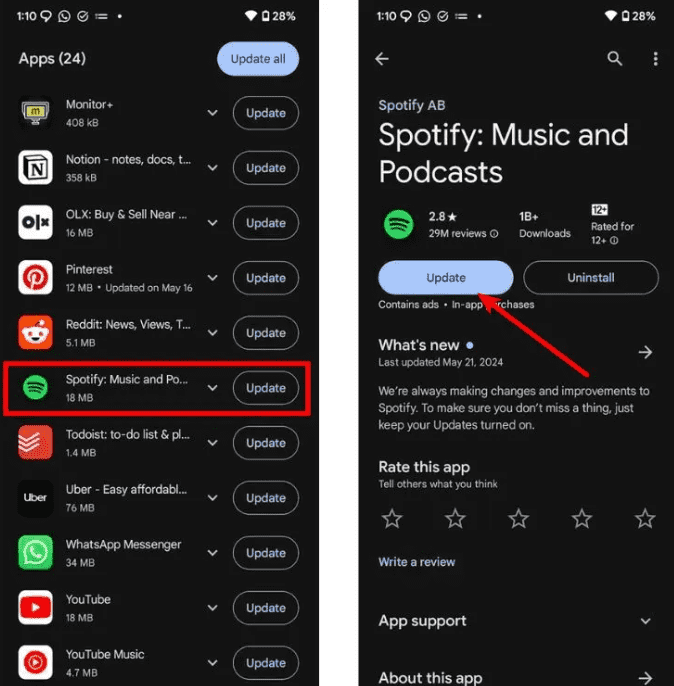
2. Mettez à jour le Spotify Application
Utilisation d'une version obsolète de Spotify peut entraîner des problèmes de lecture. Rendez-vous sur la boutique d'applications de votre appareil et installez la dernière version. Les mises à jour incluent souvent des correctifs qui résolvent ces problèmes. Spotify Problèmes de lecture.
3. Déconnectez-vous et reconnectez-vous
Actualiser votre session peut résoudre les erreurs de synchronisation temporaires. De nombreux utilisateurs indiquent que cette simple manipulation permet de récupérer les morceaux indisponibles.
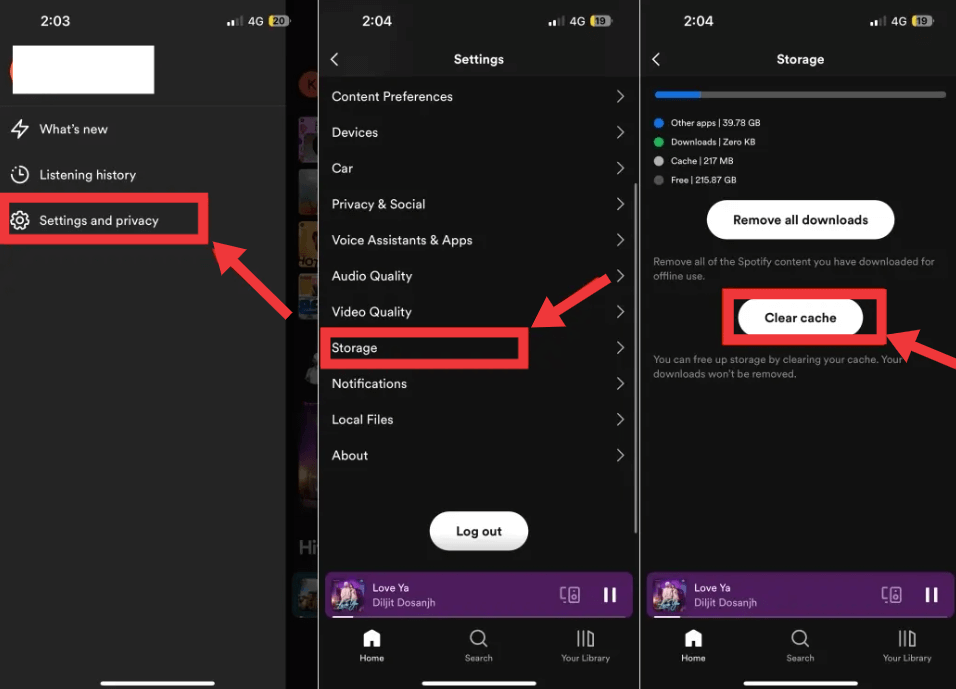
4. Effacer Spotify Cache
Les données mises en cache peuvent se corrompre avec le temps. Cela ne supprimera pas vos listes de lecture, mais peut résoudre les erreurs de lecture.
- Ouvrez Spotify Paramètres
- Sélectionnez Stockage
- Appuyez sur Effacer le cache
5. Vérifiez la disponibilité régionale
Parfois, une chanson est indisponible parce que Spotify ne possède pas les droits de diffusion en continu dans votre pays. Si vous vous demandez comment écouter des chansons non diffusables sur SpotifyC'est l'une des raisons les plus courantes.
Si un morceau est grisé, essayez de le rechercher à nouveau pour voir s'il existe une autre version. Vous pouvez également consulter la page de l'artiste pour voir s'il l'a remis en ligne, ou simplement patienter, car les titres sont souvent de nouveau disponibles une fois les contrats de licence renouvelés.
6. Réinstaller Spotify
Si vous rencontrez toujours des problèmes de lecture après avoir essayé les solutions de base, vous devrez peut-être réinstaller le jeu. Spotify pour supprimer les fichiers d'installation potentiellement corrompus. Commencez par désinstaller le Spotify Installez l'application et redémarrez votre appareil. Une fois l'opération terminée, téléchargez la dernière version depuis le site officiel. Spotify Rendez-vous sur le site web et reconnectez-vous. Ce processus garantit que votre candidature est à jour et exempte de conflits internes.
7. Vérifiez vos fichiers locaux
Si vous essayez de lire de la musique importée, assurez-vous que vos fichiers locaux sont toujours disponibles.
Les problèmes courants incluent :
- Les fichiers originaux ont été déplacés.
- Les noms de fichiers ont été modifiés.
- Périphérique de stockage déconnecté.
- La synchronisation a échoué.
Ces problèmes rendent souvent Spotify Les fichiers locaux semblent indisponibles.
Article connexe: Spotify Impossible de lire les fichiers locaux ? Solutions éprouvées qui fonctionnent vraiment
8. Confirmez votre abonnement Premium
Certaines chansons téléchargées nécessitent une connexion active. Spotify Premium abonnement. Si votre abonnement a expiré, Spotify Les titres hors ligne ne seront peut-être plus disponibles. Veuillez vérifier l'état de votre compte et renouveler votre abonnement si nécessaire.
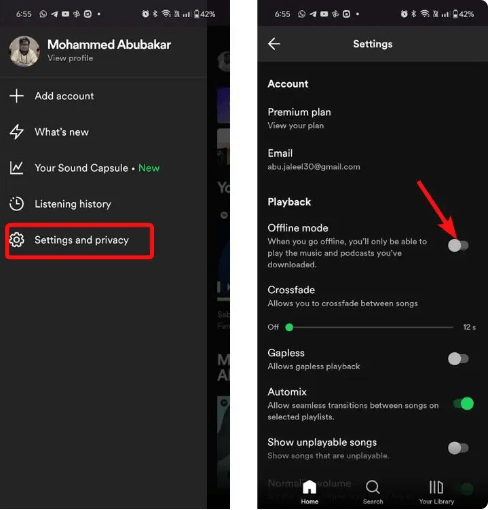
9. Désactivez le mode hors ligne
Lorsqu'une chanson est « grisée » (non jouable) sur SpotifyCela est généralement dû au mode hors ligne. Si le mode hors ligne est activé et qu'aucune chanson n'est téléchargée, Spotify La lecture de musique en ligne ne fonctionne pas. Désactivez cette fonction et redémarrez l'application.
10. Attendez si la chanson a été supprimée.
Il arrive que votre appareil fonctionne parfaitement. Les chansons peuvent disparaître temporairement pour les raisons suivantes :
- L'artiste les a retirés.
- Les maisons de disques ont changé de licence.
- Spotify a mis à jour son catalogue.
Dans ces situations, la chanson pourrait être de nouveau disponible ultérieurement.
Partie 3. Pouvez-vous jouer ? Indisponible Spotify Chansons hors ligne ?
Spotify L'abonnement Premium permet aux utilisateurs de télécharger des chansons pour une écoute hors ligne. Cependant, les chansons téléchargées restent soumises à plusieurs limitations :
- Ils restent protégés par DRM.
- Ils exigent une vérification périodique des comptes.
- Elles cessent de fonctionner si votre abonnement Premium expire.
- Ils ne peuvent pas être transférés sur des clés USB ou MP3 joueurs.
- Chansons retirées de SpotifyLe catalogue de [Nom de l'entreprise] pourrait également devenir indisponible.
Ainsi, même si les téléchargements hors ligne sont pratiques, ils ne sont pas permanents.
Partie 4. Meilleure façon de conserver Spotify Des chansons jouables à tout moment
Si vous rencontrez fréquemment des chansons indisponibles ou si vous souhaitez plus de flexibilité pour l'écoute hors ligne, DumpMedia Spotify Music Converter offre une solution pratique. Avec DumpMedia, vous pouvez convertir Spotify chansons, albums et listes de lecture pour MP3WAV, FLAC, AAC et autres formats populaires. Pour les utilisateurs cherchant comment lire des morceaux illisibles sur SpotifyLa conversion de la musique pour une gestion personnelle hors ligne offre une plus grande flexibilité, notamment en cas de restrictions de diffusion en continu ou de problèmes de lecture.
Téléchargement gratuit Téléchargement gratuit
👍Plus de fonctionnalités clés de DumpMedia Spotify Music Converter
- ✔️Accédez à la bibliothèque musicale complète à partir de la bibliothèque intégrée Spotify Lecteur Web
- ✔️ Profitez de conversions rapides avec des vitesses 35 fois plus rapides
- ✔️Conserver les informations de métadonnées et les balises ID3
- ✔️Conservez la qualité audio d'origine
- ✔️100% Propre. Aucun risque à utiliser
- ✔️Mises à jour et assistance technique gratuites
Télécharger Spotify Chansons utilisant DumpMedia pour éviter les problèmes de lecture
Étape 1 : Téléchargez et installez DumpMedia Spotify Music Converter sur votre Mac/PC. Lancez-le et vous verrez l'interface. Utilisez votre Spotify Compte Premium/Gratuit pour se connecter.
Téléchargement gratuit Téléchargement gratuit
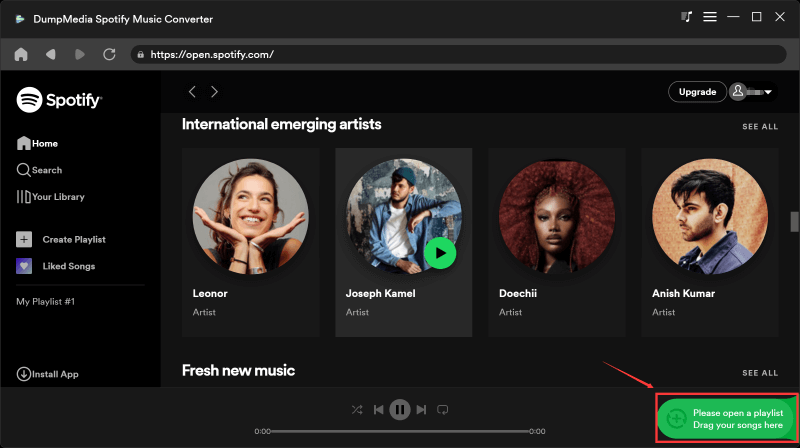
Étape 2. Sélectionnez les morceaux, playlists ou albums que vous souhaitez télécharger. Ouvrez-les et cliquez sur le bouton « Ajouter à la conversion ». Vous pouvez également glisser-déposer la playlist dans la liste de conversion située à droite.
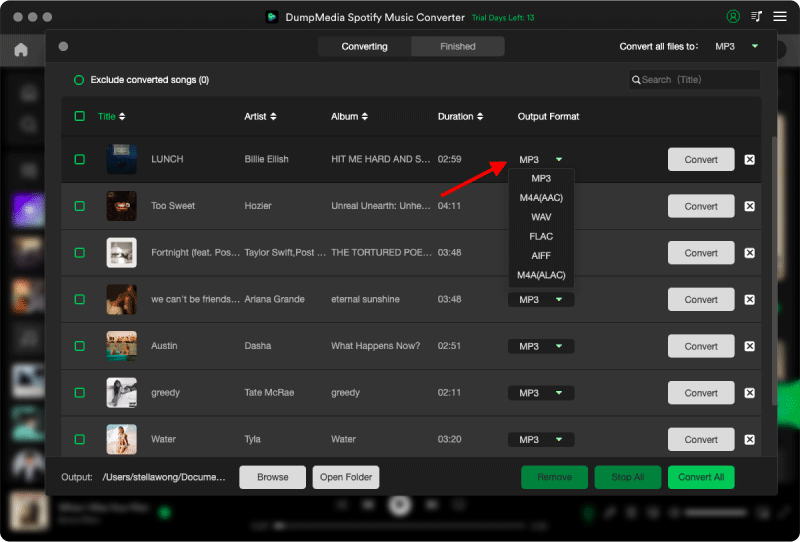
Étape 3 : Après DumpMedia analyse automatiquement les chansons, le format est défini sur MP3 par défaut sur l'interface de conversion. Si vous souhaitez modifier, cliquez sur le «MP3Sélectionnez une option dans le menu déroulant. Vous pouvez également modifier le débit binaire ou la fréquence d'échantillonnage. Pour un bon compromis, choisissez 320 kbps.
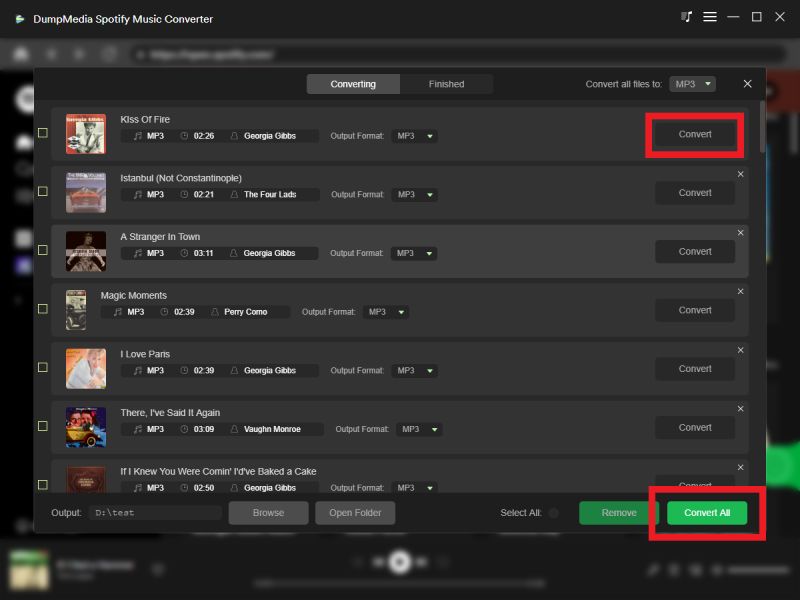
Étape 4 : Une fois les paramètres configurés, les utilisateurs peuvent lancer la conversion en cliquant sur l'icône « Convertir ». DumpMedia va télécharger Spotify chansons à MP3 en quelques secondes grâce à sa vitesse ultra-rapide.
Partie 5. FAQ
Pourquoi les chansons sont-elles injouables sur Spotify?
Il se peut que certaines chansons deviennent illisibles en raison de restrictions de licence, de disponibilité régionale, d'abonnements expirés, d'un cache corrompu, de problèmes d'application ou de fichiers locaux manquants.
Pourquoi Spotify Des chansons grisées ?
Les chansons grisées indiquent généralement que Spotify n'a actuellement pas l'autorisation de diffuser le morceau dans votre région ou le contenu a été retiré de son catalogue.
Puis-je jouer ? (indisponible) Spotify Chansons?
Cela dépend de la cause. Si le problème est lié à votre application, au cache ou à votre compte, quelques étapes de dépannage permettent souvent de rétablir la lecture. Si le morceau a été retiré pour des raisons de droits d'auteur, vous devrez attendre qu'il soit de nouveau disponible ou chercher une version alternative.
Peut être téléchargé Spotify Les chansons disparaissent ?
Oui. Les téléchargements hors ligne nécessitent un abonnement Premium actif et Spotifyaccords de licence. Les chansons téléchargées peuvent devenir indisponibles si votre abonnement prend fin ou si les titres sont retirés de la plateforme. Spotify.
Puis-je sauvegarder définitivement Spotify Chansons?
SpotifyLes téléchargements intégrés sont chiffrés et liés à votre compte. Si vous souhaitez une plus grande flexibilité pour la lecture hors ligne personnelle, des outils comme DumpMedia Spotify Music Converter peut convertir Spotify de la musique dans des formats audio largement compatibles.
Partie 6. Dernières pensées
Si vous avez cherché comment jouer des chansons injouables sur SpotifyLa bonne nouvelle, c'est que la plupart des problèmes de lecture peuvent être résolus en quelques étapes de dépannage simples. Si vous souhaitez un meilleur contrôle de votre collection musicale personnelle et une plus grande flexibilité pour l'écoute hors ligne, DumpMedia Spotify Music Converter offre un moyen fiable de convertir et de gérer vos Spotify de la musique sur une large gamme d'appareils compatibles.