


Comment convertir des chansons Pandora en MP3 en 2026 : Guide étape par étape
Pandora est l'une des plateformes de streaming musical les plus populaires, mais ses titres sont souvent protégés par des restrictions d'abonnement, empêchant l'accès hors ligne et une lecture flexible. De nombreux utilisateurs se demandent : comment convertir les chansons Pandora en MP3 Ainsi, ils peuvent écouter de la musique partout sans se soucier de l'expiration de leur abonnement. Dans ce guide, nous vous expliquons pourquoi vous pourriez vouloir convertir votre abonnement Pandora en MP3, les meilleurs outils pour ce travail, et une procédure étape par étape pour mettre votre musique hors ligne définitivement.
Guide des matières Partie 1. Peut-on télécharger directement des chansons Pandora sur MP3?Partie 2. Meilleur outil pour convertir la musique Pandora en MP3Partie 3. Comment convertir la musique Pandora en MP3 Pas à pas?Partie 4. FAQPartie 5. Conclusion
Partie 1. Peut-on télécharger directement des chansons Pandora sur MP3?
Pandora permet l'écoute hors ligne pour les utilisateurs Premium, mais les chansons téléchargées sont liées à votre compte et à votre abonnement. Pandora (comme Spotify et Apple Music) utilise DRM (gestion des droits numériques) Pour vous assurer de n'écouter que tant que votre abonnement est actif. Les titres hors ligne ne peuvent être transférés sur d'autres appareils ni sauvegardés définitivement. Pour obtenir les titres Pandora sur un support physique MP3 Pour ce format, vous devez utiliser des méthodes non officielles.
Partie 2. Meilleur outil pour convertir la musique Pandora en MP3
Comment convertir la musique Pandora en MP3La solution la plus fiable est ? DumpMedia Convertisseur de musique PandoraCet outil aide les utilisateurs à convertir les chansons Pandora en MP3Téléchargez des fichiers FLAC, M4A et WAV en un clic. Vous pouvez ainsi sauvegarder vos playlists localement et conserver votre musique même après un changement d'abonnement. Au lieu de dépendre entièrement du streaming, les utilisateurs peuvent constituer des collections musicales à long terme à partir de leurs playlists Pandora. Même si l'application Pandora ne fonctionne pas sur votre appareil, vous pouvez… Écouter des chansons Pandora hors ligne sur un autre lecteur de musique immédiatement.
🏅Pourquoi choisir DumpMedia Convertisseur de musique Pandora :
- ⭐Intégration avec le lecteur web Pandora
- ⭐Fonctionne pour les utilisateurs de Pandora Premium et de la version gratuite
- ⭐Fournit une conversion par lots jusqu'à 35 fois plus rapide
- ⭐Conservez les balises ID3 telles que l'artiste, la couverture, l'illustration, etc.
- ⭐Préserver la qualité audio d'origine
- ⭐100% propre. Aucun risque à utiliser
Téléchargement gratuit Téléchargement gratuit
Cet outil facilite la conversion des chansons Pandora en MP3 sans installation complexe ni connaissances techniques.
Partie 3. Comment convertir la musique Pandora en MP3 Pas à pas?
Suivez ces étapes simples pour convertir les chansons Pandora en MP3 au DumpMedia Convertisseur de musique Pandora :
Étape 1 : Téléchargez et installez DumpMedia Installez Pandora Music Converter sur votre Mac/PC. Lancez-le pour afficher l'interface. Connectez-vous avec votre compte Pandora Premium/gratuit.
Téléchargement gratuit Téléchargement gratuit
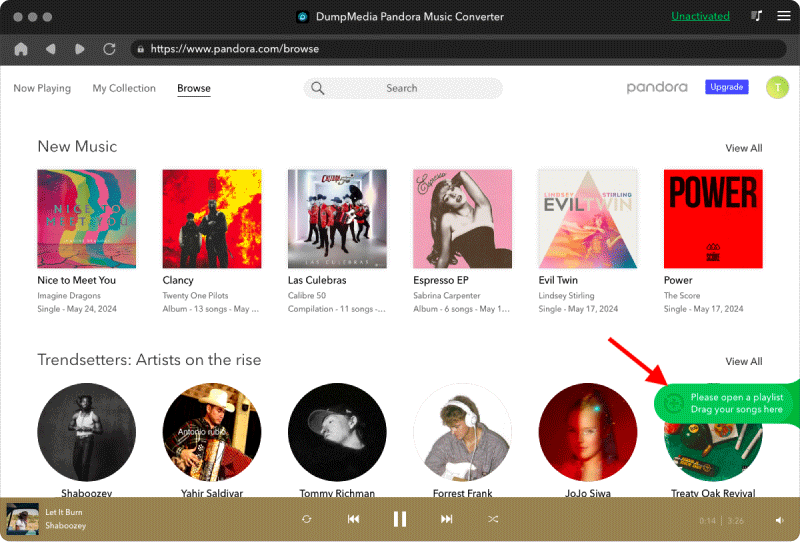
Étape 2. Ensuite, faites glisser directement les chansons ou les listes de lecture vers l'icône « + » flottante pour les ajouter à la file d'attente de conversion afin de préparer le téléchargement.
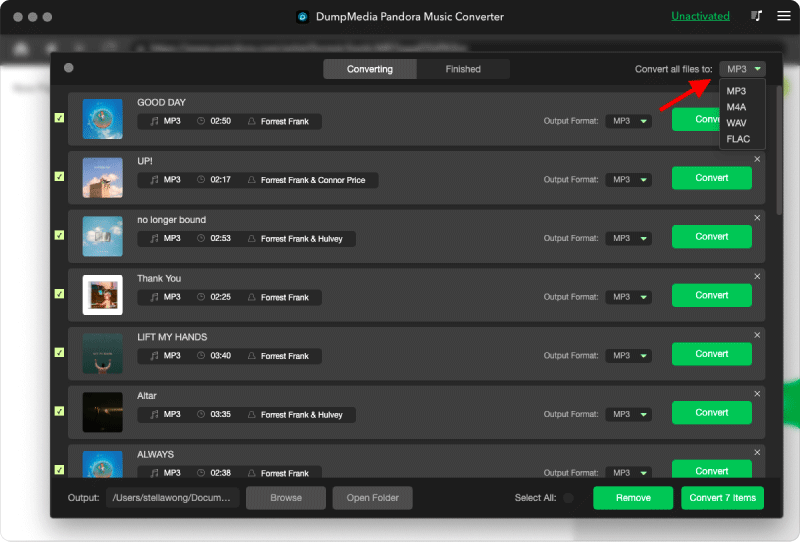
Étape 3. Une fois que vous êtes satisfait des chansons que vous avez sélectionnées, vous pouvez choisir le format de fichier audio que vous préférez.
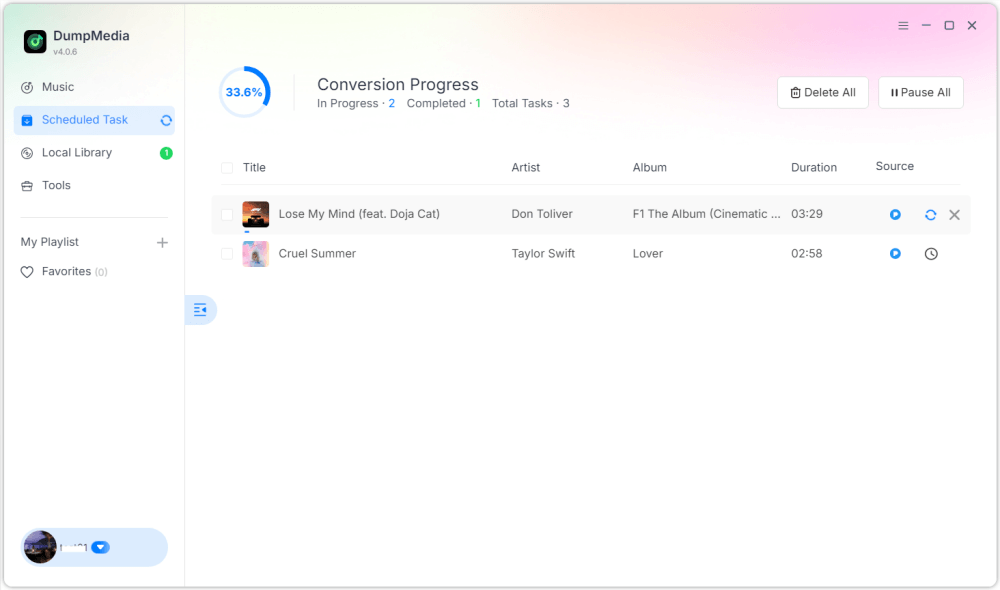
Étape 4 : Une fois les paramètres configurés, les utilisateurs peuvent lancer la conversion en cliquant sur l'icône « Convertir ». DumpMedia se produira pour convertir les chansons Pandora en MP3 en quelques secondes grâce à sa vitesse ultra-rapide.
Partie 4. FAQ
Q1 : Puis-je convertir des chansons Pandora en MP3 gratuitement?
Oui, certains outils proposent des essais gratuits, mais les convertisseurs premium comme DumpMedia offrir des vitesses plus rapides et une conversion par lots.
DumpMedia lance fréquemment des campagnes promotionnelles ; vous pouvez contacter DumpMedia Contactez le service clientèle pour vous renseigner sur les remises et offres supplémentaires.
Q2 : Est-il légal de convertir des chansons Pandora en MP3?
La conversion pour un usage personnel hors ligne est généralement considérée comme acceptable, mais la distribution ou l'utilisation commerciale peuvent enfreindre les lois sur le droit d'auteur.
Q3 : Puis-je convertir des listes de lecture Pandora entières en MP3 immediatement?
Oui. DumpMedia Pandora Music Converter prend en charge la conversion par lots pour les listes de lecture et les albums.
Q4 : Le MP3 conserver les informations sur la chanson ?
Oui, le convertisseur préserve les métadonnées, notamment le titre, l'artiste, l'album et la pochette.
Partie 5. Conclusion
Convertir les chansons Pandora en MP3 C'est la meilleure façon d'écouter votre musique préférée hors ligne, de conserver des sauvegardes permanentes et de contrôler entièrement la lecture sur tous vos appareils. Comment convertir des chansons Pandora en MP3? Utilisant DumpMedia Avec Pandora Music Converter, vous pouvez convertir rapidement et facilement des chansons, des albums et des listes de lecture en MP3 sans perte de qualité ni de métadonnées. Commencez la conversion dès aujourd'hui pour conserver votre collection musicale Pandora pour toujours.