


Deezer HiFi vs Tidal : quel service de musique offre la meilleure qualité sonore ?
Le streaming musical sans perte est devenu de plus en plus populaire auprès des audiophiles et des mélomanes. Lorsqu'ils comparent Deezer HiFi et Tidal HiRes, la plupart des utilisateurs ne cherchent pas simplement une nouvelle plateforme de streaming ; ils veulent savoir quel service offre une meilleure qualité sonore, de meilleures performances FLAC et une expérience d'écoute haute résolution plus authentique. Dans cette comparaison de qualité sonore, nous nous concentrerons précisément sur la qualité sonore, les formats FLAC, les performances audio haute résolution et les expériences d'écoute réelles pour les audiophiles.
Sommaire Partie 1. Deezer vs Tidal : Comparaison des formats audio Partie 2. Deezer vs Tidal : Test de qualité sonore Partie 3. Meilleure façon de conserver sa musique Deezer HiFi hors ligne Partie 4. FAQ Partie 5. Résumé
Partie 1. Deezer vs Tidal : Comparaison des formats audio
Vue d'ensemble de base
La principale différence dans le débat Deezer HiFi vs Tidal HiRes réside dans la manière dont chaque plateforme gère l'audio sans perte.
Qualité audio HiFi Deezer
Deezer HiFi diffuse de la musique en utilisant le format FLAC (Free Lossless Audio Codec) à l'adresse :
- 16-bits
- 44.1kHz
- Environ 1 411 kbps
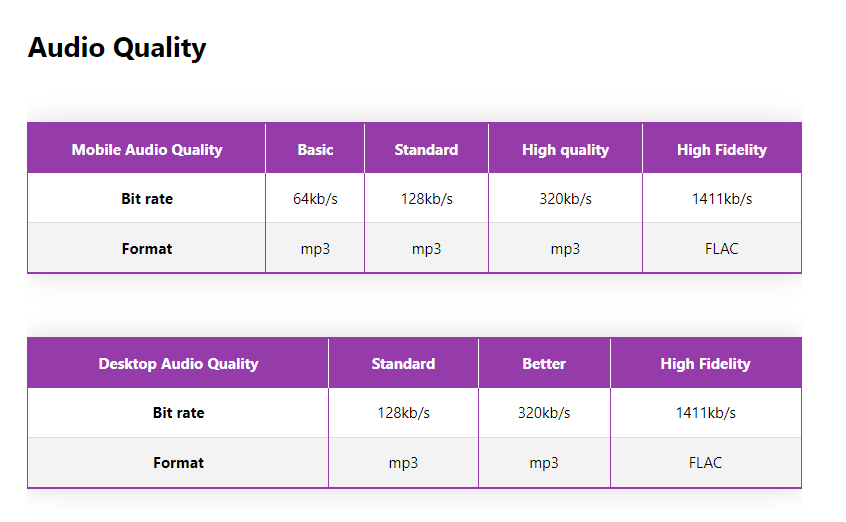
Il s'agit d'un format audio sans perte de qualité CD standard. La compression FLAC préserve la qualité d'enregistrement originale sans perte d'informations audio, ce qui rend Deezer HiFi attractif pour les utilisateurs recherchant une lecture sans perte stable et fluide. Dans la plupart des comparaisons entre Deezer HiFi et Tidal HiRes, Deezer est souvent salué pour son streaming FLAC simple et fiable, sans traitement audio supplémentaire.
Tidal HiFi et FLAC haute résolution
Tidal s'est d'abord fait connaître pour sa technologie MQA, mais aujourd'hui la plateforme se concentre de plus en plus sur :
- FLAC
- FLAC haute résolution
- Audio jusqu'à 24 bits/192 kHz
Comparé à Deezer HiFi, Tidal prend en charge une résolution audio nettement supérieure pour les enregistrements et les équipements de lecture compatibles. Cela confère à Tidal un avantage technique potentiel dans la comparaison de la qualité sonore entre Deezer HiFi et Tidal, notamment pour les utilisateurs possédant des convertisseurs numérique-analogique (DAC), des amplificateurs et des casques de studio haut de gamme.
FLAC vs FLAC haute résolution : existe-t-il une réelle différence ?
L'une des questions les plus importantes dans la comparaison Deezer HiFi vs Tidal HiRes est de savoir si les utilisateurs peuvent réellement entendre la différence entre le FLAC standard et le FLAC haute résolution.
FLAC standard (qualité CD)
Deezer HiFi utilise principalement le format FLAC de qualité CD à un débit maximal de 1 411 kbps, offrant une profondeur de 16 bits et une fréquence d'échantillonnage de 44.1 kHz. Cela surpasse déjà la qualité de la plupart des formats de streaming compressés, tels que… MP3 ou AAC. Pour de nombreux auditeurs, le format FLAC HiFi de Deezer offre un excellent niveau de détail, des voix claires, une réponse en fréquence équilibrée et une large plage dynamique.
FLAC haute résolution
Offrant une profondeur de couleur non compressée de 24 bits et une fréquence d'échantillonnage jusqu'à 192 kHz, l'audio Tidal Max exploite pleinement le potentiel de votre système audio. En théorie, cette architecture de qualité studio permet une plage dynamique étendue, une restitution plus précise des détails sonores et une meilleure séparation des instruments.
Cependant, la différence d'écoute réelle entre Deezer HiFi et Tidal HiRes dépend fortement du matériel de lecture.
Partie 2. Deezer vs Tidal : Test de qualité sonore
Lorsqu'on compare Deezer et Tidal en conditions d'écoute réelles, les résultats dépendent souvent du genre musical, du matériel et des préférences personnelles.
Clarté vocale
Deezer HiFi offre des voix claires et naturelles avec une qualité FLAC stable. Tidal Hi-Res apporte parfois un peu plus de détails spatiaux et d'aération aux enregistrements vocaux.
Performances des basses
Dans de nombreux tests comparatifs entre Deezer HiFi et Tidal, Tidal offre des basses légèrement plus profondes sur du matériel audio haut de gamme. Cependant, pour une écoute occasionnelle, Deezer HiFi propose souvent un son plus doux et équilibré.
Séparation des instruments
Le format FLAC haute résolution de Tidal offre généralement de meilleures performances pour les enregistrements orchestraux complexes ou en direct où la superposition des instruments devient importante.
Fatigue d'écoute
Certains utilisateurs indiquent que l'implémentation FLAC plus simple de Deezer HiFi offre une expérience d'écoute plus agréable lors de longues sessions.
C’est pourquoi le débat entre Deezer HiFi et Tidal reste très subjectif parmi les audiophiles.
Quel est le meilleur choix pour les audiophiles ?
Le choix entre Deezer HiFi et Tidal dépend en grande partie de vos priorités d'écoute.
Choisissez Deezer HiFi si vous préférez :
- Streaming FLAC stable
- Audio sans perte plus simple
- Lecture de qualité CD constante
- Un écosystème audio moins complexe
- Signature sonore équilibrée
Choisissez Tidal si vous préférez :
- Prise en charge du format FLAC haute résolution
- résolution audio plus élevée
- Systèmes de lecture de qualité audiophile
- Compatibilité DAC avancée
- Qualité audio technique maximale
Dans la comparaison Deezer HiFi vs Tidal HiRes, Tidal peut avoir l'avantage technique pour les systèmes haut de gamme, tandis que Deezer HiFi offre souvent une expérience d'écoute FLAC plus stable et plus simple.
Partie 3. Meilleure façon de conserver la musique Deezer HiFi hors ligne
Deezer et Tidal proposent tous deux le téléchargement hors ligne, mais des limitations importantes subsistent. Les morceaux téléchargés restent protégés par DRM, ce qui signifie qu'ils ne peuvent être écoutés qu'au sein de l'application de streaming et ne peuvent être transférés librement. Pour les audiophiles qui souhaitent une écoute hors ligne permanente au format FLAC, ces restrictions peuvent s'avérer frustrantes.
C’est pourquoi certains utilisateurs choisissent des outils comme DumpMedia DeezPlus Pour conserver votre musique Deezer HiFi en local. Ce convertisseur professionnel de chansons Deezer vous permet d'enregistrer vos morceaux localement pour une écoute hors ligne stable, sans connexion réseau ni autorisation régionale.
Téléchargement gratuit Téléchargement gratuit
🏆Pourquoi choisir DumpMedia DeezPlus
- 🎵Supprimer la protection DRM de Deezer*
- 🎵Convertir Deezer en MP3, WAV, FLAC et AAC
- 🎵Intégration avec le lecteur web Deezer
- 🎵Conservez la qualité sonore originale
- 🎵Téléchargement par lots de playlists et d'albums
- 🎵Vitesse de conversion rapide
- 🎵Conserver les métadonnées et les balises ID3 des morceaux
- 🎵Prise en charge de la lecture hors ligne sur n'importe quel appareil
De nombreux utilisateurs de la communauté Deezer HiFi vs Tidal préfèrent conserver leurs bibliothèques FLAC locales pour une lecture plus stable et un accès à la musique à long terme.
Téléchargez Deezer sur MP3 L'utilisation de DumpMedia
Étape 1 : Téléchargez et installez DumpMedia Ouvrez DeezPlus sur votre Mac/PC. L'interface s'affichera. Connectez-vous avec votre compte Deezer Premium/Gratuit.
Téléchargement gratuit Téléchargement gratuit
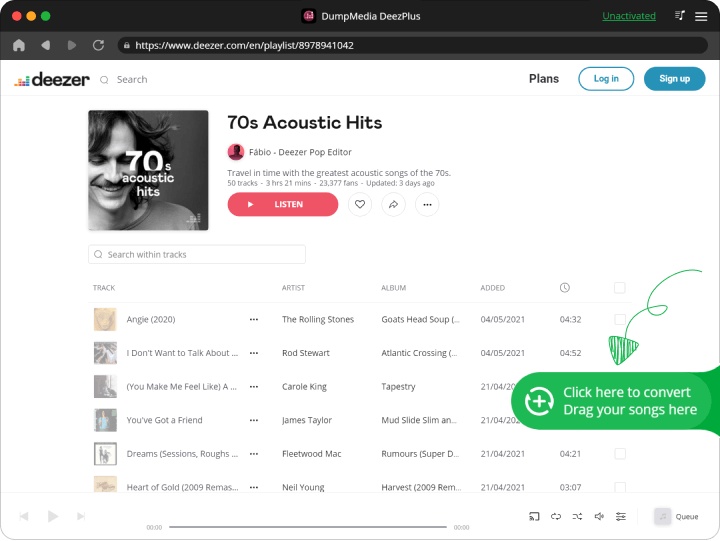
Étape 2. Trouvez la playlist, l'album ou le morceau que vous souhaitez convertir. Vous pouvez glisser un morceau sur l'icône « + » à droite de l'écran. Vous pouvez également ouvrir une playlist ou un album entier et cliquer sur l'icône « Ajouter à la conversion » pour charger la liste complète dans le convertisseur.
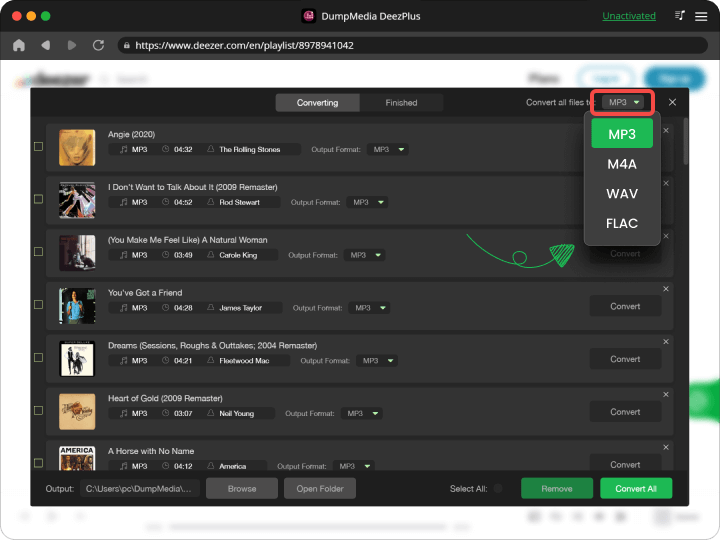
Étape 3 : Sélectionner MP3 (Compatibilité optimale). Vous pouvez également modifier le débit binaire ou la fréquence d'échantillonnage. Pour un équilibre optimal, choisissez 320 kbps.
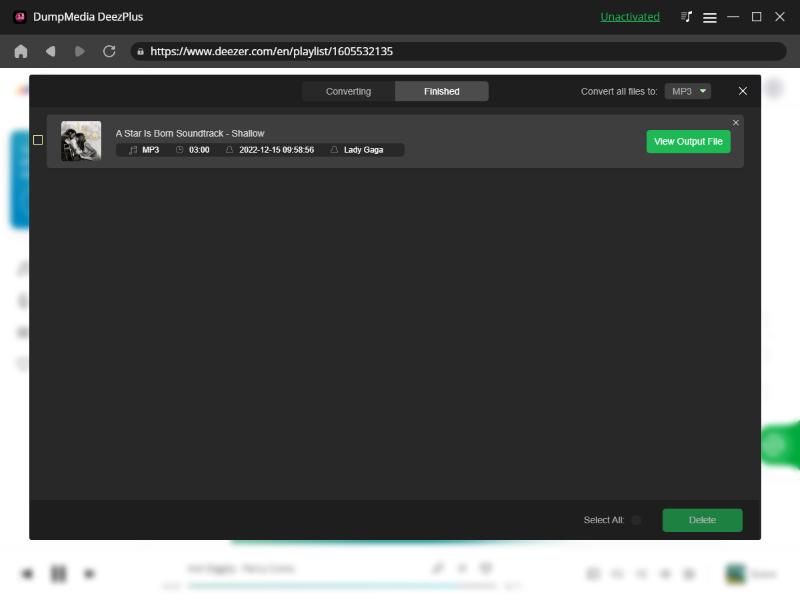
Étape 4 : Une fois les paramètres configurés, les utilisateurs peuvent lancer la conversion en cliquant sur l'icône « Convertir ». DumpMedia convertira les chansons Deezer en MP3 en quelques secondes grâce à sa vitesse ultra-rapide.
Partie 4. FAQ
Deezer HiFi est-il meilleur que Tidal ?
Cela dépend de vos préférences. Deezer HiFi privilégie la qualité FLAC stable, comparable à celle d'un CD, tandis que Tidal met l'accent sur le FLAC haute résolution et la lecture en haute résolution.
Tidal offre-t-il une meilleure qualité sonore que Deezer HiFi ?
Sur les systèmes audio haut de gamme, le format FLAC haute résolution de Tidal peut offrir plus de détails et une plage dynamique plus étendue. Les auditeurs occasionnels remarqueront probablement peu de différence.
La technique FLAC est-elle meilleure que MP3?
Oui. Le FLAC est un format audio sans perte qui préserve la qualité d'enregistrement intégrale, contrairement aux formats compressés. MP3 fichiers.
Pouvez-vous entendre les différences audio haute résolution ?
La différence est plus perceptible sur les équipements audio haut de gamme tels que les convertisseurs numérique-analogique (DAC), les amplificateurs et les casques de studio.
Quel service est le meilleur pour les audiophiles ?
Tidal séduit souvent les audiophiles en quête d'une résolution maximale, tandis que Deezer HiFi est apprécié pour sa simplicité et sa constance en matière de format FLAC.
Puis-je conserver la musique Deezer HiFi indéfiniment ?
Les téléchargements officiels restent soumis à un abonnement. Certains utilisateurs utilisent DumpMedia DeezPlus pour un accès hors ligne permanent.
Partie 5. Résumé
La comparaison entre Deezer HiFi et Tidal HiRes se résume finalement à l'importance que vous accordez à l'audio haute résolution par rapport à la stabilité du format FLAC. Tidal propose des formats audio à plus haute résolution et une meilleure compatibilité avec le matériel audiophile haut de gamme, tandis que Deezer HiFi offre un streaming FLAC fiable et constant en qualité CD, toujours très apprécié des auditeurs.
Pour les utilisateurs qui souhaitent un accès hors ligne permanent à la musique Deezer HiFi, DumpMedia DeezPlus offre une solution efficace pour préserver une lecture musicale de haute qualité au-delà des limitations du streaming.
Téléchargement gratuit Téléchargement gratuit
*DumpMedia Ce logiciel fonctionne en décryptant et en téléchargeant les morceaux Deezer dans des fichiers sans DRM, vous permettant ainsi d'obtenir une copie propre et sans restriction de votre bibliothèque pour n'importe quel appareil. Il ne permet pas de supprimer la protection DRM des fichiers audio locaux.